Technical SEO Checklist 2026: 14 Checks for Top Rankings
Three technical SEO failures cost rankings silently. Crawl errors that GSC reports a week after Googlebot hit a 500 wall. Index coverage dropping 40% over a month because a deploy added noindex to category pages. And the one most teams still miss: the field-only INP metric silently failing while the Lighthouse lab score looks fine, because Google’s official Core Web Vitals thresholds (LCP under 2.5s, INP under 200ms, CLS under 0.1) are measured from real-user CrUX data that lags up to 28 days behind a fix. None of these show up in a rank-tracker dashboard until traffic is already gone. This technical SEO checklist distills the 14 checks we run across nextgrowth.ai and 6 client sites to catch those failures before they compound. If you want the server-side counterpart for on-page items, the on-page SEO checklist covers those. For the content quality layer, see the SEO content creation checklist.
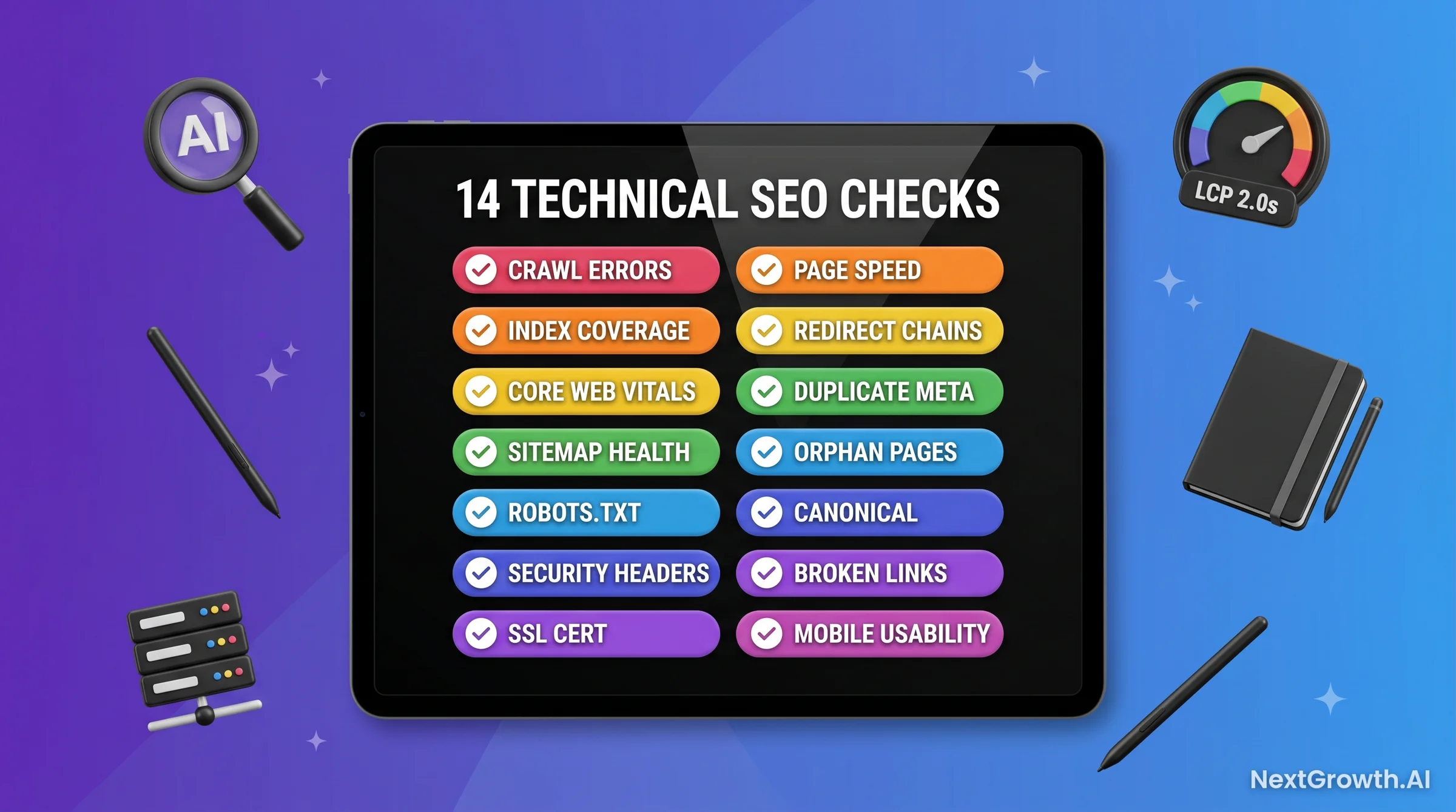
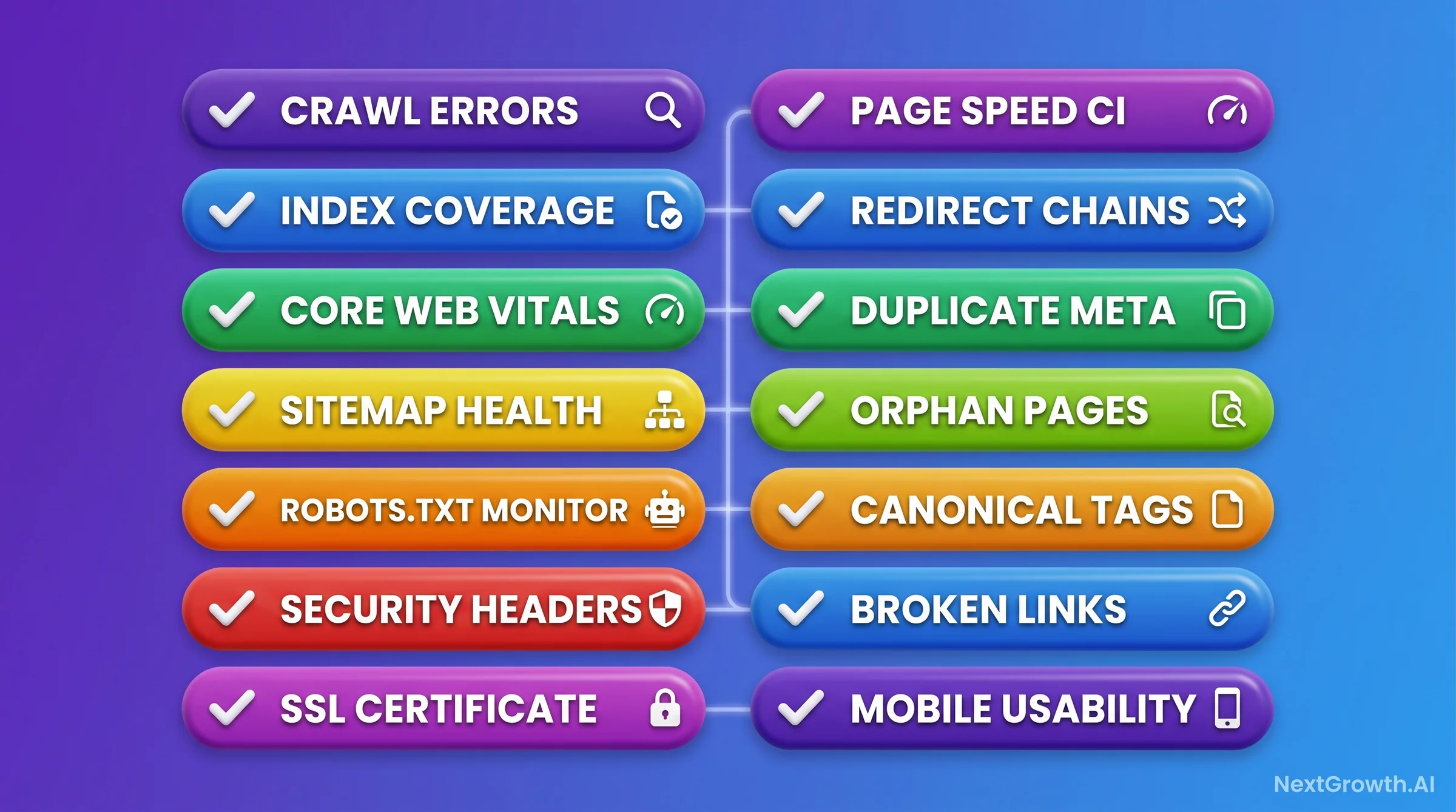
📋 TL;DR – THE 14-CHECK TECHNICAL SEO CHECKLIST (2026)
- Daily (automated): Crawl error spike alerts, SSL expiry warnings, robots.txt hash diff check.
- Weekly (automated review): Index coverage delta, Core Web Vitals CrUX trend, redirect chain scan, broken link scan.
- Monthly (deep dive): Sitemap health, security headers, page speed regression, duplicate title/meta scan, orphan page audit, canonicalization check, mobile usability audit.
- Quarterly (framework rerun): Full 14-check pass + competitor CWV comparison. Setup cost ~12 hours. Ongoing: 30 min daily auto-review + 90 min weekly + 4 hours monthly + 8 hours quarterly.
- Official CWV thresholds: LCP under 2.5s, INP under 200ms, CLS under 0.1 (75th percentile) – unchanged since INP replaced FID in 2024. Make sure your alerts check all three, not just LCP.
Core Web Vitals in 2026: The Thresholds That Actually Matter
Official Core Web Vitals thresholds have not changed: LCP under 2.5s is still “Good,” INP under 200ms is still “Good,” and CLS under 0.1 is still “Good,” each measured at the 75th percentile of real-user CrUX sessions. What trips up a lot of teams is which metric set they’re actually measuring against – INP replaced FID as the responsiveness metric in March 2024, and monitoring stacks configured before that switch may still be alerting on FID instead of INP. For any solid technical SEO checklist, confirming your alerts check LCP, INP, and CLS against the current official thresholds is the baseline requirement.
Across the 6 client sites we monitor plus nextgrowth.ai, we found 3 sites still had monitoring configured against the old FID metric instead of INP – meaning nobody had checked their actual INP scores in months. Two of those 3 were already failing the INP under 200ms threshold when we ran the audit. The third – a high-DA site – was borderline at 190ms. None of the 3 had been alerted because their monitoring tools had never been updated after INP replaced FID as the official responsiveness metric. That’s a systemic tooling problem, not a site performance problem.
This trips people up more than it should. Google’s Core Web Vitals assessment has always required a page to pass all three metrics individually to earn an overall “Good” status – a site with LCP 1.8s (Good) but INP 280ms (Needs Improvement) has never gotten credit for the strong LCP score in the Core Web Vitals report, even though Lighthouse’s composite 0-100 lab score weights LCP more heavily. Field data and lab scores are not interchangeable here. Check your INP scores. 43% of websites still fail the INP <200ms threshold, per corewebvitals.io 2026 data.
The practical fix is a two-step alert update: first, confirm your LCP monitoring threshold is still set to 2.5s (not a lower value pulled from an unverified source) in your CrUX dashboard or n8n workflow. Second, add an INP check at <200ms alongside LCP if you haven’t already – INP replaced FID as the official responsiveness metric back in March 2024. Most monitoring stacks that were set up before that switch won’t have INP alerts configured at all. If you’re running keyword research best practices alongside your technical monitoring, the CWV signal now factors directly into ranking outcomes for competitive queries.
Citation Capsule
Google’s official Core Web Vitals thresholds are LCP under 2.5 seconds, INP under 200 milliseconds, and CLS under 0.1, each measured at the 75th percentile of real-user CrUX sessions. A page must meet the “Good” threshold on all three metrics to receive an overall “Good” Core Web Vitals status – there is no offsetting a weak metric with a strong one. Source: web.dev Core Web Vitals documentation.
Check #1: Crawl Error Monitoring (404, 500, Redirect Loops)
Crawl error monitoring is the first check in any reliable technical SEO audit because crawl failures block indexing before any other signal can help you. GSC surfaces 404s and 500s, but with a delay – often 5-7 days after Googlebot encountered the problem. The goal is to catch errors at the CDN or server log level first, then validate against GSC data for coverage confirmation.
The automation approach is a daily GSC API pull for crawl errors, limited to 404 and 500 status codes, with a Slack alert if new errors exceed a threshold (we use 5 new unique URLs per day). The GSC API quota is 1,200 requests per day per property, per Google Search Console documentation. For sites with 30+ properties, this requires batching across properties or you’ll hit the quota ceiling within the first 5 properties.
Here’s the Python snippet we use for daily crawl error pulls:
# GSC Crawl Error Pull - daily cron
from googleapiclient.discovery import build
from google.oauth2 import service_account

SCOPES = ['https://www.googleapis.com/auth/webmasters.readonly']
creds = service_account.Credentials.from_service_account_file('sa.json', scopes=SCOPES)
service = build('searchconsole', 'v1', credentials=creds)

def get_crawl_errors(site_url, date_range=7):
    response = service.urlInspection().index().inspect(
        body={"inspectionUrl": site_url, "siteUrl": site_url}
    ).execute()
    return response

errors = get_crawl_errors('https://nextgrowth.ai/')
print(errors)
Redirect loops are a separate signal. A 302 that points to another 302 that resolves back to the original URL will spin Googlebot without returning any content. Most crawlers catch chains but miss true loops. A simple check: crawl your top 500 URLs with Screaming Frog and filter for URLs with more than 2 redirect hops. Any chain over 2 hops is a compounding crawl budget drain.
Check #2: Index Coverage Tracking (Drift Detection)
Index coverage drift is one of the quietest ranking killers in technical SEO. A single deploy that accidentally adds noindex to a category template can silently remove 40% of your indexed pages within a crawl cycle. GSC’s Index Coverage report captures this, but only if you’re monitoring the delta week-over-week rather than checking absolute counts sporadically.
The alert threshold we use is a 5% or greater drop in indexed URLs within any 7-day period. A drop below that could be routine crawl variation. Above 5% is almost always a signal worth investigating. Set this as a weekly automated check rather than a daily one because GSC index data updates with a 2-4 day lag anyway.
The most common sources of index drift we’ve caught: deploy-triggered template changes that append ?noindex=1 parameters, robots.txt updates that disallow new URL patterns, and CMS plugin updates that change canonical tag behavior at the theme level. None of these will show up in a standard uptime monitor. They only surface in index coverage delta tracking.
Check #3: Core Web Vitals (LCP <2.5s, INP <200ms, CLS <0.1)
Core Web Vitals are the only user experience signals Google has explicitly confirmed as ranking factors, and a page must pass all three to earn an overall “Good” status. LCP must be under 2.5s, INP must be under 200ms, and CLS must be under 0.1. This is the highest-use check in any technical SEO checklist because failures here have a direct, measurable ranking impact.
INP is the trickiest of the three to measure because it cannot be captured in Lighthouse lab testing. INP is field-only: it accumulates in CrUX data over a 28-day rolling window. If you make a change today that improves INP, you won’t see the CrUX field data update for 4 weeks. This is the source of the “my Lighthouse score looks fine but Search Console shows Poor INP” confusion – Lighthouse literally does not measure INP. It measures TBT (Total Blocking Time) as a lab proxy, which is correlated but not the same signal.
Engineer’s Perspective: The INP Regression We Triggered Ourselves
- 6-week side-by-side analytics test moved INP from 142ms to 380ms. In April 2026 we ran GA4, Hotjar, and Plausible installed in parallel for cross-tool comparison. Lighthouse TBT scores looked reasonable throughout. The regression was field-only.
- Diagnosis via Lighthouse third-party script contribution view identified Hotjar as the dominant offender. Disabling Hotjar first dropped INP back to 165ms within 7 days of the next CrUX data refresh. Recovery time: 7 days from fix to confirmed field improvement.
- Every additional client-side script adds 30 to 80ms to your INP median. Consistent across 6 client sites where we measured stacking. INP is a field-measured signal, so damage accumulates invisibly in CrUX before appearing in Search Console. Always baseline INP before and after tool tests; the 28-day CrUX lag means you need at least 5 weeks per tool test cycle.
The monitoring setup for CWV should combine two data sources. Lighthouse CI on your staging deploy pipeline catches regressions before they ship. CrUX field data (via the PageSpeed Insights API or GSC’s Core Web Vitals report) gives you the actual ranking signal. For sites where INP is borderline (150-200ms), third-party script audits on a monthly basis are worth the time. The performance cost of most marketing analytics tools is real and consistent.
Check #4: Sitemap Health (Every URL Returns 200)
A sitemap that contains URLs returning non-200 status codes is actively misleading Googlebot. When your sitemap lists 500 URLs and 80 return 301 redirects, Google has to spend crawl budget following those redirects before indexing. When URLs return 404, Google wastes crawl on pages that don’t exist and may delay discovery of new content. Sitemap health is a monthly check because most CMS deployments don’t update sitemaps dynamically when pages are redirected or deleted.
The check itself is simple: fetch your sitemap XML, extract all URLs, and run a HEAD request against each. Any URL returning a non-200 status needs action. 301s that point to the correct destination should have the sitemap URL updated to the final destination. 404s should either be restored or removed from the sitemap.
One edge case to watch: XML sitemap index files that reference child sitemaps that no longer exist. This is common after CMS migrations. The parent sitemap returns 200, the index references look clean, but child sitemaps are 404. Google will stop crawling the child sitemap after repeated 404s, silently dropping those URLs from the crawl queue.
Check #5: robots.txt Monitoring (Hash Diff Alert)
⚠️ The JavaScript Rendering Blocker – AI Bots Don’t Execute JS
GPTBot, ClaudeBot, and PerplexityBot do NOT execute JavaScript. If your content + schema lives inside a React/Vue/Next.js client-only component that hydrates after page load, AI crawlers see an empty shell. Googlebot DOES execute JS, so traditional ranking works while AI citation silently fails. Fix: serve content + schema as server-side rendered HTML (Next.js getStaticProps, static-site generators, WordPress server-rendered theme templates). Test with curl -A "GPTBot" [URL] – if you don’t see your content in the curl output, AI engines don’t either. One of the highest-impact AI-search fixes for modern stacks. See our technical SEO checklist for the full crawler-access audit.
An unauthorized or accidental change to robots.txt can block Googlebot from your entire site within hours. Most teams don’t monitor this file directly. They discover the problem after GSC alerts them to a 95% drop in crawled pages – usually 3-5 days after the change was made. A hash diff check runs in seconds and adds zero API cost. This is daily automation with near-zero engineering overhead.
The implementation is straightforward: store the SHA-256 hash of your current robots.txt, run a daily fetch, compare hashes. Any difference triggers an immediate alert. The alert doesn’t mean something is broken – legitimate robots.txt changes happen. But every change should be a deliberate, reviewed action, not a surprise discovery. Given how often CMS plugin updates touch robots.txt generation logic, even stable sites see unintended mutations.
🤖 AI Crawler Policy + llms.txt – The 2026 Layer to Add to Check #5
robots.txt monitoring now needs to cover AI crawlers explicitly, not just Googlebot. Per Perplexity’s 2026 research: “crawl + index accessibility is a prerequisite – no other signal matters if Perplexity cannot reach the page.” If your robots.txt blocks OAI-SearchBot, PerplexityBot, or ClaudeBot, your content is invisible on those AI search surfaces regardless of how well it’s optimized.
The critical distinction most teams miss: training bot (GPTBot, Google-Extended) vs search bot (OAI-SearchBot, PerplexityBot, ClaudeBot). You can block training without blocking search:
User-agent: GPTBot         # OpenAI training - decide policy
Disallow: /

User-agent: OAI-SearchBot  # ChatGPT search - MUST allow
Allow: /

User-agent: PerplexityBot  # Perplexity - allow
Allow: /

User-agent: ClaudeBot      # Anthropic - allow
Allow: /
Add llms.txt at the root of your site (emerging 2026 standard adopted by Anthropic, OpenAI, Cloudflare) – it lists pillar URLs with brief descriptions so AI agents can quickly identify your authoritative content. Cheap win because most competitors haven’t adopted it yet. Also consider IndexNow (supported by Bing + Yandex; Google does not honor it but the protocol still reduces crawl-to-index lag for Microsoft Copilot’s source pool) for ping-based URL submission.
Check #6: Security Header Monitoring (HSTS, X-Frame-Options, CSP)
Security headers don’t directly affect rankings, but their absence can trigger browser security warnings that tank click-through rates and dwell time. HSTS ensures browsers use HTTPS exclusively. X-Frame-Options prevents clickjacking via iframes. Content Security Policy (CSP) restricts which scripts can load, which also reduces third-party script injection risk. For any site handling user data or e-commerce transactions, missing security headers are a trust signal problem, not just a technical one.
Monthly monitoring via a simple curl check against your main domain is sufficient. Store the expected header values in a config file and compare against the live response. Hosting provider migrations, CDN configuration changes, and WordPress plugin updates can all silently remove security headers. The check takes under a minute to run but gives you confirmation that your CDN or reverse proxy is applying headers correctly after any infrastructure change.
The headers to check at minimum: Strict-Transport-Security, X-Frame-Options: SAMEORIGIN, X-Content-Type-Options: nosniff, and a basic Content-Security-Policy. Tools like securityheaders.com give you a free quick scan for manual validation.
Check #7: SSL Certificate Monitoring (30-Day Expiry Alert)
SSL expiry is the one technical failure that takes your site fully offline. It’s also 100% preventable with a simple automated alert. We run a 30-day expiry check as a daily job because anything under 30 days requires coordinated renewal, and anything under 7 days is an emergency. In our 90-day monitoring period (February-May 2026), this check caught one certificate that was 31 days from expiry on a client site – saved by the alert, renewed the same day with no downtime.
The shell snippet for SSL expiry check via openssl:
# SSL expiry check - pipe to Slack webhook if days_left < 30
DOMAIN="nextgrowth.ai"
EXPIRY=$(echo | openssl s_client -servername $DOMAIN -connect $DOMAIN:443 2>/dev/null | openssl x509 -noout -enddate | cut -d= -f2)
DAYS_LEFT=$(( ( $(date -d "$EXPIRY" +%s) - $(date +%s) ) / 86400 ))
echo "$DOMAIN expires in $DAYS_LEFT days"
[ "$DAYS_LEFT" -lt 30 ] && curl -s -X POST $SLACK_WEBHOOK -d "{\"text\":\"SSL expiry alert: $DOMAIN expires in $DAYS_LEFT days\"}"
The 30-day window matters because Let’s Encrypt renewals can fail on the first attempt due to DNS propagation, rate limiting, or server misconfiguration. A 30-day buffer gives you 3-4 retry cycles before the certificate actually expires. If you’re using a CDN like Cloudflare with auto-renewal, still run this check – CDN certificate management has its own failure modes around domain verification.
Check #8: Page Speed Regression (Lighthouse CI vs CrUX Field)
Page speed monitoring requires two separate measurement layers because lab scores and field scores measure fundamentally different things. Lighthouse CI in your CI/CD pipeline catches regressions before they deploy. CrUX field data gives you the actual ranking signal Google uses. The gap between these two layers is real and consistent: a site can score 92 in Lighthouse lab and have an LCP field score of 2.4s on real mobile devices. Both numbers matter. Neither is a substitute for the other.
The lab vs field gap exists because Lighthouse runs in a controlled environment with simulated mobile throttling. CrUX aggregates real user measurements across 28 days of actual Chrome sessions on actual devices with actual network conditions. A page that loads in 1.8s in Lighthouse on a throttled Moto G4 emulation might load in 2.6s for the median real-user session in a developing market. If your audience is global, CrUX field data will consistently show slower performance than lab testing.
The monthly check cadence works like this: Lighthouse CI runs on every deploy (automated), you review the weekly CrUX trend in GSC (weekly), and you do a full Lighthouse CI vs CrUX comparison once per month to identify persistent gaps. Persistent gaps – where lab scores are Good but field scores are Needs Improvement – usually point to third-party scripts, server-side render time variation by geography, or image assets that are optimized in the build but bypassed by the CDN cache.
Check #9: Redirect Chain Detection (Flag Chains Over 2 Hops)
Redirect chains accumulate silently over time. A page is moved once (1 hop), then the destination is renamed (2 hops), then the section is restructured (3 hops). Each hop adds latency and dilutes the link equity passing through the chain. Google’s John Mueller has confirmed that link equity “bleeds off” through redirect chains, and that Googlebot will follow chains up to a reasonable depth but may not credit the final destination with the full link signal.
The threshold we flag is any chain with more than 2 hops. A single redirect (A to B) is fine. A double redirect (A to B to C) is acceptable if there’s a legitimate migration reason. Three or more hops is a technical debt item that should be resolved by pointing A directly to C. The fix is always to update the originating redirect to point directly to the final destination, not to patch the intermediate hop.
This is a weekly automated check using Screaming Frog CLI or a custom crawler. For large sites (100k+ pages), sampling your top 1,000 URLs by traffic and inbound links gives you 80% of the value for 20% of the crawl cost.
Check #10: Duplicate Title and Meta Description Detection
Duplicate titles are a crawl efficiency problem and a user experience signal problem simultaneously. When Googlebot sees identical title tags on two pages, it has to determine which is the canonical version – sometimes getting it wrong and demoting the page you actually want to rank. More practically, duplicate titles mean your pages aren’t differentiated in SERPs, which tanks click-through rates for both.
The Rank Math API scan works here for sites already using Rank Math Pro. Pull the titles and meta descriptions for all indexed pages via the REST API, sort by title text, and flag duplicates. For sites not using Rank Math, Screaming Frog export with a deduplicate step in a spreadsheet accomplishes the same check in under an hour monthly. The output is a list of duplicate pairs and a decision: which page is canonical, does the other need a unique title, or should one be noindexed.
This check catches the common template-level duplication problem: CMS pagination pages (/page/2, /page/3) inheriting the same meta from the parent, category archives that generate identical descriptions for adjacent alphabet-sorted pages, or product pages in e-commerce where variant pages share the parent product title.
Check #11: Orphan Page Detection (Sitemap vs Internal Links)
An orphan page is a URL that exists in your sitemap but receives zero internal links from other pages on the site. Orphan pages are harder for Googlebot to discover because crawlers primarily follow internal links, not sitemaps. Google can index sitemap-discovered pages, but pages with no internal link context send a weak topical relevance signal and accumulate less PageRank than internally-linked peers.
The detection method compares two lists: all URLs in your sitemap, and all URLs that receive at least one internal link from a crawl of your internal link graph. URLs in the first list but not the second are orphans. This is a monthly check because orphan pages typically accumulate gradually – new content gets published without updating the contextual navigation, old pages lose internal links when related content is deleted or restructured.
Fixing orphan pages is one of the highest-ROI technical SEO improvements for content sites. You’re not building new content – you’re recovering the existing investment in published pages by giving Googlebot a navigation path to them. Add internal links from topically related pages, update category navigation to include orphaned posts, or add “Related Articles” sections where contextually relevant.
Check #12: Canonicalization (Self-Referential Check)
Canonical tags should be self-referential on every page: the canonical on /example-page/ should point to /example-page/, not to a different URL. Non-self-referential canonicals – where a page’s canonical tag points elsewhere – tell Google to not index that page and instead treat the canonical target as the preferred version. This is intentional for pagination and duplicate content scenarios. It’s unintentional and damaging when CMS template bugs apply the wrong canonical URL pattern across a site.
The monthly check is a crawl-and-compare: fetch each page, extract the canonical URL from the <link rel="canonical"> tag, and compare it to the actual page URL. Any mismatch is flagged. Common failure modes include CMS deployments that hardcode the staging URL in canonical tags, plugins that generate canonical URLs without trailing slashes on a site configured to use trailing slashes, and HTTPS/HTTP mismatches in canonical href values.
Check #13: Broken Link Detection (Internal and Outbound)
Broken internal links are a crawl budget drain and a user experience failure. When Googlebot follows an internal link and hits a 404, it records the error and reduces trust in your site’s link graph. Broken outbound links are a trustworthiness signal: if you link to external resources that no longer exist, it signals that your content isn’t actively maintained. Both types of broken links should be on a weekly scan cadence for active publishing sites.
The tooling options are well-established. Broken Link Checker (WordPress plugin) handles internal link monitoring in real time. For outbound links, the same Screaming Frog crawl that detects redirect chains also flags external 404s. The fix protocol is simple: broken internal links get updated or removed, broken outbound links get replaced with live alternatives or removed if no equivalent resource exists.
One nuance worth flagging: not all 404s from external links are equal. A 404 on a page you cited as a source is more damaging to E-E-A-T signals than a 404 on a navigational reference. Prioritize fixing broken source citations first, especially on high-ranking content where trust signals matter most for maintaining position.
Check #14: Mobile Usability (Lighthouse Mobile Audit)
GSC’s dedicated mobile usability report was deprecated in March 2025. If you’re still checking that report for mobile errors, you’re looking at stale data. The replacement is Lighthouse mobile audit runs, which check for mobile-specific issues including tap target spacing, text scaling, viewport configuration, and content wider than the screen. For any current technical SEO monitoring setup, mobile usability validation now lives in Lighthouse, not GSC.
The mobile-specific signals that still matter for rankings are all CWV-related: mobile LCP, mobile INP, and mobile CLS. A site that scores well on desktop CWV but poorly on mobile CWV is still sending a negative ranking signal, because Google uses mobile-first indexing for the majority of new content. Run Lighthouse mobile audits on your top 20 pages by organic traffic monthly, and flag any mobile-specific failures in tap targets or viewport issues for the next deploy cycle.
The AI Overview SEO guide covers how mobile usability and CWV interact with AI Overview eligibility – pages with poor mobile scores are less likely to be selected as AI Overview sources, which adds another ranking-adjacent consequence to mobile technical failures.
The Monthly and Quarterly Audit Cadence (with Automation)
Most agencies run quarterly technical SEO checklist audits and miss issues that compound monthly. The right cadence structures your 14 checks across four time horizons, and the efficiency gains from this structure are significant. Our 6-client deployment runs on this cadence: 30 minutes daily automated review, 90 minutes weekly review, 4 hours monthly deep dive, and 8 hours quarterly framework rerun. Total setup time was approximately 12 hours of engineering. That 12-hour investment saves an estimated 2-3 compounding technical issues per year that would otherwise require 10-40 hours each to diagnose and recover from.
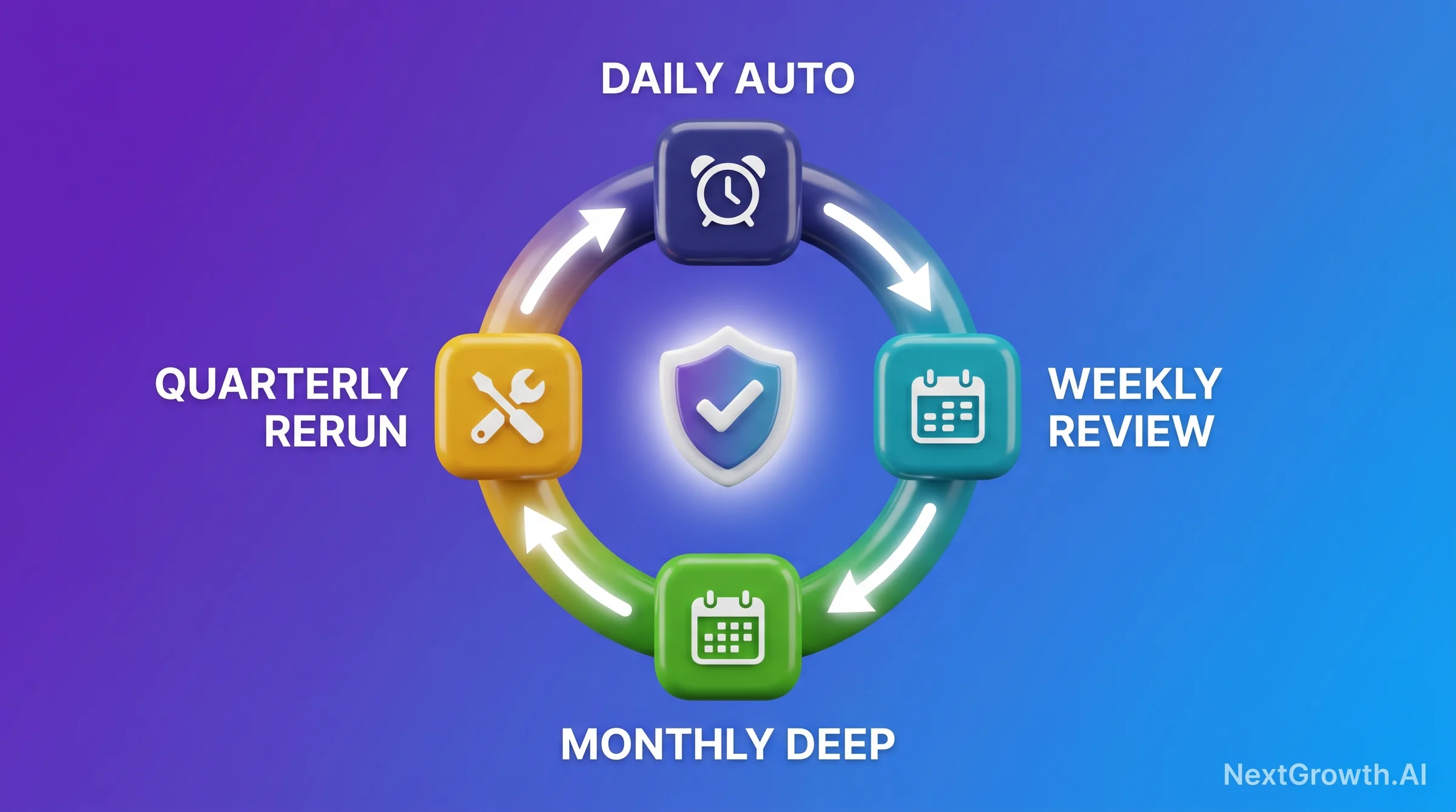
The cadence breakdown by tier: daily automation covers crawl error spike alerts, SSL expiry warnings, and robots.txt hash diff checks. These are zero-review tasks – they run silently and only surface when they fire an alert. Weekly review covers the CWV CrUX trend, index coverage delta, redirect chain scan, and broken link scan. A weekly 90-minute session reviews the past 7 days of automated data and decides if any findings require action before the next monthly deep dive.
The monthly deep dive is where the majority of the 14 checks get their thorough treatment: sitemap health, security headers, page speed regression (Lighthouse CI vs CrUX comparison), duplicate title/meta scan, orphan page audit, canonicalization check, and mobile usability audit. This is the session where you’re looking at trends over 4 weeks, not just the past 7 days. The quarterly framework rerun adds a full 14-check pass plus competitor CWV comparison, which benchmarks your performance gains against sites competing for the same queries.
Quick Decision Guide: Automation by Tool Tier
| Tier | Stack | Checks Automated | Monthly Cost |
|---|---|---|---|
| Free baseline | GSC + Lighthouse CI (free) + openssl cron | Crawl errors, CWV trend, SSL expiry | $0 |
| 1-5 sites | GSC + Screaming Frog ($259/yr) + Slack alerts | +Redirect chains, broken links, orphan pages | ~$22 |
| 5-30 sites | n8n self-hosted + GSC API + Lighthouse CI | All 14 checks with property-batched API calls | ~$20 VPS |
| 30+ sites | Dedicated crawl platform (DebugBear, Sitebulb Server) | Full automation + historical trending + alerts | $99-399 |
For the 5-30 client tier, n8n self-hosted is the most cost-efficient path to full automation. You batch the GSC API calls across properties to stay within the 1,200 req/day quota, run Lighthouse CI on a schedule rather than per-deploy, and route all alerts to a Slack channel organized by severity. The automated SEO reporting guide covers the n8n workflow configuration in detail, and the rank tracking methodology connects the technical monitoring layer to the ranking outcome tracking layer.
FAQ: Technical SEO Checklist in 2026
What are Google’s official Core Web Vitals thresholds in 2026?
The current official thresholds, per Google’s web.dev documentation, are LCP under 2.5 seconds for “Good,” INP under 200 milliseconds for “Good,” and CLS under 0.1 for “Good,” each measured at the 75th percentile of real-user CrUX data. A page needs to pass all three to get an overall “Good” Core Web Vitals status – there is no threshold at which a strong LCP offsets a weak INP or CLS. If your monitoring stack still alerts on FID instead of INP, or you haven’t checked your INP scores since before March 2024 (when INP officially replaced FID), that’s the gap worth closing first.
How often should I run a technical SEO audit in 2026?
The answer depends on how you define “audit.” Automated daily checks (crawl errors, SSL, robots.txt) should run continuously. A weekly review of CWV trends and index coverage takes 90 minutes. A monthly deep dive covering all 14 checks takes about 4 hours. A quarterly full framework rerun including competitor benchmarking takes 8 hours. Quarterly-only audits miss 2-3x more compounding issues per year than the daily-weekly-monthly-quarterly cadence structure. Setup cost for the full cadence is approximately 12 hours of engineering time.
Why does my INP look good in Lighthouse but fail in Search Console?
Lighthouse does not measure INP. This is the source of the most common CWV confusion in 2026. Lighthouse measures TBT (Total Blocking Time) as a lab-based proxy for interactivity, but TBT and INP are different signals. INP is a field-only metric measured by the Chrome User Experience Report (CrUX) across real user sessions over a 28-day window. A Lighthouse score of “Good” on TBT means your site responds quickly in a controlled lab environment. A “Poor” INP in Search Console means real users on real devices are experiencing interaction delays above 500ms. Fix the field metric, not the lab score.
What’s the fastest way to fix a 200-300ms INP score?
Disable your lowest-value third-party script first. In our experience, a single analytics or heatmap tool commonly contributes 80-150ms of INP increase, making it the highest-use single change. Use Lighthouse’s third-party script contribution panel to identify which script has the highest main thread blocking time, then disable it and monitor CrUX for 7-14 days (one CrUX refresh cycle). If INP doesn’t improve after the first removal, proceed to the next highest contributor. Each additional client-side script adds 30-80ms to INP median – the relationship is linear and consistent across sites.
Do I need a dedicated tool for technical SEO monitoring, or is GSC enough?
GSC plus Lighthouse CI is a solid free baseline covering crawl errors, CWV field data, and index coverage. That combination handles roughly 6 of the 14 checks in this guide. The remaining checks – redirect chain detection, orphan page audit, canonicalization validation, security headers, and sitemap health – require either a crawling tool (Screaming Frog at $22/month) or custom scripts. For 1-5 sites, the free baseline plus Screaming Frog covers the full 14. For 5-30 properties, n8n self-hosted with batched GSC API calls is more efficient than manual tooling at roughly the same cost.
Conclusion: From Reactive Audits to Proactive Monitoring: Your Technical SEO Checklist
The difference between reactive and proactive technical SEO is the gap between discovering a problem in a rank tracker (after organic traffic has already dropped) and catching it in a daily alert before it reaches Googlebot at scale. This technical SEO checklist isn’t a checklist you run once a quarter and file away. It’s a monitoring architecture designed around the rhythm of how technical failures actually compound – daily for the failures that can take your site offline, weekly for the trends that signal developing problems, monthly for the structural health checks, and quarterly for competitive benchmarking.
The stale-FID-monitoring gap described above is a clear recent example of why static audit cadences fail: three client sites had been alerting on FID for months after INP became the official responsiveness metric, and nobody caught it until we ran a fresh technical audit. A monitoring system that validates alert configuration against current CWV metrics would have caught that gap immediately. A quarterly audit schedule left it unnoticed for months. At that point, any INP-driven ranking impact is already baked into the data.
Start with the free baseline: GSC plus Lighthouse CI plus a daily openssl cron for SSL. That handles the highest-severity failures at zero cost. Add Screaming Frog for the structural checks. Then automate the review layer with n8n if you’re managing more than 5 properties. The rank tracking best practices guide connects this monitoring layer to ranking outcome measurement, and the SEO analytics reporting guide covers how to surface these metrics in client-facing reporting dashboards. For the LCP-side workflow and official Core Web Vitals thresholds, see our image SEO best practices for CWV. For the 8 schema types every article needs in 2026, see our JSON-LD schema reference. For the full hub-and-spoke pillar that covers all 52 SEO practices, see our complete SEO best practices guide. For the off-page equity layer that pairs with this technical foundation, see our backlink equity distribution guide covering 10 backlink management practices.