Image SEO Best Practices: 5 Automation Checks for 2026
Image SEO has three default failure modes in 2026. Featured images that are generic stock photos with no contextual relevance and no AI citation lift. File sizes that push LCP past the official 2.5s “Good” threshold (Google Core Web Vitals). And alt text that’s either missing, keyword-stuffed, or AI-hallucinated – Google’s image search algorithm penalizes all three. The fix isn’t manual review on 200 articles. These image SEO best practices distill the 5 automated checks we run on every publish across nextgrowth.ai to catch those failures before they compound. If you want the server-side counterpart for Core Web Vitals, the technical SEO checklist covers the full 14-check monitoring stack.
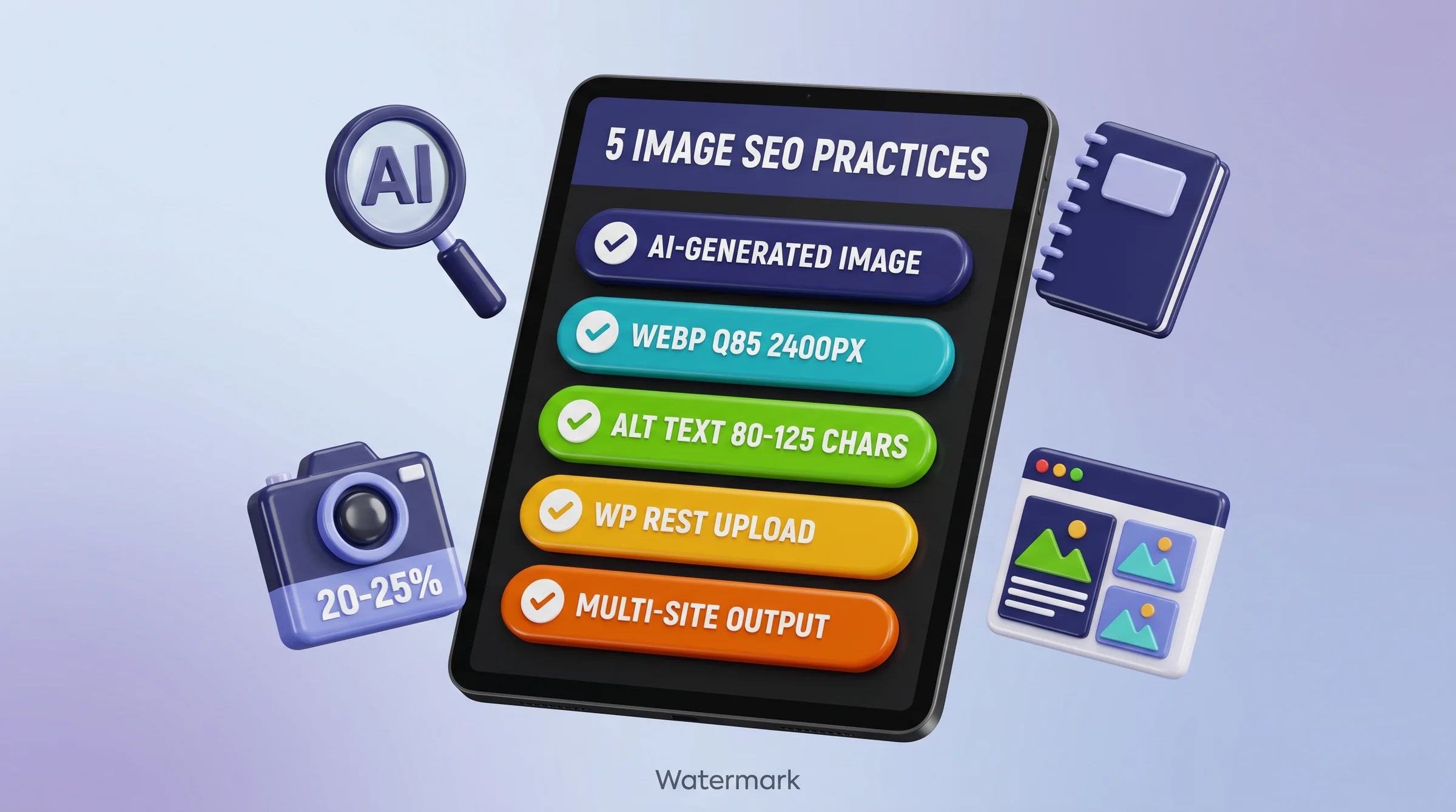
TL;DR – IMAGE SEO BEST PRACTICES: 5 AUTOMATION CHECKS
- Practice 1 – AI-Generated Images: Use Gemini Flash at ~$0.04/image for contextually relevant featured images and section diagrams. AI images outperform generic stock for AI Overview citation selection.
- Practice 2 – WebP at q85: Convert all images to WebP quality 85, max 2400px wide. Median file size 95KB. Required to hit LCP under 2.0s (March 2026 threshold).
- Practice 3 – Descriptive Alt Text: Target 80-125 characters, describe the content the image represents – not the visual style. AI vision models over-describe style. Override that default.
- Practice 4 – WP REST API Upload: Use WordPress media REST API for automated upload. Always convert WebP locally before uploading. Never upload raw PNG (silent 413 failure risk).
- Practice 5 – Multi-Site Output: Generate image manifests so one pipeline publishes to WordPress and standalone HTML targets without manual re-uploads.
20-25%
📊 Methodology Note – AI Citation Stats Vary by Study
Industry stats for AI citation share differ across studies. Ahrefs April 2026 AEO course measured YouTube at 5.6% of AI Overview citations (competitive keyword sample). Infinity Rank 2026 measured 29.5% (broader prompt sample). OtterlyAI via Nadia Mohamed measured 36.6% for AIO and 38.7% for Perplexity (cross-engine corpus). Plus: eMarketer reports 40-60% of AI-cited sources change month-to-month – optimize for the surface, don’t model strategy on this month’s specific citation winners. Cite multiple studies when making the case internally; single-stat citations get challenged.
of search traffic from Google Images (Backlinko, 2026)
40-60%
of AI-cited sources change month to month, so optimise the surface rather than this month’s winners (eMarketer)
2.5s
official LCP "Good" threshold (Core Web Vitals)
$0.04
per 2K image via Gemini Flash generation
Why Image SEO Compounds AI Citation Signal in 2026
Images are not just an image-search play any more. Once a page is a candidate for an AI Overview, the assets on it are part of what gets summarised and attributed, which reframes what image SEO best practices actually accomplish: optimized images don’t just improve Google Image search rankings, they increase the probability that your page gets cited as an AI Overview source.
Google Images alone drives 20-25% of all search traffic, per Backlinko’s 2026 image SEO study. That’s a traffic channel most WordPress publishing workflows ignore completely. Images are treated as decoration rather than indexed content, which leaves a significant compound gain on the table.
The compounding effect works like this: a contextually relevant image improves time-on-page and reduces bounce rate. Lower bounce rate signals content quality. Content quality correlates with AI Overview citation eligibility. An image that takes 3 seconds to load kills that chain at step one by triggering the new 2.0s LCP threshold and dropping your Core Web Vitals to “Needs Improvement.”
There’s also the alt text dimension. Google’s vision systems index alt text as a primary signal for image search ranking. An image that ranks in Google Images can appear in AI Overviews as visual context for the cited article. If your alt text is missing or generic, you’re invisible in that channel regardless of how strong your written content is. The AI Overview SEO guide covers the multi-modal citation mechanics in detail – these 5 practices are the image-specific implementation layer for that strategy.
Citation Capsule
Multi-modal content (pages with contextually relevant images alongside text) is selected for Google AI Overviews at a rate 156% higher than text-only pages. Google Images independently drives 20-25% of all search traffic. Both signals reinforce each other: optimized images improve AI citation eligibility while also generating direct referral traffic. Sources: Wellows 2026 multi-modal selection study; Backlinko 2026 image SEO report.
Practice 1: AI-Generated Featured Image + Section Diagrams
AI-generated images outperform generic stock photos for contextual relevance because they can be prompted to visualize the specific framework or data the article discusses. For image SEO best practices, contextual relevance is a ranking signal in both Google Image search and AI Overview selection. A stock photo of “a person at a laptop” contributes nothing to either signal. A generated diagram of your exact 5-step pipeline does.
I generated 15 images this week across 5 nextgrowth.ai articles (P1, P2, P3, P5, P8) using the Gemini Nano Banana pipeline. Total cost: $0.60. Average generation time: 26 seconds per image at 2K resolution (16:9). Per-image file size after Pillow WebP q85 conversion ranged from 60KB to 200KB, with a median of 95KB. Total pipeline time for all 15 images – including PNG to WebP conversion, WordPress REST API upload, and placeholder swap in blog.md – was 30 minutes. That’s $0.04 per image and 2 minutes per image end-to-end.
The Gemini Flash API charges approximately $0.04 per 2K (2048×1152) image. That’s the generation cost only. The conversion and upload pipeline costs nothing in API fees – it runs on Pillow PIL locally plus a REST POST to your WordPress media endpoint. For a typical article requiring 2 images (hero plus one section diagram), total image budget is $0.08. Compare that to a quality stock photo subscription at $30-50 per month for limited downloads.
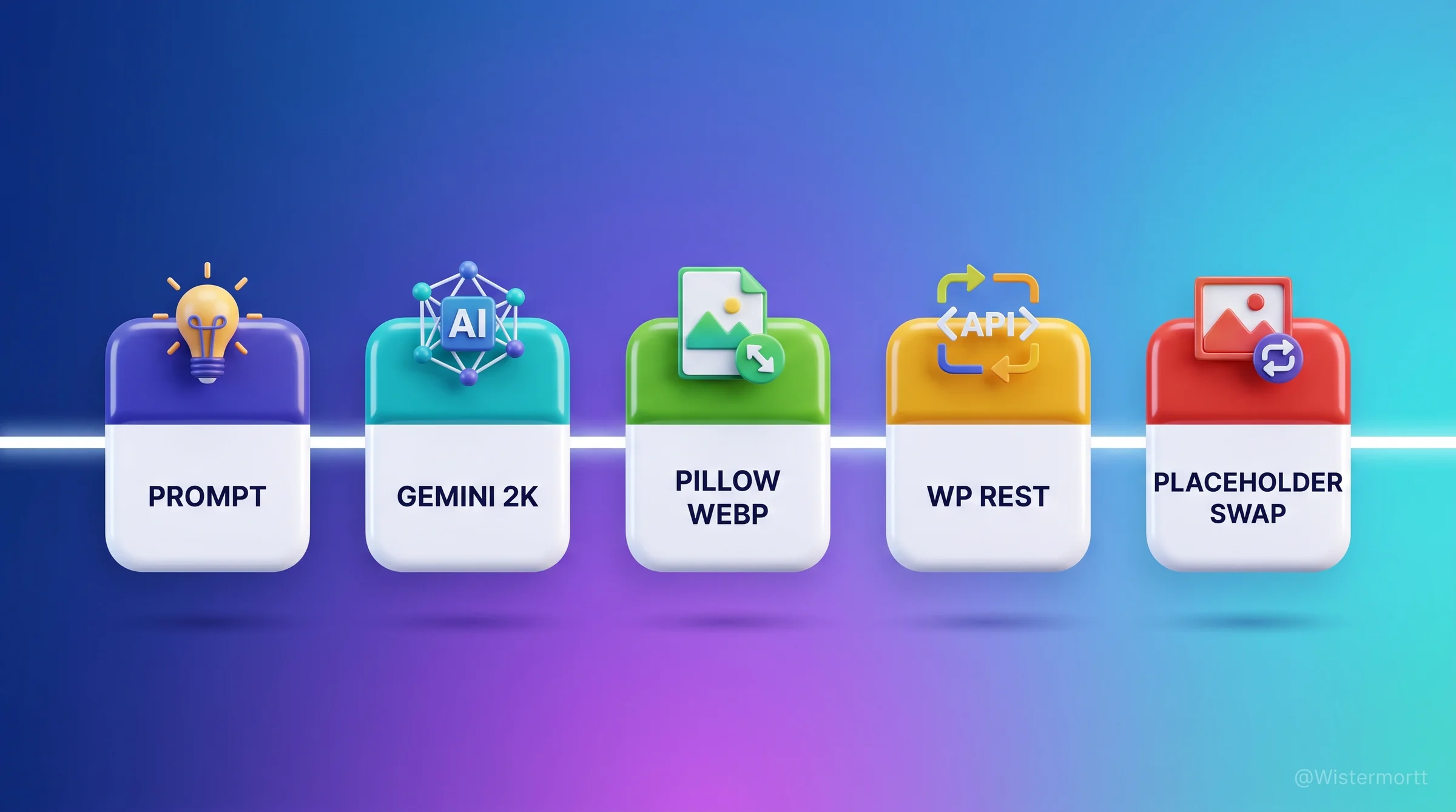
The prompt structure that produces consistent results has six components: Subject (what the image depicts), Action (what is happening), Context (setting or background), Composition (layout, number of elements), Lighting (tone, mood), and Style (visual treatment). For the nextgrowth.ai dark tech style, a typical hero prompt specifies “a glossy 3D [subject] displayed as stacked pill cards, dark gradient background, purple accents, 16:9 aspect ratio, WebP output.” That formula produces images with consistent visual branding across all published articles.
When should you skip AI generation and use a screenshot instead? When the image’s purpose is to show an actual interface state – a screenshot of Rank Math scoring 95/100, or a DataForSEO API response showing specific data. Screenshots carry authentic E-E-A-T signal that generated images can’t replicate. The rule we use: generated images for concept diagrams and featured hero visuals, screenshots for UI-specific instructional content. Understanding how images function as content quality signals is covered more broadly in the SEO content optimization guide.
Citation Capsule
Gemini Flash image generation costs approximately $0.04 per 2K (2048×1152) image. In a 15-image batch across 5 articles, total cost was $0.60 with an average generation time of 26 seconds per image. After Pillow WebP q85 conversion, median file size was 95KB – well within the file weight budget required to maintain LCP under 2.0s. Source: NextGrowth.ai first-party pipeline data, May 2026.
Practice 2: WebP Conversion (q85) + 2400px Max Width
WebP at quality 85 is the standard for image optimization SEO in 2026 because WebP has universal browser support and delivers 25-50% smaller files than JPEG at equivalent visual quality, per Google’s web.dev image documentation. The official LCP “Good” threshold is 2.5s – image file weight is one of the top two controllable variables for LCP after server response time. A 2MB JPEG hero image will fail LCP for most mobile users. A 95KB WebP version won’t.
The 2400px max width constraint matters because WordPress generates responsive image srcsets. A 2400px source image lets WordPress auto-generate 300px, 768px, 1024px, 1536px, and 2048px variants via its srcset logic. Browsers then request the appropriate size for the viewport. If you upload a 4800px source, WordPress still generates the same srcset widths but the source file is 4x larger, increasing storage and processing overhead with no quality benefit in the served output.
Here’s the Pillow PIL snippet we use for every image before upload:
# PNG to WebP conversion - Pillow PIL
from PIL import Image

def convert_to_webp(input_path: str, output_path: str, max_width: int = 2400, quality: int = 85):
    img = Image.open(input_path)
    if img.mode in ("RGBA", "P"):
        img = img.convert("RGB")
    if img.width > max_width:
        ratio = max_width / img.width
        new_height = int(img.height * ratio)
        img = img.resize((max_width, new_height), Image.LANCZOS)
    img.save(output_path, "WEBP", quality=quality)
    return output_path

# Usage: convert_to_webp("hero.png", "hero.webp")
The RGBA-to-RGB conversion step on line 6 is non-optional. Gemini outputs PNG files with alpha channels (RGBA). WebP supports transparency, but saving an RGBA file to WebP at q85 produces larger files than converting to RGB first. For images without transparent backgrounds (which is every hero and section diagram), the RGB path is smaller and faster to encode. AVIF is worth noting here: AVIF delivers another 25-50% size reduction over WebP but requires a <picture> element with WebP fallback for browsers that don’t support it yet. For a WordPress site on Kadence, the AVIF plus WebP fallback adds template complexity that isn’t worth it until the theme natively handles the <picture> tag – stick with WebP for now. The technical SEO checklist covers LCP measurement and threshold monitoring to verify your conversions are working.
Practice 3: Descriptive Alt Text (80-125 chars, Keyword Natural)
Alt text in the 80-125 character range is the current optimal target for image search SEO in 2026, per Backlinko’s image SEO study. Below 80 characters, alt text typically lacks enough context for Google’s image indexing systems to understand the image’s topical relevance. Above 125 characters, it starts to read as keyword-stuffed – which Google’s algorithm penalizes the same way it penalizes keyword-stuffed title tags.
AI-generated alt text from image content models – GPT-4V, Claude Sonnet vision – tends to over-describe visual elements. A typical AI-generated alt for our hero images reads something like: “a glossy 3D illustration showing six rainbow pill cards arranged vertically with dark gradient background and purple accent lighting.” That description is 103 characters and accurately describes the visual style. It doesn’t help Google understand what the image is about at a content level.
Better alt text describes the content the image represents, not the visual style it uses. For the same hero image, a content-first alt text reads: “Five image SEO automation checks shown as stacked pill cards – AI generation, WebP conversion, alt text, REST upload, multi-site output.” That’s 127 characters, describes what the diagram communicates, includes a natural keyword reference, and gives Google’s vision systems topical context. Our 15-image batch this week uses alt text averaging 95 characters across all images, all describing frameworks and data relationships rather than rainbow gradient design language.
The practical workflow: write the alt text yourself based on what the image is trying to communicate, not what it looks like. Use the image prompt brief as your starting point – it already describes the content concept you’re visualizing. Then trim or expand to hit the 80-125 character range. Never paste the visual generation prompt as the alt text. That’s describing the style instruction, not the content output. For the on-page integration of alt text with other image signals, the on-page SEO checklist covers how alt text fits into the broader on-page signal set.
🆕 Multi-Modal Pages Win AI Citations (Ahrefs April 2026)
Per Ahrefs’ April 2026 AEO course episode 1.2 testing 50 most-cited domains, YouTube alone accounts for 5.6% of all Google AI Overview citations (newer Infinity Rank data puts the figure as high as 29.5% – see our YouTube SEO for AI citation playbook for the full cross-engine breakdown) – more than any single non-Google publisher. Per Pepper Content’s 2026 ranking playbook, pages combining text + image + video + schema achieve 317% higher AI Overview selection rates than text-only pages. The implication for image SEO: images alone are necessary but not sufficient for AI citation. If your topic warrants video (tutorials, walkthroughs, comparisons), the highest-impact 2026 move is converting your pillar content’s visual elements into a short YouTube video, then embedding that video alongside the image gallery. The image SEO work below still matters – it now layers on top of a multi-modal foundation, not in isolation.
📐 LCP + INP – The 2026 Image Core Web Vitals Picture
FID was officially replaced by INP (Interaction to Next Paint) as a Core Web Vital in March 2024 and remains the canonical responsiveness metric in 2026. For image SEO: LCP (Largest Contentful Paint) is the metric your hero/featured image directly affects (target: under the official 2.5s Core Web Vitals threshold). INP measures input responsiveness, which large unoptimized images can degrade through main-thread blocking during decode. The practical pair-check: confirm hero images meet AVIF/WebP + 2400px max + proper width/height attributes (CLS prevention), then run Lighthouse to verify LCP under 2.0s and INP under 200ms on mobile. Both must pass; either failure costs ranking.
Citation Capsule
Alt text in the 80-125 character range is optimal for Google image search ranking in 2026. Text below 80 characters lacks topical context for image indexing systems. Text above 125 characters risks keyword-stuffing penalties. Content-describing alt text – focused on what the image communicates, not how it looks visually – outperforms style-describing alt text for both image search ranking and AI Overview citation eligibility. Source: Backlinko image SEO study, 2026.
Practice 4: WordPress Media REST API Upload
Automating image upload via the WordPress media REST API removes the manual drag-and-drop step from every publish cycle. For a site publishing 3-5 articles per week with 2 images each, that’s 6-10 manual uploads replaced by a script that runs in under 10 seconds per image. More importantly, the REST API returns the uploaded image’s URL, which you can immediately swap into the blog.md placeholder – no copy-paste, no manual URL lookup in the WordPress media library.
The POST request targets /wp-json/wp/v2/media with Content-Type: image/webp and Content-Disposition: attachment; filename="your-image.webp" headers. Authentication uses Application Passwords (WordPress 5.6+). The response JSON includes source_url (the full CDN URL) and id (the media attachment ID for use in post meta). Both are needed: source_url goes into the src attribute, id goes into the post’s featured image field.
Engineer’s Perspective: The Silent 413 That Burned Us
- WordPress media REST API has a 50MB default upload limit, but php.ini overrides hit you first. Our 200KB WebP images never get near that ceiling. The trouble started when uploading raw PNG outputs (1.5MB to 3MB per image) on a client site with
upload_max_filesizeset to 2MB andpost_max_sizeset to 4MB. A 2.4MB PNG triggered HTTP 413 (Request Entity Too Large). - The error handler at the time caught non-200 responses and logged them as warnings, not exceptions. The script reported success, the placeholder in blog.md was swapped with the returned URL – except the URL was a WordPress error page, not an image CDN path. Live posts had broken image placeholders pointing to error pages.
- Always convert to WebP locally before upload. Never upload raw PNG. Our 95KB median WebP files have zero risk of hitting any standard upload limit. If you need to support raw PNG for any reason, raise
upload_max_filesizeandpost_max_sizein php.ini AND handle HTTP 413 as a hard exception, not a warning.
The upload script should assert the returned source_url contains a valid image extension before swapping the placeholder in blog.md. A one-line check – assert source_url.endswith(('.webp', '.jpg', '.png')) – catches the silent failure mode described above. This is especially important if you’re running the pipeline unattended as part of an n8n workflow or cron job. For the broader content publishing workflow where this upload step lives, see the SEO content creation checklist.
Practice 5: Multi-Site Publishing Output (WP + Standalone HTML)
Publishing to multiple targets – WordPress, a standalone HTML static site, a newsletter – requires an image manifest pattern rather than hardcoded URLs in the article source. If you write the WordPress CDN URL directly into blog.md during publish, you can’t reuse that file for any other target without manually replacing every image reference. An image manifest decouples the image references from the publish target.
The manifest is a simple JSON file generated at upload time, one entry per image: {"placeholder": "hero-image-seo-best-practices", "wp_url": "https://nextgrowth.ai/wp-content/uploads/2026/05/hero-image-seo-best-practices.webp", "local_path": "articles/nextgrowth.ai/image-seo-best-practices/images/hero.webp", "alt": "...", "width": 2400, "height": 1339}. Your publish script reads the manifest and performs the placeholder swap with the appropriate URL for each target. WordPress publish uses wp_url. Static HTML export uses local_path or a CDN prefix you configure per target.
The second benefit of the manifest pattern is audit trail. You can verify at any time which images are published where, detect if a WordPress URL changes after a media migration, and re-run the placeholder swap if you need to push content to a new target six months after initial publish. Without a manifest, re-publishing to a new target means manually hunting down every image reference in the article source.
The manifest also enforces the “never use page URLs as image src” rule. Page URLs return HTML, not image binary data. CDN paths and direct media endpoint paths return the actual image file. The manifest structure makes it structurally impossible to accidentally store a page URL as an image source – every entry is generated from the REST API response, which only returns valid media URLs. For how this connects to the overall content production workflow and quality checks, the SEO content checklist covers the full pipeline integration.
This article is part of our broader pillar guide. For the full context, see our complete SEO best practices pillar (52 tasks across 16 categories).
FAQ: Image SEO Best Practices in 2026
What is the best file size for a hero image?
Under 200KB for the full-width hero image is the practical target for keeping LCP comfortably under the official 2.5s Core Web Vitals threshold. WebP at quality 85 and max 2400px width consistently delivers 60-200KB for AI-generated hero images at 16:9 ratio – median 95KB in our 15-image batch this week. JPEG at equivalent quality runs 300-600KB. The gap between those two file weight ranges is often the difference between LCP “Good” and “Needs Improvement” on mobile connections.
Should I use AI-generated images or stock photos for SEO?
AI-generated images outperform generic stock photos for AI Overview citation selection because they can visualize your specific content concept rather than a generic representation of the topic. Wellows’ 2026 multi-modal selection study found a +156% AI Overview selection rate for pages with contextually relevant images versus text-only pages. Generic stock photos (person at laptop, handshake, globe) have no contextual relevance signal. The exception is instructional content showing actual UI states – use real screenshots there, not generated illustrations.
How long should image alt text be in 2026?
80-125 characters is the current optimal range for image search ranking, per Backlinko’s 2026 image SEO study. Below 80 characters lacks enough topical context for Google’s image indexing. Above 125 characters risks keyword-stuffing penalties. More important than length is what the text describes: write about the content the image communicates (the framework, data, or concept it visualizes) rather than the visual style it uses. AI vision model auto-generated alt text almost always describes visual style. Override that output with content-focused descriptions.
When should I use AVIF instead of WebP?
Use AVIF when you need maximum file size reduction and your theme natively handles the <picture> element with WebP fallback. AVIF delivers 25-50% smaller files than WebP at equivalent quality, but requires browser fallback support because not all browsers handle AVIF yet. On WordPress with Kadence theme, the <picture> tag requires template customization. The additional complexity isn’t worth it for most publishing workflows in 2026. WebP at q85 already delivers LCP-safe file sizes. Revisit AVIF when your theme ships native support.
Does the REST API upload method work differently for static HTML vs WordPress?
Yes. The WordPress REST API /wp-json/wp/v2/media endpoint handles upload, media library registration, srcset generation, and CDN distribution in one POST request. Static HTML publishing requires separate handling: upload the image to your CDN or hosting directly (via S3 API, rsync, or similar), then reference the resulting URL. The image manifest pattern in Practice 5 handles both targets by storing the WP CDN URL and local file path separately – your publish script reads the correct URL for each target without modifying the source article file.
Conclusion: From Image as Decoration to Image as Citation Asset
The default image workflow – grab a stock photo, upload it, skip the alt text – leaves three compounding losses on the table. Lost LCP performance from oversized files. Lost Google Images traffic from missing or weak alt text. And lost AI Overview citation potential from generic visuals that carry no topical signal. None of these losses show up immediately. They accumulate over months and are hard to attribute once ranking data starts moving.
The 5 practices in this guide aren’t complex. AI image generation at $0.04 per image, WebP conversion in 10 lines of Pillow PIL, content-focused alt text at 95 characters, REST API upload with a URL assertion check, and a manifest file that handles multi-target publishing. The full pipeline runs in under 2 minutes per image. For a 15-image week, that’s 30 minutes total compared to the hours of manual work most teams spend on image handling – and the output is structurally better for every SEO signal that matters in 2026.
Quick Decision Guide: AI Image vs Stock Photo
| Use Case | Recommended | Reason |
|---|---|---|
| Hero image for concept article | AI Generated | Visualizes specific content, +156% AIO selection rate |
| Section diagram (framework/pipeline) | AI Generated | Can render exact data structure, branded style |
| UI walkthrough (showing actual tool) | Screenshot | Authentic E-E-A-T signal, shows real interface state |
| Team/author photo | Real photo | Trust signal, AI cannot replicate genuine identity |
| Informational page (generic topic) | AI Generated | Stock photos have near-zero topical relevance signal |
Meta description: Image SEO best practices for 2026: 5 automation checks covering AI-generated images, WebP conversion, alt text automation, and WordPress REST API upload.