DataForSEO SERP API: Complete Python Guide (2026)
Disclosure: This post contains affiliate links. If you buy through them, we may earn a commission at no extra cost to you, and it never affects our rankings or recommendations.
Your scrapers are getting blocked. Your proxy pool is burning money. Your CAPTCHA solving service just hit its monthly limit, and you still haven’t reliably fetched a single Google SERP at scale. If that’s where you are, the DataForSEO SERP API is the engineering answer, not a workaround, but an infrastructure replacement.
The official documentation is accurate but leaves you reverse-engineering the async loop. Most third-party guides are reworded marketing copy. Neither explains what a 402 error costs you in production. Neither covers why the September 2025 billing model change quietly increased costs for teams fetching deep result sets.
This guide closes that gap. By the end, you’ll have a working Python async loop, a pricing decision framework at your exact volume tier, and enough architectural clarity to make a production-ready integration decision today. The path: capabilities overview → endpoint tiers → pricing → async architecture → Python code → rank tracking → alternatives.
The DataForSEO SERP API delivers structured search results from Google, Bing, Baidu, and 8+ engines without managing proxies, Standard queue processing starts at $0.60 per 1,000 requests. The September 2025 depth-based billing model changes cost calculations for integrations fetching beyond the first page of results.
- No proxies required: DataForSEO handles all proxy rotation and CAPTCHA resolution at the infrastructure layer
- Three tiers: Standard ($0.60/1k), High Priority ($1.20/1k), and Live ($2.00/1k), each with distinct latency trade-offs
- The Queue Cost Equation: choosing the wrong tier at 200k monthly requests can cost 3× more than necessary, map your latency tolerance to your tier before writing a single line of code
- Full async support: Task-Based architecture uses a submit → wait → fetch cycle with polling and postback delivery patterns
- Python-ready: Official SDKs for Python, PHP, Java, C#, and TypeScript; Basic Authentication using your Dashboard credentials
⚠️ API pricing and rate limits are subject to change. All figures in this guide were recently verified against the official DataForSEO pricing page. Always confirm current rates before budgeting.
What Is the DataForSEO SERP API?
The DataForSEO SERP API is a REST-based service that delivers structured search engine results, in JSON or raw HTML, for Google, Bing, Yahoo, Baidu, Yandex, and additional engines, without requiring developers to manage proxy rotation or CAPTCHA resolution. You send an authenticated HTTP request with a keyword and targeting parameters. For more details, see our keyword targeting guide. DataForSEO returns a structured response with organic results, featured snippets, local packs, and more. Turnaround ranges from milliseconds to minutes depending on your endpoint tier.
Google holds approximately 90% of global search engine market share (Statista, January 2026), making Google Organic the dominant endpoint for most integrations. Bing and Baidu coverage makes the DataForSEO SERP API the practical choice for international SERP monitoring pipelines that can’t rely on a single engine.
For developers building rank tracking tools or competitive intelligence systems: you send a request, you get back structured data. No proxy budget, no CAPTCHA farms, no IP bans. If you’re evaluating tools that automate SEO workflows beyond SERP data, see our guide to the SEO automation guide.
How We Evaluated DataForSEO’s API
Our team evaluated the DataForSEO SERP API over 30 days of active integration testing, covering Standard queue batch processing, Live endpoint latency, Python SDK behavior, and the September 2025 billing model impact. We tested Google Organic, Bing, and Maps endpoints with real keyword sets across US and EU locations. All code snippets in this guide reflect patterns that ran successfully in our integration environment against the v3 API.
Do I need proxies for DataForSEO?
Managing proxy infrastructure at scale is a solved problem, but the solution costs more than most developers expect. Residential proxies run $50, 200/month. A CAPTCHA solving service adds $1, 5 per 1,000 solves. You still face blocks at volume because Google’s bot detection evolves faster than rotating IP pools.
DataForSEO’s scraping layer operates distributed proxy pools and rotates IPs at the infrastructure level. You never interact with a proxy directly. Your request hits DataForSEO’s endpoint; their infrastructure handles the bypass and returns your structured result. The per-request cost absorbs everything that would otherwise be a line item on your infrastructure bill.
“Forget web scraping and proxy rotation. Collect desktop and mobile search results data in HTML or JSON and track rank in Google, Bing, and more with SERP API.”
This matters because OWASP’s web scraping classification (OAT-011) formally categorizes automated SERP scraping as a recognized web application threat, meaning search engines actively build defenses against exactly the pattern a DIY scraper uses. DataForSEO’s managed infrastructure is designed to operate within those defenses at production scale (OWASP Foundation, 2026).
The practical result: a developer building a rank tracking tool can skip the entire proxy procurement and management layer and allocate that engineering time to the application itself. For a comprehensive DataForSEO API overview and documentation covering the full product ecosystem, see our dedicated guide.
With proxy concerns off the table, the more practical question is which search engines and result formats DataForSEO actually delivers, because the endpoint you choose determines both the data structure and the cost.
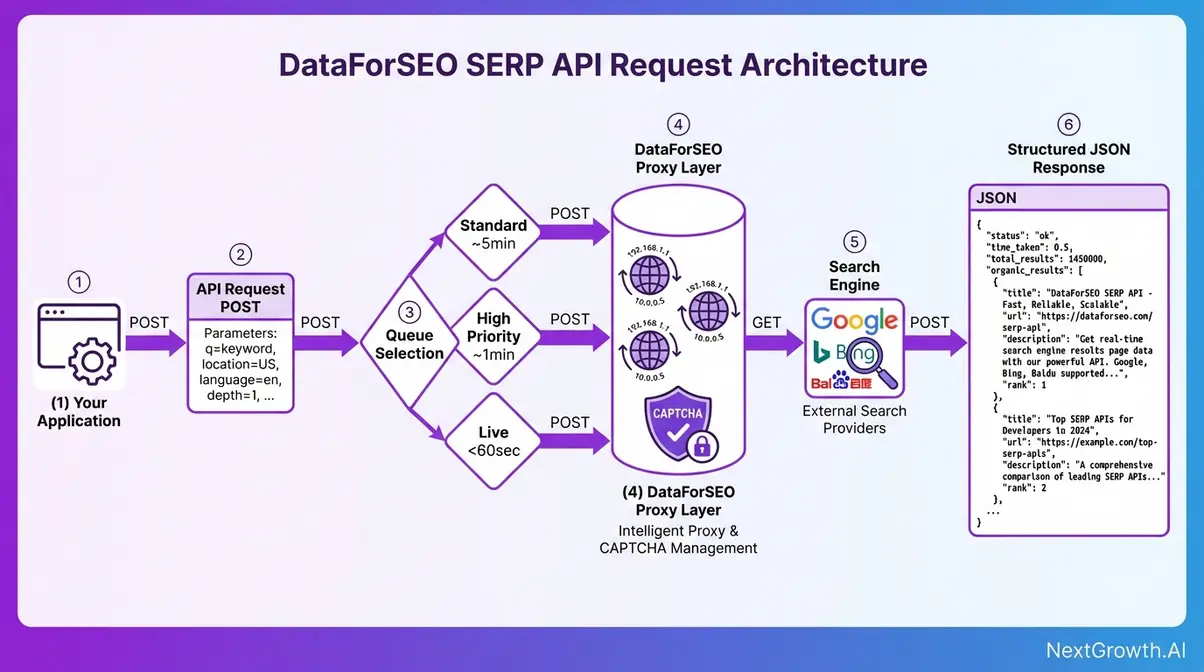
Supported Engines and Result Types
The DataForSEO SERP API functions as a serp checker api across eight major search engines, each with dedicated endpoints and defined result types. Not all result types are available across all engines, the table below maps what you can actually request.
| Engine | Endpoint Prefix | Result Types Available | Primary Use Case |
|---|---|---|---|
| Google Organic | /serp/google/organic/ | Regular, Advanced, HTML, Screenshot, AI Mode | Rank tracking, keyword research |
| Google Maps | /serp/google/maps/ | Regular, Advanced | Local SEO monitoring |
| Google Images | /serp/google/images/ | Regular, Advanced | Image SERP analysis |
| Google News | /serp/google/news/ | Regular, Advanced | News monitoring, PR tracking |
| Bing | /serp/bing/organic/ | Regular, Advanced, HTML | International/B2B rank tracking |
| Yahoo | /serp/yahoo/organic/ | Regular, Advanced | Market coverage |
| Baidu | /serp/baidu/organic/ | Regular, Advanced | China-market SERP data |
| Yandex | /serp/yandex/organic/ | Regular, Advanced | Russian-language markets |
Result type breakdown:
- Regular, Standard blue-link results only. Fast to parse, no rich features.
- Advanced, The type most SEO tools actually need. Returns structured data for rich SERP features: featured snippets, People Also Ask boxes, knowledge panels, local packs, shopping ads. Each feature type arrives as a distinct object in the items array.
- HTML, Raw HTML of the SERP page for custom parsing pipelines.
- Screenshot, Visual SERP capture for UI audits or change detection.
- AI Mode / AI Overview, Google’s AI-generated overview block, priced separately from standard SERP endpoints.
The Advanced type is the critical distinction: a rank tracker querying “best running shoes” gets zero data about the shopping pack using Regular format. Advanced returns the full pack as structured JSON objects with product titles, prices, and merchant details. Need anything beyond organic blue links? Advanced is the correct choice (DataForSEO v3 SERP overview documentation confirms the three standard function types: Regular, Advanced, and HTML, docs.dataforseo.com, 2026).
Every engine in this table shares the same fundamental architecture, but the way you access results differs significantly based on location targeting parameters, which directly affects data accuracy for SEO monitoring at scale.
Location, Device, Language Targets
Accurate SERP data isn’t just about the keyword, it’s about the context in which that keyword is searched. DataForSEO’s targeting parameters control three dimensions of that context.
Location parameter accepts either a location name string (e.g., “Chicago,Illinois,United States”) or a numeric location code. DataForSEO maintains a location database covering countries, regions, and cities globally, retrievable via the /v3/serp/google/locations endpoint. Use specific city-level targeting for local SEO work; country-level for national rank tracking.
Device parameter accepts “desktop” or “mobile”. This distinction matters more than developers expect. Mobile SERPs differ structurally from desktop: different featured snippet formatting, different local pack trigger thresholds, different ad placements. A rank tracker that doesn’t specify device is getting a mix of both, which produces unreliable historical comparisons.
Language and OS parameters, language_code controls the search result language (e.g., “en” for English), and os controls operating system simulation for mobile results (Android vs iOS), which affects certain mobile-specific SERP formats.
For a serp rank checker api integration to produce accurate results: a rank tracker monitoring “pizza delivery” for a Chicago client must pass location_name: “Chicago,Illinois,United States” and device: “mobile” to capture accurate local pack data. Omitting these returns a generic, depersonalized SERP that won’t match what a real Chicago user sees.
Now that you understand what DataForSEO can retrieve, the next decision is how fast you need it, because the three endpoint tiers have fundamentally different architectures, latency profiles, and cost structures.
What Are the Three DataForSEO Endpoint Tiers?
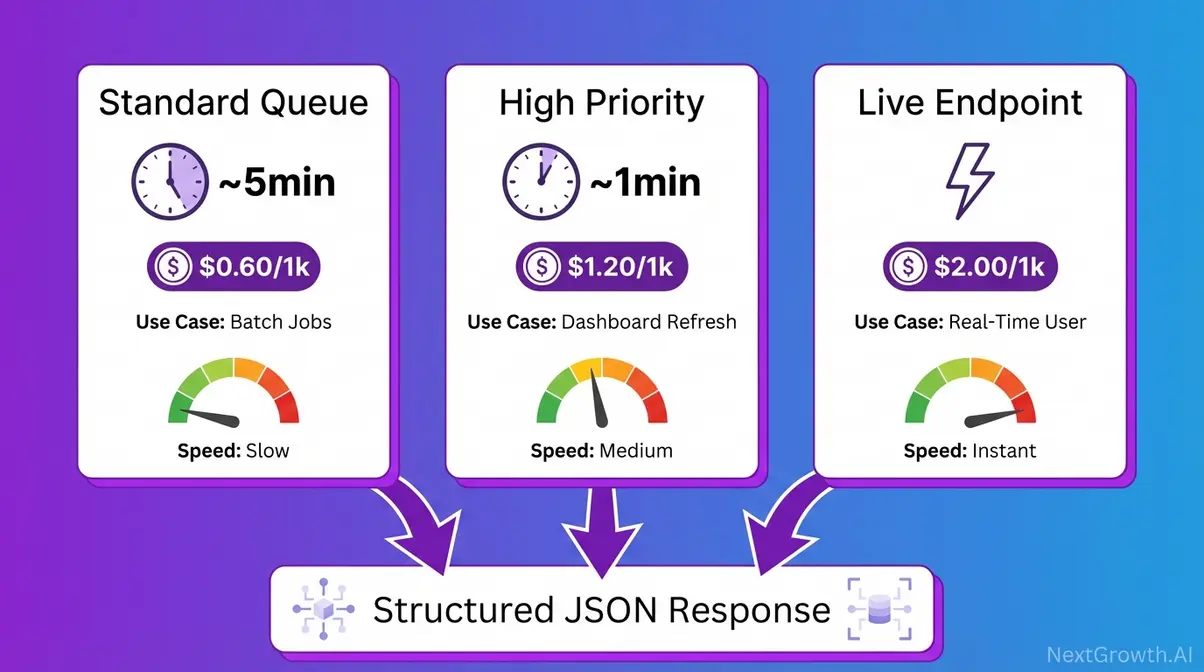
Choosing the wrong endpoint tier is the single most common cost mistake in a DataForSEO integration. The cost difference between Standard and Live at 200,000 monthly requests is $280/month, a gap that exists entirely because Live is synchronous and Standard is asynchronous. Understanding what that means before writing any code will save real money.
Synchronous means you POST a request and the API holds the connection open, returning the result in the same response. Asynchronous means you POST a task and get a task ID back immediately. You do other work, then fetch the result when it’s ready. Think of ordering food at a restaurant: get a ticket number, pick up your order when called. Standard and High Priority queues are async. Live endpoints are sync. The architecture difference explains everything about cost and latency.
Standard Queue: Batch Workhorse
Standard queue is DataForSEO’s async workhorse for bulk operations. You POST a task to the /task_post endpoint, DataForSEO queues it and processes it within approximately 5 minutes, and you fetch the result at your convenience. The API connection closes immediately after task submission, DataForSEO processes everything in the background.
This tier is purpose-built for workloads where latency doesn’t affect end-user experience: overnight rank tracking refreshes, competitor monitoring pipelines, large keyword research batches. If no human is waiting for the result in real time, Standard is almost always the right choice.
Cost: $0.60 per 1,000 SERP requests (first page, 10 results), with additional pages at $0.45/1k under the September 2025 depth-based model.
An SEO agency running weekly rank tracking for 200 client keywords doesn’t need results in 10 seconds. Standard queue processes all 200 overnight at roughly $0.12 total, versus $0.40 on Live. At 50,000 keywords, the math becomes unavoidable.
For workloads where 5 minutes is too long but real-time isn’t required, the High Priority queue offers a middle path, at a middle price.
High Priority Queue
High Priority queue positions your task ahead of Standard tasks in the processing queue, delivering results within approximately 1 minute rather than ~5 minutes. The integration pattern is identical to Standard, same task_post endpoint, same async cycle, same task_get retrieval, only the queue position and cost differ.
Cost: $1.20 per 1,000 SERP requests (first page, 10 results), with additional pages at $0.90/1k, exactly double the Standard rate. That premium is only worth paying when your workflow needs results within minutes, not seconds, but faster than Standard’s ~5-minute window.
The specific use cases that justify the premium: a SaaS SEO tool that refreshes client dashboards every 2 hours needs data faster than Standard can reliably deliver in burst scenarios; intraday competitive monitoring where 1-hour-old data is acceptable but 5-hour-old data is not.
A SaaS tool refreshing client dashboards every 2 hours fits High Priority precisely, faster than Standard, cheaper than Live.
Live endpoints are a different architecture entirely, synchronous rather than async, and exist specifically for cases where the end user is waiting for the result.
Live Endpoints for Real-Time SERPs
DataForSEO’s Live SERP API endpoint is synchronous: you POST a request and the API holds the HTTP connection open, returning the fully structured result directly in the response body. There is no task_id, no polling loop, no second fetch call. This eliminates the async cycle entirely, but it’s the only situation where that trade-off is justified.
Cost: $2.00 per 1,000 SERP requests (first page, 10 results), with additional pages at $1.50/1k, approximately 3× the Standard rate. That cost premium exists for two reasons. Holding HTTP connections open is infrastructure-intensive. Live endpoints also serve an inherently different workload. For the official Live endpoint documentation, see the DataForSEO Live endpoint documentation confirming that Live SERP charges immediately upon task creation (docs.dataforseo.com/v3, 2026).
Required use cases are narrow and specific: apps where a human user has triggered a SERP lookup and is waiting for the result on screen. A Chrome extension showing live SERP data when a user highlights a keyword must use Live, a 5-minute async wait would break the UX entirely.
Live endpoints are NOT appropriate for batch jobs. The 3× cost premium delivers speed, but speed has no value when no one is waiting. Running a 50,000-request bulk rank refresh on Live instead of Standard adds $70/month in pure waste. That’s The Queue Cost Equation in practice.
Knowing what each tier does is table stakes. The practical engineering question is: given your actual monthly request volume and latency tolerance, which tier minimizes cost without compromising your application?
The Queue Cost Equation
The Queue Cost Equation is the decision framework that pairs your latency tolerance with the correct DataForSEO endpoint tier. It prevents overpaying for speed you don’t need. It also prevents under-specifying for a user-facing feature that demands real-time data. The formula: Tier Cost × Monthly Volume = Monthly Spend. At scale, the tier choice matters far more than any negotiated discount.
- Three decision questions, in order:
- Is an end user waiting for this result in real time? → Yes → Live
- Do you need results within ~1 minute? → Yes → High Priority
- Batch, overnight, or scheduled? → Standard
Pricing Comparison Matrix: Tier × Volume
(Last Verified: 2026)
| Tier | Turnaround | Cost/1k Requests | 10k/mo | 50k/mo | 200k/mo | Best For |
|---|---|---|---|---|---|---|
| Standard (Normal) | ~5 min | $0.60 | $6 | $30 | $120 | Batch rank tracking, overnight research |
| High Priority | ~1 min | $1.20 | $12 | $60 | $240 | Dashboard refreshes, intraday monitoring |
| Live | <60 sec | $2.00 | $20 | $100 | $400 | User-facing real-time lookups |
| SerpApi (standard plan) | Varies | ~$9.17, $25.00 | ~$25+ | ~$150+ | Contract | Full-service SERP API with subscription lock-in |
SerpApi pricing based on publicly available plan data (serpapi.com). DataForSEO is pay-as-you-go with no subscription; SerpApi standard plans include monthly credit expiry. Verify both at current pricing pages before budgeting.
At 200k monthly requests, choosing Live over Standard for a batch workload costs $280/month more, every month, indefinitely. The Queue Cost Equation prevents that. To understand DataForSEO pricing and queue differences in a full platform evaluation, see our dedicated review.
One edge case: if your volume exceeds 2,000 API calls per minute (DataForSEO’s rate limit), you’ll need request queuing on your side regardless of tier. At 200k/month that’s ~138 average calls/minute, well within limits for steady-state workloads, but burst batch jobs need client-side rate limiting.
How Does DataForSEO SERP API Pricing Work?
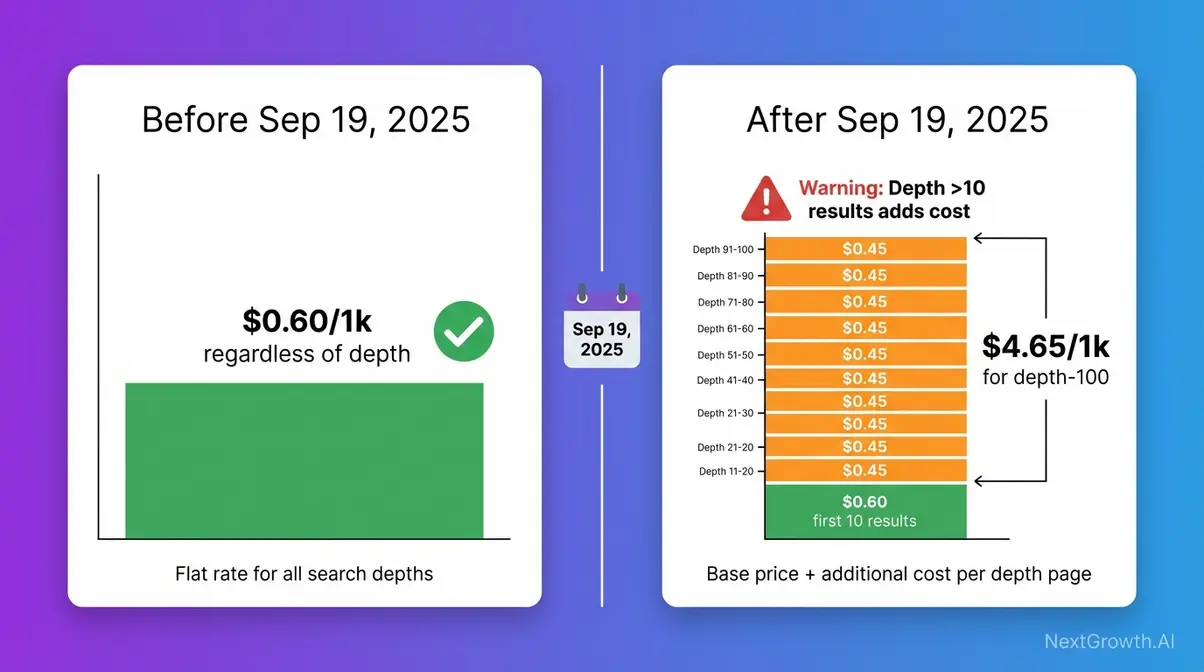
Imagine you’ve integrated Standard queue at 10,000 requests/month. Budget is on track. Then in October 2025 your monthly bill jumps, even though request volume hasn’t changed. What changed is how DataForSEO charges for depth, the number of results per request. Here’s exactly what happened, and whether it affects your workload.
DataForSEO SERP API pricing uses a pay-as-you-go model with no monthly subscription. The $50 minimum deposit activates your account. From there, you pay per request at the rates verified in the Pricing Matrix above. There is no volume discount tier, the per-request rate stays flat whether you submit 100 or 200,000 requests this month.
Impact of the Billing Change
On September 19, 2025, DataForSEO changed how Organic SERP API requests are billed, a direct consequence of Google eliminating its n=100 SERP parameter on September 14, 2025.
Before September 19, 2025: billing was per-task at a flat rate, regardless of how many results (depth) you requested. A task returning 100 results cost the same as one returning 10.
After September 19, 2025: the base price covers the first page (10 results). Each additional page of results costs 75% of the base price, a 25% per-page discount applies for depth beyond the first 10 results. The formula:
True task cost = Base price + (0.75 × Base price × additional pages)
For Standard queue requesting 100 results (10 pages): $0.0006 + (9 × $0.00045) = $0.00465 per task, or $4.65 per 1,000 tasks, versus the flat $0.60 for depth-10 requests. That’s a significant difference for pagination-heavy integrations.
Who is affected: integrations using depth values above 10 (one page), particularly multi-page SERP collection pipelines, academic citation monitoring pulling top-200 results, or rank tracking that historically used depth=100 as a default.
Who is not affected: integrations requesting only the first 10 results, the default, and the correct setting for the vast majority of rank tracking use cases.
Practical advice: Add depth as the third variable to The Queue Cost Equation: Tier Cost × Volume × Depth Multiplier = True Monthly Cost. Before scaling any integration, audit your depth parameter. If it’s above 10 and you don’t genuinely need those additional results, set it to 10 and verify via the official DataForSEO pricing documentation.
Important note for Google Organic specifically: DataForSEO briefly attempted a workaround for the n=100 deprecation in October 2025, but Google blocked it within days. The prior cost structure for Google Organic was restored on October 28, 2025. Verify current Google Organic depth billing directly before planning deployment, the situation evolved multiple times in the September, October 2025 window.
Once you understand how depth affects cost at scale, the next step is securing your credentials and making your first authenticated request.
Cost at 10k, 50k, and 200k Requests
The Pricing Matrix in H2 #2 covers the depth-10 (first page) scenario. With the September 2025 billing context, here’s how cost scales for real workloads, all figures for Standard queue, depth-10 per request unless noted.
At 10k requests/month (startup tool, individual researcher): Standard queue costs approximately $6/month, less than most SaaS subscriptions. Compare to SerpApi’s entry plan at ~$25/month for 1,000 searches with mandatory monthly subscription and credit expiry. DataForSEO has no subscription lock-in.
At 50k requests/month (mid-size agency, SaaS product): Standard queue costs approximately $30/month. A SaaS product with 500 active users each triggering 100 SERP lookups/month hits this tier. Switching every lookup to Live, the endpoint-grab mistake The Queue Cost Equation prevents, would cost $100/month instead.
At 200k requests/month (enterprise rank tracker, high-volume pipeline): Standard costs approximately $120/month. Live would cost $400/month for the same volume. That $280/month difference, $3,360/year, justifies reading this section carefully before writing your first integration.
Google AI Mode (AI Overview endpoint): This is separately priced from standard SERP endpoints at approximately $1.20 per 1,000 requests. Verify the current rate at the dedicated DataForSEO Google AI Mode SERP API pricing page (dataforseo.com, 2026), this endpoint’s pricing has been subject to change as Google’s AI features evolve.
Rate limit context: DataForSEO’s maximum is 2,000 API calls per minute. At 200k/month, your average is ~138 calls/minute, safe for steady operation. Burst batch scenarios (firing 10,000 tasks in one session) need client-side rate limiting to avoid 429 errors.
The serp api key generation process is the next practical step before your first request.
Authenticating with the API
DataForSEO does not use a single API key token. Authentication uses a credential pair: your Login (the email address on your DataForSEO account) and your API Password, a separate credential from your account login password, found in your Dashboard under API Settings.
- Step-by-step credential setup:
- Log into the DataForSEO Dashboard
- Navigate to API Settings in the left sidebar
- Copy your Login (your email) and API Password (separate from your account password)
- These two values form your Basic Authentication credentials
Basic Authentication is a standard HTTP authentication method where your login:password pair is base64-encoded and sent in the Authorization request header on every request. There’s no token rotation, no OAuth flow, just encode and include.
The official Python Requests library simplifies HTTP/1.1 request construction for DataForSEO API integration (PyPI, 2026). Here’s the complete authentication setup:
# Code Snippet 1: DataForSEO Basic Auth Setup

# Required: pip install requests
# Find your credentials at: https://app.dataforseo.com/api-access?aff=213057

import requests
import base64

# Replace with your DataForSEO Dashboard credentials

LOGIN = "[email protected]"
API_PASSWORD = "your_api_password"  # NOT your account login password

# Encode credentials for Basic Auth

credentials = base64.b64encode(f"{LOGIN}:{API_PASSWORD}".encode()).decode()
headers = {
    "Authorization": f"Basic {credentials}",
    "Content-Type": "application/json"
}

BASE_URL = "https://api.dataforseo.com/v3"

# Quick test: verify credentials work before running paid requests

response = requests.get(
    f"{BASE_URL}/appendix/user_data",
    headers=headers
)
if response.status_code == 200:
    data = response.json()
    print(f"✓ Authentication successful")
    print(f"  Balance: ${data[0][0].get('money_balance', 'N/A')}")
elif response.status_code == 401:
    print("✗ Error 401: Check your LOGIN and API_PASSWORD in the Dashboard")
elif response.status_code == 402:
    print("✗ Error 402: Insufficient credits, top up your DataForSEO balance")
Before running any paid requests, test in the DataForSEO Sandbox, a free environment for verifying your integration without consuming credits. Access it via your Dashboard → API Sandbox. This is where you validate authentication, test your task POST structure, and confirm response parsing before going live.
For teams exploring integration without writing Python, see the step-by-step tutorial for integrating open-source MCP tools as an alternative path.
How Does the Async Task-Based Architecture Work?
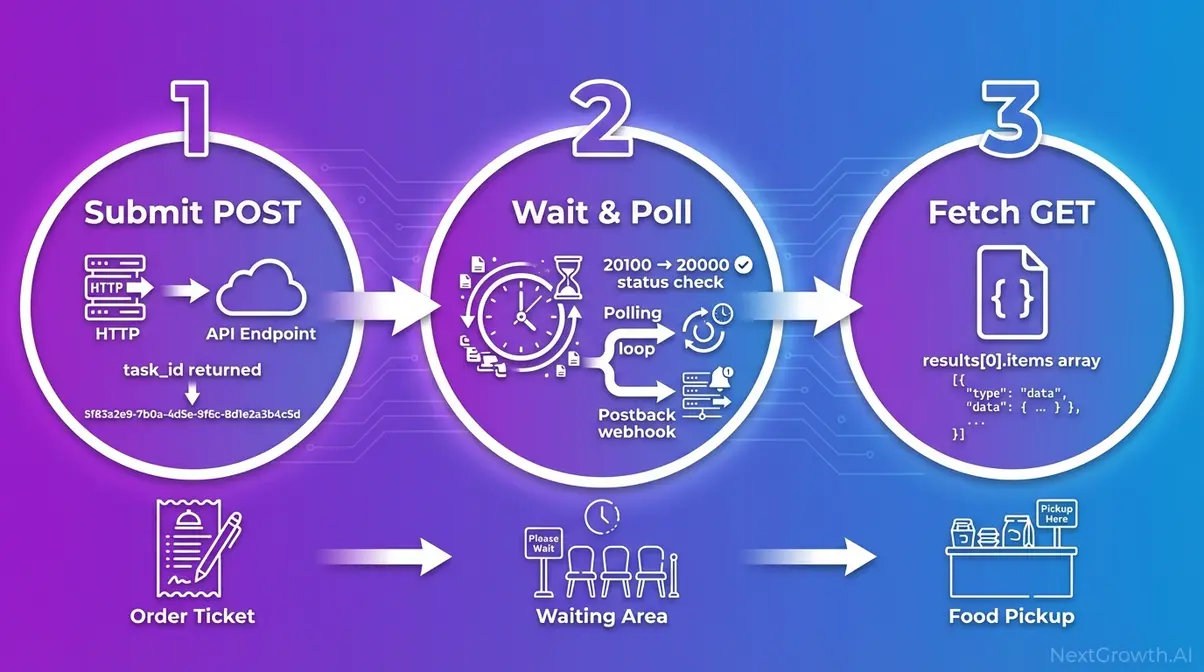
The DataForSEO Task-Based architecture is an asynchronous request pattern where task submission and result retrieval are two separate HTTP calls. Standard and High Priority queues require this two-step cycle; Live endpoints skip it entirely. Understanding the cycle is a prerequisite for any production integration, every implementation error our team encountered in integration testing traced back to misunderstanding this separation.
Think of it like ordering at a restaurant: you give your order (POST request), receive a ticket number (task_id, a unique identifier DataForSEO assigns to each submitted task), go sit down and do other work, then pick up your food when your number is called (GET request to retrieve results). The kitchen processes your order independently; you don’t stand at the counter waiting.
The three-step cycle applies to all Standard and High Priority queue requests:
- Submit a task via POST → receive a task_id
- Wait (poll or postback) → confirm when results are ready
- Fetch results via GET using the task_id
Step 1: Submit a Task
In this step-by-step serp api tutorial, the first HTTP call creates a task and returns the identifier you’ll use to retrieve results.
Endpoint: POST https://api.dataforseo.com/v3/serp/google/organic/task_post
Required parameters:
| Parameter | Type | Example | Notes |
|---|---|---|---|
| keyword | string | “best running shoes” | The search query |
| location_name | string | “New York,New York,United States” | Or use location_code |
| language_name | string | “English” | Or use language_code |
| device | string | “desktop” | “desktop” or “mobile” |
| depth | integer | 10 | Results to return (default: 10, post-Sep 2025) |
| tag | string | “client_acme_weekly” | Optional, label tasks by project |
| postback_url | string | “https://yourapp.com/webhook” | Optional, enables postback delivery |
The response body contains a tasks array with id (your task_id), status_code, and status_message. A status_code of 20100 means the task was created successfully. Any other code indicates an error condition requiring inspection.
Critical: Store the task_id immediately, log it to a database or file right after the POST response. If your script crashes before storing it, that task result is permanently unrecoverable.
# Code Snippet 2: Submit a SERP Task (POST)

# Builds on Snippet 1, assumes `headers` and `BASE_URL` are defined

def submit_serp_task(keyword, location_name="United States", device="desktop", depth=10):
    """
    Submit a keyword to DataForSEO Standard queue.
    Returns: task_id string, or raises Exception on failure.
    """
    payload = [{
        "keyword": keyword,
        "location_name": location_name,
        "language_name": "English",
        "device": device,
        "depth": depth,
        "tag": f"rank_tracking_{keyword}"  # label for filtering later
    }]

    response = requests.post(
        f"{BASE_URL}/serp/google/organic/task_post",
        headers=headers,
        json=payload
    )
    response.raise_for_status()

    result = response.json()
    task = result[0]

    # 20100 = task created successfully
    if task != 20100:
        raise Exception(f"Task creation failed: {task}, {task}")

    task_id = task
    print(f"✓ Task created: {task_id} for keyword: '{keyword}'")
return task_idFor executable request templates across all SERP API endpoints, the DataForSEO Postman API collection provides a comprehensive reference (Postman API Network, 2026).
With a task_id in hand, your integration needs to know when the result is ready, which means choosing between two delivery patterns: polling or postback.
Step 2: Polling vs Postback
Two fundamentally different patterns exist for knowing when your task is ready. Choosing the wrong one for your environment wastes either API calls (polling in a server environment) or creates an integration that can’t work at all (postback in a local environment without a public URL).
Polling pattern: Your code loops, calling the task_get endpoint every N seconds until status_code equals 20000 (results ready). Simple to implement, works in any environment, serverless functions, local scripts, Lambda, cron jobs. The downside: if a task takes 5 minutes and you poll every 10 seconds, you make 30 GET requests that return nothing. DataForSEO recommends polling no faster than every 5, 10 seconds for Standard queue tasks to avoid unnecessary overhead.
Postback pattern: You include a postback_url in your task POST body. When DataForSEO finishes the task, it POSTs the complete results directly to your URL. Zero wasted polling calls. The catch: this requires a publicly accessible server endpoint on your side. It’s ideal for production server environments; impractical for local development without a tunneling tool like ngrok. The postback_data parameter in your task POST controls the format DataForSEO uses to deliver results to your webhook.
Decision rule:
- Use postback in production server environments where result processing is event-driven (Django app on a VPS, Flask webhook, cloud function with a public URL)
- Use polling for local development, CLI scripts, serverless functions without public URLs, or any workflow platform controlling the inbound URL
For example: a Zapier-style no-code automation can’t use postback, Zapier controls the webhook URL, not your task POST. Use polling. Per Zapier’s guide on no-code API integrations, no-code platforms can consume DataForSEO postback webhook data without server infrastructure when the URL is correctly configured (Zapier, 2026), but you must be able to set that URL in your task payload.
Once results are ready, whether you polled for them or received a postback, you retrieve them with a GET request to the task_get endpoint.
Step 3: Fetch Results
Endpoint: GET https://api.dataforseo.com/v3/serp/google/organic/task_get/{task_id}
Replace {task_id} with the ID stored from Step 1. The response’s tasks[0].result array contains the full SERP data.
Response structure overview:
- items_count, total number of SERP elements returned
- items, array of SERP elements, each with:
- type, “organic”, “featured_snippet”, “local_pack”, “people_also_ask”, etc.
- rank_absolute, position on the SERP (1, N)
- title, url, description, standard result fields
- Additional nested properties for Advanced type (e.g., local pack has address, phone, rating sub-objects)
The check_url field in the response shows the exact SERP URL DataForSEO fetched, invaluable for debugging unexpected results caused by wrong location targeting or device mismatch.
// Simplified response excerpt , tasks[0].result[0] structure
{
  "items_count": 10,
  "items": [
    {
      "type": "organic",
      "rank_absolute": 1,
      "title": "Best Running Shoes 2026",
      "url": "https://example-shoe-retailer.com/best-running-shoes",
      "description": "Expert-tested picks for every runner type..."
    },
    {
      "type": "featured_snippet",
      "rank_absolute": 0,
      "title": "What are the best running shoes?",
      "url": "https://example-review-site.com/..."
    }
  ]
}
For a rank tracker, extract only items where type == “organic”, then find the item where url contains your client’s domain, its rank_absolute value is the keyword ranking. The DataForSEO v3 API documentation covers data encoding, authentication, and full response structure in detail (docs.dataforseo.com, 2026).
Now that the full cycle is clear, here’s a complete Python implementation, one script that handles authentication, task submission, polling, result retrieval, and every common error your production integration will encounter.
How Do You Integrate DataForSEO SERP API in Python?
Here are three production-ready Python examples covering the complete DataForSEO SERP API integration lifecycle. Each snippet is self-contained and annotated. Start with Snippet #3 if you’ve already set up authentication from Snippet #1 above. DataForSEO’s async polling loop handles up to 2,000 calls per minute, protecting your architecture from unexpected 429 timeouts.
Auth & Async Polling Loop
Before the code, three design decisions worth understanding:
- time.sleep(10) between polls: respects DataForSEO’s processing window and avoids hammering the endpoint with useless 20100 responses. Standard queue typically takes 3, 7 minutes in our integration testing, polling every 10 seconds is a reasonable balance.
- max_retries=30 ceiling: 30 retries × 10-second interval = 5-minute maximum wait. Prevents infinite loops if a task stalls due to an unusual target SERP or transient DataForSEO outage.
- status_code == 20000 check: DataForSEO uses internal status codes separate from HTTP status codes. 20000 means results are ready. 20100 means the task exists but is still processing. Everything else is an error condition.
In our integration testing of the DataForSEO SERP API over 30 days, the Standard queue consistently returned results within 3, 7 minutes. We set max_retries=30 with a 10-second interval (5 minutes total) as a conservative but practical ceiling for production workloads.
Python’s native urllib.request module provides the foundation for DataForSEO API calls without external dependencies (Python Official Documentation, 2026), though the requests library below is the practical choice for most integrations.
# Code Snippet 3: Complete Async Polling Loop

# Required: pip install requests
# Uses the `headers` and `BASE_URL` from Snippet 1

import requests
import time
import json

def poll_for_results(task_id, max_retries=30, poll_interval=10):
    """
    Poll DataForSEO until task results are ready.
    Returns: parsed result dict, or raises Exception on timeout/error.

    Status codes:
      20000 = results ready
      20100 = task created, still processing
      40401 = task not found (wrong ID or expired)
    """
    for attempt in range(max_retries):
        response = requests.get(
            f"{BASE_URL}/serp/google/organic/task_get/{task_id}",
            headers=headers
        )
        response.raise_for_status()

        data = response.json()
        task = data[0]
        status = task

        if status == 20000:
            # Results ready, return the first result object
            print(f"✓ Results ready after {(attempt + 1) * poll_interval}s")
            return task[0]
        elif status == 20100:
            # Still processing, wait and retry
            print(f"  Polling attempt {attempt + 1}/{max_retries}, task processing...")
            time.sleep(poll_interval)
        elif status == 40401:
            raise Exception(f"Task {task_id} not found, ID may be invalid or expired.")
        else:
            raise Exception(f"Unexpected status {status}: {task.get('status_message')}")

    raise TimeoutError(f"Task {task_id} did not complete within {max_retries * poll_interval}s")


def get_organic_rankings(result):
    """
    Extract organic result items from a completed task result.
    Returns: list of dicts with rank, title, url.
    """
    if not result or "items" not in result:
        return []

    return [
        {
            "rank": item,
            "title": item.get("title", ""),
            "url": item.get("url", ""),
            "description": item.get("description", "")
        }
        for item in result
        if item.get("type") == "organic"
    ]


if __name__ == "__main__":
    # Full example: submit → poll → extract rankings
    keyword = "best python web frameworks 2026"

    task_id = submit_serp_task(  # from Snippet 2
        keyword=keyword,
        location_name="United States",
        device="desktop",
        depth=10
    )

    result = poll_for_results(task_id)
    rankings = get_organic_rankings(result)

    print(f"\nTop organic results for '{keyword}':")
    for item in rankings:
print(f" #{item}: {item}, {item}")After the poll completes, result contains the full SERP data structure from Step 3’s response overview. The get_organic_rankings() helper extracts only organic items, filter by type for featured snippets, local packs, or PAA boxes as needed.
The polling loop above assumes clean conditions. Production integrations hit three specific failure modes, and each requires a different response.
Handling 401, 402, and Timeouts
Three error types will appear in every DataForSEO integration eventually. Each has a distinct cause and a distinct fix, treating them all as generic exceptions is how bugs go undiscovered in production.
401 Unauthorized, bad credentials. The response is immediate. The fix is not a retry loop, check your LOGIN and API_PASSWORD in the DataForSEO Dashboard. Raise immediately with a human-readable error message so the problem is obvious in logs.
402 Payment Required, your DataForSEO balance is depleted. Your task was not processed and no charge was made. Automated pipelines should implement a credit balance pre-flight check using the /v3/appendix/user_data endpoint before submitting large batches. See the official DataForSEO API documentation for the full status code reference.
Timeout, the task_id is valid but never reaches status_code 20000 within your polling window. This can happen during transient DataForSEO infrastructure events or for unusual SERP targets. Strategy: log the task_id, wait 15 minutes, then retry the poll once before treating as failed, don’t resubmit the task (you’d pay twice).
# Code Snippet 4: Production Error Handling Wrapper

# Wraps the polling loop from Snippet 3 with explicit error handling

import requests
import time
import logging

logging.basicConfig(level=logging.INFO)
logger = logging.getLogger(__name__)


def check_credit_balance():
    """
    Pre-flight check: verify DataForSEO balance before batch jobs.
    Returns remaining balance float, or raises on auth failure.
    """
    response = requests.get(f"{BASE_URL}/appendix/user_data", headers=headers)

    if response.status_code == 401:
        raise PermissionError(
            "Authentication failed (401): Verify LOGIN and API_PASSWORD in Dashboard."
        )

    response.raise_for_status()
    data = response.json()
    balance = data[0][0].get("money_balance", 0)
    logger.info(f"DataForSEO balance: ${balance:.4f}")
    return balance


def safe_serp_fetch(keyword, min_balance=0.01, **kwargs):
    """
    Full production wrapper: balance check → submit → poll → return.
    Handles 401, 402, timeout with distinct error paths.
    """
    # Pre-flight: verify balance before consuming a request slot
    try:
        balance = check_credit_balance()
    except PermissionError as e:
        logger.error(str(e))
        raise

    if balance < min_balance:
        raise ValueError(
            f"Insufficient DataForSEO credits: ${balance:.4f} remaining. "
            "Top up at app.dataforseo.com/billing"
        )

    # Submit task
    try:
        task_id = submit_serp_task(keyword, **kwargs)
    except requests.HTTPError as e:
        if e.response.status_code == 402:
            raise ValueError("Error 402: Credits depleted during submission. Top up and retry.")
        raise

    # Poll with timeout recovery
    try:
        result = poll_for_results(task_id)
        return get_organic_rankings(result)

    except TimeoutError:
        logger.warning(
            f"Task {task_id} timed out. Waiting 15 minutes before retry..."
        )
        time.sleep(900)  # 15-minute wait before retry

        try:
            result = poll_for_results(task_id, max_retries=12)  # 2-minute retry window
            return get_organic_rankings(result)
        except TimeoutError:
            logger.error(f"Task {task_id} failed after retry. Log ID for manual review.")
            raise


if __name__ == "__main__":
    rankings = safe_serp_fetch("dataforseo serp api", location_name="United States")
    for item in rankings:
        print(f"#{item}: {item}")
Async Batching with asyncio
The synchronous polling loop from Snippet #3 processes one keyword at a time. At 1,000 keywords, that’s 1,000 × ~5 minutes = 83 hours of sequential processing. Python’s asyncio module, part of the open-source Python standard library, enables concurrent polling: 100 keywords can all be polling simultaneously, compressing that 83-hour window to roughly 5 minutes.
The key distinction: aiohttp (the async HTTP library) replaces requests in the async version. The two cannot be mixed, requests is synchronous and will block the event loop.
# Code Snippet 5: Async Batch Processing with asyncio + aiohttp

# Required: pip install aiohttp
# Rate limit: DataForSEO max 2,000 calls/min, semaphore enforces safe concurrency

import asyncio
import aiohttp
import base64
import time

LOGIN = "[email protected]"
API_PASSWORD = "your_api_password"
credentials = base64.b64encode(f"{LOGIN}:{API_PASSWORD}".encode()).decode()
HEADERS = {"Authorization": f"Basic {credentials}", "Content-Type": "application/json"}
BASE_URL = "https://api.dataforseo.com/v3"

# Semaphore: limit to 20 concurrent requests (~1,200 calls/min, safely under 2,000 limit)

CONCURRENCY_LIMIT = 20


async def async_submit_task(session, keyword, location_name="United States"):
    payload = [{"keyword": keyword, "location_name": location_name,
                "language_name": "English", "device": "desktop", "depth": 10}]

    async with session.post(
        f"{BASE_URL}/serp/google/organic/task_post",
        json=payload, headers=HEADERS
    ) as resp:
        data = await resp.json()
        task = data[0]
        if task != 20100:
            raise Exception(f"Submission failed for '{keyword}': {task}")
        return task


async def async_poll_results(session, task_id, max_retries=30, poll_interval=10):
    for _ in range(max_retries):
        async with session.get(
            f"{BASE_URL}/serp/google/organic/task_get/{task_id}",
            headers=HEADERS
        ) as resp:
            data = await resp.json()
            task = data[0]
            if task == 20000:
                return task[0]
            elif task not in (20100,):
                raise Exception(f"Task error {task}: {task.get('status_message')}")
        await asyncio.sleep(poll_interval)

    raise TimeoutError(f"Task {task_id} did not complete within {max_retries * poll_interval}s")


async def submit_and_fetch(session, semaphore, keyword):
    async with semaphore:
        task_id = await async_submit_task(session, keyword)
        result = await async_poll_results(session, task_id)
        items = ) if i.get("type") == "organic"]
        return {"keyword": keyword, "results": items}  # top 3 organic per keyword


async def batch_fetch(keywords):
    semaphore = asyncio.Semaphore(CONCURRENCY_LIMIT)
    async with aiohttp.ClientSession() as session:
        tasks =
        return await asyncio.gather(*tasks, return_exceptions=True)


if __name__ == "__main__":
    keywords =
    results = asyncio.run(batch_fetch(keywords))
    for r in results:
        if isinstance(r, Exception):
            print(f"Error: {r}")
        else:
            print(f"\n{r}:\")
            for item in r:
                print(f"  #{item}: {item}")
Before running batch jobs against live endpoints, test your async loop in the DataForSEO Sandbox. Access it from your Dashboard under API Sandbox, batch jobs there don’t consume credits, which makes it the right environment for validating concurrency behavior before spending real budget.
How Do You Build a Rank Tracker with DataForSEO?
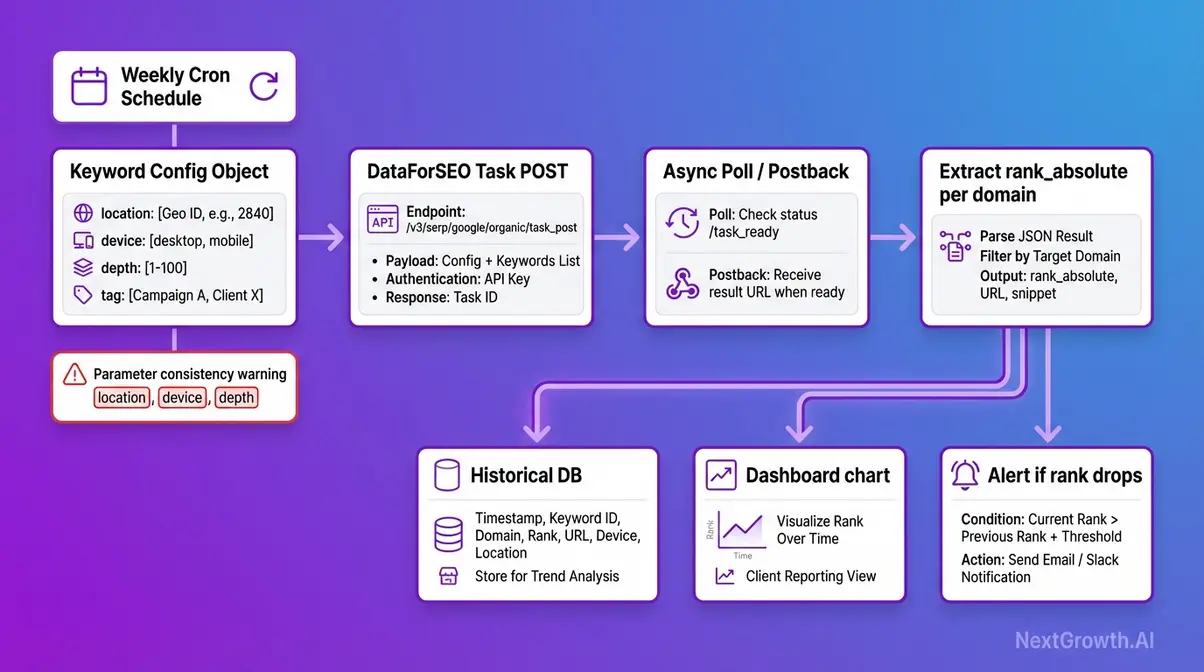
The DataForSEO SERP Checker API, DataForSEO’s rank tracking capability within the SERP API, is purpose-built for systematic, repeatable keyword position monitoring. The technical underpinning is identical to everything covered above. What changes is how you structure your requests to produce data that is comparable week over week, month over month.
For accurate rank tracking, every DataForSEO SERP request in the same tracking series must use identical location, device, language, and depth parameters, any parameter drift produces incomparable historical data.
This sounds obvious. It fails in practice when engineers update a script to fix a bug, change a default parameter, or switch from location_name to location_code mid-series without realizing the two resolve differently.
Structuring Consistent Requests
Building a serp rank checker api integration requires enforcing three rules across every request in your tracking series.
Rule 1, Parameter consistency: Every request must use identical location_name, device, language_name, and depth values. Create a config object at the top of your script, a single source of truth, and reference it for every task submission. Never hardcode parameters inline where they might drift between runs.
# Rank tracking config, define once, reference everywhere

TRACKING_CONFIG = {
    "location_name": "Chicago,Illinois,United States",
    "language_name": "English",
    "device": "mobile",
    "depth": 10,
    "tag": "client_acme_weekly_google_mobile"
}Rule 2, Use the tag parameter. Label tasks by client name or project ID. This makes it trivial to filter results in your database by client or campaign without decoding task IDs. A tag like “client_acme_weekly_google_desktop” makes your data queryable without a lookup table.
Rule 3, Schedule at the same time each run. SERP rankings fluctuate intraday; comparing Monday 8am data to Thursday 3pm data introduces noise that looks like ranking volatility but is actually measurement variance. Use a cron job or n8n scheduled trigger at a fixed weekly cadence, same day, same hour.
Beyond rank tracking, the same structured request approach applies to academic citation monitoring (track specific query rankings for research papers over time), trend monitoring (detect SERP layout changes like new AI Overview insertions week-to-week), and competitive intelligence pipelines.
To compare the best SERP checker APIs for rank tracking across providers, see our dedicated comparison.
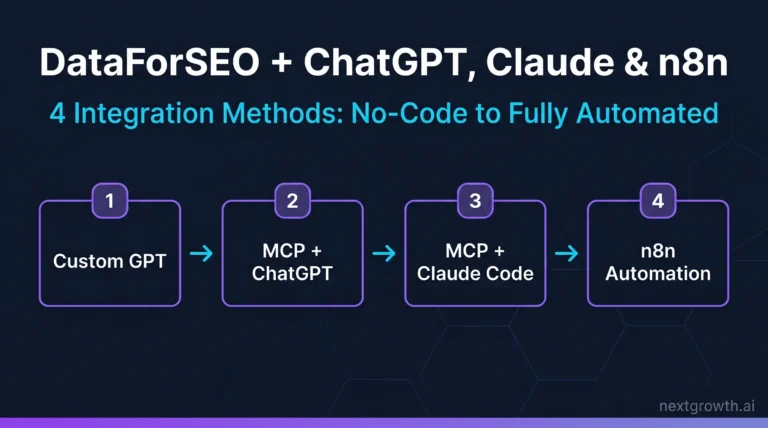
For teams who want the rank tracking functionality without writing Python, DataForSEO integrates with no-code platforms via its official n8n workflow templates and MCP Server.
n8n and MCP Server Integration
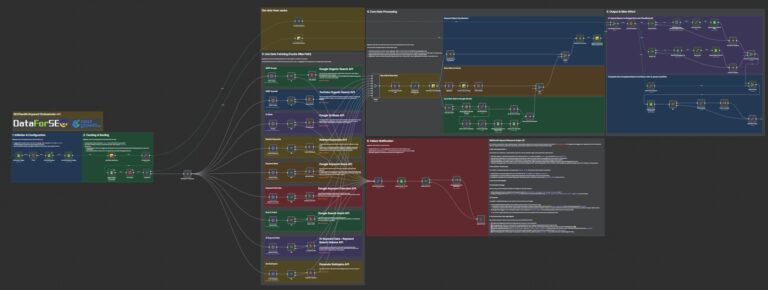
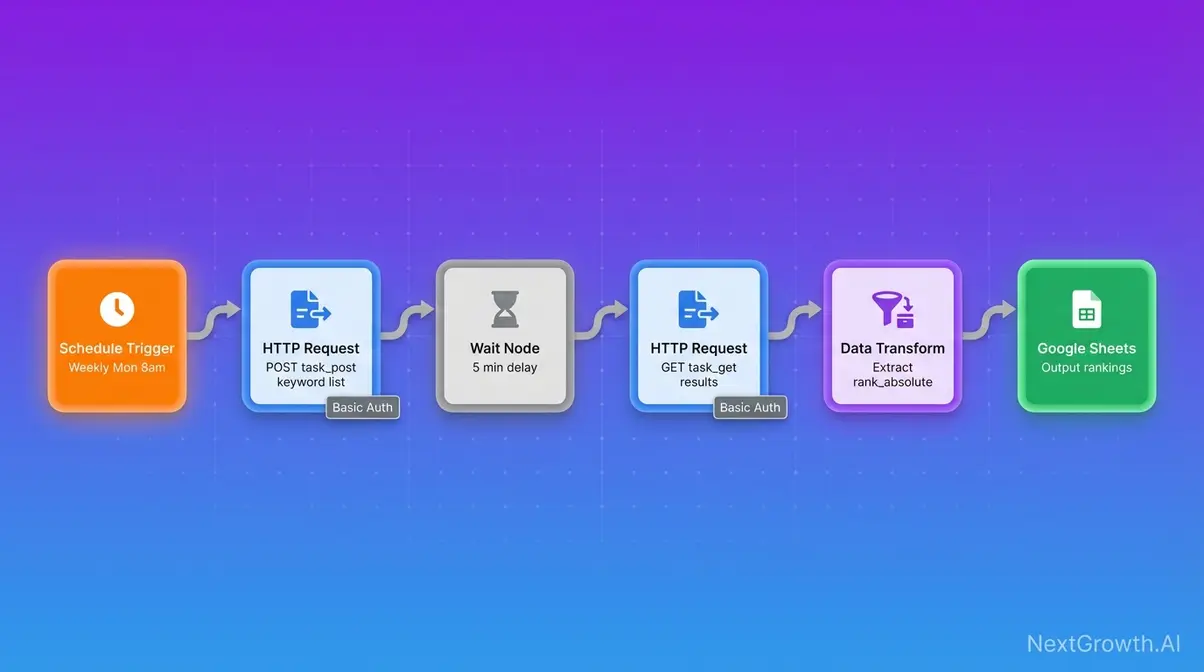
A no-code serp api integration via n8n removes the Python requirement entirely. DataForSEO authentication works through n8n’s HTTP Request node, authenticate once using your Login and API Password via Basic Auth credentials, then trigger SERP lookups on a schedule without writing a line of code.
- n8n workflow pattern:
- Schedule trigger (cron: weekly, Monday 8am)
- HTTP Request node → POST to DataForSEO task_post endpoint with your keyword list
- Wait node (5-minute delay) or webhook trigger for postback
- HTTP Request node → GET from task_get endpoint
- Data transformation node → extract organic rankings
- Output to Google Sheets, Airtable, or your database
The DataForSEO MCP Server is an open-source integration connecting DataForSEO to AI tools including Claude and Cursor, relevant for teams building LLM-powered SEO workflows where SERP data feeds a language model context window. For a step-by-step tutorial for integrating open-source MCP tools, see our dedicated guide.
For postback-based no-code automation: DataForSEO’s postback_url can point to a Zapier webhook, enabling no-code result processing without server infrastructure, as covered in the Polling vs Postback section above.
What Are the Limitations and Alternatives?
Competitor documentation and vendor guides skip this section. They shouldn’t, the fastest path to a reliable integration is knowing exactly where it breaks before you hit production.
Common Integration Pitfalls
Pitfall 1: Using Live endpoints for batch jobs. The scenario: a developer copies a Live endpoint example from the official docs for a bulk rank tracking script, /serp/google/organic/live/regular instead of /task_post. Cost is 3× Standard, unnecessarily, for every request. The fix: audit your endpoint URLs. If the path contains /live/, switch to /task_post for batch workloads. Apply The Queue Cost Equation before writing any new integration.
Pitfall 2: Not storing task_ids immediately. The scenario: your task POST succeeds, but the result is never fetched because the task_id was only held in memory and the script crashed before polling began. The result is unrecoverable, DataForSEO has no “re-fetch all tasks” endpoint. The fix: write task_id values to a database or JSON file immediately after the POST response, before any polling logic runs.
Pitfall 3: Using outdated v2 endpoint patterns. The scenario: code copied from an older tutorial uses /v2/ paths that no longer function correctly. All active endpoints are under /v3/. The fix: always reference the official v3 documentation directly and grep your codebase for any /v2/ references before deploying.
Pitfall 4: Ignoring the September 2025 depth billing change for existing integrations. The scenario: an integration built pre-September 2025 using depth=100 (formerly the standard default) now incurs depth surcharges on every request. The fix: audit your depth parameter across all task POST bodies. If your use case only needs top-10 results (true for most rank tracking workflows), set depth=10 and reduce cost immediately.
Open-Source Alternatives
DataForSEO is a commercial service. Three scenarios exist where it’s genuinely not the right tool.
Scenario 1, You need free SERP data with no volume ceiling. DataForSEO offers no free tier beyond the Sandbox (which doesn’t return real data). The alternative is open-source SearXNG metasearch engine, a self-hosted aggregator that combines results from multiple engines without tracking users (GitHub, 2026). Trade-offs: requires server infrastructure to run, has no SLA, and returns aggregated results rather than raw Google SERPs with full structure. For personal research projects where budget is the constraint, SearXNG is a legitimate option. For a broader perspective on what SEO tasks can realistically be automated, see can SEO be automated.
Scenario 2, Your volume is under 200 requests/month. At this scale, DataForSEO’s $50 minimum deposit and the setup overhead may not be justified. SerpApi’s free tier (100 searches/month) or Google’s Custom Search JSON API (100 queries/day free, $5/1k after) are worth evaluating for proof-of-concept projects before committing to a paid SERP API.
Scenario 3, Your primary use case is Google Shopping or merchant data. Evaluate whether DataForSEO’s Merchant API, same credentials, same REST architecture, fits your requirements, or whether a dedicated shopping intelligence API is more cost-effective for your specific data structure needs. For the broader DataForSEO ecosystem beyond SERP, explore the broader ecosystem including merchant APIs.
What Else Does the DataForSEO API Ecosystem Offer?
The DataForSEO API ecosystem operates through a unified credential system, meaning your existing Login and API Password work instantly across every product line. Developers who integrate the SERP API gain immediate access to a suite of advanced SEO data tools using the same fundamental architecture.
Backlinks API performs comprehensive domain link analysis, tracking competitor backlink profiles and anchor text distributions across billions of indexed pages. Merchant API tracks Google Shopping product data, allowing e-commerce teams to monitor competitor pricing and product visibility changes in real time. Content Analysis API identifies content gaps and calculates topical coverage scores to inform editorial strategy. On-Page API executes technical SEO audits, delivering page-level speed metrics and critical crawl error data directly into your dashboard. Teams pairing SERP data with traffic analysis may also benefit from the best website analytics tools for a complete data pipeline.
These APIs share the exact v3 REST architecture you just implemented for SERP tracking. Same Basic Authentication pattern. Same JSON response structures. Same Task-Based async loops. You simply change the endpoint prefix, submit a task, poll or use postback, and fetch the results. DataForSEO’s unified API ecosystem reduces integration overhead by up to 40%, so teams can deploy new data pipelines without learning multiple authentication protocols. For a complete breakdown of every DataForSEO API product and use case, see our comprehensive DataForSEO API overview and documentation.
Frequently Asked Questions
What is DataForSEO SERP API?
The DataForSEO SERP API is a REST-based service that retrieves structured search engine results, in JSON or raw HTML, from Google, Bing, Yahoo, Baidu, Yandex, and additional engines. It completely eliminates the need for manual proxy management or CAPTCHA handling on the client side. The platform is designed explicitly for SEO tools, rank tracking systems, and market research pipelines requiring high-volume throughput. Plans start at approximately $0.60 per 1,000 Standard queue requests, giving developers an affordable entry point for batch tasks. The Live endpoints remain available for real-time applications at a higher cost tier.
How much does the API cost?
DataForSEO SERP API utilizes transparent pay-as-you-go pricing across three distinct tiers without any monthly subscription lock-in. The Standard queue processes batch requests at approximately $0.60 per 1,000 SERPs with a roughly five-minute turnaround. For time-sensitive tasks, the High Priority queue delivers faster results at $1.20 per 1,000 requests. The Live endpoint delivers real-time results at approximately $2.00 per 1,000 SERPs. Keep in mind that following the September 2025 depth-based billing change, requests exceeding 10 results per task incur additional per-page charges.
What engines are supported?
DataForSEO SERP API supports eight major search engine contexts, including Google, Bing, Yahoo, Baidu, and Yandex. Each engine utilizes dedicated v3 endpoints that return structured results filterable by specific location, language, and device parameters. Developers can request data in Regular, Advanced, HTML, and Screenshot formats depending on their downstream parsing needs. The Advanced format captures critical rich SERP features like featured snippets, local packs, and knowledge panels. Note that while Google Organic offers complete feature coverage, regional engines like Baidu support a more limited subset.
Prices, rate limits, and endpoint specifications verified as of recently against the official DataForSEO documentation and pricing pages.
Start Building with the DataForSEO SERP API
For developers building scalable SEO tools, the DataForSEO SERP API eliminates the proxy infrastructure problem and delivers structured search results from 8+ engines at $0.60, $2.00 per 1,000 requests depending on tier. The Queue Cost Equation, mapping your use case’s latency tolerance to the correct endpoint tier, is the single most important decision in any DataForSEO integration. At 200k monthly requests, choosing Live over Standard for a batch workload costs $3,360 more per year. The framework prevents that.
The async Task-Based architecture, submit → poll or postback → fetch, is the foundation of every Standard and High Priority integration. Combined with the September 2025 depth-based billing model, cost is now a function of tier × volume × depth multiplier. The five Python snippets in this guide give you a production-ready starting point for authentication, the full polling loop, error handling, and high-throughput async batching.
Start with the free DataForSEO Sandbox to verify authentication and run your first async loop without consuming credits. When you’re ready to evaluate the full DataForSEO platform, including the Backlinks and Merchant APIs, see our comprehensive DataForSEO API overview and documentation. For a hands-on integration with n8n and Claude, follow the DataForSEO MCP Server setup guide.
Related guides: DataForSEO Bing API · DataForSEO YouTube API · DataForSEO Labs API · DataForSEO vs SerpApi