DataForSEO Bing API: Bing SERP and Keyword Data in Python
Disclosure: This post contains affiliate links. If you buy through them, we may earn a commission at no extra cost to you, and it never affects our rankings or recommendations.
- DataForSEO Bing API covers three groups: SERP API (rank tracking), Keywords Data API (volume from Bing Ads), and Labs Bing API (competitive intelligence)
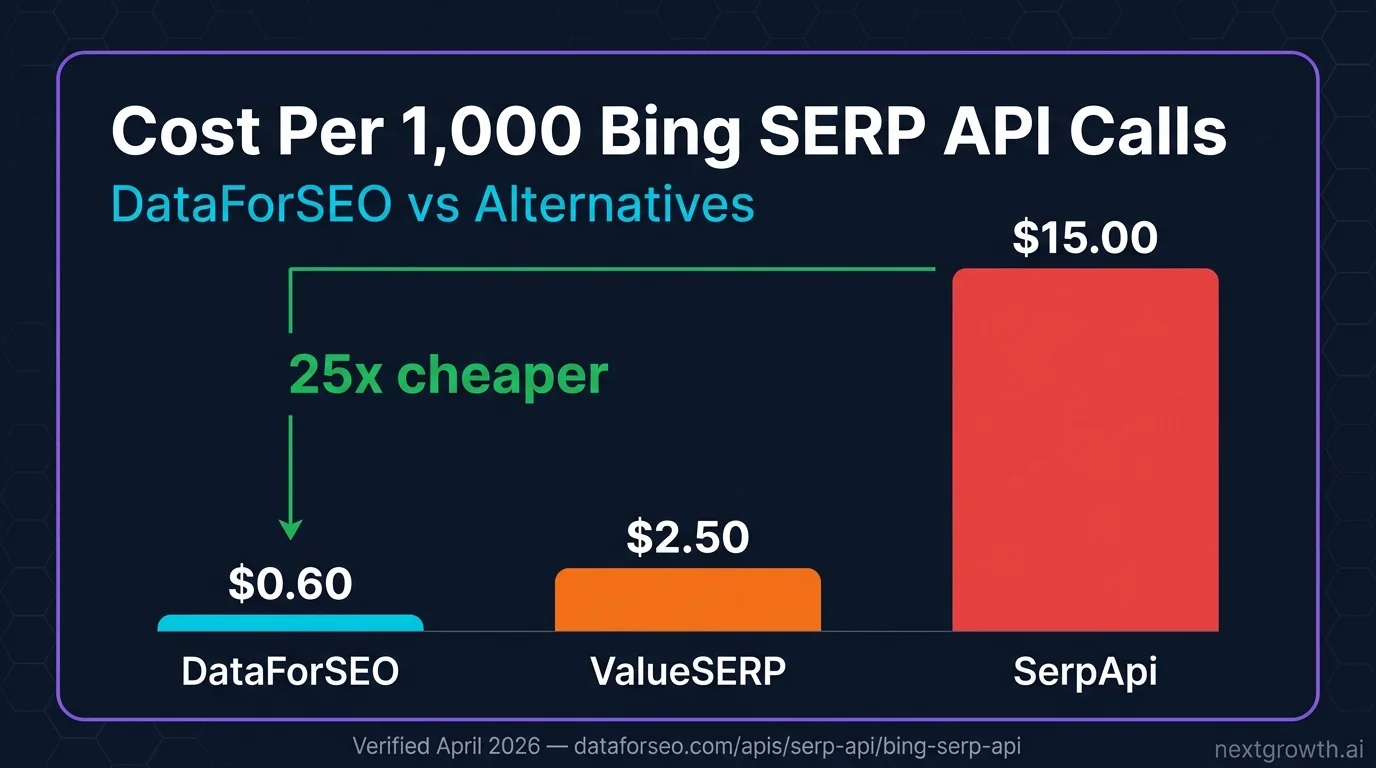
- SERP API costs $0.60 per 1,000 calls (Standard queue), 25x cheaper than SerpApi ($15/1K)
- Bing reaches 17% of US desktop users and powers both Yahoo Search and DuckDuckGo’s primary link results
- The Advanced endpoint returns Bing Copilot AI Overview data including cited sources and AI-generated text. This is a feature no other Bing API tutorial covers
- Named framework: The Bing Intelligence Stack: SERP rankings + keyword volume + competitive Labs data, all in one Python client
Bing holds 17% of US desktop search traffic and powers Yahoo Search (100% of results) and DuckDuckGo (primary link source). That makes Bing’s actual ecosystem reach closer to 22% of US desktop users when you factor in those downstream platforms. For B2B companies, it skews higher: 41% of US Bing users earn over $100,000 per year, making it the default search engine for enterprise users on Windows and Microsoft 365.
The DataForSEO Bing API covers all three layers of Bing data through the Bing Intelligence Stack: SERP rankings via the SERP API, search volume and CPC via the Keywords Data API (sourced from Bing Ads), and competitive rank intelligence via the Labs Bing API. This guide covers all three with working Python code.
What Is DataForSEO Bing API And Why Use It?
Bing’s market share numbers understate its actual reach. The 4% global figure is all-device and includes mobile, where Bing has almost no presence. On desktop only, Bing holds 12.2% globally and 17.1% in the US (StatCounter, March 2025). For B2B SaaS companies targeting enterprise users on Windows machines, that number is a floor, not a ceiling.
The Bing ecosystem extends beyond Bing.com itself. Microsoft’s 2009 agreement made Yahoo Search 100% powered by Bing results; Yahoo brings approximately 1.3% of global searches on top of Bing’s share. DuckDuckGo uses Bing as its primary source for traditional link results, adding another 0.9% of global search volume. Combined, ranking on Bing means appearing across the Bing, Yahoo, and DuckDuckGo ecosystems at once.
The user demographic makes Bing data commercially valuable even at smaller volumes. With 41% of US Bing users in the $100K+ income bracket and 18% of enterprise organizations using Bing as the default browser search engine, Bing rankings often deliver higher-value clicks than the equivalent Google position for enterprise software, financial services, and professional services categories.
Bing holds 12.21% global desktop share and 17.07% US desktop share (StatCounter via seoprofy.com, March 2025). 41% of US Bing users earn $100K+ (backlinko.com, 2025).
The DataForSEO APIs Available for Bing
DataForSEO organizes Bing data into three separate API groups, each covering a different data layer.
Bing SERP API returns live and queued Bing search result pages. Theorganic/live/advanced endpoint is the most complete, returning organic results, paid ads, local pack, featured snippets, and Bing Copilot AI Overview data. Standard queue costs $0.60 per 1,000 tasks (up to 45 minutes); Live mode costs $2.00 per 1,000 tasks (seconds). Pages 2+ are 25% cheaper at $0.45 per 1,000.
Bing Keywords Data API returns search volume, CPC, and monthly trends from Bing Ads, the same data source used by Microsoft Advertising. Up to 1,000 keywords per request, at $0.05 per task on Standard queue. This covers search_volume, keywords_for_keywords (keyword suggestions), keywords_for_site (domain-level keywords), and audience_estimation (B2B demographic targeting). For a broader overview of how DataForSEO authentication works across all endpoints, see the DataForSEO API guide.
Labs Bing API provides competitive intelligence derived from DataForSEO’s own Bing SERP crawl database: ranked keywords for any domain, related keywords, SERP competitors, domain intersection, and historical rank overviews. All Labs Bing endpoints are Live mode only, typically returning in under 2 seconds, at $0.01 per task plus $0.0001 per result item.
Setting Up the Bing API Python Client
All three API groups use the same Base64 authentication. The client below handles both synchronous live requests and the async task pattern for queued endpoints.
import requests
import base64
import time
from tenacity import retry, stop_after_attempt, wait_exponential

DFS_LOGIN = "[email protected]"
DFS_PASSWORD = "your_password"
DFS_BASE = "https://api.dataforseo.com/v3"

credentials = base64.b64encode(f"{DFS_LOGIN}:{DFS_PASSWORD}".encode()).decode()
HEADERS = {
"Authorization": f"Basic {credentials}",
"Content-Type": "application/json"
}

@retry(stop=stop_after_attempt(3), wait=wait_exponential(multiplier=1, min=2, max=10))
def dfs_post(endpoint: str, payload: list) -> dict:
try:
r = requests.post(
f"{DFS_BASE}/{endpoint}",
headers=HEADERS,
json=payload,
timeout=30
)
r.raise_for_status()
return r.json()
except requests.exceptions.Timeout:
raise RuntimeError(f"Timeout on {endpoint}")
except requests.exceptions.HTTPError as e:
raise RuntimeError(f"HTTP {e.response.status_code}: {e.response.text[:200]}")


@retry(stop=stop_after_attempt(3), wait=wait_exponential(multiplier=1, min=2, max=10))
def dfs_get(endpoint: str) -> dict:
try:
r = requests.get(
f"{DFS_BASE}/{endpoint}",
headers=HEADERS,
timeout=30
)
r.raise_for_status()
return r.json()
except requests.exceptions.Timeout:
raise RuntimeError(f"Timeout on GET {endpoint}")
except requests.exceptions.HTTPError as e:
raise RuntimeError(f"HTTP {e.response.status_code}: {e.response.text[:200]}")
pip install requests tenacity
Tracking Bing SERP Rankings
The serp/bing/organic/live/advanced endpoint returns the full Bing SERP for a keyword, including organic positions, paid ads, featured snippets, local pack results, and Copilot AI Overview data.
# Requires dfs_post() and dfs_get() from setup above

def get_bing_serp(keyword: str, location_code: int = 2840, depth: int = 10) -> dict:
"""Fetch Bing SERP for a keyword. Live mode.
Cost: $0.60 per 1,000 calls (Standard queue) or $2.00 (Live).
Returns organic results, ads, featured snippets, and Copilot AI data.
"""
payload = [{
"keyword": keyword,
"location_code": location_code,
"language_code": "en",
"depth": depth,
"device": "desktop",
"os": "windows"
}]

try:
response = dfs_post("serp/bing/organic/live/advanced", payload)
task = response["tasks"][0]

if task["status_code"] != 20000:
raise ValueError(f"SERP error: {task['status_message']}")

result = task["result"][0] if task.get("result") else {}
items = result.get("items", [])

# Separate item types
organic = []
copilot = None
featured = None
ads = []

for item in items:
item_type = item.get("type", "")
if item_type == "organic":
organic.append({
"rank": item.get("rank_absolute"),
"title": item.get("title"),
"url": item.get("url"),
"description": item.get("description"),
"domain": item.get("domain"),
"is_featured_snippet": item.get("is_featured_snippet", False)
})
elif item_type == "ai_overview":
copilot = {
"text": item.get("text"),
"references": [
{
"source": ref.get("source_name"),
"url": ref.get("url"),
"snippet": ref.get("snippet")
}
for ref in item.get("references", [])
]
}
elif item_type == "featured_snippet":
featured = {
"title": item.get("title"),
"url": item.get("url"),
"description": item.get("description")
}
elif item_type in ("paid", "google_ads"):
ads.append(item.get("domain"))

return {
"keyword": keyword,
"organic": organic,
"copilot_ai": copilot,
"featured_snippet": featured,
"ads": ads,
"total_count": result.get("se_results_count")
}

except (KeyError, IndexError) as e:
raise RuntimeError(f"SERP parse error: {e}")


# Usage: track rank positions for target keywords
keywords = [
"best seo software",
"rank tracker tool",
"keyword research tool free",
"dataforseo api"
]

for kw in keywords:
result = get_bing_serp(kw)
print(f"\n[{kw}] - {result['total_count']:,} results")
for item in result["organic"][:5]:
feat = " [Featured]" if item["is_featured_snippet"] else ""
print(f"  #{item['rank']:>2} {item['domain']}{feat}")
if result["copilot_ai"]:
sources = [r["source"] for r in result["copilot_ai"]["references"][:3]]
print(f"  Copilot AI: cited {sources}")
The ai_overview item type was added to the Advanced endpoint in April 2025. When Bing Copilot generates an answer box for a keyword, the response includes the AI-generated text and all cited sources as structured JSON. This data is not available through any other Bing SERP API on the market.
Getting Bing Keyword Search Volume
The Bing Keywords Data API returns search volume from Microsoft Bing Ads data, the same source used by Microsoft Advertising’s Keyword Planner. Volume figures represent actual Bing (plus Yahoo and DuckDuckGo) search activity, not modeled estimates.
# Requires dfs_post() from setup above

def get_bing_keyword_volume(keywords: list[str], location_code: int = 2840) -> list:
"""Get Bing search volume, CPC, and monthly trends for up to 1,000 keywords.
Cost: $0.05 per task (Standard queue). Live: $0.075 per task.
Source: Microsoft Bing Ads data (includes Yahoo + DuckDuckGo volume).
"""
if len(keywords) > 1000:
raise ValueError("Maximum 1,000 keywords per request")

payload = [{
"keywords": keywords,
"location_code": location_code,
"language_code": "en"
}]

try:
response = dfs_post("keywords_data/bing/search_volume/live", payload)
task = response["tasks"][0]

if task["status_code"] != 20000:
raise ValueError(f"bing_volume error: {task['status_message']}")

items = task.get("result") or []
return [
{
"keyword": item.get("keyword"),
"volume": item.get("search_volume"),
"cpc": item.get("cpc"),
"competition": item.get("competition"),
"competition_level": item.get("competition_level"),
"monthly_searches": item.get("monthly_searches", [])
}
for item in items
]

except (KeyError, IndexError) as e:
raise RuntimeError(f"bing_volume parse error: {e}")


# Usage: compare Google vs Bing volume for same keywords
bing_keywords = [
"dataforseo api",
"seo rank tracker",
"keyword research tool",
"bing seo",
"microsoft advertising api"
]

volumes = get_bing_keyword_volume(bing_keywords)
print(f"{'Keyword':<35} {'Volume':>8} {'CPC':>6} {'Competition'}")
print("-" * 65)
for v in sorted(volumes, key=lambda x: x["volume"] or 0, reverse=True):
print(f"{v['keyword']:<35} {v['volume'] or 0:>8,} ${v['cpc'] or 0:>5.2f} {v['competition_level'] or 'N/A'}")
Bing volume figures are lower than Google for most keywords, but the CPC data reflects actual Bing Ads bidding prices, useful for PPC cost estimation independently of Google Ads data.
Extracting Bing Copilot AI Overview Data
Bing Copilot AI Overviews appear for informational and navigational queries where Microsoft’s AI generates an answer with cited sources. Extracting this data helps identify which domains Bing’s AI cites and whether your content is being referenced.
# Requires dfs_post() from setup above

def get_bing_copilot_citations(keywords: list[str], location_code: int = 2840) -> list:
"""Extract Bing Copilot AI Overview citations for a list of keywords.
Only returns results for keywords where Copilot AI generates an answer.
Cost: $0.60 per 1,000 calls. Data available via Advanced endpoint only.
"""
copilot_results = []

for keyword in keywords:
try:
payload = [{
"keyword": keyword,
"location_code": location_code,
"language_code": "en",
"depth": 10,
"device": "desktop",
"os": "windows"
}]
response = dfs_post("serp/bing/organic/live/advanced", payload)
task = response["tasks"][0]

if task["status_code"] != 20000:
continue

items = task["result"][0].get("items", [])
for item in items:
if item.get("type") == "ai_overview":
copilot_results.append({
"keyword": keyword,
"has_copilot": True,
"ai_text_preview": (item.get("text") or "")[:200],
"cited_domains": [
ref.get("url", "").split("/")[2]
for ref in item.get("references", [])
if ref.get("url")
],
"citation_count": len(item.get("references", []))
})
break
else:
copilot_results.append({"keyword": keyword, "has_copilot": False})

except Exception as e:
copilot_results.append({"keyword": keyword, "has_copilot": False, "error": str(e)})

return copilot_results


# Usage: check which keywords trigger Bing Copilot and who gets cited
keywords = [
"what is keyword research",
"how to check bing ranking",
"best seo tools for agencies",
"bing vs google seo differences"
]

citations = get_bing_copilot_citations(keywords)
for c in citations:
if c.get("has_copilot"):
print(f"[Copilot] {c['keyword']}")
print(f"  Cited domains ({c['citation_count']}): {', '.join(c['cited_domains'][:5])}")
else:
print(f"[No AI]   {c['keyword']}")
Monitoring Copilot citations weekly for 50 target keywords costs $0.03 per run ($0.60 per 1K tasks). If your domain starts appearing in Bing’s AI answers, it signals growing entity recognition in Microsoft’s knowledge graph.
How Do You Build a Bing Rank Tracker?
Combining SERP positions, keyword volume, and Labs competitive data creates a complete Bing rank monitoring pipeline.
# Requires all functions above
import time
from datetime import date

def bing_rank_tracker(domain: str, keywords: list[str], location_code: int = 2840) -> list:
"""Track domain positions across Bing for a list of keywords.
Returns rank, title, URL, and keyword volume for each keyword.
Cost: ~$0.0006 per keyword for SERP + $0.00005 per keyword for volume.
"""
print(f"Tracking {len(keywords)} keywords for {domain} on Bing...")

# Step 1: Get Bing SERP positions
rank_data = {}
for kw in keywords:
try:
result = get_bing_serp(kw, location_code)
domain_rank = next(
(item for item in result["organic"] if domain in (item.get("domain") or "")),
None
)
rank_data[kw] = {
"rank": domain_rank["rank"] if domain_rank else None,
"url": domain_rank["url"] if domain_rank else None,
"has_copilot": result["copilot_ai"] is not None
}
time.sleep(0.2)
except Exception as e:
rank_data[kw] = {"rank": None, "url": None, "error": str(e)}

# Step 2: Get keyword volumes from Bing Ads
try:
volume_data = get_bing_keyword_volume(keywords, location_code)
volume_map = {item["keyword"]: item["volume"] for item in volume_data}
except Exception:
volume_map = {}

# Step 3: Merge and return
results = []
for kw in keywords:
r = rank_data.get(kw, {})
results.append({
"date": str(date.today()),
"keyword": kw,
"rank": r.get("rank"),
"url": r.get("url"),
"bing_volume": volume_map.get(kw, 0),
"copilot_active": r.get("has_copilot", False)
})

return results


# Usage
tracked_keywords = [
"dataforseo review",
"seo api comparison",
"keyword research api python",
"bing seo tools"
]

rankings = bing_rank_tracker("nextgrowth.ai", tracked_keywords)
print(f"\n{'Keyword':<35} {'Rank':>5} {'Vol':>6} {'Copilot'}")
print("-" * 60)
for r in sorted(rankings, key=lambda x: x["rank"] or 999):
rank_str = str(r["rank"]) if r["rank"] else "N/R"
copilot = "Yes" if r["copilot_active"] else "No"
print(f"{r['keyword']:<35} {rank_str:>5} {r['bing_volume'] or 0:>6,} {copilot}")
Running this tracker on 100 keywords costs approximately $0.066 per run (SERP + volume). Daily tracking for 100 keywords costs $2/month, compared to $450+/month on SerpApi.
How Does DataForSEO Bing API Compare To Alternatives?
| Feature | DataForSEO | ScrapingBee | ValueSERP | SerpApi |
|---|---|---|---|---|
| Bing SERP Standard | $0.60/1K | $0.20-0.24/1K* | N/A | N/A |
| Bing SERP Live | $2.00/1K | $49/month floor | $2.50/1K PAYG | $15.00/1K |
| Bing Keywords Data | $0.05/task | No | No | No |
| Labs Bing API | Yes ($0.01/task) | No | No | No |
| Copilot AI Overview | Yes (Advanced) | Partial | No | No |
| Yahoo + DuckDuckGo | Via Bing results | Via scraping | No | No |
| Billing model | Pay-as-you-go | $49/month min | Pay-as-you-go | Monthly subscription |
*ScrapingBee standard queue at $49/month. For under 81,000 calls/month, ScrapingBee is cheaper per call than DataForSEO Standard queue. Above 81,000 calls/month, DataForSEO becomes cheaper.
DataForSEO Bing SERP API: $0.60/1K Standard, $2.00/1K Live (dataforseo.com/apis/serp-api). SerpApi Bing: $15.00/1K (serpapi.com/pricing). Pricing verified April 2026.
FAQ
Is the DataForSEO Bing API the same as the Bing Search API from Microsoft?
No. Microsoft retired the Bing Web Search API (Azure Cognitive Services) on August 11, 2025. The DataForSEO Bing API is an independent alternative that scrapes Bing results at the infrastructure level and returns structured JSON. It was not affected by Microsoft’s retirement and continues operating. For keyword volume data, DataForSEO’s Bing Keywords Data API uses the Bing Ads platform (Microsoft Advertising API), which remains active.
Does the DataForSEO Bing API return Bing Copilot AI Overview data?
Yes. The serp/bing/organic/live/advanced endpoint returns ai_overview items when Bing Copilot generates an answer for a keyword. Each AI overview item includes the AI-generated text and a references array with source URLs, domain names, and snippets. This is the only commercially available API that returns Bing Copilot AI Overview citations as structured data.
How accurate is Bing keyword search volume from DataForSEO?
The Bing Keywords Data API sources volume figures directly from Microsoft Advertising (Bing Ads), the same data source used by Microsoft’s own Keyword Planner tool for advertisers. The volume numbers represent actual Bing search activity, including searches that flow through Yahoo Search and DuckDuckGo (both powered by Bing’s index). This makes the figures more accurate than modeled estimates.
What is the cheapest way to track Bing SERP rankings via API?
At low volumes (under 81,000 calls/month), ScrapingBee’s $49/month plan offers a lower per-call cost than DataForSEO’s Standard queue ($0.60/1K). Above 81,000 calls/month, DataForSEO becomes more cost-effective since ScrapingBee’s pricing scales with additional credit packs. For any organization needing Bing Keywords Data or Labs Bing competitive analysis alongside SERP tracking, DataForSEO is the only single-vendor option.
Does tracking Bing rankings also cover Yahoo and DuckDuckGo?
Partially. Since Yahoo uses Bing’s organic results 100% and DuckDuckGo sources primary link results from Bing, a domain that ranks in Bing’s top 10 for a keyword will typically appear in the same position on Yahoo. DuckDuckGo’s display format differs and it adds its own features, but the underlying link results for most queries reflect Bing’s index. Tracking Bing through DataForSEO effectively monitors your footprint across the full Bing ecosystem.
What Are the Next Steps for Bing SEO Intelligence?
The Bing Intelligence Stack built in this guide tracks SERP positions, keyword volume, and Copilot AI citations across the full Bing ecosystem. For the keyword research layer on Google to complement Bing data, see the DataForSEO Keyword Research API guide. For domain-level traffic and authority analysis using the Labs API, see the DataForSEO Domain Overview API guide. For the full DataForSEO endpoint reference including authentication setup, see the DataForSEO API guide.