DataForSEO Keyword Research API: Python Keyword Data Guide
Disclosure: This post contains affiliate links. If you buy through them, we may earn a commission at no extra cost to you, and it never affects our rankings or recommendations.
- DataForSEO keyword research spans two APIs: the Keywords Data API (Google Ads data) and the Labs API (SERP-based intelligence)
- Search volume costs $0.075 per 1,000 keywords via Keywords Data API, 10x cheaper than most alternatives
- Labs API adds keyword difficulty, search intent, and related keywords starting at $0.025 per 1,000 calls
- Bulk lookup: up to 1,000 keywords per request; no monthly subscription required
- The same Base64 auth covers both APIs; one Python client handles all keyword research endpoints
The DataForSEO keyword research API gives you search volume, keyword difficulty, CPC, and search intent data for any keyword or list of keywords. Two APIs handle different layers of this data: the Keywords Data API pulls raw Google Ads metrics, and the Labs API adds SEO-specific intelligence like keyword difficulty, related keywords, and competitive SERP data.
This guide covers both APIs with working Python code, explains when to use each, and shows how to build a keyword research pipeline that costs $0.075 per 1,000 keywords.
Which DataForSEO APIs Handle Keyword Research?
DataForSEO keyword research data comes from two different APIs, each covering a different data source.
Keywords Data API pulls directly from Google Ads and Google Search Console data. It returns search volume (monthly, 12-month average), CPC, competition level, and seasonality trends. This is the same data source Ahrefs and Semrush use for their volume estimates. Key endpoints:– keywords_data/google_ads/search_volume/live: bulk volume + CPC for up to 1,000 keywords
– keywords_data/google_ads/keywords_for_keywords/live: keyword suggestions from Google Ads
– keywords_data/google_ads/keywords_for_site/live: keywords associated with a domain
– dataforseo_labs/google/bulk_keyword_difficulty/live: keyword difficulty for up to 1,000 keywords
– dataforseo_labs/google/related_keywords/live: semantically related keywords
– dataforseo_labs/google/keyword_suggestions/live: keyword expansion with difficulty + volume
– dataforseo_labs/google/search_intent/live: I/C/T/N intent classification
For a complete keyword research workflow, combine both: Keywords Data for volume and CPC, Labs for difficulty and intent. For a broader look at all Labs endpoints including ranked keywords and competitor data, see the DataForSEO Labs API guide.
Setting Up the Keyword Research Python Client
import requests
import base64
from tenacity import retry, stop_after_attempt, wait_exponential

DFS_LOGIN = "[email protected]"
DFS_PASSWORD = "your_password"
DFS_BASE = "https://api.dataforseo.com/v3"

credentials = base64.b64encode(f"{DFS_LOGIN}:{DFS_PASSWORD}".encode()).decode()
HEADERS = {
"Authorization": f"Basic {credentials}",
"Content-Type": "application/json"
}

@retry(stop=stop_after_attempt(3), wait=wait_exponential(multiplier=1, min=2, max=10))
def dfs_post(endpoint: str, payload: list) -> dict:
try:
r = requests.post(
f"{DFS_BASE}/{endpoint}",
headers=HEADERS,
json=payload,
timeout=30
)
r.raise_for_status()
return r.json()
except requests.exceptions.Timeout:
raise RuntimeError(f"Timeout on {endpoint}")
except requests.exceptions.HTTPError as e:
raise RuntimeError(f"HTTP {e.response.status_code}: {e.response.text[:200]}")
pip install requests tenacity
Getting Search Volume for a List of Keywords
The search_volume/live endpoint returns monthly search volume, CPC, and competition score for up to 1,000 keywords per request. Authentication setup is covered in the DataForSEO API guide; the same credentials work across all keyword research endpoints.
# Requires dfs_post() from the setup section above

def get_search_volume(keywords: list[str], location_code: int = 2840) -> list:
"""Get search volume and CPC for up to 1,000 keywords.
Cost: $0.075 per 1,000 keywords. Live mode.
"""
if len(keywords) > 1000:
raise ValueError("Maximum 1,000 keywords per request")

payload = [{
"keywords": keywords,
"location_code": location_code,
"language_code": "en",
"date_from": None,   # use most recent data
"date_to": None
}]

try:
response = dfs_post("keywords_data/google_ads/search_volume/live", payload)
task = response["tasks"][0]

if task["status_code"] != 20000:
raise ValueError(f"search_volume error: {task['status_message']}")

items = task["result"]
return [
{
"keyword": item.get("keyword"),
"volume": item.get("search_volume"),
"cpc": item.get("cpc"),
"competition": item.get("competition"),
"competition_level": item.get("competition_level"),
"categories": item.get("categories", [])
}
for item in (items or [])
]

except (KeyError, IndexError) as e:
raise RuntimeError(f"search_volume parse error: {e}")


# Usage
keywords = [
"dataforseo api",
"seo rank tracker",
"keyword research tool",
"backlink checker",
"site audit tool"
]
volumes = get_search_volume(keywords)
for v in sorted(volumes, key=lambda x: x["volume"] or 0, reverse=True):
print(f"{v['keyword']:<30} vol: {v['volume']:>8,}   cpc: ${v['cpc'] or 0:.2f}   competition: {v['competition_level']}")
Looking up 1,000 keywords costs $0.075. Looking up 100 keywords costs $0.0075. For a typical keyword research session covering 5,000 seed keywords, the API cost is $0.375.
The competition field (0-1 scale) and competition_level (LOW/MEDIUM/HIGH) reflect Google Ads advertiser competition, not SEO difficulty. Use the Labs API for SEO-specific keyword difficulty.
Getting Keyword Difficulty via the Labs API
The bulk_keyword_difficulty endpoint returns DataForSEO’s SEO difficulty score (0-100) for up to 1,000 keywords per call.
# Requires dfs_post() from the setup section above

def get_keyword_difficulty(keywords: list[str], location_code: int = 2840) -> list:
"""Get SEO keyword difficulty for up to 1,000 keywords.
Cost: $0.025 per 1,000 keywords. Live mode.
"""
if len(keywords) > 1000:
raise ValueError("Maximum 1,000 keywords per request")

payload = [{
"keywords": keywords,
"location_code": location_code,
"language_code": "en"
}]

try:
response = dfs_post("dataforseo_labs/google/bulk_keyword_difficulty/live", payload)
task = response["tasks"][0]

if task["status_code"] != 20000:
raise ValueError(f"bulk_keyword_difficulty error: {task['status_message']}")

items = task["result"][0].get("items", [])
return [
{
"keyword": item.get("keyword"),
"difficulty": item.get("keyword_difficulty")
}
for item in items
]

except (KeyError, IndexError) as e:
raise RuntimeError(f"keyword_difficulty parse error: {e}")


# Usage
keywords = ["dataforseo api", "seo rank tracker", "keyword research tool"]
difficulties = get_keyword_difficulty(keywords)
for d in difficulties:
label = "Easy" if d["difficulty"] < 30 else "Medium" if d["difficulty"] < 60 else "Hard"
print(f"{d['keyword']:<30} KD: {d['difficulty']:>3}  [{label}]")
DataForSEO keyword difficulty is calculated from the top-10 SERP results for each keyword: it considers the domain rank, backlink count, and content quality of ranking pages. A score below 20 generally means low competition. Above 60 typically requires significant domain authority to compete.
How Do You Get Search Intent Classification?
The search_intent endpoint classifies keywords as Informational, Commercial, Transactional, or Navigational, the same framework most SEO teams use for content planning.
# Requires dfs_post() from the setup section above

def get_search_intent(keywords: list[str], location_code: int = 2840) -> list:
"""Classify keyword search intent: informational, commercial, transactional, navigational.
Cost: $0.025 per 1,000 keywords. Live mode.
"""
payload = [{
"keywords": keywords,
"location_code": location_code,
"language_code": "en"
}]

try:
response = dfs_post("dataforseo_labs/google/search_intent/live", payload)
task = response["tasks"][0]

if task["status_code"] != 20000:
raise ValueError(f"search_intent error: {task['status_message']}")

items = task["result"][0].get("items", [])
return [
{
"keyword": item.get("keyword"),
"intent": item.get("main_intent"),
"secondary_intent": item.get("secondary_intents", []),
"intent_probability": item.get("intent_probability", {})
}
for item in items
]

except (KeyError, IndexError) as e:
raise RuntimeError(f"search_intent parse error: {e}")


# Usage: filter keywords by intent before content planning
keywords = [
"best seo tools",
"how to do keyword research",
"buy seo software",
"ahrefs login",
"seo rank tracker free"
]
intents = get_search_intent(keywords)
for item in intents:
print(f"{item['keyword']:<35} → {item['intent']}")
if item['secondary_intent']:
print(f"  secondary: {', '.join(item['secondary_intent'])}")
Intent classification is particularly useful when scaling content production. Before writing 100 articles from a keyword list, run them through search_intent to separate informational topics (blog posts) from transactional ones (landing pages) automatically.
How Do You Find Related Keywords and Expand a Seed List?
The related_keywords and keyword_suggestions endpoints expand a single seed keyword into a cluster of semantically related terms.
# Requires dfs_post() from the setup section above

def get_related_keywords(seed_keyword: str, limit: int = 50, location_code: int = 2840) -> list:
"""Get semantically related keywords for a seed term.
Returns keywords with volume, difficulty, and relevance score.
Cost: $0.025 per 1,000 calls. Live mode.
"""
payload = [{
"keyword": seed_keyword,
"location_code": location_code,
"language_code": "en",
"limit": limit,
"order_by": [["keyword_data.keyword_info.search_volume", "desc"]]
}]

try:
response = dfs_post("dataforseo_labs/google/related_keywords/live", payload)
task = response["tasks"][0]

if task["status_code"] != 20000:
raise ValueError(f"related_keywords error: {task['status_message']}")

items = task["result"][0].get("items", [])
return [
{
"keyword": item.get("keyword_data", {}).get("keyword"),
"volume": item.get("keyword_data", {}).get("keyword_info", {}).get("search_volume"),
"difficulty": item.get("keyword_data", {}).get("keyword_properties", {}).get("keyword_difficulty"),
"intent": item.get("keyword_data", {}).get("search_intent_info", {}).get("main_intent"),
"relevance": item.get("se_type")
}
for item in items
]

except (KeyError, IndexError) as e:
raise RuntimeError(f"related_keywords parse error: {e}")


# Usage: expand seed keyword into content cluster
related = get_related_keywords("keyword research", limit=30)
print(f"Found {len(related)} related keywords:")
for kw in related[:10]:
print(f"  {kw['keyword']:<40} vol: {kw['volume']:>7,}  KD: {kw['difficulty']:>3}  intent: {kw['intent']}")
Related keywords from DataForSEO are grouped by SERP overlap; keywords that appear in similar search results. This is more reliable than pure semantic similarity for identifying keywords that share ranking potential.
How Do You Build a Full Keyword Research Pipeline?
Combining volume, difficulty, and intent in one pipeline gives you a ready-to-use keyword database for content planning.
# Requires dfs_post() from the setup section above
import time

def full_keyword_research(seed_keywords: list[str], location_code: int = 2840) -> list:
"""Complete keyword research pipeline: volume + difficulty + intent.
Total cost: ~$0.175 per 1,000 keywords (volume + difficulty + intent combined).
"""
# Step 1: Get volume and CPC (Keywords Data API)
volume_data = get_search_volume(seed_keywords, location_code)
volume_map = {item["keyword"]: item for item in volume_data}
time.sleep(0.5)  # brief pause between API families

# Step 2: Get keyword difficulty (Labs API)
difficulty_data = get_keyword_difficulty(seed_keywords, location_code)
difficulty_map = {item["keyword"]: item["difficulty"] for item in difficulty_data}
time.sleep(0.5)

# Step 3: Get search intent (Labs API)
intent_data = get_search_intent(seed_keywords, location_code)
intent_map = {item["keyword"]: item["intent"] for item in intent_data}

# Merge all data
results = []
for kw in seed_keywords:
vol_item = volume_map.get(kw, {})
results.append({
"keyword": kw,
"volume": vol_item.get("volume", 0),
"cpc": vol_item.get("cpc", 0),
"competition": vol_item.get("competition_level", "N/A"),
"difficulty": difficulty_map.get(kw, 0),
"intent": intent_map.get(kw, "unknown")
})

return sorted(results, key=lambda x: x["volume"] or 0, reverse=True)


# Usage
seed_keywords = [
"dataforseo api",
"seo api python",
"keyword research api",
"rank tracker api",
"backlink api"
]
results = full_keyword_research(seed_keywords)
print(f"\n{'Keyword':<35} {'Volume':>8} {'KD':>5} {'CPC':>7} {'Intent':<15} {'Competition'}")
print("-" * 90)
for r in results:
print(f"{r['keyword']:<35} {r['volume']:>8,} {r['difficulty']:>5} ${r['cpc']:>6.2f} {r['intent']:<15} {r['competition']}")
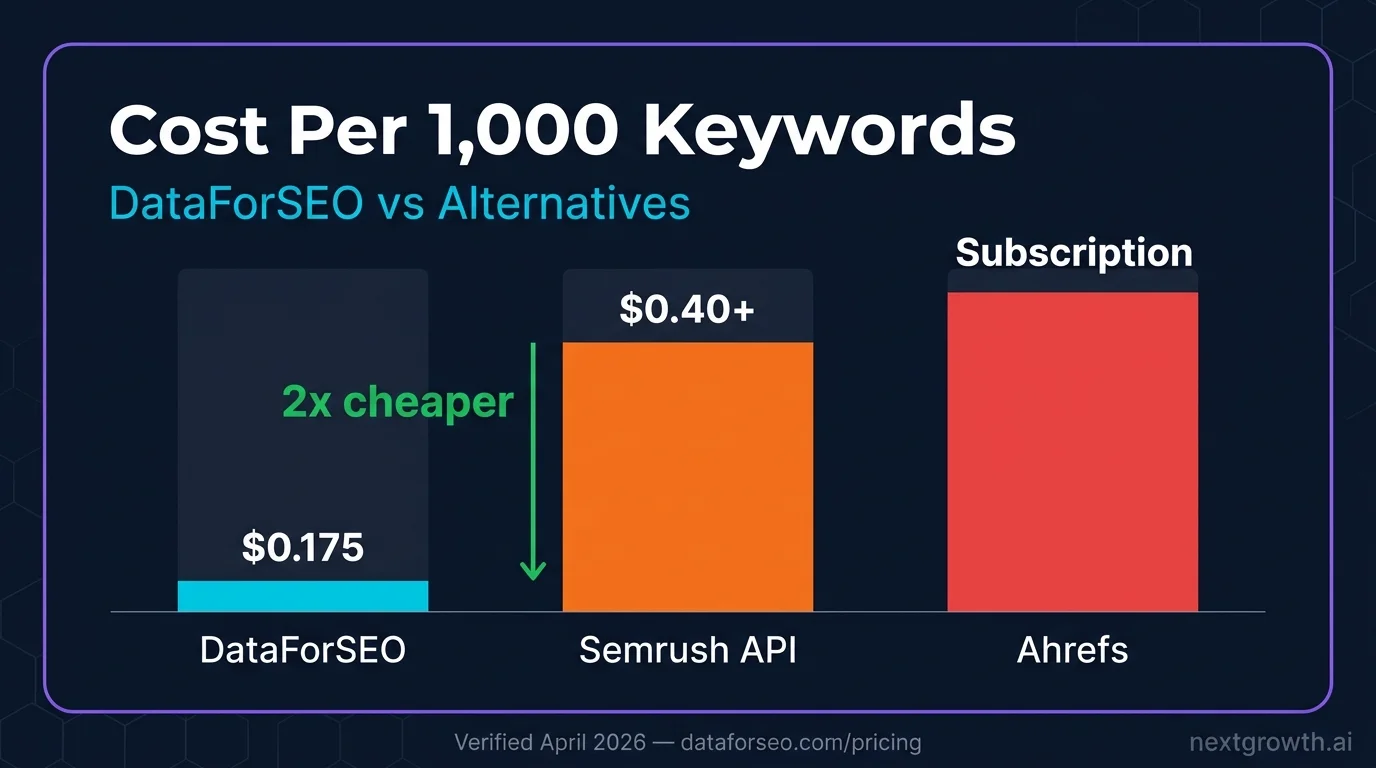
Running a pipeline on 1,000 seed keywords costs approximately $0.175 total: $0.075 for volume (Keywords Data) + $0.025 for difficulty (Labs) + $0.025 for intent (Labs) + $0.025 for related keywords if included.
DataForSEO Keyword Research API vs Alternatives
| Feature | DataForSEO Keywords Data | DataForSEO Labs | Semrush API | Ahrefs API |
|---|---|---|---|---|
| Search volume source | Google Ads | SERP-based | Google Ads + model | Own crawl |
| Keyword difficulty | N/A | Labs KD (0-100) | Semrush KD | Ahrefs KD |
| Search intent | N/A | I/C/T/N | Semrush intent | N/A |
| Cost per 1K | $0.075 | $0.025 | ~$0.40+ | Subscription |
| Bulk limit per request | 1,000 | 1,000 | Unit-based | Unit-based |
| Billing | Pay-as-you-go | Pay-as-you-go | Subscription | Subscription |
For teams running programmatic keyword research at scale, pulling volume and difficulty for tens of thousands of keywords weekly, DataForSEO’s combined cost of $0.10 per 1,000 keywords (volume + difficulty) competes with nothing else at that price point.
DataForSEO Keywords Data API: $0.075/1K (dataforseo.com/apis/keywords-data-api). Labs API: $0.025/1K (dataforseo.com/apis/dataforseo-labs-api). Verified April 2026.
FAQ
What is the cheapest way to get keyword search volume via API?
The DataForSEO Keywords Data API costs $0.075 per 1,000 keywords on a pay-as-you-go basis. This is significantly cheaper than Semrush API ($0.40+ per 1,000 units on subscription plans) or paying for a Semrush seat ($140-500/month) when you only need the volume data. For 10,000 keywords, DataForSEO costs $0.75 versus $4.00+ on Semrush API.
What is the difference between Keywords Data API and Labs API for keyword research?
The Keywords Data API pulls from Google Ads data, the same source as Google Keyword Planner. It returns search volume, CPC, and advertiser competition. The Labs API uses DataForSEO’s SERP crawl data to return SEO-specific metrics: keyword difficulty (0-100), search intent classification, related keywords based on SERP overlap, and ranked keywords for domains. A complete keyword research workflow uses both APIs.
Can I get search intent for keywords via the DataForSEO API?
Yes. The dataforseo_labs/google/search_intent/live endpoint classifies keywords into Informational, Commercial, Transactional, or Navigational intent. It also returns secondary intent where applicable. This runs on the Labs API at $0.025 per 1,000 keywords.
How does DataForSEO keyword difficulty compare to Ahrefs KD?
DataForSEO keyword difficulty is calculated from the strength of the top-10 ranking pages for each keyword, considering domain rank, backlink profile, and content signals. Ahrefs KD similarly analyzes top-10 pages but uses its own domain rating (DR) metric. The two scores often correlate well on high-competition keywords but can differ significantly on long-tail queries where DataForSEO’s more recent crawl data captures SERP shifts faster.
How many keywords can I research per request?
Both the Keywords Data API (search_volume/live) and the Labs API (bulk_keyword_difficulty/live) accept up to 1,000 keywords per request. For larger lists, batch your keywords into groups of 1,000 and add a small sleep (0.1 seconds) between batches to stay under the 2,000 requests per minute rate limit.
Next Steps for Keyword Research Workflows
The DataForSEO keyword research API fits naturally into automated content pipelines. For keyword data combined with SERP rank tracking, see the DataForSEO Labs API guide which covers ranked keywords, competitor domain analysis, and historical SERP data. For a complete overview of all DataForSEO endpoints and authentication, see the DataForSEO API guide. If you need domain-level traffic and authority data to complement your keyword research, see the DataForSEO Domain Overview API guide.