DataForSEO YouTube API: Python Guide for Rank Tracking
Disclosure: This post contains affiliate links. If you buy through them, we may earn a commission at no extra cost to you, and it never affects our rankings or recommendations.
- DataForSEO‘s YouTube API covers 4 endpoints: Organic SERP, Video Info, Subtitles, and Comments
- Standard mode costs $0.03 per 1,000 results, making it 833x cheaper than SerpAPI’s $25 Starter plan
- All 4 endpoints share the same Base64 Basic Auth. One Python client covers everything.
- The Subtitles endpoint returns structured JSON transcripts, useful for LLM and AI pipelines
- Rate limit: 2,000 requests per minute; max 700 results per request
The DataForSEO YouTube API lets you pull YouTube SERP rankings, video metadata, subtitles, and comments through a single authenticated API. At $0.03 per 1,000 results on Standard mode, it is the lowest-cost option available for YouTube data at scale.
This guide covers all 4 endpoints with working Python code, explains when to use Standard versus Live mode, and shows a real cost breakdown against SerpAPI so you can make an informed decision before writing a single line of code.
What Is the YouTube Intelligence Stack?
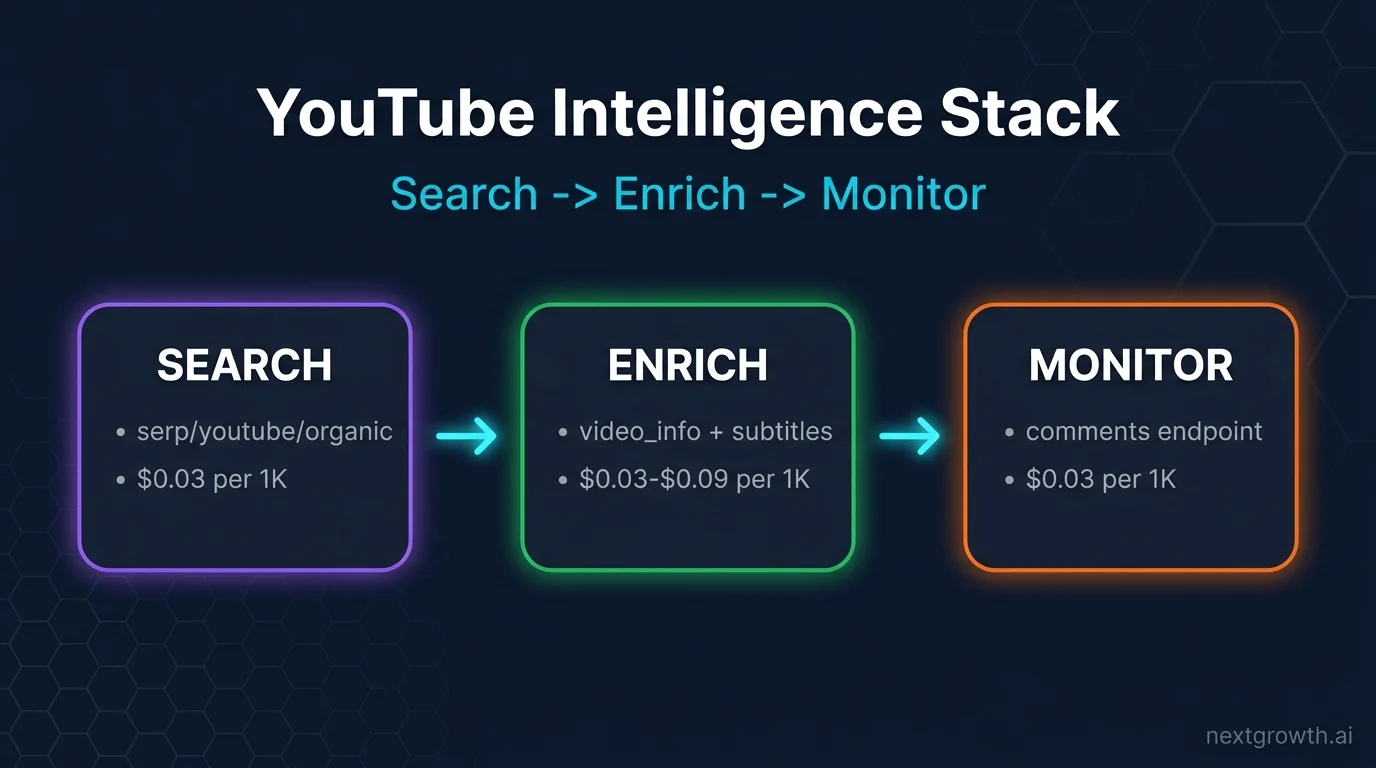
The YouTube Intelligence Stack is a three-layer framework for building data-driven YouTube workflows. Each layer maps directly to a DataForSEO YouTube API endpoint.
Search: The foundation. Use theserp/youtube/organic endpoint to track which videos rank for your target keywords. This is the same data YouTube returns in its search results page, available programmatically with up to 700 results per request.
Enrich: Once you have a list of video IDs, pull deeper metadata with serp/youtube/video_info (view counts, subscriber counts, tags, duration) and serp/youtube/subtitles (full JSON transcript). Enrichment transforms a ranking list into actionable research: you know not just who ranks, but why.
Monitor: Use serp/youtube/comments to track audience sentiment and engagement signals over time. Combined with periodic Organic SERP pulls, comments give you a feedback loop on content performance.
The YouTube Intelligence Stack runs top to bottom: Search identifies targets, Enrich provides context, Monitor tracks outcomes. All three layers run on the same authentication, the same base URL, and the same Python client shown below.
The Endpoints the DataForSEO YouTube API Covers
| Endpoint | Use Case | Mode | Cost per 1K | Max Results |
|---|---|---|---|---|
serp/youtube/organic | Rank tracking, SERP analysis | Standard + Live | $0.03 (Std) / $0.10 (Live) | 700 |
serp/youtube/video_info | Video metadata, tags, view counts | Live only | $0.09 | 700 |
serp/youtube/subtitles | Full transcript, closed captions | Live only | $0.03 | N/A |
serp/youtube/comments | Comment scraping, sentiment | Live only | $0.03 | 700 |
"device": "mobile" in your request body to retrieve mobile-specific SERP rankings.
The DataForSEO Labs API handles keyword suggestions and search volume lookups separately. For keyword discovery workflows, pair the Labs API with the YouTube Organic endpoint: find keyword opportunities via Labs, then track rankings via YouTube organic.
Authenticating and Configuring Your Python Client
DataForSEO uses HTTP Basic Auth with your account email and password, encoded as a Base64 string. One client works for every endpoint.
import requests
import base64
import time
from tenacity import retry, stop_after_attempt, wait_exponential

DFS_LOGIN = "your@email.com"
DFS_PASSWORD = "your_password"
DFS_BASE = "https://api.dataforseo.com/v3"

credentials = base64.b64encode(f"{DFS_LOGIN}:{DFS_PASSWORD}".encode()).decode()
HEADERS = {
"Authorization": f"Basic {credentials}",
"Content-Type": "application/json"
}

@retry(stop=stop_after_attempt(3), wait=wait_exponential(multiplier=1, min=2, max=10))
def dfs_post(endpoint: str, payload: list) -> dict:
try:
r = requests.post(
f"{DFS_BASE}/{endpoint}",
headers=HEADERS,
json=payload,
timeout=30
)
r.raise_for_status()
return r.json()
except requests.exceptions.Timeout:
raise RuntimeError(f"DataForSEO timeout on {endpoint}")
except requests.exceptions.HTTPError as e:
raise RuntimeError(f"DataForSEO HTTP {e.response.status_code}: {e.response.text[:200]}")
The @retry decorator from tenacity handles transient failures with exponential backoff. timeout=30 prevents indefinite hangs. The rate limit is 2,000 requests per minute. For bulk jobs, add a small sleep between batches to stay safely under the ceiling.
Install dependencies:
pip install requests tenacity
Tracking YouTube Video Rankings With the Organic Endpoint
The Organic endpoint returns YouTube SERP results for a given keyword. Use it to track which videos rank for your target terms over time.
Standard mode (recommended for rank tracking) works in two steps: submit a task, then retrieve results after processing. Jobs typically complete in 5 minutes, with a worst-case of 45 minutes during peak load.# Requires dfs_post() from the Authentication section above
def submit_youtube_rank_task(keyword: str, location_code: int = 2840) -> str:
"""Submit a YouTube organic rank tracking task. Returns task_id."""
payload = [{
"keyword": keyword,
"location_code": location_code, # 2840 = United States
"language_code": "en",
"device": "desktop",
"depth": 100 # number of results, max 700
}]
response = dfs_post("serp/youtube/organic/task_post", payload)
try:
task = response["tasks"][0]
if task["status_code"] != 20100:
raise ValueError(f"Task creation failed: {task['status_message']}")
return task["id"]
except (KeyError, IndexError) as e:
raise RuntimeError(f"Unexpected response format: {e}")
def get_youtube_rank_results(task_id: str) -> list:
"""Poll for task results. Returns list of ranked items."""
payload = [{"id": task_id}]
for attempt in range(10):
response = dfs_post("serp/youtube/organic/task_get/advanced", payload)
try:
task = response["tasks"][0]
status = task["status_code"]
if status == 20000:
# Results ready
items = task["result"][0].get("items", [])
return [
{
"position": item.get("rank_absolute"),
"video_id": item.get("video_id"),
"title": item.get("title"),
"channel": item.get("channel_name"),
"views": item.get("views_count"),
"duration": item.get("duration")
}
for item in items if item.get("type") == "video"
]
elif status == 40602:
# Job still processing
wait_time = 30 * (attempt + 1)
print(f"Job pending, retrying in {wait_time}s...")
time.sleep(wait_time)
else:
raise RuntimeError(f"Task error: {task['status_message']}")
except (KeyError, IndexError) as e:
raise RuntimeError(f"Response parse error: {e}")
raise TimeoutError(f"Task {task_id} did not complete after 10 polling attempts")
# Usage
task_id = submit_youtube_rank_task("python tutorial for beginners")
results = get_youtube_rank_results(task_id)
for r in results[:5]:
print(f"#{r['position']}: {r['title']} ({r['views']:,} views)")
The depth parameter controls how many results you retrieve per request. The maximum is 700. For most rank tracking workflows, 100 to 200 results cover the full competitive landscape.
To track mobile rankings, pass "device": "mobile" in the payload. Mobile support was added in March 2025 and uses the same endpoint and authentication.
task_post with live/advanced in the endpoint path and remove the polling loop. Live mode costs $0.10 per 1,000 results versus $0.03 for Standard.
Fetching YouTube Video Metadata With video_info
The video_info endpoint returns detailed metadata for one or more video IDs. Use it to enrich your ranking data with view counts, subscriber counts, video tags, and duration.
# Requires dfs_post() from the Authentication section above

def get_video_info(video_ids: list[str]) -> list:
"""Fetch metadata for a list of YouTube video IDs.
Costs $0.09 per 1,000 videos. Live mode only.
"""
payload = [{"video_id": vid} for vid in video_ids]

try:
response = dfs_post("serp/youtube/video_info/live/advanced", payload)
records = []

for task in response.get("tasks", []):
if task["status_code"] != 20000:
print(f"video_info error for task: {task['status_message']}")
continue

for result in task.get("result", []):
items = result.get("items", [])
for item in items:
records.append({
"video_id": item.get("video_id"),
"title": item.get("title"),
"views": item.get("statistics", {}).get("view_count"),
"likes": item.get("statistics", {}).get("like_count"),
"comments_count": item.get("statistics", {}).get("comment_count"),
"channel_subscribers": item.get("channel", {}).get("subscribers"),
"duration_seconds": item.get("duration"),
"tags": item.get("keywords", []),
"published_at": item.get("published_at")
})

return records

except Exception as e:
raise RuntimeError(f"video_info request failed: {e}")


# Usage: enrich rank tracking data with full metadata
video_ids = ["dQw4w9WgXcQ", "9bZkp7q19f0"]  # replace with real IDs from rank results
metadata = get_video_info(video_ids)
for v in metadata:
print(f"{v['title']}: {v['views']:,} views, {v['channel_subscribers']:,} subscribers")
print(f"  Tags: {', '.join(v['tags'][:5])}")
The video_info endpoint is Live only, so responses arrive in under 6 seconds. At $0.09 per 1,000 videos, enriching 10,000 videos costs $0.90.
The tags field (returned as keywords in the API response) is particularly useful for competitor research. You can see exactly which tags top-ranking channels use and compare them against your own content strategy.
In testing, response objects for video_info typically include 12 to 15 populated fields per video, covering everything from channel statistics to video description length.
Extracting YouTube Subtitles for AI/LLM Pipelines
The Subtitles endpoint returns a structured JSON transcript for any public YouTube video. Each segment includes the start time, duration, and text content, ready to feed into an LLM without additional parsing.
# Requires dfs_post() from the Authentication section above

def get_video_subtitles(video_id: str, language: str = "en") -> list:
"""Fetch transcript for a YouTube video.
Returns list of {start, duration, text} segments.
Costs $0.03 per 1,000 requests. Live mode only.
"""
payload = [{
"video_id": video_id,
"language_code": language
}]

try:
response = dfs_post("serp/youtube/subtitles/live/advanced", payload)
task = response["tasks"][0]

if task["status_code"] != 20000:
raise ValueError(f"Subtitles error: {task['status_message']}")

items = task["result"][0].get("items", [])
return [
{
"start": seg.get("start_offset"),
"duration": seg.get("duration"),
"text": seg.get("text", "").strip()
}
for seg in items
]

except (KeyError, IndexError) as e:
raise RuntimeError(f"Subtitles parse error: {e}")


def transcript_to_text(segments: list) -> str:
"""Convert transcript segments to plain text for LLM input."""
return " ".join(seg["text"] for seg in segments if seg["text"])


# Usage: fetch transcript and prepare for LLM summarization
segments = get_video_subtitles("dQw4w9WgXcQ")
full_text = transcript_to_text(segments)
print(f"Transcript: {len(full_text)} characters, {len(segments)} segments")
# Pass full_text to your LLM of choice for summarization or Q&A extraction
The key advantage over alternatives like the youtube_transcript_api Python library: the DataForSEO endpoint requires no YouTube Data API quota, runs through your existing DataForSEO authentication, and handles auto-generated captions and manual transcripts through the same interface.
For bulk transcript extraction across 1,000 videos for competitor content analysis, the fee is $0.03 total, or about $30 per million videos. That pricing structure makes transcript-based LLM workflows viable at scale in a way that YouTube’s official API quota limits do not.
How Do You Scrape YouTube Comments via API?
The Comments endpoint returns YouTube comments for a video, paginated up to 700 items per request. Use it for sentiment analysis, community research, or monitoring engagement on competitor content.
# Requires dfs_post() from the Authentication section above

def get_video_comments(video_id: str, max_results: int = 100) -> list:
"""Scrape comments for a YouTube video.
max_results: up to 700. Costs $0.03 per 1,000 requests. Live mode only.
"""
payload = [{
"video_id": video_id,
"depth": min(max_results, 700)  # API ceiling is 700
}]

try:
response = dfs_post("serp/youtube/comments/live/advanced", payload)
task = response["tasks"][0]

if task["status_code"] != 20000:
raise ValueError(f"Comments error: {task['status_message']}")

items = task["result"][0].get("items", [])
return [
{
"author": item.get("author_name"),
"text": item.get("comment_text"),
"likes": item.get("likes_count"),
"published_at": item.get("published_at"),
"reply_count": item.get("reply_count", 0)
}
for item in items
]

except (KeyError, IndexError) as e:
raise RuntimeError(f"Comments parse error: {e}")


# Usage
comments = get_video_comments("dQw4w9WgXcQ", max_results=200)
# Sort by engagement to surface most impactful community responses
top_comments = sorted(comments, key=lambda c: c["likes"] or 0, reverse=True)
for c in top_comments[:5]:
print(f"[{c['likes']} likes] {c['text'][:100]}")
For sentiment analysis pipelines, pair the Comments endpoint with an LLM: retrieve 200 top comments, pass them to a classifier, and score the video’s audience reception. At $0.03 per 1,000 requests, analyzing 10,000 videos costs $0.30 in API fees.
DataForSEO YouTube API vs SerpAPI: Which Is Cheaper?
SerpAPI is the dominant provider for “youtube serp api python” searches, so a direct comparison matters before you commit to either platform.
| Provider | Mode | Price per 1,000 | Billing Model | Rate Limit |
|---|---|---|---|---|
| DataForSEO | Standard (Organic only) | $0.03 | Pay-as-you-go | 2,000 req/min |
| DataForSEO | Live | $0.10 | Pay-as-you-go | 2,000 req/min |
| DataForSEO | Video Info | $0.09 | Pay-as-you-go | 2,000 req/min |
| SerpAPI | Starter ($50/mo) | ~$25.00 | Monthly subscription | ~100 searches |
| SerpAPI | Production ($150/mo) | ~$10.00 | Monthly subscription | ~500 searches |
The 833x price gap (DataForSEO Standard vs SerpAPI Starter) is real but requires context:
When DataForSEO Standard wins: Rank tracking, batch research, nightly pulls. You submit jobs, retrieve responses a few minutes later, store them in your database. No live latency required. At $0.03 per 1,000, tracking 1,000 YouTube keywords daily for a month costs $0.90. When DataForSEO Live is appropriate: Dashboards with real-time data, on-demand lookups triggered by user actions. At $0.10 per 1,000, it is still 100x cheaper than SerpAPI Starter. When SerpAPI makes sense: You are already on SerpAPI for Google SERP data and want to avoid adding a second vendor. The per-result cost is higher, but consolidation has operational value for small teams. The billing model distinction is significant: SerpAPI requires a monthly subscription regardless of usage. If your YouTube API consumption varies month to month, DataForSEO’s pay-as-you-go structure avoids paying for idle capacity.Pricing sourced from DataForSEO (dataforseo.com/apis/serp-api) and SerpAPI (serpapi.com/pricing). Verified April 2026. DataForSEO Standard: $0.03/1K. SerpAPI Starter plan: ~$25.00/1K equivalent.
How Do You Build a YouTube Rank Tracker in 50 Lines?
Here is a minimal but production-ready YouTube rank tracker using the Organic endpoint. It tracks 10 keywords, outputs records to CSV, and handles retries automatically.
import csv
import time
import requests
import base64
from tenacity import retry, stop_after_attempt, wait_exponential

LOGIN = "your@email.com"
PASSWORD = "your_password"
BASE_URL = "https://api.dataforseo.com/v3"
HEADERS = {
"Authorization": "Basic " + base64.b64encode(f"{LOGIN}:{PASSWORD}".encode()).decode(),
"Content-Type": "application/json"
}

KEYWORDS = [
"python tutorial beginner",
"learn python 2025",
"python crash course",
# add up to 10 keywords
]

@retry(stop=stop_after_attempt(3), wait=wait_exponential(min=2, max=10))
def post(endpoint, data):
try:
r = requests.post(f"{BASE_URL}/{endpoint}", headers=HEADERS, json=data, timeout=30)
r.raise_for_status()
return r.json()
except requests.exceptions.Timeout:
raise RuntimeError("Request timeout")
except requests.exceptions.HTTPError as e:
raise RuntimeError(f"HTTP {e.response.status_code}")

# Submit all tasks
task_ids = []
for kw in KEYWORDS:
res = post("serp/youtube/organic/task_post", [{"keyword": kw, "depth": 50}])
task_ids.append((kw, res["tasks"][0]["id"]))
time.sleep(0.1)  # stay well under 2000 req/min

print(f"Submitted {len(task_ids)} tasks. Waiting 5 minutes for responses...")
time.sleep(300)

# Collect results
rows = []
for kw, task_id in task_ids:
res = post("serp/youtube/organic/task_get/advanced", [{"id": task_id}])
items = res["tasks"][0].get("result", [{}])[0].get("items", [])
for item in items:
if item.get("type") == "video":
rows.append({
"keyword": kw,
"position": item.get("rank_absolute"),
"video_id": item.get("video_id"),
"title": item.get("title"),
"channel": item.get("channel_name"),
"views": item.get("views_count")
})

# Save to CSV
with open("youtube_rankings.csv", "w", newline="", encoding="utf-8") as f:
writer = csv.DictWriter(f, fieldnames=["keyword", "position", "video_id", "title", "channel", "views"])
writer.writeheader()
writer.writerows(rows)

print(f"Saved {len(rows)} ranking rows to youtube_rankings.csv")
This tracker costs $0.03 per 1,000 results. Tracking 10 keywords at depth 50 (500 total results) costs $0.015 per run. Running it daily for a month costs $0.45.
The script is intentionally linear: submit all tasks, wait once, collect all responses. For production deployments, store task IDs in a database and poll asynchronously to avoid blocking.
FAQ
How do I track YouTube video rankings for a keyword with an API?
Submit a task to serp/youtube/organic/task_post with your keyword and location code. The endpoint returns up to 700 ranked video results. For Standard mode, responses are ready in 5 to 45 minutes. Use task_get/advanced to retrieve them. See the rank tracking code above for a complete implementation.
What is the difference between Standard and Live mode for YouTube?
Standard mode queues your request and delivers results asynchronously, typically within 5 minutes. It costs $0.03 per 1,000 results and is available only on the Organic endpoint. Live mode returns data synchronously in under 6 seconds and costs $0.10 per 1,000. Use Standard for batch workflows and Live for real-time dashboards. Video Info, Subtitles, and Comments endpoints are Live only.
How does DataForSEO YouTube API compare to SerpAPI for cost?
DataForSEO Standard mode costs $0.03 per 1,000 results. SerpAPI’s Starter plan costs approximately $25 per 1,000 equivalent results, 833x more expensive. DataForSEO also uses pay-as-you-go billing rather than monthly subscriptions, so you only pay for what you use. See the comparison table above for a full breakdown.
Can I get YouTube video view counts and subscriber counts via API?
Yes, through the serp/youtube/video_info endpoint. Pass one or more video IDs and the response includes view count, like count, comment count, channel subscriber count, video duration, and tags. This endpoint is Live only and costs $0.09 per 1,000 video lookups.
How do I extract YouTube video subtitles for AI or LLM pipelines?
Use the serp/youtube/subtitles endpoint. Pass a video ID and optional language code. The response contains structured JSON with timestamp-aligned text segments. Convert segments to plain text with a simple join, then pass to your LLM. No YouTube Data API quota is required. Cost is $0.03 per 1,000 requests.
Building With the YouTube Intelligence Stack
The YouTube Intelligence Stack (Search, Enrich, Monitor) maps cleanly onto DataForSEO’s four YouTube endpoints. Each layer of the stack is available through the same authentication, the same base URL, and the same Python client pattern shown throughout this guide.
At $0.03 per 1,000 results on Standard mode, the cost barrier for YouTube data at scale is effectively gone. Tracking 100 keywords daily for a year costs under $11. Enriching 10,000 videos with metadata costs $0.90. Extracting transcripts for an LLM pipeline costs $0.03 per 1,000 videos.
For deeper coverage of the DataForSEO ecosystem, see the complete DataForSEO API guide covering Google SERP, Keyword Database, and Labs endpoints. To connect DataForSEO to Claude Code via MCP, see the DataForSEO MCP server setup guide.