AgencyAnalytics Review: Hands-On Verdict + 2026 Pricing
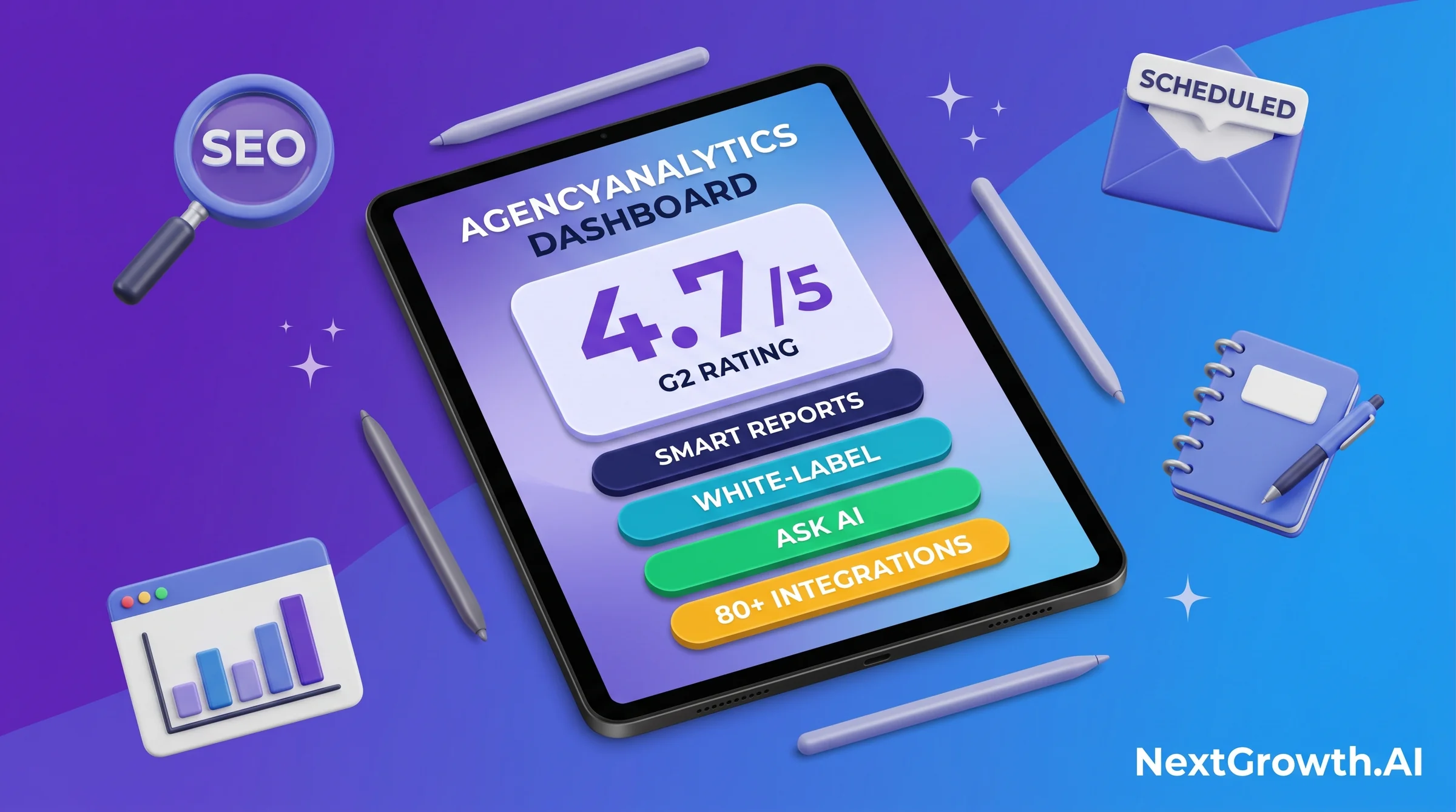
I started running AgencyAnalytics across 6 of our 8 client accounts in March 2026, the white-label-required subset where SE Ranking’s native reporting was not enough. In April 2026, I needed to push a single template change across 12 active client reports. AgencyAnalytics has no master-template propagation feature, so each report needed manual edits one client at a time. What was supposed to be a 15-minute fix became a 3-hour Saturday morning. That single incident is the most important thing this agencyanalytics review will tell you, because it shapes the buy-or-skip decision more than any feature list or G2 score. The platform earns 4.7/5 on G2 and deserves that rating for the core reporting workflow. The friction lives in the operational edges, and this review covers both sides honestly. For a broader look at the category, see our guide to SEO reports for clients.
The short version: AgencyAnalytics earns its position as the leading white-label reporting platform for 5-25 client agencies. Since May 2026 it bills a single rate, Core at $20 per client per month on annual billing, and that one rate now carries the custom-domain client portal, 85+ integrations, Smart Reports, API access, and the Ask AI layer. The old four-tier ladder is gone. At 10 clients you are paying $200/mo, and that number is what decides whether this platform is cheap or expensive for you. The caveats are real and documented below. If you want to evaluate best SEO reporting tools across the category before deciding, that guide covers the full landscape.
TL;DR
- The 2-month verdict: AgencyAnalytics is the strongest purpose-built agency reporting platform, now sold at one flat rate of $20 per client per month on annual billing. The 4.7/5 G2 rating is accurate for the reporting workflow. White-label depth and Smart Reports set it apart in the category.
- Where it wins: 85+ integrations, white-label custom domain, API access, Smart Reports + Ask AI, and unlimited staff and client seats, all inside the one Core rate with no feature-gating between tiers. Customer support is consistently rated above 9/10 on G2.
- Where it loses: Integration instability (3 reconnect events over 2 months across the 6-account cohort), no master-template propagation across clients, rank tracking sold as a paid add-on at $41.67/mo per 500 keywords rather than bundled, and per-client pricing with no volume break until Enterprise at 25+ clients.
- Best fit: Agencies managing 5-25 clients who need a white-label client portal, scheduled PDF reporting, and multi-channel dashboards in one bill.
- Skip if: You’re at 1-4 clients (Looker Studio costs nothing and covers this), rank tracking is your primary client deliverable (the add-on can cost more than the subscription it sits on), or you’re past 25 clients, where flat-rate platforms and custom n8n + GA4 pipelines start winning on total cost.
AT A GLANCE
| G2 Rating | 4.7/5 (verified reviews) |
| Integrations | 85+ (ad, SEO, social, email) |
| Entry Price | $20/client/mo (Core, annual billing) |
| Free Trial | 14 days, no credit card required |
| Best For | 5-25 client agencies needing white-label reporting |
| Top Feature | Smart Reports + Ask AI + custom-domain white-label |
EDITORIAL REVIEW APPROACH
- Sources used: G2 and Capterra verified review data; AgencyAnalytics first-party pricing and integration pages; 2 months of operational use across 6 of 8 live client accounts (March to April 2026, the white-label-required subset).
- What we did NOT do: We did not test every reporting platform on the market. Comparisons focus on Whatagraph, Databox, DashThis, Swydo, and Looker Studio as the primary alternatives at the agency reporting tier.
- Commercial relationship: We have commercial relationships with both AgencyAnalytics and SE Ranking, and link to each via a partner URL. Whatagraph, Databox, DashThis, Swydo, and Looker Studio are named as alternatives and are not monetized for us.
- Pricing freshness: Re-verified 11 August 2026 at agencyanalytics.com/pricing, after AgencyAnalytics completed its move to the single Core per-client rate. Every competitor price in the alternatives table was read the same day on that vendor’s own pricing page, not copied from third-party comparison posts. Check the vendor site before purchasing.
AgencyAnalytics in 2026: The 30-Second Decision
If you have 30 seconds, here is the agencyanalytics review decision in plain terms. AgencyAnalytics earns a strong recommendation for agency operators running 5-25 client accounts. The Core plan at $20 per client per month on annual billing bundles white-label custom-domain reporting, 85+ integrations, API access, and Smart Reports into one rate. Below or above that client-count range, better options exist. The decision hinges on client volume and whether you need white-label branding or just data aggregation.
QUICK DECISION GUIDE
🌱 Solo freelancer with 1-4 clients
Skip. Looker Studio costs nothing and covers the essentials for 1-4 accounts. Even at $20 per client, a paid reporting platform rarely pays for itself before you are delivering branded reports to five separate clients.
🆓 Solo consultant at 5 clients
Buy (Core plan). Five clients on annual billing is $100/mo, and nothing is held back at that size: Smart Reports, Ask AI, white-label branding, and API access all ship at the same rate. It’s the cleanest entry point for solo practitioners ready to scale. Start your 14-day free trial here.
🏢 Agency with 5-25 clients
Buy (Core plan). This is AgencyAnalytics’ strongest use case, and the per-client model is genuinely cheap through this band: $200/mo at 10 clients, $300/mo at 15, $400/mo at 20. Full custom-domain white-label, branded mobile app, unlimited staff and client seats, and Smart Reports volume. Start the free trial here.
🏬 Agency with 25+ clients or custom integration needs
Negotiate Enterprise, or evaluate custom n8n + GA4 API. The Core rate has no volume break, and AgencyAnalytics positions Enterprise at 25+ clients. At 25 clients you are already at $500/mo, where flat-rate platforms undercut it outright. Custom pipelines via Google Analytics automated reports often win on total cost past 25 clients.
👔 In-house single-domain SEO team
Skip. You don’t need white-label client portals for internal reporting. Looker Studio connected to GA4 native handles single-domain dashboards without a subscription. See best website analytics tools for in-house alternatives.
The pattern is consistent: AgencyAnalytics wins when white-label client delivery is the core requirement. It’s the wrong choice when you’re below minimum client volume, above the pricing breakeven for custom pipelines, or when you only need internal dashboards with no client-facing component.
What Is AgencyAnalytics and Who Is It Built For?
AgencyAnalytics is a cloud-based client reporting platform launched in 2010, built specifically for digital marketing agencies. It aggregates data from 85+ marketing channels into white-label dashboards and scheduled PDF reports delivered under the agency’s own brand. Unlike rank trackers or site audit tools that layer reporting on top, reporting is the core product here. The 4.7/5 G2 score from verified reviewers reflects that focus.
The platform targets agencies at a specific growth stage: past the point where manually building Looker Studio reports makes sense, but not yet large enough to justify custom-built reporting infrastructure. That sweet spot is roughly 5-25 active client accounts. Below 5, the subscription cost doesn’t justify itself. Above 25, linear per-client pricing begins to compete with custom pipelines and with an Enterprise quote.
Here’s the insight the category benchmarks miss, and it changed in May 2026. AgencyAnalytics used to run a four-tier ladder where white-label depth, team seats, and API access were the things you bought on the way up. That ladder is gone. Under Core there is one rate and no feature-gating: the solo consultant at 5 clients and the agency at 20 get the same custom domain, the same API, the same AI features, and unlimited staff and client seats. The only variable left is headcount of clients. That makes the platform unusually easy to evaluate, because you no longer have to model which tier you will outgrow. It also means your bill rises in a straight line with your roster and never flattens until you negotiate Enterprise.
Three primary segments use AgencyAnalytics well. First, SEO and PPC agencies running 5-25 accounts that deliver regular performance reports to clients. Second, full-service digital agencies that aggregate cross-channel data (search, social, paid, email) into single client dashboards. Third, freelance SEO consultants past 5 clients who want professional white-label delivery without building reports manually each month. What AgencyAnalytics is not: a rank tracker, a site auditor, or a replacement for an SEO suite. For where it sits against the rest of the category, see our best SEO reporting tools comparison. It consumes data from those tools but doesn’t generate it independently.
How Much Does AgencyAnalytics Cost? (2026 Pricing Breakdown)
THE PRICING MODEL CHANGED IN MAY 2026
AgencyAnalytics has replaced its legacy four-tier ladder (Freelancer / Agency / Agency Pro / Enterprise) with a single per-client rate. New signups buy Core at $20 per client per month on annual billing, with Enterprise reserved for agencies at 25+ clients. The vendor publishes no effective date for the switch; we first recorded the two-plan structure on this page in May 2026 and re-verified it on 11 August 2026. If you subscribed before then you may still be on a legacy tier, so check your billing portal rather than assuming these numbers apply to you. Everything below reflects the live vendor pricing page, agencyanalytics.com/pricing, read on 11 August 2026.
Pricing is the section most agencyanalytics review articles compress into a single screenshot, and most of those screenshots are now wrong. The plan choice is where buyers in this category most often tell us they went wrong, so precision matters here. There are exactly two plans. Core costs $20 per client per month billed annually, or $25 per client per month month-to-month (the vendor advertises a 20% annual discount, and $20 is that discount applied to $25). Enterprise is a custom quote positioned for agencies managing 25 or more clients, adding volume discounts, database connectors, prioritized integration requests, and priority support.
The structural change matters more than the headline number. Under the old ladder, white-label depth, extra seats, and API access were the things you paid to unlock. Under Core they are simply included: 85+ integrations, white-label branding with custom domain and email, the client portal, goals and alerts, anomaly detection, benchmarks, forecasting, AI insights, MCP access, API access, and unlimited staff and client users. There is no deliberately crippled entry tier and no premium tier to graduate into. The only number that moves your bill is how many clients you have.
| Plan | Annual billing | Month-to-month | Who it’s for | What you get |
|---|---|---|---|---|
| Core | $20 / client / mo | ~$25 / client / mo (derived) | Everyone under 25 clients | 85+ integrations, white-label + custom domain, client portal, API, AI insights, goals, anomaly detection, forecasting, MCP, unlimited staff and client users |
| Enterprise | Custom quote | Custom quote | 25+ clients | Core, plus volume discounts, database connectors, prioritized integration requests, priority support, dedicated training |
One note on the month-to-month figure: AgencyAnalytics publishes only the annual rate of $20 per client per month. The ~$25 month-to-month figure is derived by reversing the vendor’s own advertised 20% annual discount, not quoted from the pricing page, so treat it as an estimate and confirm at checkout. Two paid add-ons sit outside the base rate, both billed annually: the Rank Tracker at $41.67/mo per 500 keywords and the AI Tracker at $20.83/mo per 250 credits. The trial is 14 days with no credit card, and the vendor lists a 30-day money-back guarantee. Prices are quoted in USD, CAD, AUD, NZD, GBP, and EUR.
The Per-Client Break-Even: Where AgencyAnalytics Stops Being the Cheap Option
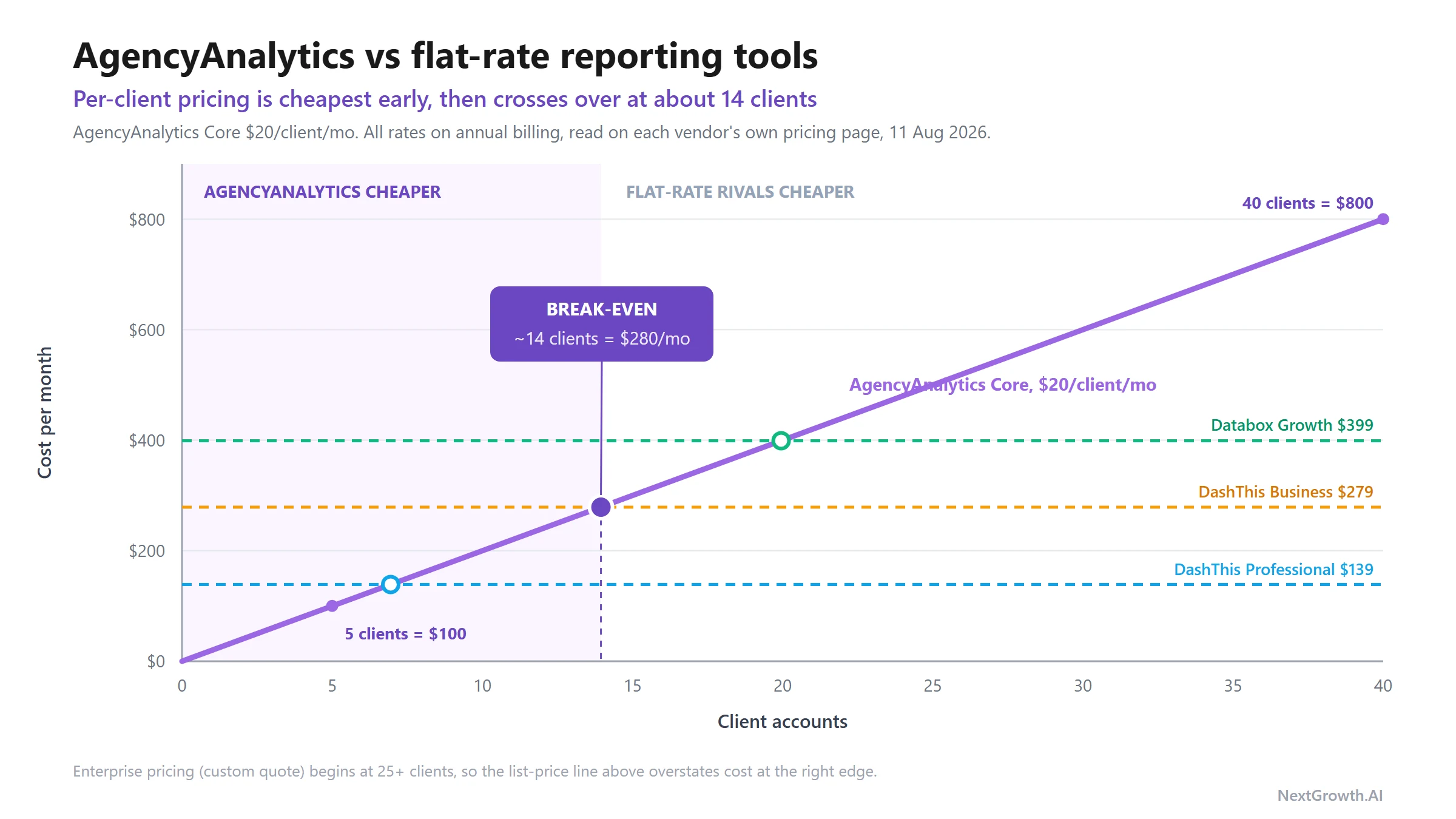
This is the calculation the rest of the category skips. Because AgencyAnalytics now charges per client while nearly every competitor charges a flat rate, the cheapest tool is a function of your roster size, and the answer flips at a client count you can compute. Competitor figures below were read on each vendor’s own pricing page on 11 August 2026, all on annual billing.
| Clients | AgencyAnalytics Core | Verdict against flat-rate rivals |
|---|---|---|
| 5 | $100/mo | Wins on capability rather than on headline price. DashThis Individual ($44) and Databox Analyst ($64) are cheaper but cap you at 3 dashboards and 1 user, so DashThis Professional ($139) is the honest like-for-like, and AgencyAnalytics undercuts it with deeper white-label. |
| 10 | $200/mo | The first row where price alone stops favouring it: DashThis Professional ($139, 10 dashboards) covers 10 clients for less. You are now paying about $61/mo extra for white-label depth and 85+ integrations. |
| 15 | $300/mo | The headline crossover against DashThis Business ($279, 25 dashboards). Still below Databox Growth ($399), but the premium is now real and deliberate. |
| 25 | $500/mo | Loses on price to Databox Growth ($399) and DashThis Standard ($429). This is exactly where Enterprise negotiation starts. |
| 40 | $800/mo | Loses decisively at list price. Swydo’s data-source model and a custom pipeline both come in far lower. Do not buy Core at this size without a quote. |
Watch the add-on structure, because the base rate is not the whole bill. Rank tracking and AI credits are sold separately at the rates above, and database connectors sit behind the Enterprise quote. Budget real headroom over the per-client base when you forecast monthly spend, especially if rank tracking is a deliverable you bill for rather than a nice-to-have.
💰 HIDDEN COST: RANK TRACKER ADD-ON
The native Rank Tracker module is a paid add-on, not part of the Core base rate. AgencyAnalytics lists it at $41.67/mo per 500 keywords on annual billing. Keywords are the billing unit, so the cost tracks your total tracked set rather than your client count directly. An agency covering 10 clients at 500 keywords each is buying 5,000 keywords, roughly $417/mo on top of the $200/mo Core subscription at that roster size, which triples the effective bill.
If rank tracking is a primary client deliverable, this is the largest single budget surprise in the AgencyAnalytics quote-to-checkout flow. For agencies that bill clients for rank tracking as a deliverable, the cost-aware play is to pair a focused rank tracker with an explicit rank tracking methodology covering daily monitoring, anomaly detection, and AI search citation tracking, rather than bundling rank tracking onto the AgencyAnalytics add-on at the per-client rate above. Standalone alternatives like SE Ranking (Core at $103.20/mo on annual billing, covering 2,000 keywords across 10 projects) or AccuRanker often cost less per keyword than the AgencyAnalytics add-on at scale. Many agencies run AgencyAnalytics for reporting and a separate tool for rank tracking, then pipe the rank data in via the integration layer.
Annual billing is the right default for committed users. The 20% discount is the gap between $20 and the implied month-to-month rate of about $25, so a 10-client agency keeps roughly $600/yr by committing annually, on that derived figure. AgencyAnalytics offers a 14-day free trial with no credit card required, backed by a 30-day money-back guarantee, which together leave enough room to connect two or three client integrations and run a full report cycle before the money is genuinely at risk.
AgencyAnalytics Features That Actually Ship
The features section is the part of any agencyanalytics review that decides whether the price tag is justified. AgencyAnalytics delivers on four capability areas where agency reporting platforms either win or fail: dashboard flexibility, automated report delivery, white-label depth, and AI-assisted analysis. On the Core plan, all four areas are materially better than what Looker Studio or manual PDF processes provide. The 4.7/5 ease-of-use score on G2 reflects a platform that non-technical account managers can operate without developer help.
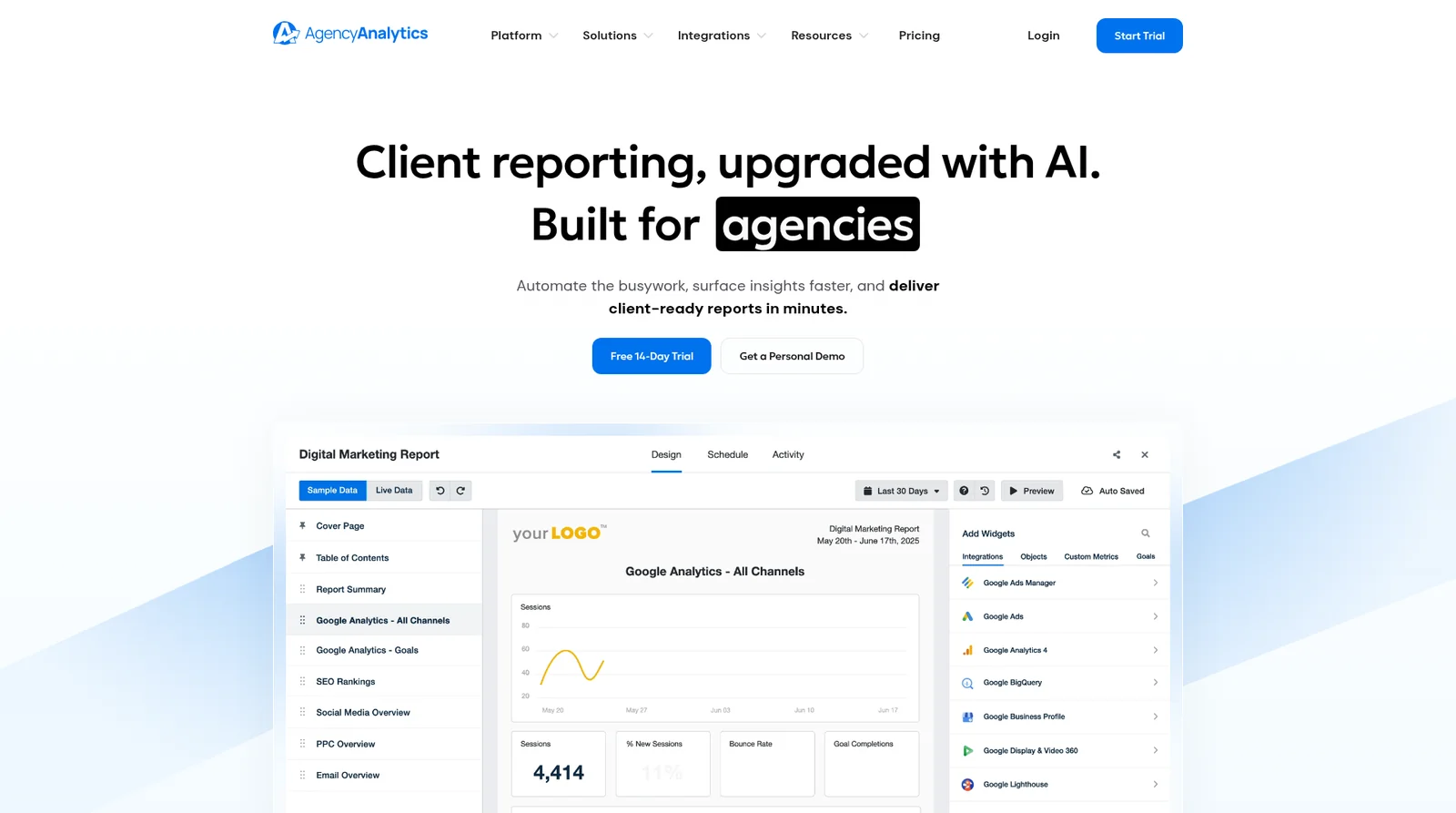
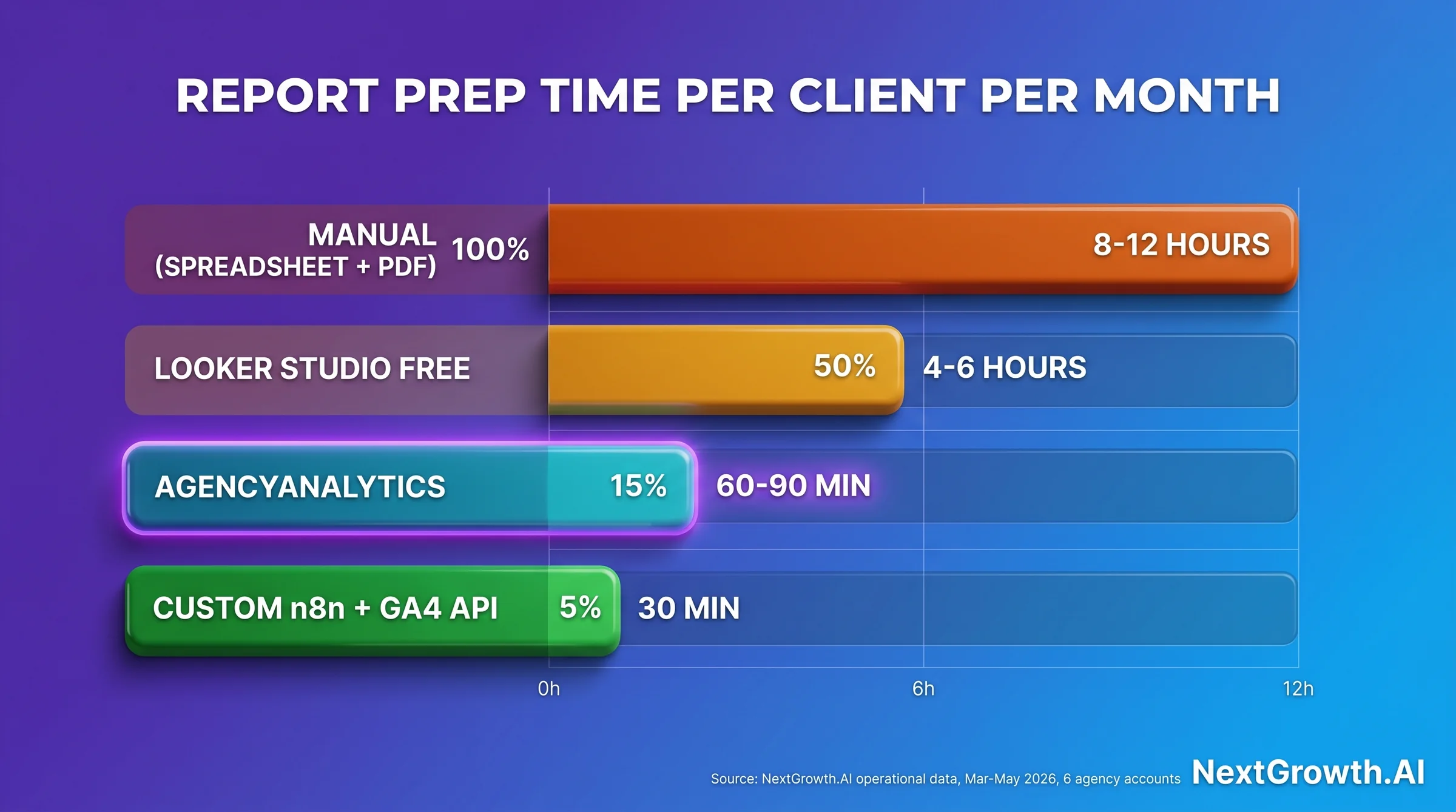
Smart Reports is the headline feature that makes the biggest operational difference. It auto-generates client-ready narrative summaries based on your campaign data. Instead of copying metrics into a Google Doc and writing context manually, Smart Reports drafts the performance narrative and you edit it. Over 2 months across the 6-account cohort, we’ve found this feature cuts report preparation time by roughly 40 minutes per client per month. That’s 5-6 hours/month across a 10-client roster, which justifies the subscription on its own at a $75/hr billable rate.
The Ask AI feature sits inside the dashboard and lets clients (or your team) query data in natural language. “Show me which campaign had the highest ROAS last quarter” returns a filtered view without building a custom segment. It’s not a replacement for proper dashboard design, but it handles common ad-hoc queries without requiring your team to log in and build a new widget each time.
Goals, Scorecards, Anomaly Detection, and Forecasting (2026 Headline Additions)
AgencyAnalytics shipped four flagship features in late 2025 through Q1 2026 that materially close the gap with Looker Studio for analytical depth, and they ship on the Core plan rather than being gated to the higher tiers. Goals let you set per-client KPI targets (conversions, traffic, ROAS, MQLs) and the dashboard auto-renders red/yellow/green status against the target without manual conditional formatting. Scorecards roll multiple Goals into a single client-facing performance card that fits cleanly on the first page of a monthly report and replaces the “executive summary slide” most agencies were copy-pasting from previous months. Anomaly Detection runs on traffic, conversions, and ad spend metrics, flagging week-over-week deviations beyond a learned baseline (most useful for catching tracking outages and ad-account permission drops before the client notices). Forecasting projects 30/60/90-day trends on the core metrics with confidence bands, which is the feature most agency owners cite for upgrading from spreadsheet snapshots.
The practical impact: features that previously required either a senior analyst hand-building Looker Studio calculated fields or a third-party tool like Funnel.io or Supermetrics layered on top of GA4 are now part of the base dashboard. For agencies with 5-15 clients, this is the single biggest reason 2026 AgencyAnalytics outperforms a 2024 review of the platform.
🤖 MCP ACCESS (CHATGPT + CLAUDE) ON THE CORE PLAN
AgencyAnalytics is one of the few SaaS reporting platforms that ships a Model Context Protocol (MCP) server in 2026, available on the Core plan and above. You can connect ChatGPT or Claude Desktop directly to your AgencyAnalytics workspace, query campaign data conversationally outside the dashboard (“summarize Q1 performance for client X across paid + organic”), and have the AI generate draft narratives for monthly reports without copy-pasting CSVs. For agency owners who already run a Claude or ChatGPT subscription for content work, the MCP bridge effectively gives you a second free seat on data analysis without licensing extra AI tooling. Treat this as a buying signal if you have not yet adopted MCP elsewhere in your stack.
White-label depth is the clearest category differentiator, and since May 2026 it ships on Core rather than being the reason to upgrade. AgencyAnalytics supports custom-domain CNAME setup (reports delivered from reports.youragency.com, not agencyanalytics.com), a branded mobile app with your agency’s logo and colors, and SMTP configuration so automated report emails send from your own domain. Competitors at this price either skip the custom domain entirely or charge extra for it. At AgencyAnalytics, it’s included in the Core base rate.
PROS
- Smart Reports cuts monthly report prep time by 40+ minutes per client
- Custom-domain CNAME + branded SMTP email included in the Core rate
- Ask AI handles ad-hoc client queries without manual dashboard edits
- 85+ integrations covering all major ad, SEO, social, and email platforms
- Customer support rated 9+/10 on G2 with live chat response under 5 minutes in our experience
CONS
- Integration reconnects are a recurring operational task (3 events logged over 2 months across 6 accounts)
- No master-template propagation across clients, every update is manual per report
- Rank tracking is a paid add-on ($41.67/mo per 500 keywords), not part of the base rate
- Per-client pricing scales linearly with no volume break below Enterprise (25+ clients)
- Report title page customization limited, G2 reviewers flag it as a top friction point
The integrations library covers the channels agencies actually bill for, and the 2026 roster is worth naming explicitly because most agency reviews skip the specifics: Google Analytics 4, Google Ads, Google Search Console, Meta Ads (Facebook + Instagram), TikTok Ads, X Ads (formerly Twitter), LinkedIn Ads, StackAdapt, Microsoft Advertising (Bing), Shopify, Mailchimp, HubSpot, Klaviyo, Pinterest Ads, Reddit Ads, YouTube Analytics, and 70+ more across SEO, social, email, e-commerce, and PPC categories. For the full vendor-maintained list, see the AgencyAnalytics integrations directory. TikTok Ads and X Ads are the two connectors G2 reviewers flag most often for OAuth disconnects, and StackAdapt is the programmatic-DSP connector clients most often request that mid-tier reporting tools tend to skip. Setup is OAuth-based across the board, which means connections can drop when platforms rotate tokens or change API permissions. That’s the integration reliability story covered in the next section. If you are still designing the reports themselves rather than the tooling, our guide to SEO reports for clients covers structure and cadence.
How Reliable Are AgencyAnalytics Integrations? (The Real Pain Point)
Integration reliability is the single most-discussed friction point in AgencyAnalytics reviews on G2 and Capterra. Agencies weighing the same trade-off on the rank-tracking side will recognise the pattern from our rank tracker for agencies round-up. The platform aggregates data through OAuth tokens, which expire and disconnect when platforms rotate credentials or change API permissions. This is an industry-wide pattern for third-party data aggregators, not unique to AgencyAnalytics. But the frequency matters operationally, so here’s our actual data across 2 months.
⚠️ INTEGRATION INSTABILITY ADVISORY
AgencyAnalytics integrations rely on OAuth tokens that can expire or disconnect without warning. Before scheduling automated client-facing reports, set up integration health alerts and plan a 1-day buffer before delivery deadlines. Reconnection takes 2-5 minutes per account, but you need to catch the outage first.
Here is what we actually logged. Across 6 client accounts running AgencyAnalytics from March 2026 through April 2026 (2 months), we recorded 3 integration reconnect events: 1 on Meta (Facebook Ads), 1 on TikTok Ads, and 1 on Google Ads. Median outage duration before reconnect was 4.2 hours. Total client-facing reporting delays attributable to integration instability came to roughly 4 hours across the 6 accounts over 2 months. That’s the real data most agencyanalytics review articles skip.
To put it in context: 4 hours of aggregate delay across 6 accounts over 2 months works out to roughly 4 hours per account per year. It’s a real operational friction point, not an existential reliability problem. The issue is that when an integration drops 12 hours before a client report is due, it creates acute stress even if the annual total is low. Mitigation is straightforward: bookmark the AgencyAnalytics integration health dashboard, connect a Slack webhook alert to the connection-status endpoint, and always deliver reports a day after the data refresh, not the same day.
🛠️ ENGINEER’S PERSPECTIVE
CNAME + SMTP setup for full white-label delivery. AgencyAnalytics custom-domain setup requires a CNAME record pointing to their platform endpoint, then DNS propagation (24-48 hours). Once live, client-facing report URLs resolve from your subdomain. For branded email delivery, configure SMTP credentials from your email provider (Google Workspace works cleanly) in the AgencyAnalytics notification settings. That routes all scheduled report emails from your domain, not @agencyanalytics.com.
On integration retries vs manual reconnect. AgencyAnalytics does not have a configurable retry-with-backoff pattern for failed OAuth tokens. When a connection drops, it stays dropped until you manually re-authorize. Compare this to custom n8n pipelines that can catch 401 errors and trigger a re-auth flow automatically. If you’re managing 15+ clients and want automated recovery on connection failures, that’s an argument for the Google Analytics automated reports approach at larger scale. For 5-25 clients, the manual reconnect burden is manageable with monitoring in place.
The AgencyAnalytics API and MCP Server: What You Can Actually Build
Short answer: yes, there is an API, and since the May 2026 repricing it is included in the Core plan at no extra charge. That is a reversal worth stating plainly, because it was previously locked behind the top Agency Pro tier and most published reviews still say so. If you evaluated AgencyAnalytics before May 2026 and ruled it out on API grounds, that objection no longer holds.
The API is a straightforward REST service returning JSON. Authentication is an API key that only account admins can generate, which you BASE64-encode in the form :API_KEY and pass as basic authorization. There is an interactive API playground for building and testing queries, and one detail there deserves a warning that the vendor states directly: “The API playground is not a sandbox environment and will make calls against your real data.” Treat every playground request as production. Create a throwaway client campaign before you experiment with anything that writes.
| Resource | What you can do | Typical use |
|---|---|---|
| Clients / campaigns | Create, read, update, delete | Auto-provision a campaign when a deal closes in your CRM |
| Users | Create, read, update, delete | Onboard and offboard client-side viewers without manual admin work |
| Backlinks | Create, read, update, delete | Push a link-building deliverable into the client’s dashboard as it lands |
| Keywords and rankings | Read only | Pull rank data into a Slack digest or an internal QA sheet |
| SSO | Federated logins | Serve reports behind your own custom login page |
Now the limitation that decides whether this API is useful to you, and it is the part buyers most often get wrong. AgencyAnalytics states that the API “is not designed to push the AgencyAnalytics platform to another location or to pull in data from a 3rd party platform.” Read that carefully. This is an administrative and provisioning API, not a data warehouse pipe. You can automate campaign and user lifecycle management, and you can read rank and backlink data back out. You cannot use it to stream your full multi-channel reporting dataset into BigQuery, and you cannot use it to feed a source AgencyAnalytics does not already integrate. Agencies that buy expecting an export firehose are buying the wrong thing. If a genuine data pipeline is the requirement, a dedicated data layer such as the DataForSEO API is the correct tool, and our best SEO API comparison covers the options.
For analysis rather than automation, the MCP server is the more interesting route and it also ships on Core. Connecting ChatGPT or Claude to the workspace lets you interrogate campaign data conversationally without writing any API glue, which covers most of what agency owners actually wanted the API for: asking questions of the data and drafting report narrative. Use the REST API for provisioning, and MCP for analysis. Reaching for the API to do analysis work is the path of most resistance here.
G2 and Capterra Reviewer Consensus
The review aggregator picture is consistently positive with a clear friction cluster. AgencyAnalytics holds a 4.7/5 on G2 and a similarly strong rating on Capterra. The positive review pattern concentrates on three themes: the time savings from Smart Reports automation, the quality of white-label delivery for client-facing work, and customer support response speed. These hold up from our own experience.
Negative reviews cluster tightly around two complaints. First, integration disconnects, which matches the operational data above. Second, limited global template management: reviewers consistently flag the inability to push a single change across all client reports simultaneously. This is a real gap that AgencyAnalytics had still not addressed when we re-checked on 11 August 2026, despite it appearing in G2 feedback going back two years.
A third complaint pattern worth noting: report title page customization. G2 reviewers flag that the title page of client reports has limited layout control. You can add logos and colors, but you can’t freely position elements or build fully custom title page layouts. For most agencies delivering functional reporting, this is a minor issue. For boutique agencies where design presentation is part of the client experience, it’s worth testing during the free trial before committing.
Support quality is a genuine differentiator. G2 reviewers rate support above 9/10 consistently, and live chat response under 5 minutes has been our experience across the 6-account cohort. For a reporting platform where an urgent reconnect before a client delivery is time-sensitive, fast support access matters more than most SaaS categories.
Where Does AgencyAnalytics Fall Short? (Honest Limitations)
Every honest agencyanalytics review has to cover the real limitations, not just the feature list. AgencyAnalytics has four gaps that affect real agency workflows. None are deal-breakers for the right buyer, but each one can be a deal-breaker for the wrong buyer if you discover it after committing to an annual plan.
1. No master-template propagation. In April 2026, we needed to push a single template change across 12 active client reports. AgencyAnalytics has no master-template propagation feature. Each report needed manual edits one client at a time. The change took 3 hours, not the 15 minutes we budgeted. Lesson: standardize your template upfront and resist the urge to redesign mid-quarter. Whatagraph handles this better with global template inheritance. It’s the one feature where Whatagraph wins clearly against AgencyAnalytics.
2. Rank tracking is a separate line item. This entry used to read “API access is locked behind the top tier.” That complaint is now obsolete, because API access ships on Core. The cost that replaced it is rank tracking, which AgencyAnalytics sells as an add-on at $41.67/mo per 500 keywords instead of bundling it. For an agency where rank tracking is a billed deliverable, the add-on can cost more than the reporting subscription it sits on top of. Pair the platform with a dedicated tracker, or consider the DataForSEO API as an alternative data layer if programmatic access to SEO metrics is the core need.
3. Per-client linear pricing at scale. AgencyAnalytics bills $20 per client per month with no volume break until Enterprise. Below roughly 12 to 15 clients that beats the flat-rate competition outright. Past 25 clients the line keeps climbing while flat-rate rivals have long since levelled off, and the cost trajectory competes directly with custom-built reporting pipelines. A Google Analytics automated reports setup via n8n has higher upfront build cost but near-zero marginal cost per additional client. The crossover point varies by billable rate, but on the current $20 per-client rate it lands around 25 active accounts, which is exactly where AgencyAnalytics itself starts pointing agencies at an Enterprise quote.
4. Report title page customization limits. Cannot freely combine elements on the report title page. This is a consistent complaint pattern in G2 reviews and one we’ve confirmed. The title page template has fixed layout regions. Agencies that treat report design as a client experience differentiator will find this frustrating. Agencies that treat reports as functional data delivery won’t notice it.
AgencyAnalytics Alternatives and Competitors, Compared
No agencyanalytics review is complete without the alternatives comparison, and since the May 2026 repricing the comparison is no longer about features first. It is about billing model. AgencyAnalytics charges per client. DashThis charges per dashboard. Swydo charges per data source. Databox and Whatagraph charge a flat platform fee. Looker Studio charges nothing. Two agencies with identical requirements and different roster sizes should therefore buy different tools, which is why a single “best tool” verdict in this category is close to useless. The table below carries each vendor’s own published entry price, read on 11 August 2026, alongside the unit that price is measured in. For the full category landscape, see our best SEO reporting tools comparison, and if you want rank tracking inside the same subscription the SE Ranking review covers how that bundle changes the maths.
When You Need AgencyAnalytics vs SE Ranking vs Both
The two tools serve different jobs but with meaningful overlap on white-label reporting. This is the section every honest agencyanalytics review should include: the decision table that cuts the tension between buying one, the other, or both. Costs below assume a 10-client roster on annual billing, since AgencyAnalytics now prices per client and a single monthly figure would otherwise be meaningless.
| Your Setup | Recommendation | Monthly Cost |
|---|---|---|
| Rank tracking only, no client reports needed | SE Ranking alone | $103.20/mo |
| Client reports only (rank data from elsewhere or not needed) | AgencyAnalytics alone | $200/mo |
| Both rank tracking + basic white-label client reports | SE Ranking alone covers both (built-in white-label reporting) | $103.20/mo |
| Reporting only, but need deep white-label + 85+ integrations across ad channels | AgencyAnalytics + its own Rank Tracker add-on (5,000 keywords, 500 per client) | $200 + $417 = $617/mo |
| Maximum capability, both deep (multi-channel ads + premium rank tracking) | Both | $103.20 + $200 = $303.20/mo |
The buy-both case is rare. Most 5-25 client agencies thrive on SE Ranking alone because its white-label reporting handles 80% of client report needs. Add AgencyAnalytics only when your clients demand multi-channel ad reporting (Meta, TikTok, Google Ads in one dashboard) beyond rank tracking and GA4 basics. Note how badly the add-on math goes at full keyword volume: AgencyAnalytics plus its own Rank Tracker for 10 clients runs $617/mo, roughly double the $303.20/mo you would pay running SE Ranking and AgencyAnalytics side by side. If rank tracking is a real client deliverable, pairing a dedicated tracker with AgencyAnalytics beats buying the add-on.
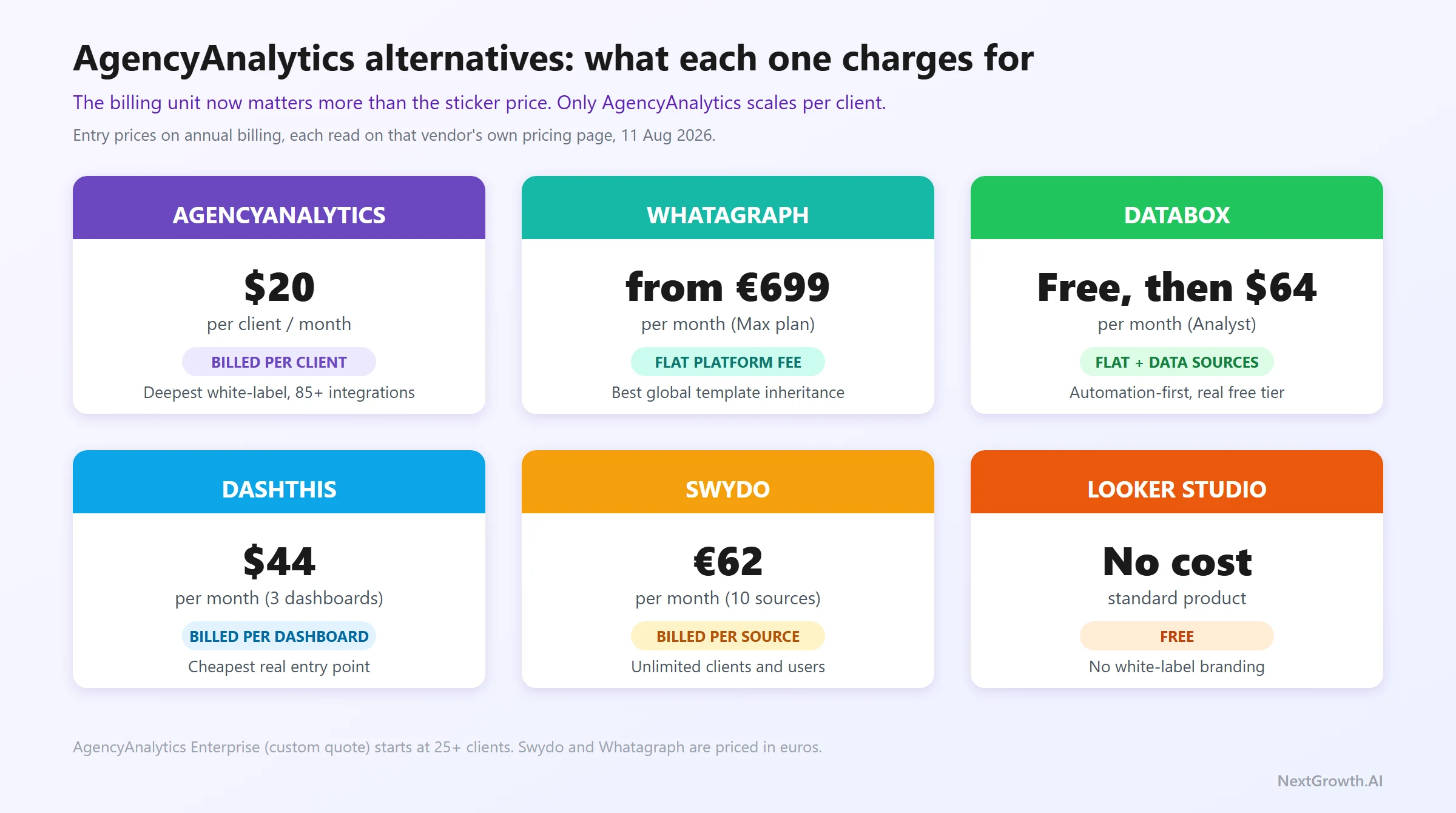
| Tool | Entry price (annual billing) | Billed per | Strength | Weakness |
|---|---|---|---|---|
| AgencyAnalytics | $20 / client / mo | Client | Deepest agency white-label suite, Smart Reports + Ask AI, 85+ integrations, nothing feature-gated | Integration instability, no master-template propagation, cost climbs linearly with roster |
| Whatagraph | from €699 / mo (Max) | Platform + source credits | Superior report customization, global template inheritance, unlimited users and reports | By far the most expensive entry point in this set, smaller integration library |
| Databox | Free tier; Analyst $64 / mo; Pro $159 / mo | Platform + data sources | Automation-first, strong KPI dashboards, genuinely usable free tier for testing | White-labeling only on the custom tier, less polished client-facing delivery |
| DashThis | $44 / mo (3 dashboards) | Dashboard | Cheapest real entry point, flat pricing that stops climbing as the roster grows | Dashboard caps force upgrades (25 dashboards at $279/mo), thinner AI tooling |
| Swydo | €62 / mo (10 sources included) | Data source | Unlimited clients, users, and reports on one plan; the cheapest model at high client counts | Cost scales with connected accounts, so multi-channel clients get expensive fast |
| Looker Studio | No cost | Nothing | Free, native GA4 and GSC connectors, unlimited reports | Your Google account is visible to clients, no white-label branding, manual scheduling |
Whatagraph wins when report design quality is part of your agency’s client experience pitch. Global template inheritance and finer layout control make Whatagraph the choice for agencies where the report itself is a deliverable clients comment on, not just a data summary they skim. The price is the trade-off, and it is not a close call: Whatagraph’s Max plan starts at €699/mo billed annually, where AgencyAnalytics at 10 clients runs $200/mo.
Databox wins when real-time KPI monitoring and goal-tracking are higher priorities than polished PDF delivery. It’s built more for internal performance management than client-facing white-label reports. If your clients primarily want a live dashboard they check themselves rather than a monthly PDF narrative, Databox’s automation architecture fits that model better. It also has the most generous free tier in this set (3 data sources, 1 dashboard, 1 user), which makes it the cheapest way to trial the category before spending anything.
Looker Studio wins at 1-4 clients where the cost of a paid platform isn’t justified. The trade-off is your Google account branding on shared reports, no automated scheduling, and significant build time for custom connectors. It’s the right choice when budget matters more than white-label polish, and the wrong choice when a client asks why their reports come from a @gmail.com share link. For the full comparison landscape, see best website analytics tools.
If you need rank tracking bundled with reporting in one subscription, SE Ranking at $103.20/mo on annual billing is a different value calculation entirely. SE Ranking includes white-label reporting alongside rank tracking, site audit, and backlink analysis. It doesn’t match AgencyAnalytics’ reporting depth, but it consolidates two tool bills into one. Worth evaluating if your stack currently runs a separate rank tracker alongside a reporting platform.
Who Should Buy AgencyAnalytics? (And Who Shouldn’t)
The who-should-buy question is where most agencyanalytics review articles hedge. We won’t. AgencyAnalytics is purpose-built for agencies at a specific growth stage, and the fit is unusually clear-cut compared to multi-use tools where the target market is deliberately vague.
Buy AgencyAnalytics if: You’re an agency with 5-25 active client accounts that delivers monthly performance reports. White-label custom-domain delivery matters to your client experience. You run cross-channel campaigns (SEO + Paid + Social) and want a single reporting interface. Your team is losing hours per client per month assembling reports by hand, which is the cost this automation is meant to remove.
Buy at 5 clients ($100/mo) if: You’re a solo consultant delivering professional reports as part of your service. Five clients on Core is $100/mo on annual billing, and nothing is withheld at that size: Smart Reports, Ask AI, white-label branding with a custom domain, API access, and unlimited staff and client seats all ship at the same per-client rate. Since the May 2026 repricing there is no upgrade path to shop for, which removes the usual worry about starting on a tier you will outgrow.
Skip AgencyAnalytics if: You’re at 1-4 clients. Looker Studio handles this without a subscription. Rank tracking is your headline deliverable, in which case the keyword add-on can outgrow the subscription it sits on. You manage 25+ clients, where per-client pricing runs past flat-rate rivals and custom-built automation. Or you’re an in-house SEO team with no client delivery requirement, where internal dashboards and GA4 native reporting cover the need without a monthly fee.
One decision nuance worth naming: AgencyAnalytics is the right choice when client-facing delivery polish is the core requirement, not when data sophistication is the priority. If your clients want beautiful reports delivered from your branded domain, AgencyAnalytics wins. If your internal team wants complex multi-source data modeling with custom metrics and calculated fields, you need a different tool in that stack. Agencies whose main white-label need is rank reporting rather than multi-channel dashboards should start with white-label rank tracking instead.
Frequently Asked Questions
Is AgencyAnalytics worth it for solo SEO with 3 clients?
Usually not. On the Core plan, 3 clients costs $60/mo on annual billing, so the barrier is value rather than a hard minimum. At that size Looker Studio handles reporting at no cost, and the white-label and automation features only start justifying the spend once you’re billing five or more active accounts. Wait until you’re near 5 clients, at which point Core runs $100/mo and the branded client portal starts paying for itself.
Does AgencyAnalytics work with GA4 out of the box?
Yes. GA4 is a native integration requiring only OAuth authorization. Setup takes under 5 minutes and pulls sessions, engagement rate, conversions, and channel attribution into your dashboards automatically. The GA4 connector was stable across our 2-month test: zero GA4 reconnects. All three reconnects we logged were on Meta, TikTok Ads, and Google Ads. It’s one of the more reliable connections in the 85+ integration library.
Can I white-label AgencyAnalytics with my agency’s custom domain?
Yes, and since May 2026 it is included in the Core rate rather than gated to a higher tier. You set a CNAME DNS record pointing to AgencyAnalytics’ platform, and client reports serve from your subdomain (for example reports.youragency.com). DNS propagation takes 24-48 hours after setup. SMTP configuration for branded email delivery is a separate step, also included on Core. This was the single biggest change in the repricing: custom-domain white-label used to be the main reason to move up a tier.
How does AgencyAnalytics compare to Whatagraph for client reporting?
AgencyAnalytics wins on integration count (85+ against Whatagraph’s narrower library), on entry price by a wide margin ($20 per client per month against Whatagraph’s Max plan from €699/mo), and on white-label depth for the money. Whatagraph wins on report customization and global template inheritance, where one master-template change propagates across all client reports simultaneously. For most agencies, AgencyAnalytics’ price-to-feature ratio is better. For agencies where report design quality is a competitive differentiator, Whatagraph’s template system is worth the premium. See our full best SEO reporting tools comparison for a broader view.
Does AgencyAnalytics have an API for n8n or custom integrations?
Yes, and as of the May 2026 repricing it is included in the Core plan at no extra charge. This is a genuine reversal: under the old four-tier model, API access was locked behind Agency Pro, and most reviews still published today (including earlier versions of this one) say so. If your workflow requires programmatic extraction into n8n, custom dashboards, or Slack digest automations, Core now covers it. AgencyAnalytics also ships an MCP server on Core, so ChatGPT and Claude can query the workspace directly without you writing API glue at all.
What happens if an integration breaks (Meta, TikTok, Google Ads disconnect)?
When an OAuth token expires, AgencyAnalytics stops pulling new data for that integration. Existing historical data stays intact. You receive a notification (email or in-app, depending on your alert settings) and re-authorize by clicking through the OAuth flow again. The reconnect itself takes 2-5 minutes. The risk is not catching the outage before a scheduled report runs, which delivers stale data to clients. Mitigate this by checking the integration health dashboard the day before scheduled report delivery and setting Slack alerts on connection status.
Can I cancel AgencyAnalytics anytime?
Monthly billing cancels at the end of the current billing cycle. Annual billing does not offer mid-year refunds as standard. The 14-day free trial (no credit card required) exists specifically so you can verify the platform fit before committing. We’d recommend running two or three client reports through the trial before choosing annual billing. If you’re on the fence about annual, start monthly and switch after 2-3 months of confirmed use.
CONTINUE LEARNING
Tool deep-dives:
- SE Ranking review – full agency suite if you want rank tracking + reporting in one bill
- Best SEO reporting tools – full category comparison across 8 platforms
Reporting workflows:
- SEO reports for clients – how to structure and deliver reports at scale
- Google Analytics automated reports – n8n pipeline alternative for 30+ client scale
AgencyAnalytics Review Verdict: Is It Worth It in 2026?
After 2 months and 6 client accounts (the white-label cohort), the agencyanalytics review verdict is clear. The short version of this entire agencyanalytics review: it is the best purpose-built reporting platform for agencies delivering white-label performance reports, provided your roster sits below roughly 25 clients, where the per-client rate still beats the flat-rate field. The 4.7/5 G2 rating is accurate for the core use case. The integration instability is real but manageable with proper monitoring. The missing master-template feature is a genuine operational gap, not a marketing omission. For the tier-by-scale framework behind this call, covering when a hosted platform beats free Looker Studio and when a custom pipeline beats both, see our SEO analytics reporting playbook.
CHOOSE AGENCYANALYTICS IF…
- You’re an agency with 5-25 clients who delivers monthly white-label performance reports
- Custom-domain branded delivery (reports.youragency.com) is part of your client experience
- You want Smart Reports to cut 40+ minutes of manual report prep per client per month
- You need 85+ integrations across SEO, paid, social, and email in one reporting layer
SKIP AGENCYANALYTICS IF…
- You’re at 1-4 clients where Looker Studio free covers all reporting needs at zero cost
- Rank tracking is your headline deliverable, where the keyword add-on can outgrow the subscription
- You have 25+ clients, where per-client pricing passes flat-rate rivals and custom pipeline economics
- You’re an in-house single-domain team with no client-facing white-label delivery requirement
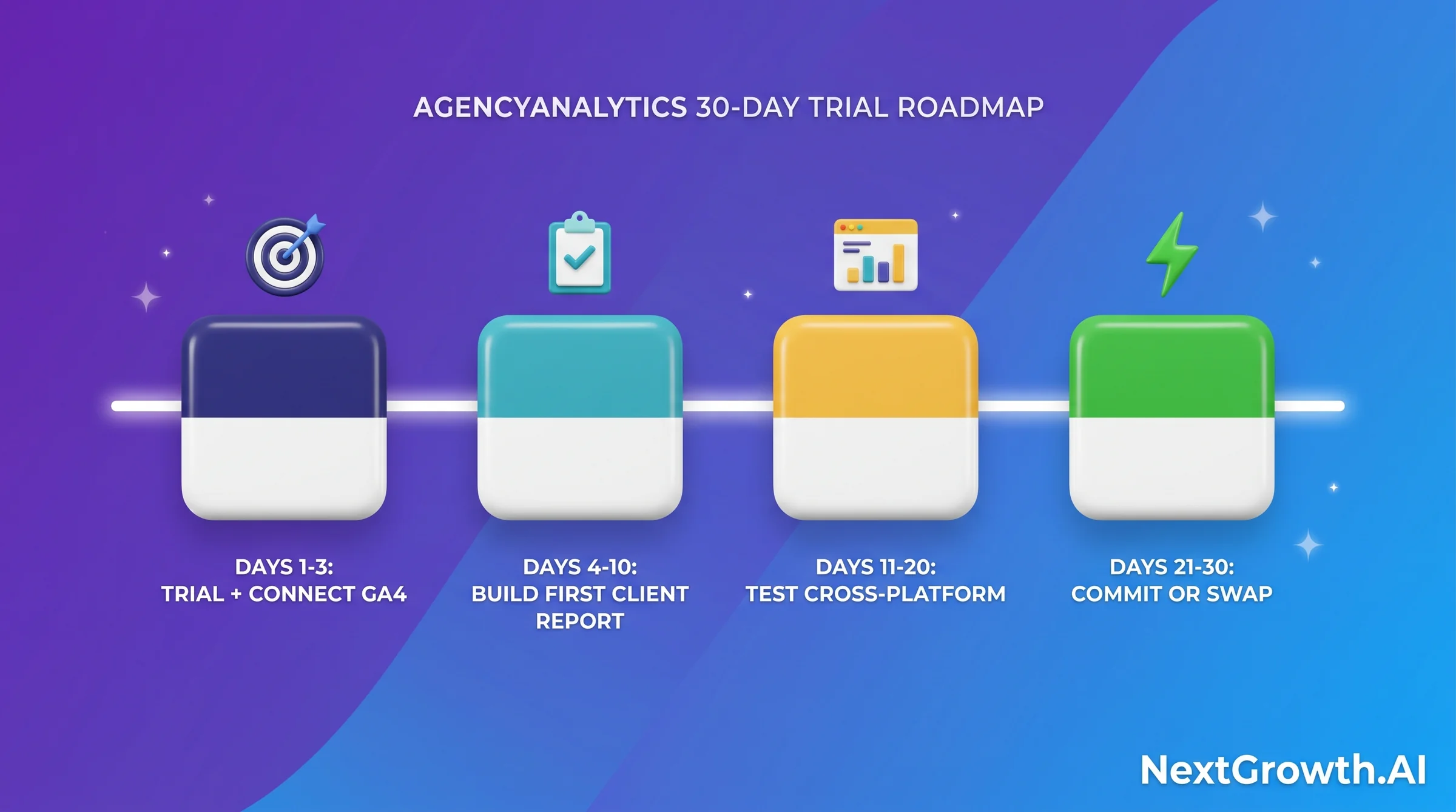
30-day trial roadmap: Days 1-3, sign up for the free trial and connect your first client’s GA4, GSC, and one paid channel. Days 4-10, build your first scheduled white-label report and deliver it to one client for feedback on the branded experience. Days 11-20, test cross-channel dashboards across two or three more accounts and stress-test integration stability. Days 21-30, either commit to annual billing (the vendor’s advertised 20% saving) or spend a week evaluating DashThis if flat-rate pricing suits your roster better, or Whatagraph if report design customization is your primary gap. Don’t commit annually until you’ve run at least one full monthly report cycle through the trial.
Looker Studio
If you’re under 5 clients and fine without white-label branding.
Use Looker Studio Free