
n8n SSRF Protection Is Off by Default: How to Turn It On
Quick answer: SSRF protection in n8n is off unless you switched it on. N8N_SSRF_PROTECTION_ENABLED defaults to false, so on a stock instance a workflow can send an HTTP request to your private network, to localhost, or to your cloud provider’s metadata endpoint. Setting it to true blocks those ranges.
The obvious reason for shipping it off is that turning it on breaks any instance that legitimately calls an internal service, though n8n has not published that reasoning. What is on record is that the default was challenged upstream: issue #28035, “SSRF Protection Disabled by Default (CWE-918)”, was closed as not planned. It is still a default worth knowing about, and most people running n8n do not, because the flag arrived quietly in 2.12.0 and nothing in the editor tells you it is off.
This is one of the shipped defaults the seven hardening flags in our Coolify production setup do not cover, so it needs handling separately.
Before you begin
- n8n 2.12.0 or later. SSRF protection does not exist before that version.
- Access to the environment your n8n container reads, usually the
.envbeside your compose file. If you followed our Ubuntu and Docker setup, that is/home/n8n/.env. - A restart window. This is an environment variable, so it takes effect on restart, not on save.
- A list of internal hosts your workflows legitimately call, if any. Gather it before you flip the switch rather than after a workflow breaks.
Step 1: Is SSRF protection on in your n8n?
Almost certainly not. There is no UI for this, so check the environment the container actually sees rather than the file you think it reads:
docker exec n8n printenv | grep -i SSRFNo output means protection is off, provided the command ran. Use your own container name, which on a Compose install is usually <project>-n8n-1 rather than n8n: a wrong name fails to stderr and leaves stdout empty, which reads exactly like a clean negative. That is the default state, not a misconfiguration, and it is worth checking on the container rather than the file because an .env edit that was never followed by a restart looks identical to a working configuration from the outside.
Step 2: What does an attacker actually reach while it is off?
The abstract answer is “internal resources”, which is why this default gets ignored. The concrete answer is more useful.
An HTTP Request node fetches whatever URL it is given. If any part of that URL comes from outside your control, a webhook payload, a form field, an item from an upstream API, then whoever controls that input chooses the destination. Point it at 169.254.169.254 and on AWS or GCP you are talking to the instance metadata service, which hands out temporary credentials for the IAM role the n8n host itself runs as. Point it at 127.0.0.1 and you reach anything bound to loopback that assumed the network was the boundary: an admin port, a database, an internal API with no auth because it was “not exposed”.
The workflow never errors. It returns a 200 and some JSON, the same as any other request, which is why nothing in your error alerting will tell you it happened.
Step 3: Turn on SSRF protection
# .env
N8N_SSRF_PROTECTION_ENABLED=true
Restart, and n8n starts validating outbound requests from user-controllable nodes against its documented blocklist. The default set covers RFC 1918 private space (10.0.0.0/8, 172.16.0.0/12, 192.168.0.0/16), loopback (127.0.0.0/8 and ::1/128), link-local ranges including the metadata endpoints from Step 2, IPv6 unique-local addresses, and reserved ranges.
Two details matter more than the list itself. Validation covers redirect targets and DNS resolution, not just the URL you can see, which is what closes DNS rebinding and open-redirect bypasses. And N8N_SSRF_BLOCKED_IP_RANGES takes the literal keyword default, so you extend rather than replace the built-in set:
N8N_SSRF_BLOCKED_IP_RANGES=default,100.64.0.0/10Write only the CIDR and you have silently dropped every default protection you just turned on.
Step 4: Which allowlist wins?
Most instances have at least one internal service a workflow genuinely needs. n8n gives you four allow and deny variables for that, and the order they resolve in is the part to get right. A fifth, N8N_SSRF_DNS_CACHE_MAX_SIZE (default 1048576), only sizes the DNS resolution cache and takes no part in that order:
| Variable | Default | What it does |
|---|---|---|
N8N_SSRF_ALLOWED_HOSTNAMES | none | Hostnames to allow, supports a leading *. wildcard |
N8N_SSRF_ALLOWED_IP_RANGES | none | CIDR ranges to allow. Takes precedence over the blocklist |
N8N_SSRF_BLOCKED_HOSTNAMES | none | Hostnames to deny, checked before DNS resolution |
N8N_SSRF_BLOCKED_IP_RANGES | none | Extra CIDR ranges to deny, on top of the defaults |
Precedence runs hostname allowlist, then IP allowlist, then IP blocklist. An allowed hostname always overrides a blocked one.
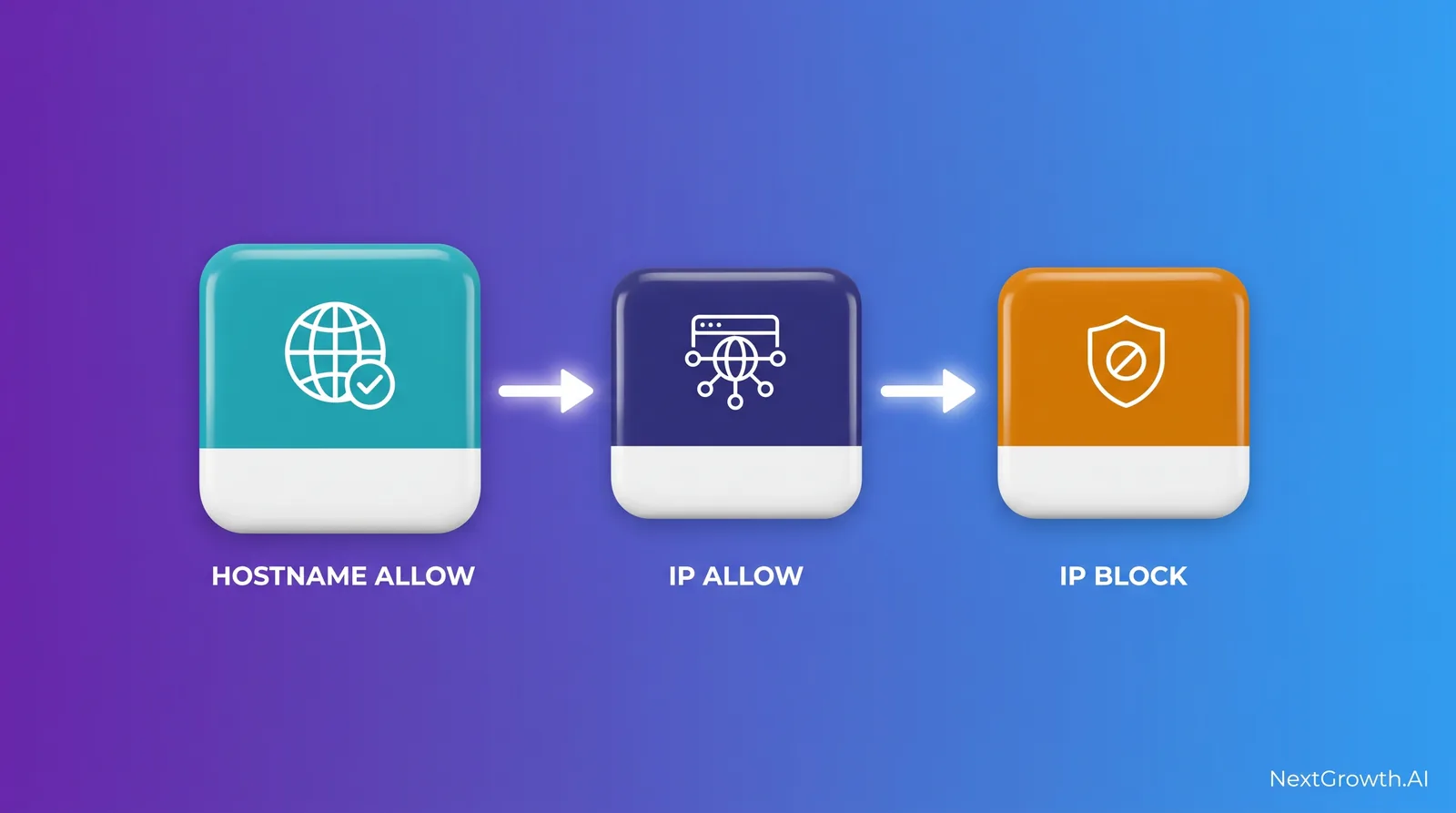
That makes the hostname allowlist the sharpest edge in the feature. A hostname entry skips the IP blocklist entirely, so a name you do not fully control, one resolved by a DNS zone someone else can write to, becomes a route straight back to the ranges you just blocked. n8n’s own guidance is to allowlist hostnames only within your control, meaning internal DNS zones. Prefer the IP allowlist when you can name the address.
Step 5: Patch the bypass, and read the caveats
Enabling the flag is necessary and not sufficient. Three things belong in the same change window.
Patch to 2.32.1 or later. CVE-2026-72768 is an SSRF protection bypass through the MCP Client node: an authenticated user can send requests to internal or blocked hosts without routing through the protection at all. It scores CVSS 6.4 and is fixed in 2.32.1, or in 2.31.5 if you are pinned to the 2.31 branch. If you are wiring MCP into n8n, this is the version floor, not an optional upgrade.
Keep the network controls. n8n documents this as an application-level defence that complements firewalls, security groups and network policies rather than replacing them. An egress rule that cannot reach 169.254.169.254 does not depend on an application flag being set correctly.
Test rather than trust. There is an open community report, issue #28218, arguing that domain restriction is enforced only when credentials with explicit domain limits are attached to the HTTP Request node. It concerns the credential-level allowedDomains mechanism rather than the instance flag covered here, the two are not the same feature, and the issue was closed as not planned with no maintainer response on record. Treat it as unconfirmed. It is still a good argument for verifying on your own instance instead of assuming, which is the next step anyway.
How do you prove it is actually blocking?
Build a throwaway workflow with a single HTTP Request node pointed at your own cloud’s metadata address and run it, before and after. Use the path your platform actually serves: http://169.254.169.254/latest/meta-data/ on AWS, and http://169.254.169.254/computeMetadata/v1/ with a Metadata-Flavor: Google header on GCP. What you are comparing is the two responses, not any particular one: on a hardened host a plain GET may already be refused (AWS returns 401 where IMDSv2 is enforced), and that is fine. With the flag on, the request should not reach the address at all.
For an ongoing signal rather than a one-off check, n8n can publish SSRF metrics. Set N8N_METRICS_INCLUDE_SSRF_METRICS=true alongside N8N_METRICS=true and you get counters for checks performed, requests blocked, and check duration. A blocked-request counter that moves in normal operation is worth investigating: something in your workflows is reaching for an internal address. The full flag list and the scrape setup are in our guide to n8n monitoring with Prometheus and Grafana, and the wider picture of what monitoring can and cannot see is in what n8n monitoring actually covers.
Frequently asked questions
Does enabling SSRF protection break existing workflows?
Only those calling private, loopback or link-local addresses. Public API calls are unaffected. If something breaks, it was reaching an internal address, which is the information you wanted.
Why is it off by default?
Because turning it on by default would break self-hosted instances that legitimately call internal services, which is most of them. The cost of that choice is that the safer setting is the one you have to know about.
Do I still need it behind a firewall?
Yes, as defence in depth. The firewall is the primary control. The flag catches the case where a workflow reaches something inside the perimeter the firewall was never asked to block.
Does this protect n8n Cloud?
This is a self-hosting configuration. On Cloud you do not set environment variables, and the egress boundary is n8n’s to manage.
What version added SSRF protection?
2.12.0. Older instances have no flag to set, and the upgrade is the fix. Patch to at least 2.32.1 to clear CVE-2026-72768 at the same time.
Set it today, then check the rest of your defaults
Two lines in an .env and a restart close a path from any user-controllable URL to your cloud credentials. Add the metrics flag and you will know whether anything was using that path already.
SSRF is one default among several that ship permissive. If you would rather have someone check the whole surface, we run a fixed-scope n8n production readiness audit: encryption key handling, backup and restore, health endpoints, metrics exposure and the shipped security defaults, delivered as a report against your own instance, deployed and reviewed in your account rather than ours.
Configuration and version claims verified against n8n’s SSRF protection documentation and the CVE-2026-72768 advisory on 2026-09-03. n8n ships quickly; confirm against the version you run before relying on any default named here.