
Will You Lose Data Upgrading n8n? One Change Says Yes
Quick answer: the version bump does not touch your data. One change in n8n 2.0 does, and it is the one nobody warns you about. n8n 2.0 dropped MySQL and MariaDB as storage backends. If your instance runs on either, upgrading is a database migration, not a version bump, and pulling the old image tag back will not undo it.
Everything else that breaks in a major n8n upgrade breaks configuration. Configuration rolls back. Databases do not.
| What changed | How you undo it | Example from n8n 2.0 |
|---|---|---|
| A setting | Put the setting back | Task runners on by default, env access in the Code node blocked |
| The application | Pull the version tag you pinned | Any regression in the release itself |
| The storage backend | Nothing. You migrate forward, before upgrading | MySQL and MariaDB dropped |
Will you lose data when you upgrade n8n?
Not from the upgrade itself, if you are on PostgreSQL or a current SQLite.
Your n8n workflows, credentials, executions and settings live in the database. A container tag change swaps the application, not the data. That is why most upgrades that “go wrong” are recoverable: the instance misbehaves, you put the old tag back, and your workflows are still there.
The exception is any change that requires you to move the data before the new version will accept it. n8n 2.0 has exactly one of those, and it is why the rest of this article puts the database first.
The one change that is not reversible
n8n’s 2.0 breaking-changes document states it plainly: “n8n will no longer support MySQL and MariaDB as storage backends. This support was deprecated from n8n 1.0.”
The migration path it gives is not a flag you set. It is: “Before upgrading to n8n 2.0, use the database migration tool to move your data from MySQL or MariaDB to PostgreSQL or SQLite.”
That sentence is doing a lot of work. Moving from MySQL to PostgreSQL is a data operation you perform while still on 1.x, before the new image ever starts. Do it in the wrong order, by pulling the 2.x tag first, and n8n will not start against a database it no longer supports. You have not lost anything at that moment, your MySQL data is intact, but you are now doing the migration under pressure with the instance down.
Two related database changes ship in the same release and are worth checking in the same sitting. The legacy SQLite driver is removed, so an old SQLite install may need the newer driver. And the in-memory binary data mode is gone: N8N_DEFAULT_BINARY_DATA_MODE no longer accepts default, leaving filesystem (the default in regular mode), database (the default in queue mode) and s3. N8N_AVAILABLE_BINARY_DATA_MODES is removed with it.
If you are on Postgres already, none of this applies and your upgrade risk drops to configuration.
What breaks that is only configuration
The rest of the 2.0 list is disruptive without being destructive, in the sense that nothing here loses data. Most of it is configuration you can set back to the old behaviour. Two things on the list are not: the runner leaving the main image, and runners themselves, which no longer have an off switch. And beyond this list, 2.0 also removes capabilities rather than re-defaulting them, including the Pyodide in-process Python execution in the Code node, the legacy Start node and n8n --tunnel. A removal is not something you configure your way out of, so read the breaking-changes document for what is gone before you plan around what merely moved.
- Task runners are on by default. All Code node executions now run on task runners. n8n’s stated migration path is to set
N8N_RUNNERS_ENABLED=trueon your current 1.x instance and test there before upgrading, which is the only window in which that flag helps. It is not a switch you keep afterwards:runners.config.tson master declares fourteenN8N_RUNNERS_*variables and an enable flag is not among them, so on 2.0 you tune runners rather than turn them off. What that container is, and why it is not the hardened one n8n’s own security page describes, is covered in hardening n8n task runners. - The runner is no longer in the main image.
n8nio/n8nno longer ships the task runner for external mode; you need the separaten8nio/runnersimage. - Code node module allowlists move with it. In n8n’s source,
NODE_FUNCTION_ALLOW_BUILTINandNODE_FUNCTION_ALLOW_EXTERNALare task-runner configuration and both default to empty. A Code node that imported an external module before will stop resolving it until the allowlist is set where the runner reads it. - Environment access from the Code node is blocked. The default for
N8N_BLOCK_ENV_ACCESS_IN_NODEis nowtrue. Set it tofalseif workflows depend on it, or move those values into credentials. - Two nodes are disabled by default. ExecuteCommand and LocalFileTrigger are excluded in the shipped config unless you re-enable them.
Our Ubuntu and Docker setup guide carries the shorter version of this table, including the config-file and execution-mode renames, and it is worth reading alongside this list rather than instead of it.
The env-access one deserves a note because nothing errors when it bites. A Code node reading $env simply stops seeing values, and a workflow that built a URL that way keeps running while emitting the fallback. That is the failure class your error alerting cannot raise, because there is no error.
Before you pull the new tag
Four things, in this order.
# 1. Pin what you are running now, so "the old tag" means something
docker exec n8n n8n --version

# 2. Dump the database. Postgres here; see below if you are on SQLite
docker exec postgres sh -c 'pg_dumpall -U "$POSTGRES_USER"' > n8n-pre-upgrade.sql

# 3. Confirm the dump is not empty
ls -lh n8n-pre-upgrade.sql

# 4. Record the encryption key. Without it the dump restores unreadable credentials
docker exec n8n printenv N8N_ENCRYPTION_KEY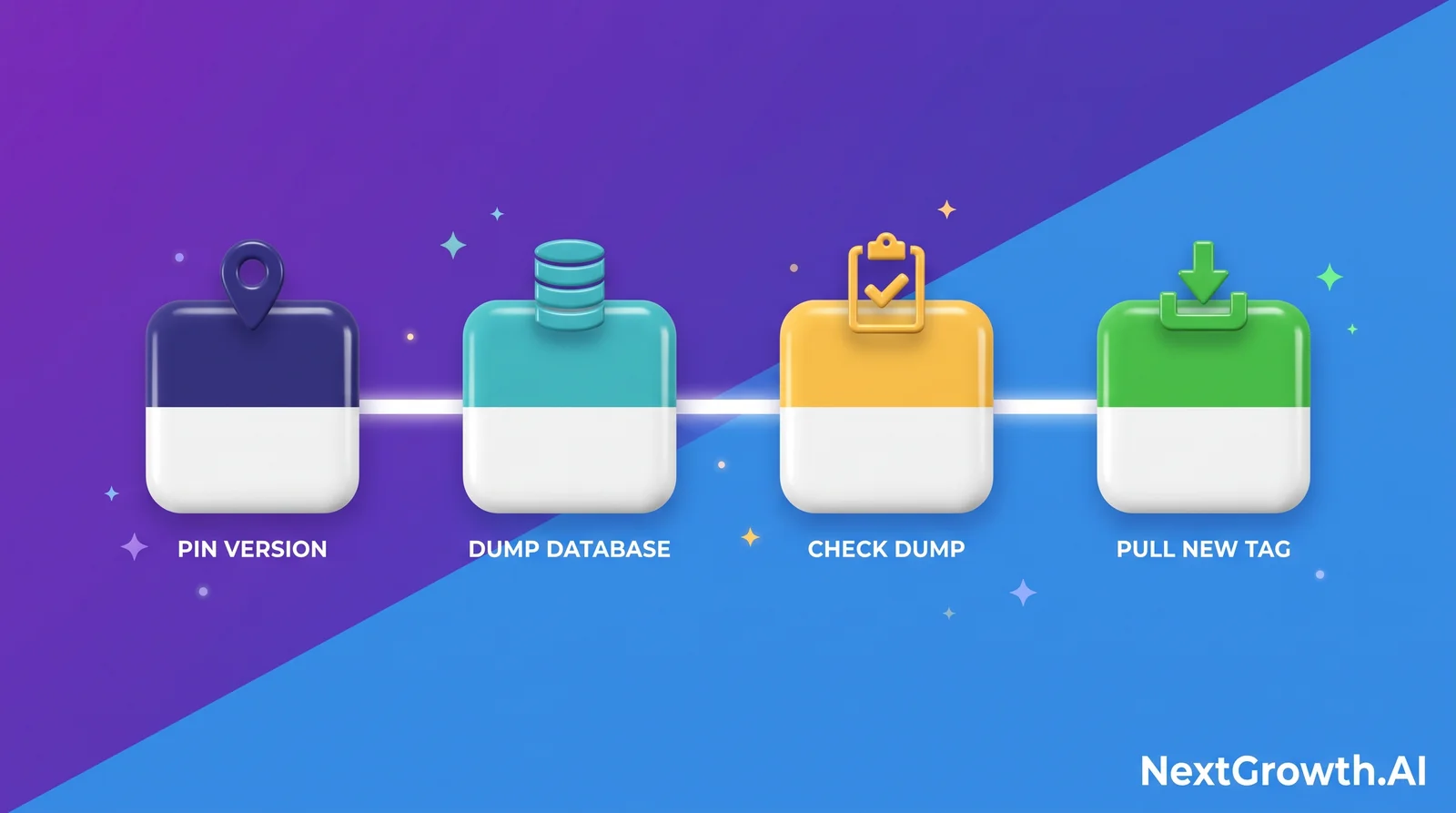
Two notes on that block. pg_dumpall is Postgres; the default SQLite deployment has no dump command, and its equivalent is to stop the container and copy the whole .n8n volume, database file and all. And the encryption key is not optional housekeeping: a restored database without the key that wrote it gives you every workflow back with credentials nothing can decrypt, which is the failure the encryption key article covers in full. If you are on MySQL or MariaDB, stop here and do the database migration first.
The Coolify deployment guide covers pinning an explicit image tag rather than tracking latest, which is what makes step one meaningful. An instance running latest has already upgraded itself the last time it restarted.
How do you actually roll back?
Honestly: you restore. n8n’s update guidance covers how to update self-hosted instances and does not publish a downgrade path, and its breaking-changes documents give migration steps forward only. Nothing there tells you how to take a 2.x database back to 1.x.
So the practical rollback is the restore procedure run against the dump you took in the previous section, restored onto the pinned version you wrote down. If you skipped either, the rollback does not exist, which is the entire reason those two steps come before the tag change.
This is worth being blunt about because the community keeps asking for the other answer. The one request of that kind we traced in n8n’s issue tracker was answered with a restore rather than a downgrade path, which matches the documented forward-only migration but is a single data point, not a survey.
What is coming in n8n 3.0?
Sooner than most people planning a 2.x upgrade realise. n8n’s 3.0 breaking-changes document says the release is “scheduled for October 2026”, and the breaking changes are already published.
The one that reshapes deployments: self-hosted n8n will require Docker. Installations run with npm or npx n8n stop being supported. If that is how you run n8n, the 3.0 upgrade is a deployment change before it is a version change.
The rest, as published:
- Function, Function Item and Item Lists nodes are removed. Move to the Code node and to Split Out, Aggregate, Sort, Limit, Remove Duplicates or Summarize.
- AI Agent node version 1 is removed, taking the SQL, Conversational, OpenAI Functions, Plan and Execute and ReAct modes with it.
- The
$getPairedItemexpression helper is removed. - Compression node limits drop hard:
N8N_COMPRESSION_NODE_MAX_DECOMPRESSED_SIZE_BYTESfrom 2 GiB to 256 MiB andN8N_COMPRESSION_NODE_MAX_ZIP_ENTRIESfrom 5,000 to 1,000. Set them back explicitly if you decompress larger archives. - Chat Hub is retired, and workflow import from a URL is removed from the editor.
- Encryption key rotation becomes a default, rather than the opt-in flag it is today. If you have not read how n8n’s two encryption keys work, October is a reason to.
One caveat the source document states about itself: n8n “will update this page with full details, migration guides, and links as n8n 3.0 approaches its release”. Treat the list as the current shape, not the final one.
How do you check the upgrade worked?
Three checks, in increasing usefulness.
# Version is what you intended
docker exec n8n n8n --version

# The instance is ready, not merely reachable
curl -fsS https://your-n8n-domain.com/healthz/readiness
That second endpoint is the one that waits on the database, a distinction covered in our Prometheus and Grafana guide. Then run one real workflow that touches a credential and a Code node, because those are the two subsystems this upgrade changes most. A workflow that lists green in the executions log is not proof; open it and confirm the node output is populated, not empty. The env-access change produces exactly that shape of failure, and it will not appear in any alert.
Frequently asked questions
Do I lose my workflows when I update n8n?
No. Workflows live in the database, and changing the container image does not touch it. The exception is being on MySQL or MariaDB, where 2.0 requires you to migrate the data to PostgreSQL or SQLite first.
Can I skip versions and jump straight to the latest?
The breaking changes accumulate rather than cancel out, so a jump across a major boundary means every item in that release applies at once. Read the breaking-changes document for the major version you are crossing, not just the release notes for the tag you are pulling.
How do I downgrade n8n if the new version breaks something?
n8n does not publish a downgrade path. Restore the database dump you took before upgrading, onto the version you pinned. Both steps have to happen before the upgrade for this to be available.
Does upgrading n8n require downtime?
The container restart does. The database migration, if you are moving off MySQL or MariaDB, requires considerably more, which is why it is worth doing as its own maintenance window rather than inside the upgrade.
Will n8n 3.0 break my npm install?
It removes support for it. Self-hosted n8n will require a Docker-based deployment from 3.0, so an npm or npx install needs to move to Docker before that upgrade rather than during it.
Take the dump first, then read the list
The order matters more than the details. Pin the version, dump the database, check the dump is not empty, and only then read what changed. Done in that order, the worst case is an afternoon restoring. Done in the other order, the worst case is unbounded.
If your instance is on MySQL or MariaDB, that is the one item on the list that is not a setting, and it deserves its own window before you touch the tag.
If you would rather have someone check the whole surface before you cross a major version, we run a fixed-scope n8n production readiness audit: backup and restore, database and storage backend, health endpoints, task runner configuration and the shipped security defaults, delivered as a report against your own instance, deployed and reviewed in your account rather than ours.
Version, availability and breaking-change claims verified against n8n’s published 2.0 and 3.0 breaking-changes documents and its update guidance on 2026-09-04, with the task-runner and node-exclusion defaults read from packages/@n8n/task-runner/src/config/js-runner-config.ts and packages/@n8n/config/src/configs/nodes.config.ts on the same date. The 3.0 list is pre-release and n8n states it will change.