
n8n Task Runners: the Hardening Page Assumes Another Image
Quick answer: turning task runners on moves Code node execution out of the main n8n process, which is real isolation. It does not give you the hardened container n8n’s own hardening page describes. That page asks for a distroless image as UID 65532, a read-only root filesystem and an AppArmor profile. The default image is Alpine, with a shell, at UID 1000.
Both facts come from n8n. Neither document mentions the other.
One scoping note before the configuration, because it decides which half of this article you need. The runner mode defaults to internal, where the runner is a subprocess of n8n rather than its own container. Everything below about images, users and filesystems applies to external mode; on a default instance those controls belong to the n8n container itself, and the environment variables go there too.
Does enabling task runners actually isolate the Code node?
Partly, and the part it does is worth having.
With runners enabled, JavaScript from the Code node stops executing inside the main n8n process. In external mode the runner is a separate container, which n8n’s task runner documentation describes as “a fully isolated environment to execute the JavaScript defined in the Code node”. That is a genuine boundary, and since n8n 2.0 turned runners on by default, most self-hosted instances now have it whether they chose it or not.
What it is not is a hardened container. n8n publishes a separate page of hardening recommendations, and the gap between that page and the shipped image is the rest of this article.
What the default runner image actually is
Read the Dockerfile rather than the docs and the picture is concrete.
The default runner image builds its runtime stage from python:3.13-alpine, with the JavaScript runner built on node:26.7.0-alpine3.24. It creates a user explicitly:
addgroup -g 1000 -S runner
adduser  -u 1000 -S -G runner -h /home/runner -D runner
USER runner
So it runs as UID 1000, not root. That matters and it is the single most important thing the image does for you.
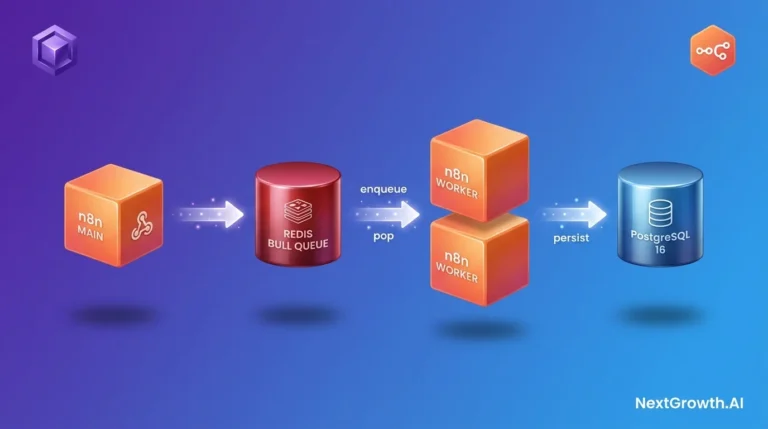
It is also Alpine, which means a shell, a package manager and the usual userland are present in the container where untrusted code runs, alongside the queue-mode workers it sits next to in a scaled deployment. The hardening page’s first three recommendations exist to change exactly that, and nothing in the default setup applies them.
| Hardening recommendation | Default image | Distroless image |
|---|---|---|
| Minimal base, no shell | No, Alpine | Yes, gcr.io/distroless/cc-debian13 |
| Runs as UID 65532 | No, UID 1000 | Yes, declared in the Dockerfile |
| Read-only root filesystem | You configure it | You configure it |
| AppArmor profile | You configure it | You configure it |
| External mode isolation | You configure it | You configure it |
Switch to the distroless image
This is the cheapest change on the list, and it is a tag suffix.
n8n’s documentation says to “append the -distroless suffix to the Docker tag”, giving 2.4.6-distroless as the example. There is no separate registry, no build step.
services:
  n8n-runner:
    image: docker.n8n.io/n8nio/runners:2.4.6-distroless
The distroless variant builds its runtime from gcr.io/distroless/cc-debian13. Distroless images, in n8n’s words, “contain only the application and its runtime dependencies, excluding package managers, shells, and other utilities that aren’t needed at runtime”. Code that escapes into the container finds no shell to spawn.
Pin an explicit version rather than tracking a floating tag, for the reason the Coolify deployment guide covers: an image tracking latest has already upgraded itself the last time it restarted.
Pin the user to 65532
n8n’s hardening page asks you to run the runner “as the unprivileged nobody user with user and group ID 65532”.
A naming note, because it will confuse you otherwise. The distroless project calls that account nonroot, and n8n’s own distroless Dockerfile comments it as “distroless nonroot user (UID 65532)”. The docs call it nobody. They are not the same account: in distroless’ own variables.bzl, NONROOT = 65532 and NOBODY = 65534. The docs have the name wrong and the number right, and the number is what a container runtime enforces, so set the number.
user: "65532:65532"Note what this does on each image. On the distroless variant the Dockerfile already declares USER 65532:65532, so the directive is belt and braces. On the default Alpine image it overrides UID 1000, and you should test it: files baked into that image are owned by runner, not by 65532. The same caution applies to any volume the runner writes, including the paths set in your install’s compose file.
Make the root filesystem read-only without breaking the runner
A read-only root filesystem stops code in the container writing anywhere it should not. It also stops the runner working, unless you do the second half.
n8n’s page is explicit: “Task runners still require some temporary storage for operation. To accommodate this, mount a minimal emptyDir volume to /tmp.”
emptyDir is Kubernetes. The whole hardening page is written for Kubernetes: it links Kubernetes security-context documentation and the Kubernetes AppArmor tutorial. On Docker Compose, which is what most self-hosted stacks run, the equivalent is a tmpfs mount:
    read_only: true
    tmpfs:
      - /tmp:size=64m
    cap_drop:
      - ALL
    security_opt:
      - no-new-privileges:true
Size the /tmp mount to your workflows. n8n’s guidance is to start minimal and “increase the size of the volume accordingly” if your workflows need more temporary space. A Code node handling large binary payloads will need more than 64 MB, and the failure mode when it does not is a workflow error rather than anything subtle.
What is an AppArmor profile actually blocking here?
One specific thing, and it is worth understanding rather than copying.
n8n’s page gives the rule verbatim:
audit deny @{PROC}/[0-9]*/{environ,mounts} rwl,That denies and logs any attempt to read, write or link the per-process environ and mounts files under /proc. The reason, in n8n’s words: “These files can expose environment variables, including secrets and credentials, to code running inside the container.”
Apply it on Compose by naming a loaded profile. security_opt is one key taking a list, so this goes in the same block as no-new-privileges above rather than a second one; two security_opt: keys on one service is a duplicate mapping key and Compose refuses the file:
    security_opt:
      - no-new-privileges:true
      - apparmor=n8n-runner
Here is the connection neither document makes. n8n 2.0 set N8N_BLOCK_ENV_ACCESS_IN_NODE to true, which stops Code node code reading $env. This AppArmor rule stops the same code reading the same environment variables through the filesystem instead. They are two layers over one secret, and they fail independently: the flag closes the documented API, the profile closes the path around it. The /proc route only opens once something in the container can touch the filesystem, which on a default runner it cannot: the module allowlists below are empty, so there is no fs to import. AppArmor is the layer still standing after that assumption fails, whether through an allowlisted module or a sandbox escape.
If your instance predates 2.0 and you have not read what that upgrade changed, the env-access default is one of the five changes that bite.
Where does the Code node module allowlist live now?
On the runner, which is why it looks like it disappeared.
In n8n’s source, NODE_FUNCTION_ALLOW_BUILTIN and NODE_FUNCTION_ALLOW_EXTERNAL are task-runner configuration, and both default to an empty string. Nothing is allowed until you list it.
    environment:
      - NODE_FUNCTION_ALLOW_EXTERNAL=moment,lodash
Set that on whichever process runs the code: the runner service in external mode, the n8n container itself in internal mode. This is the shape of a recurring post-upgrade complaint about the Code node: an import that worked before stops resolving, because the allowlist now has to be set where the runner reads it rather than where n8n used to.
Keep the list short. Every module you allow is a module untrusted code can call, which is the same trade the SSRF allowlist makes in a different place.
How do you check what you are running?
Three commands, in the order that answers the question fastest.
# Which image, and is it the distroless variant?
docker inspect --format '{{.Config.Image}}' n8n-runner

# Which UID is the process actually running as?
docker inspect --format '{{.Config.User}}' n8n-runner

# Is the root filesystem read-only?
docker inspect --format '{{.HostConfig.ReadonlyRootfs}}' n8n-runner
The second command is the useful one, and it answers on both images because it reads the container’s configuration rather than running anything inside it. docker exec n8n-runner id also works on the Alpine image and fails on distroless, but do not read that failure as proof you switched: docker exec exits non-zero for a stopped container, a mistyped name or an unreachable daemon just as readily as for a missing shell. A container that fails these checks is worth catching the same way you catch everything else that ships permissive: by testing it rather than reading the config back.
Frequently asked questions
Do I need external mode for any of this?
The isolation argument is strongest in external mode, where the runner is a separate container you can apply all of these controls to. In internal mode, which is the default (runners.config.ts declares mode: TaskRunnerMode = 'internal'), the runner is a subprocess of n8n and there is no separate container to harden. Everything container-level below applies to external mode; on a default instance the environment variables go on the n8n container and the image, user and filesystem controls are the n8n container’s to set.
Does the distroless image change how workflows behave?
It removes shells and package managers from the container, not runtime capability. What it breaks is anything that assumed a shell was there, including your own debugging habits.
Is the default image insecure?
No. It runs as a non-root user, which is the control that matters most. It is simply not the container the hardening page describes, and the page does not tell you that.
Why is my Code node import failing after upgrading?
Because the module allowlist lives on the task runner and defaults to empty. Set NODE_FUNCTION_ALLOW_EXTERNAL where the runner reads it: the runner service in external mode, the n8n container in internal mode. Note also that the allowlist only unlocks modules already present in n8n/node_modules; it does not install anything, and the distroless image gives you no way to add one.
Where do I put the AppArmor profile?
The profile is loaded on the host, and the container references it by name in security_opt. n8n’s page links the Kubernetes tutorial; on Docker the mechanics are the host’s apparmor_parser plus the apparmor= option.
Read the Dockerfile, then the hardening page
The order matters. n8n’s hardening page is a list of good recommendations with no configuration and a Kubernetes accent. Read it first and you will assume you are further along than you are.
Read the Dockerfile first and the list becomes concrete: you are on Alpine as UID 1000, so the distroless tag and the user: directive are the two changes that move you furthest, the read-only filesystem needs a /tmp mount to work at all, and the AppArmor rule is closing a door that the 2.0 env-access change only half closed.
If you would rather have someone check the whole surface, we run a fixed-scope n8n production readiness audit: task runner configuration, the shipped security defaults, backup and restore, health endpoints and metrics exposure, delivered as a report against your own instance, deployed and reviewed in your account rather than ours.
Recommendations and the AppArmor rule verified against n8n’s task-runner hardening documentation on 2026-09-04. Image base, user and entrypoint read from docker/images/runners/Dockerfile and Dockerfile.distroless, and the module allowlist defaults from packages/@n8n/task-runner/src/config/js-runner-config.ts, on the same date. The Compose directives shown are standard Docker features, not n8n-specific settings.