
n8n Encryption Key Rotation: You Are Rotating the Wrong Key
Quick answer: n8n has two encryption keys, and the one the guides you will find tell you to rotate is the one n8n says never changes. N8N_ENCRYPTION_KEY is the instance master key, set at deployment. It exists to protect the data encryption keys, and those are what rotation actually replaces, behind the flag N8N_ENV_FEAT_ENCRYPTION_KEY_ROTATION.
If your compliance checklist says “rotate the encryption key annually”, this is the distinction that decides whether you follow a safe documented path or take your credentials offline for an afternoon.
Which n8n encryption key are you actually rotating?
Two keys, two jobs.
The instance key is N8N_ENCRYPTION_KEY, the value you generated during install and were told to save somewhere safe. If you followed our Ubuntu and Docker setup, it is in the .env beside your compose file. n8n’s documentation describes it as the master key, set at deployment time, which never changes and is used only to protect the data encryption keys.
The data encryption key, or DEK, is what actually encrypts your credentials, OAuth tokens and other sensitive fields. It lives in the database rather than in your environment, and it is the key rotation replaces.
The relationship is worth stating precisely, because it explains every recovery scenario later in this article. In n8n’s source, a DEK is stored wrapped: encrypted with AES-256-GCM under a key derived as sha256(N8N_ENCRYPTION_KEY) (cipher.ts). Your instance key is a key-wrapping key. It never touches your credential data directly.
| Instance key | Data encryption key | |
|---|---|---|
| Name | N8N_ENCRYPTION_KEY | DEK, no env var |
| Where it lives | Your environment, set at deployment | The n8n database, wrapped |
| What it encrypts | The data encryption keys, plus credential data directly on any row written before rotation | Credentials, OAuth tokens, sensitive fields |
| Does it change | Never, per n8n’s documentation | Every time you rotate |
| Algorithm | AES-256-GCM to wrap a DEK | AES-256-CBC legacy, or the algorithm its key row names |
| If you lose it | Everything is unreadable | Every prefixed row written under it is unreadable. The instance key unwraps a stored key, it cannot regenerate one |
Why do the rotation guides you find change the wrong key?
Because they were written for the older answer, and it used to be the only one. To be exact about the sample: when this was checked on 2026-09-04, the search results for the term contained exactly one blog, lumadock.com, and it teaches the method below. The rest of the first page is n8n’s own documentation, a repository issue and one community thread.
Before n8n shipped native rotation, changing the encryption material meant exactly what those guides describe: export your credentials while the old key still works, stop n8n, put a new value in N8N_ENCRYPTION_KEY, restart, re-import. It is a real procedure and it was the only one available.
It is also the procedure with the failure mode everyone has read about. Miss the export, or restart with a new key against an old database, and every stored credential becomes unreadable. That risk is what made “rotate the n8n encryption key” a question people ask carefully.
Native rotation removes that trade entirely. The instance key stays put, so nothing you already stored stops decrypting, and the key that changes is one n8n manages for you.
Turn on rotation
Take a full database backup first. n8n’s documentation asks for one before you enable the feature, and given what the flag changes about the on-disk format, that is not a formality.
# .env
N8N_ENV_FEAT_ENCRYPTION_KEY_ROTATION=true
That is the exact string the code checks: key-rotation-flag.ts turns rotation on only when the variable equals true.
Three limits to check before you set it:
- Self-hosted only. Rotation is available on self-hosted across all editions, and is not available on n8n Cloud.
- Instance owner only. You need to be the instance owner both to enable the feature and to rotate keys.
- Every instance shares one instance key. All n8n instances must run the same
N8N_ENCRYPTION_KEYvalue. In a queue mode deployment that means main, workers and any webhook process, not just the container you edited.
Restart after setting it. This is an environment variable, so it takes effect on restart, not on save.
One horizon worth knowing before you treat this as optional. n8n’s 3.0 breaking changes, for a release scheduled for October 2026, list key rotation among the security defaults that become default-on. Turning it on deliberately now, with a database backup taken and the format change understood, is a different experience from meeting it inside a major upgrade.
Rotate the key
In the editor, go to Settings, then Data Encryption Keys, and select Rotate key. If you would rather drive it from a script, the same operation is a POST to the /encryption/keys endpoint, which requires the encryptionKey:manage scope.
What happens next is the part that makes native rotation worth the flag. n8n generates a new data encryption key and uses it for all future writes. Existing data encrypted with the previous key stays readable, and n8n silently re-encrypts each record to the new key the next time you update it.
So rotation is not a migration you wait on. There is no bulk re-encryption job to babysit and no window where half your credentials are unreadable, which would otherwise reach you as a wave of workflow failures rather than as a clean error. Old rows keep working under the old DEK until something touches them.
One invariant is enforced underneath: exactly one key may be active at a time. n8n’s key manager treats more than one active key as a violated invariant and raises an error rather than guessing which to write with.
What “no rollback path” actually breaks
The documentation is blunt here and stops short of explaining itself. Enabling rotation is described as a one-way change with no rollback path. You are told not to disable the feature flag after any data has been written in the new format. Older versions of n8n cannot read that format. The docs extend that to any instance running without the flag; key-rotation-flag.ts notes that module load, key seeding and provider wiring stay unconditional, which suggests a current binary with the flag off still resolves keys and only reverts its writes to the legacy format. Treat the docs’ wording as the safe assumption until you have tested your own version.
Here is what the format change is.
With rotation off, n8n writes ciphertext the old way: AES-256-CBC under the instance key, with nothing in front of it. With rotation on, a write goes out as keyId:ciphertext, where the prefix names which DEK in the store encrypted it. On the way back in, n8n splits on the first colon, checks the prefix against the shape a stored key id can have, looks that key up, unwraps it with your instance key, and decrypts. Anything without a valid key-id prefix is treated as legacy data and decrypted with the instance key directly, which is how your pre-rotation rows keep working.
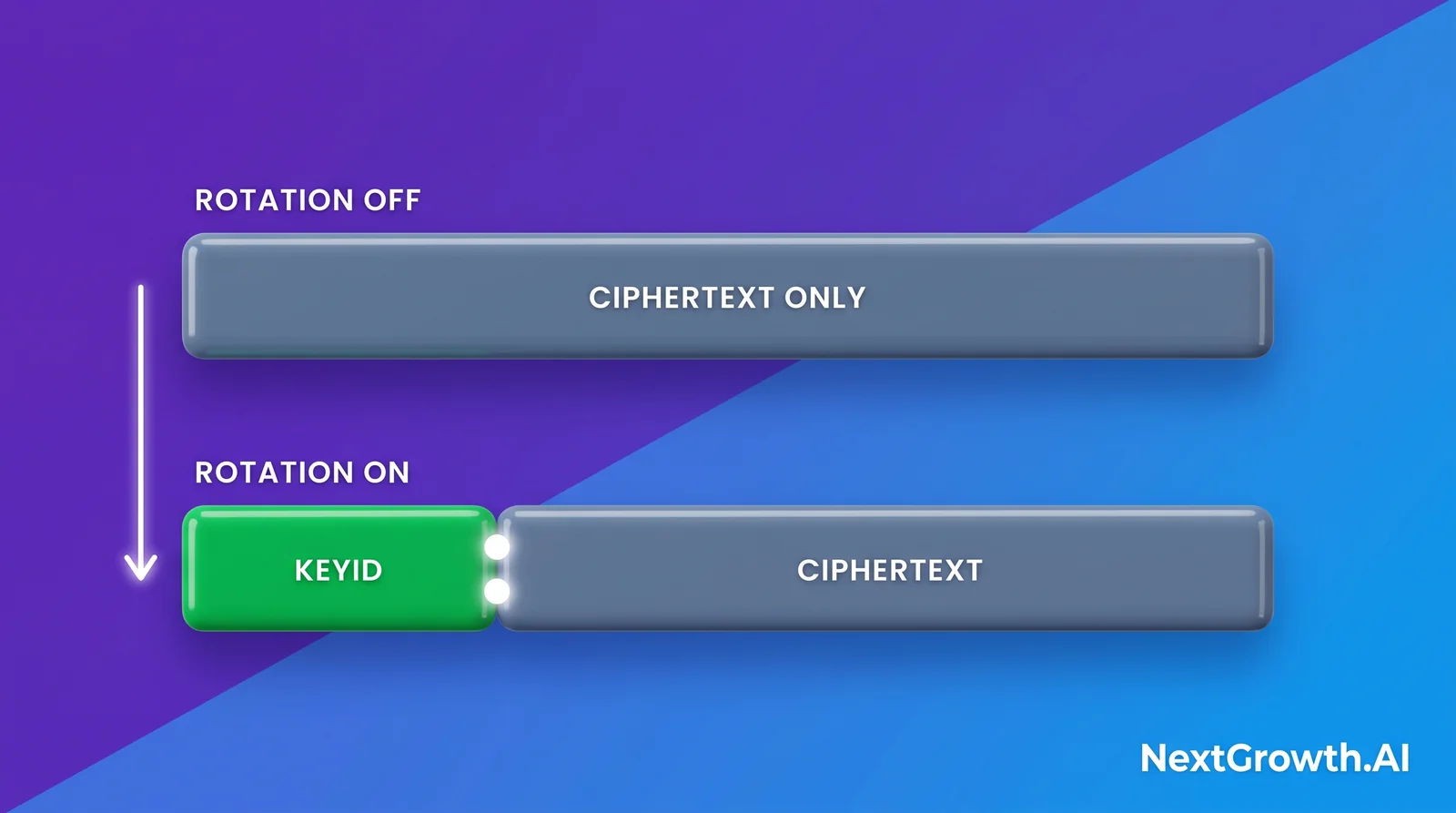
A downgraded binary has no key store to consult. It takes the whole string, prefix included, and tries to decrypt it with the instance key under CBC. That fails. Not because the key is missing, but because the reader does not understand the envelope.
That distinction matters for your recovery position. Rotated rows are not cryptographically stranded: the DEKs sit in the database wrapped by a key derived from N8N_ENCRYPTION_KEY, so an instance that understands the format, holds the same instance key, and still has those rows can read them. Go back up a version and your data is there. Restore a database snapshot without the key rows, or roll back to a binary that predates the module, and you are looking at unreadable ciphertext until you come forward again.
What is genuinely unrecoverable has not changed: lose N8N_ENCRYPTION_KEY and everything is gone, because it wraps every DEK you own. Rotation does not soften that, and it is the reason the instance key is the value that belongs in a secret manager rather than only in a .env on one box. The same logic drives the other defaults that ship permissive.
What happens if a worker never gets the key?
It refuses to start, and it tells you exactly why. n8n’s worker startup error reads:
Failed to start worker because of missing encryption key. Please set the
N8N_ENCRYPTION_KEYenv var when starting the worker. See: https://docs.n8n.io/hosting/configuration/configuration-examples/encryption-key/
This is a better failure than the alternative, because a worker that started without the key would pull jobs it could not decrypt credentials for and fail them one at a time. Refusing to boot is loud. A worker container in a restart loop after a deploy is worth checking against this before anything else, particularly on stacks where the main instance reads a .env the worker service was never given.
That refusal is visible where you already look: a worker in a restart loop shows up in docker compose ps and in any container restart counter, which is the signal worth alerting on rather than waiting for a workflow to fail. It is the kind of distinction covered in what monitoring can and cannot see.
How do you check which format your rows are in?
Read a credential row and look at the front of the stored value. A value that begins with a short token followed by a colon was written after rotation, under the DEK that token names. A value that starts straight into ciphertext is legacy format, encrypted with the instance key.
That check answers the question the documentation’s warning implies but does not let you test: whether any data has been written in the new format yet. Read it as an observation, not as permission to turn the flag back off. Sampling one row cannot prove a negative across a whole table, enabling the flag seeds a key immediately, and n8n’s own wording is unconditional: enabling rotation is a one-way change with no rollback path. Treat it as one-way.
If you are storing your key with the rest of your stack secrets on Coolify, the save your encryption key step covers where that value should live before you start any of this.
Frequently asked questions
Does rotating change N8N_ENCRYPTION_KEY?
No. That is the point of the feature. The instance key stays as it is, and rotation replaces the data encryption key it protects.
Can I turn the feature flag back off?
Only before any data has been written in the new format. n8n’s documentation says not to disable the flag after that point, because instances running without it cannot read prefixed rows.
Do I still need the old key after rotating?
You need N8N_ENCRYPTION_KEY, always. It is not the key being rotated, and it unwraps every data encryption key including the new one.
Is rotation available on n8n Cloud?
No. It is a self-hosted feature, available across all self-hosted editions.
Do my credentials get re-encrypted immediately?
No. Existing records stay readable under the previous key and are re-encrypted to the new one the next time you update them.
Rotate the right key, then check the rest of your defaults
One line of configuration and one UI click separate a documented rotation from the export-and-reimport procedure that guide still describes. The prerequisite is the same either way: know where N8N_ENCRYPTION_KEY lives and be certain you could produce it tomorrow.
Encryption key handling is one item on a longer list of things that ship quiet on a self-hosted instance. If you would rather have someone check the whole surface, we run a fixed-scope n8n production readiness audit: key handling, backup and restore, health endpoints, metrics exposure and the shipped security defaults, delivered as a report against your own instance, deployed and reviewed in your account rather than ours.
Configuration, availability and behaviour claims verified against n8n’s encryption key rotation documentation on 2026-09-04, with the format and wrapping details read from packages/core/src/encryption/cipher.ts, packages/cli/src/modules/encryption-key-manager/ and packages/core/src/instance-settings/worker-missing-encryption-key.error.ts on the same date. n8n ships quickly; confirm against the version you run.