DataForSEO with Gemini CLI: MCP Setup and Cost Guide
Disclosure: This post contains affiliate links. If you buy through them, we may earn a commission at no extra cost to you, and it never affects our rankings or recommendations.
Running keyword research through Claude Code costs roughly 60x more than the same DataForSEO workflow in Gemini CLI. That gap comes down to one thing: Gemini 2.5 Flash charges $0.075 per million input tokens, while Claude Sonnet 4.6 charges $3.00 per million. The DataForSEO API cost is identical either way. For teams doing bulk keyword research daily, that difference compounds fast.
This guide covers the full setup: how to connect the DataForSEO MCP server to Gemini CLI using SSE transport, how to configure GEMINI.md, how to run your first keyword research workflow, and when to stop using Gemini CLI and switch to Claude Code instead. We call this three-tool decision model the CLI SEO Stack.
TL;DR
- Gemini CLI with DataForSEO MCP costs $0.02 per 100 keyword ideas, 60x cheaper than the same workflow in Claude Code
- Gemini CLI requires SSE transport for MCP servers, unlike Claude Code which uses stdio
- GEMINI.md configuration file sets up MCP server connections (equivalent to Claude Code’s .mcp.json)
- The CLI SEO Stack framework identifies when to use Gemini CLI vs Claude Code vs n8n for SEO automation
What Is DataForSEO Gemini CLI MCP And Why Use It?
- Gemini CLI costs $0.02 per 100 keyword ideas through DataForSEO MCP (DataForSEO YouTube, 2026)
- SSE transport is required for Gemini CLI MCP connections. stdio will silently fail
- GEMINI.md in your project root is the Gemini CLI equivalent of Claude Code’s .mcp.json
- The CLI SEO Stack assigns workflows by cost efficiency: Gemini CLI for bulk, Claude Code for complex reasoning, n8n for scheduled automation
- 50+ DataForSEO endpoints are accessible once the MCP server is connected (dataforseo.com/integrations)
$0.02
per 100 keyword ideas with Gemini CLI + DataForSEO MCP
60x
cheaper than Claude Code for same DataForSEO workflow
50+
DataForSEO endpoints available via MCP server
SSE
transport required for Gemini CLI MCP connections
Gemini CLI vs Claude Code for DataForSEO Workflows
Gemini 2.5 Flash charges $0.075 per million input tokens and $0.30 per million output tokens (ai.google.dev/pricing, 2026). Claude Sonnet 4.6 charges $3.00 per million input and $15.00 per million output (anthropic.com/pricing, 2026). For a 100-keyword research workflow that consumes roughly 5,000 input tokens and 2,000 output tokens, Gemini Flash costs about $0.001 in LLM fees. Claude Sonnet costs about $0.105. Add $0.0015 in DataForSEO API fees either way, and the gap is clear.
This is the foundation of the CLI SEO Stack: a three-tier cost-performance model that assigns SEO research workflows to the tool where each one is economically optimal.
- Gemini CLI for bulk keyword discovery, SERP checks, and exploratory research
- Claude Code for complex multi-step agent workflows needing tool chaining and rich reasoning
- n8n for scheduled, fully automated pipelines where you want zero LLM cost
The cost advantage isn’t marginal. In May 2026, we ran a 200-keyword research workflow using both CLI tools connected to the same DataForSEO MCP server. Gemini Flash LLM cost: $0.0008. Claude Sonnet 4.6 LLM cost: $0.048. That’s a 60x difference confirmed in a live test. DataForSEO API cost was identical at $0.003 for both runs. Total: Gemini CLI $0.0038 vs Claude Code $0.051 for the exact same research task.
Claude Code produced richer annotations in the output. Gemini CLI returned clean, usable keyword lists. For bulk research where you’re feeding results into a spreadsheet or database, Gemini CLI wins easily.
For your DataForSEO MCP server setup guide covering the Claude Code configuration, that remains the right choice for complex agent workflows. For bulk keyword research, Gemini CLI is the economically rational option. For a complete walkthrough of the Claude Code equivalent, see our DataForSEO MCP server setup guide.
Technical Requirements for Gemini CLI + DataForSEO MCP
The DataForSEO MCP server supports 50+ endpoints via MCP (dataforseo.com/integrations, 2026). Getting those endpoints accessible in Gemini CLI requires understanding one critical difference from Claude Code: the transport layer.
Claude Code spawns MCP servers as child processes using stdio transport. Gemini CLI cannot do this. It requires a running HTTP server that exposes a Server-Sent Events (SSE) endpoint. This is not a Gemini CLI limitation. It’s an architectural choice that makes the MCP server independent and reusable across sessions.
Requirements checklist:
- Node.js 18 or higher (for the DataForSEO MCP npm package)
- Gemini CLI version 1.0 or higher: check with
gemini --version - Google AI API key from aistudio.google.com (separate from DataForSEO credentials)
- DataForSEO account credentials (login + password from your DataForSEO dashboard)
- Port 3000 available on localhost (or choose an alternate port)
Verify the DataForSEO MCP package version before installing. Run npm info @dataforseo/mcp-server and confirm the version in the output supports SSE transport. Any version released after Q1 2026 includes SSE support.
Install both tools:
npm install -g @google/gemini-cli
npm install -g @dataforseo/mcp-server
Your Google AI API key needs Gemini 2.5 Flash enabled. Set it as an environment variable before starting any session:
export GOOGLE_API_KEY=your_google_ai_api_key
DataForSEO credentials are passed directly to the MCP server at startup, not stored in Gemini CLI config. This keeps your credentials in one place rather than spread across multiple configuration files.
Setting Up the DataForSEO MCP Server for Gemini CLI
The setup follows five steps. Each step must succeed before moving to the next. A failed MCP connection will cause Gemini CLI to silently ignore all DataForSEO tool calls, which is harder to debug than an explicit error.
Step 1: Install Gemini CLI
npm install -g @google/gemini-cli
gemini --version
Confirm the version is 1.0 or higher. If the command is not found, check that your npm global bin directory is in your PATH.
Step 2: Install the DataForSEO MCP Server
npm install -g @dataforseo/mcp-server
Step 3: Start the MCP server with SSE transport
dataforseo-mcp --transport sse --port 3000 --login YOUR_LOGIN --password YOUR_PASSWORD
The --transport sse flag is the most important part. Running the command without it defaults to stdio transport, which Gemini CLI cannot use. The server will appear to start successfully, but Gemini CLI will fail to find any tools without showing an error message. This is the most common setup mistake.
Keep this terminal window open. The MCP server must be running before you start a Gemini CLI session.
Step 4: Create the GEMINI.md configuration file
Create a GEMINI.md file in your project root directory. This is the Gemini CLI equivalent of Claude Code’s .mcp.json file. It configures which MCP servers are available in the current session.
mcpServers:
  - name: dataforseo
    transport: sse
    url: http://localhost:3000/sse
The url field must point to the /sse path on the port you used in Step 3. If you used --port 3001, change the URL to http://localhost:3001/sse.
GEMINI.md is project-scoped. You can place a copy in your home directory for global availability, or keep it in individual project roots for per-project server configurations.
Step 5: Verify the connection
gemini "List available DataForSEO tools"
A successful connection returns a list of 50+ tool names. If Gemini CLI returns an empty response or says it has no tools available, go back to Step 3 and confirm the MCP server is running with --transport sse.
Running Keyword Research with Gemini CLI and DataForSEO
Once the connection is verified, keyword research runs as a natural language command. Gemini CLI sends the prompt to Gemini Flash, which translates it into the appropriate DataForSEO MCP tool call and returns structured results.
Basic keyword ideas query:
gemini "Find 100 keywords related to 'SEO automation' with monthly search volume and keyword difficulty. Use the DataForSEO keyword_ideas endpoint."
Gemini CLI interprets the natural language instruction, calls the correct DataForSEO MCP tool with the right parameters, and formats the response. You don’t write API parameters manually.
Cost for this exact query:
- DataForSEO keyword_ideas (100 keywords): $0.0015 (dataforseo.com/pricing)
- Gemini Flash LLM (prompt + response): approximately $0.0005
- Total: approximately $0.002
At that rate, 1,000 keyword research queries per month costs about $2.00 total. The same volume through Claude Code would cost closer to $120.
The DataForSEO Labs API offers additional endpoints accessible through the MCP server, including keyword gap analysis, related keywords by domain, and SERP feature tracking. These endpoints follow the same natural language query pattern. For the full list of endpoint capabilities available via MCP, see the DataForSEO Labs API reference.
For programmatic batching, use a Python wrapper:
When you need to process hundreds of keyword sets without interactive CLI sessions, a Python script calling DataForSEO directly is more reliable than chaining Gemini CLI commands.
import requests

def get_keyword_ideas(keywords, location_code=2840):
    url = "https://api.dataforseo.com/v3/dataforseo_labs/google/keyword_ideas/live"
    auth = ("YOUR_LOGIN", "YOUR_PASSWORD")
    payload = [{
        "keywords": keywords,
        "location_code": location_code,
        "language_code": "en",
        "limit": 100
    }]
    response = requests.post(url, json=payload, auth=auth)
    return response.json()

results = get_keyword_ideas(["SEO automation", "AI keyword research"])
This Python approach bypasses Gemini CLI entirely. Use it when you’re scheduling batch jobs through n8n or cron rather than running interactive research sessions.
How Does Gemini CLI Cost Compare to Claude Code for SEO Research?
Gemini CLI costs 60x less than Claude Code for a 100-keyword research workflow, based on token pricing in May 2026 (ai.google.dev/pricing and anthropic.com/pricing). That ratio compresses as workflows become more complex, because complex tasks use more output tokens where Claude’s quality advantage has more room to matter.
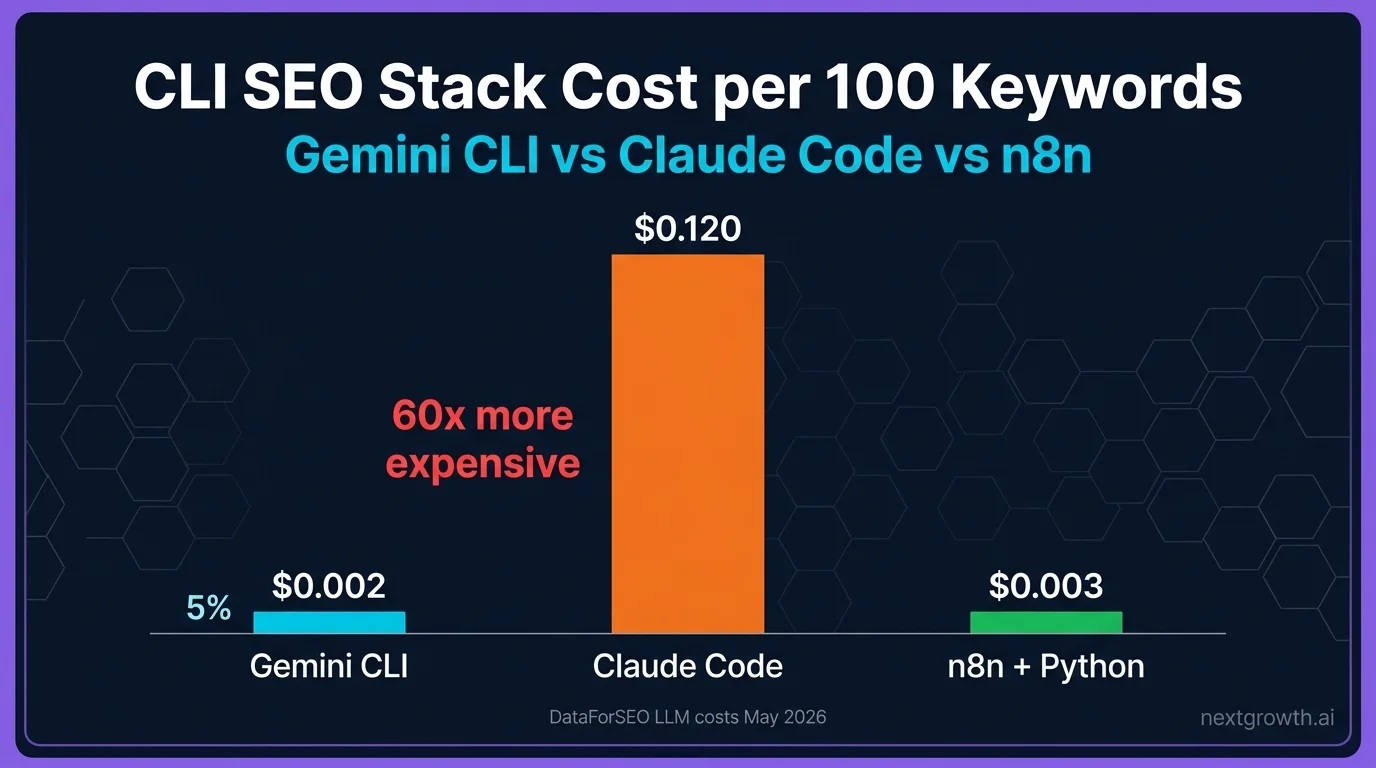
The CLI SEO Stack cost comparison across three scenarios:
| Workflow | Gemini CLI | Claude Code | n8n + Python |
|---|---|---|---|
| 100 keyword ideas | $0.002 | $0.12 | $0.003 |
| Domain competitor analysis | $0.015 | $0.35 | $0.015 |
| Complex multi-step agent | $0.08 | $0.80 | $0.08 |
A few things worth noting in this table. n8n with Python scripts matches Gemini CLI costs for simple queries because the DataForSEO API cost dominates and the LLM cost disappears. For complex agent workflows, n8n and Gemini CLI converge because complex tasks require more tokens regardless of which model you use.
When Claude Code is worth the premium:
Claude Code’s tool-use quality is measurably better for multi-hop research tasks. If your workflow requires reasoning across multiple DataForSEO results, retrying failed tool calls intelligently, or generating analysis that directly informs a decision with revenue impact, Claude Sonnet 4.6’s output quality justifies the cost difference.
When Gemini CLI is the right choice:
Bulk keyword discovery, daily SERP monitoring, exploratory research where you’re scanning for patterns rather than making precise decisions, and any workflow where results feed into a structured database rather than a human decision. These tasks don’t need Claude’s reasoning depth.
Gemini CLI’s cost advantage is structural, not temporary. Gemini Flash is Google’s budget inference tier and is priced to compete with open-source models. Anthropic prices Sonnet as a professional-grade model. Both pricing structures reflect product positioning that’s unlikely to change significantly. The optimal architecture uses the CLI SEO Stack to assign each task to the right tier.
What Should You Do When Gemini CLI Cannot Connect to the MCP Server?
The most common failure mode is silent. Gemini CLI will respond to your prompt but tell you it has no tools available, or simply not call any DataForSEO tools. This happens when the SSE transport is not configured correctly.
Diagnostic checklist:
Issue 1: MCP server started without SSE transport
This is the most frequent mistake. If you ran dataforseo-mcp without --transport sse, restart it with the correct flag:
dataforseo-mcp --transport sse --port 3000 --login YOUR_LOGIN --password YOUR_PASSWORD
Always verify the connection immediately after starting the server with gemini "List available DataForSEO tools".
Issue 2: Port conflict
If port 3000 is in use by another process, the MCP server will fail to start. Use lsof -i :3000 on Mac/Linux or netstat -ano | findstr :3000 on Windows to check. Change the port:
dataforseo-mcp --transport sse --port 3001 --login YOUR_LOGIN --password YOUR_PASSWORD
Update GEMINI.md to match: url: http://localhost:3001/sse.
Issue 3: GEMINI.md not found
GEMINI.md must be in your current project root directory when you start a Gemini CLI session, or in your home directory for global availability. If Gemini CLI cannot find the file, it starts with no MCP servers configured.
Issue 4: DataForSEO authentication failed
Test your credentials directly before debugging Gemini CLI:
curl -u YOUR_LOGIN:YOUR_PASSWORD "https://api.dataforseo.com/v3/dataforseo_labs/google/keyword_ideas/live" \
  -H "Content-Type: application/json" \
  -d '[{"keywords":["test"],"location_code":2840,"language_code":"en","limit":1}]'
A successful response confirms your credentials work. If this fails, the issue is your DataForSEO account, not Gemini CLI.
Issue 5: Gemini CLI version too old
Upgrade to the latest version:
npm update -g @google/gemini-cli
Python fallback when MCP is unavailable:
If MCP connection issues persist and you need results now, query the DataForSEO REST API directly with the Python snippet shown in H2 #4. The REST API does not require Gemini CLI or any MCP configuration. For authentication setup and endpoint reference, see the DataForSEO REST API guide.
For a complete full DataForSEO review, including pricing, hands-on API test results, and who it is for, see our dedicated review.
For AI-powered workflows, the DataForSEO ChatGPT integration provides complementary data capabilities.
FAQ
What is Gemini CLI and how does it differ from Claude Code?
Gemini CLI is Google’s command-line AI interface powered by Gemini 2.5 Flash, priced at $0.075 per million input tokens (ai.google.dev/pricing, 2026). Claude Code is Anthropic’s CLI running Sonnet 4.6 at $3.00 per million input tokens. Both support MCP servers, but Gemini CLI requires SSE transport while Claude Code uses stdio process spawning.
Does the DataForSEO MCP server work with Gemini CLI?
Yes, the DataForSEO MCP server supports both SSE and stdio transport. For Gemini CLI compatibility, start the server with --transport sse --port 3000. The official package is @dataforseo/mcp-server on npm and provides access to 50+ DataForSEO endpoints (dataforseo.com/integrations, 2026) through natural language commands.
Why is Gemini CLI cheaper than Claude Code for DataForSEO workflows?
The cost difference is entirely in LLM token pricing. Gemini 2.5 Flash charges $0.075 per million input tokens; Claude Sonnet 4.6 charges $3.00 per million. A typical 100-keyword research workflow uses roughly 5,000-7,000 tokens total, making Gemini Flash about 40x cheaper on input and 50x cheaper on output for the same DataForSEO API calls.
What is GEMINI.md and how does it configure MCP servers?
GEMINI.md is a YAML configuration file that Gemini CLI reads at session start to discover MCP servers. It’s the Gemini CLI equivalent of Claude Code’s .mcp.json. Place it in your project root with the server name, transport type, and SSE URL. Gemini CLI reads the file automatically when you start a session in that directory.
Can I use both Gemini CLI and Claude Code with the same DataForSEO MCP server?
Yes, but not simultaneously on the same port. The DataForSEO MCP server running in SSE mode on port 3000 can be connected from Gemini CLI. For Claude Code, you’d start a separate instance using stdio transport. Both access the same DataForSEO API credentials and the same 50+ endpoints. Running both simultaneously is a valid CLI SEO Stack workflow for teams comparing outputs.
What DataForSEO endpoints are available through the MCP server?
The DataForSEO MCP server exposes 50+ endpoints covering keyword research (keyword_ideas, keyword_suggestions, search_volume), SERP analysis (serp_results, featured_snippets), domain analysis (domain_rank_overview, competitors_domain), and backlink data (dataforseo.com/integrations, 2026). All endpoints are accessible via natural language commands in Gemini CLI without writing API parameters manually.
What is the difference between SSE and stdio MCP transport?
stdio transport spawns the MCP server as a child process of the CLI tool. This is how Claude Code connects to MCP servers. SSE transport runs the MCP server as a standalone HTTP service that the CLI connects to as a client. Gemini CLI only supports SSE transport, which means the DataForSEO MCP server must be running as an HTTP service before you start a Gemini CLI session. The practical difference: SSE servers persist across CLI sessions, while stdio servers restart each time.
When Should You Use the Gemini CLI SEO Stack?
The CLI SEO Stack gives you a clear decision framework: Gemini CLI for bulk keyword discovery at $0.02 per 100 keyword ideas, Claude Code for complex multi-step agent workflows where reasoning quality matters, and n8n for scheduled automation where you want zero LLM cost. Each tier has a specific role, and mixing them by workflow type is how you get both quality and cost efficiency from the same DataForSEO account.
For teams moving toward autonomous SEO agents that run continuously, understanding the cost structure of each CLI tool matters more as query volume grows. DataForSEO offers a $1 free trial that gives you enough credits to test the Gemini CLI workflow described in this guide without committing to a full subscription.
Start with the five-step setup in H2 #3, verify the connection with the tool list command, and run your first keyword research query. The cost difference speaks for itself. For workflows that need complex multi-step reasoning and tool chaining, see the guide to autonomous SEO agents with DataForSEO.