DataForSEO Merchant API: Python Guide to E-commerce Data
Disclosure: This post contains affiliate links. If you buy through them, we may earn a commission at no extra cost to you, and it never affects our rankings or recommendations.
- DataForSEO Merchant API covers both Google Shopping and Amazon product data in one API with identical authentication
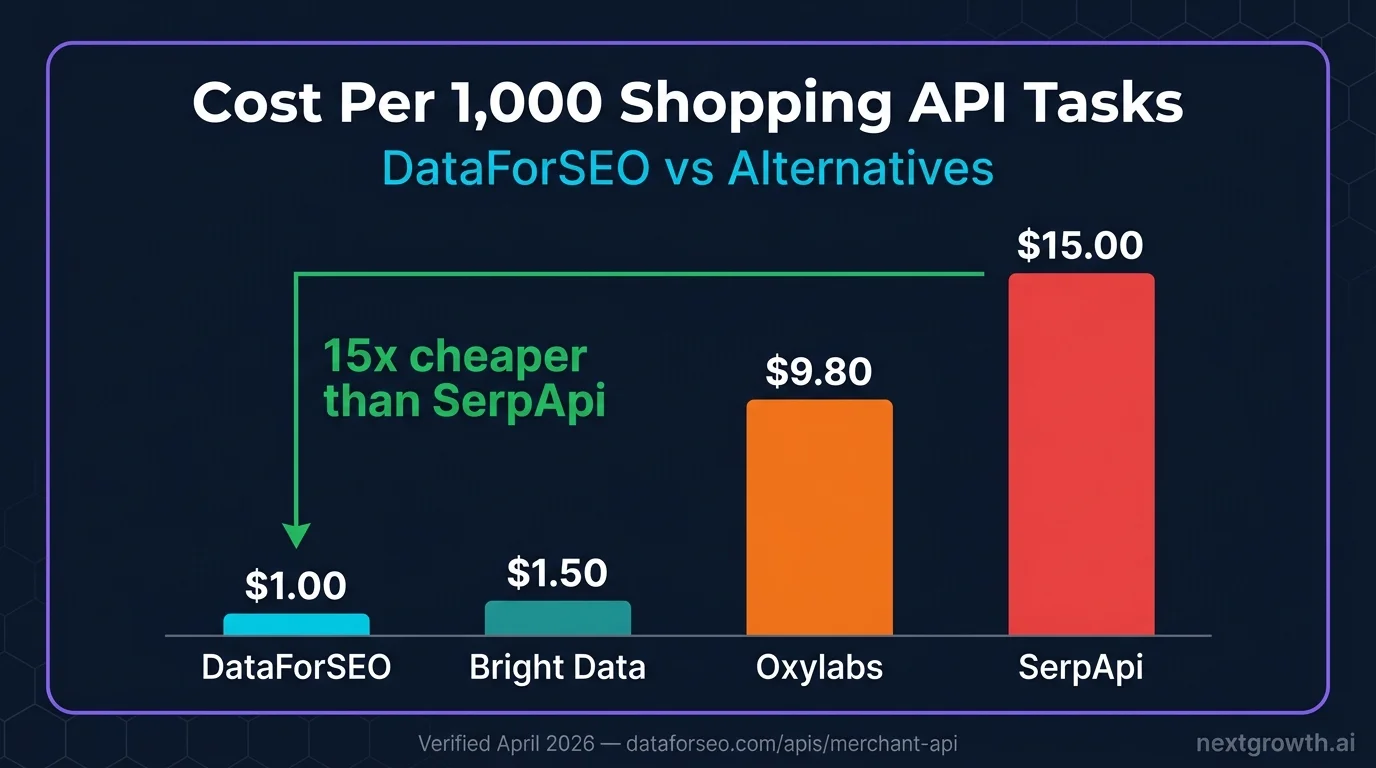
- Standard queue costs $1 per 1,000 tasks, 10-15x cheaper than SerpApi ($15/1K) for the same Google Shopping data
- Returns 25+ fields per product: title, price, ratings, reviews count, seller, delivery info, and SERP rank position
- Async task model: submit batch, poll for completion, fetch results, handling high-volume price monitoring without rate limit issues
- Named framework: The Cross-Marketplace Intelligence Stack: query both Google Shopping and Amazon, reconcile by product, build unified price and demand signals
The DataForSEO Merchant API retrieves product listings, prices, seller data, and customer ratings from Google Shopping and Amazon without managing proxies, parsing HTML, or hitting rate limits from the search engines themselves. You submit tasks via a POST request, poll for readiness, then fetch structured JSON results covering everything from product titles and delivery costs to is_amazon_choice flags and star ratings.
This guide covers the full Cross-Marketplace Intelligence Stack: setting up the Python client, querying Google Shopping products, pulling Amazon ASIN data, extracting reviews, and combining both marketplaces into a unified price monitoring pipeline.
What Is the DataForSEO Merchant API?
The DataForSEO Merchant API is a pre-built e-commerce data layer that scrapes Google Shopping and Amazon product listings on your behalf. It handles browser rendering, CAPTCHAs, geolocation, and pagination so you receive clean JSON instead of raw HTML.
Google Shopping coverage includes theproducts, product_info, sellers, reviews, and sellers_ad_url resources. Each supports Standard queue (up to 45 minutes, $0.001 per task) and Priority queue (up to 1 minute, $0.002 per task). Standard is suitable for overnight batch runs; Priority is for dashboards needing near-real-time data.
Amazon coverage includes products (search result listings), sellers (seller pages), asin (product variations by ASIN), and reviews. Pricing follows the same Standard/Priority model: $0.0015 per Amazon ASIN lookup on Standard, $0.003 on Priority.
The Cross-Marketplace Intelligence Stack combines both: query a keyword on Google Shopping to get current retail prices and seller rankings, then query the same keyword on Amazon to get bought_past_month demand signals and is_best_seller flags. The merged dataset tells you both what competitors are charging and what customers are actually buying. For broader context on the DataForSEO API ecosystem, see the DataForSEO API guide.
Setting Up the Merchant API Python Client
The Merchant API uses the same Base64 authentication as every other DataForSEO endpoint. The async task model (POST to create, GET to poll, GET to fetch) requires a helper for the polling loop.
import requests
import base64
import time
from tenacity import retry, stop_after_attempt, wait_exponential

DFS_LOGIN = "[email protected]"
DFS_PASSWORD = "your_password"
DFS_BASE = "https://api.dataforseo.com/v3"

credentials = base64.b64encode(f"{DFS_LOGIN}:{DFS_PASSWORD}".encode()).decode()
HEADERS = {
"Authorization": f"Basic {credentials}",
"Content-Type": "application/json"
}

@retry(stop=stop_after_attempt(3), wait=wait_exponential(multiplier=1, min=2, max=10))
def dfs_post(endpoint: str, payload: list) -> dict:
try:
r = requests.post(
f"{DFS_BASE}/{endpoint}",
headers=HEADERS,
json=payload,
timeout=30
)
r.raise_for_status()
return r.json()
except requests.exceptions.Timeout:
raise RuntimeError(f"Timeout on POST {endpoint}")
except requests.exceptions.HTTPError as e:
raise RuntimeError(f"HTTP {e.response.status_code}: {e.response.text[:200]}")


@retry(stop=stop_after_attempt(3), wait=wait_exponential(multiplier=1, min=2, max=10))
def dfs_get(endpoint: str) -> dict:
try:
r = requests.get(
f"{DFS_BASE}/{endpoint}",
headers=HEADERS,
timeout=30
)
r.raise_for_status()
return r.json()
except requests.exceptions.Timeout:
raise RuntimeError(f"Timeout on GET {endpoint}")
except requests.exceptions.HTTPError as e:
raise RuntimeError(f"HTTP {e.response.status_code}: {e.response.text[:200]}")


def poll_tasks_ready(resource_path: str, max_wait: int = 300) -> list:
"""Poll tasks_ready until tasks are complete. Max wait: max_wait seconds.
Returns list of {id, tag, date_posted} dicts.
"""
deadline = time.time() + max_wait
while time.time() < deadline:
resp = dfs_get(f"{resource_path}/tasks_ready")
tasks = resp.get("tasks", [])
if tasks and tasks[0].get("result"):
items = tasks[0]["result"]
if items:
return items
time.sleep(10)
raise TimeoutError(f"Tasks not ready after {max_wait}s")
pip install requests tenacity
The poll_tasks_ready() helper handles the async pattern: submit a batch of keywords, call tasks_ready every 10 seconds, and collect task IDs once results are available. Standard queue tasks typically complete in 5-15 minutes for Google Shopping.
Scraping Google Shopping Results
The merchant/google/products endpoint returns up to 40 product listings per task, including price, seller, ratings, and SERP rank position.
# Requires dfs_post(), dfs_get(), poll_tasks_ready() from setup above

def get_google_shopping_products(keywords: list[str], location_code: int = 2840, priority: int = 1) -> list:
"""Fetch Google Shopping product listings for a list of keywords.
priority=1 is Standard ($0.001/task, up to 45 min)
priority=2 is Priority ($0.002/task, up to 1 min)
"""
if len(keywords) > 100:
raise ValueError("Maximum 100 keywords per batch POST")

payload = [
{
"keyword": kw,
"location_code": location_code,
"language_code": "en",
"priority": priority,
"tag": f"shopping_{kw[:30]}"
}
for kw in keywords
]

try:
# Step 1: Submit batch
post_resp = dfs_post("merchant/google/products/task_post", payload)
task_count = len(post_resp.get("tasks", []))
print(f"  Submitted {task_count} tasks")

# Step 2: Wait for completion
ready_items = poll_tasks_ready("merchant/google/products", max_wait=600)

# Step 3: Fetch each result
results = []
for item in ready_items:
task_id = item["id"]
resp = dfs_get(f"merchant/google/products/task_get/advanced/{task_id}")
task_result = resp["tasks"][0]

if task_result["status_code"] != 20000:
print(f"  Task {task_id} error: {task_result['status_message']}")
continue

items = task_result.get("result", [{}])[0].get("items", [])
keyword = task_result.get("data", {}).get("keyword", "")

for product in items:
results.append({
"keyword": keyword,
"rank": product.get("rank_absolute"),
"title": product.get("title"),
"price": product.get("price"),
"currency": product.get("currency"),
"seller": product.get("seller"),
"rating": product.get("product_rating", {}).get("value") if product.get("product_rating") else None,
"reviews": product.get("reviews_count"),
"delivery": product.get("delivery_info", {}).get("message") if product.get("delivery_info") else None,
"url": product.get("url"),
"type": product.get("type")
})

return results

except (KeyError, IndexError) as e:
raise RuntimeError(f"google_shopping parse error: {e}")


# Usage: monitor prices for 3 product categories
keywords = ["wireless earbuds", "standing desk", "mechanical keyboard"]
products = get_google_shopping_products(keywords)

print(f"\nFound {len(products)} products across {len(keywords)} keywords\n")
for p in sorted(products, key=lambda x: (x['keyword'], x['rank'] or 999)):
price_str = f"${p['price']:.2f}" if p['price'] else "N/A"
rating_str = f"{p['rating']:.1f}★" if p['rating'] else "no rating"
print(f"[{p['keyword']}] Rank {p['rank']:>2} | {price_str:>8} | {rating_str} | {p['title'][:45]}")
Each task fetches 40 products by default, sorted by relevance. To sort by price (ascending), add "sort_by": "price_low_to_high" to the payload. The type field differentiates organic listings (google_shopping_serp) from paid ads (google_shopping_paid). Filter to google_shopping_serp for competitive price analysis.
Getting Amazon Product Data
The Amazon products endpoint returns search listings with demand signals that Google Shopping does not provide: bought_past_month, is_amazon_choice, and is_best_seller flags.
# Requires dfs_post(), dfs_get(), poll_tasks_ready() from setup above

def get_amazon_products(keywords: list[str], location_code: int = 2840) -> list:
"""Fetch Amazon product search results including demand signals.
Cost: $0.001 per task (Standard queue). Priority: $0.002.
Returns: title, price, rating, reviews_count, bought_past_month, is_amazon_choice, is_best_seller.
"""
if len(keywords) > 100:
raise ValueError("Maximum 100 keywords per batch POST")

payload = [
{
"keyword": kw,
"location_code": location_code,
"language_code": "en",
"priority": 1,
"tag": f"amazon_{kw[:30]}"
}
for kw in keywords
]

try:
# Step 1: Submit
post_resp = dfs_post("merchant/amazon/products/task_post", payload)
print(f"  Submitted {len(post_resp.get('tasks', []))} Amazon tasks")

# Step 2: Poll
ready_items = poll_tasks_ready("merchant/amazon/products", max_wait=600)

# Step 3: Fetch
results = []
for item in ready_items:
task_id = item["id"]
resp = dfs_get(f"merchant/amazon/products/task_get/advanced/{task_id}")
task_result = resp["tasks"][0]

if task_result["status_code"] != 20000:
continue

items = task_result.get("result", [{}])[0].get("items", [])
keyword = task_result.get("data", {}).get("keyword", "")

for product in items:
if product.get("type") != "amazon_serp":
continue
results.append({
"keyword": keyword,
"rank": product.get("rank_absolute"),
"title": product.get("title"),
"asin": product.get("asin"),
"price_from": product.get("price_from"),
"price_to": product.get("price_to"),
"currency": product.get("currency"),
"rating": product.get("rating"),
"reviews_count": product.get("reviews_count"),
"bought_past_month": product.get("bought_past_month"),
"is_amazon_choice": product.get("is_amazon_choice"),
"is_best_seller": product.get("is_best_seller"),
"url": product.get("url")
})

return results

except (KeyError, IndexError) as e:
raise RuntimeError(f"amazon_products parse error: {e}")


# Usage: check demand signals for product research
keywords = ["wireless earbuds", "standing desk", "mechanical keyboard"]
amazon_products = get_amazon_products(keywords)

print(f"\nAmazon results: {len(amazon_products)} products")
for p in amazon_products[:10]:
price = f"${p['price_from']:.2f}" if p['price_from'] else "N/A"
signals = []
if p['is_amazon_choice']: signals.append("AC")
if p['is_best_seller']: signals.append("BS")
bought = f"{p['bought_past_month']:,} bought/mo" if p['bought_past_month'] else ""
print(f"[{p['keyword']}] Rank {p['rank']:>2} | {price:>8} | {', '.join(signals) or 'none':>6} | {bought:>20} | {p['title'][:40]}")
The bought_past_month field (e.g., “5K+ bought in past month”) is Amazon’s own demand signal; it is not scraped from publicly visible text but returned as a numeric field by the API. Combined with is_best_seller and review count, it gives a demand-weighted view of which products are actually selling, independent of price.
Getting Product Reviews and Seller Ratings
The reviews endpoints on both Google Shopping and Amazon return paginated customer review data at $0.00075 per 10 reviews on Standard queue.
# Requires dfs_post(), dfs_get(), poll_tasks_ready() from setup above

def get_product_reviews(product_id: str, platform: str = "google", location_code: int = 2840) -> list:
"""Get customer reviews for a specific product.
platform: 'google' or 'amazon'
Cost: $0.00075 per 10 reviews (Standard queue).
"""
if platform == "google":
post_endpoint = "merchant/google/reviews/task_post"
ready_endpoint = "merchant/google/reviews"
get_endpoint_prefix = "merchant/google/reviews/task_get"
payload = [{"product_id": product_id, "location_code": location_code, "language_code": "en", "priority": 1}]
elif platform == "amazon":
post_endpoint = "merchant/amazon/reviews/task_post"
ready_endpoint = "merchant/amazon/reviews"
get_endpoint_prefix = "merchant/amazon/reviews/task_get"
payload = [{"asin": product_id, "location_code": location_code, "language_code": "en", "priority": 1}]
else:
raise ValueError("platform must be 'google' or 'amazon'")

try:
dfs_post(post_endpoint, payload)
ready_items = poll_tasks_ready(ready_endpoint, max_wait=300)

if not ready_items:
return []

task_id = ready_items[0]["id"]
resp = dfs_get(f"{get_endpoint_prefix}/{task_id}")
task_result = resp["tasks"][0]

if task_result["status_code"] != 20000:
raise ValueError(f"reviews error: {task_result['status_message']}")

items = task_result.get("result", [{}])[0].get("items", [])
reviews = []
for r in items:
reviews.append({
"rating": r.get("rating", {}).get("value") if isinstance(r.get("rating"), dict) else r.get("rating"),
"title": r.get("title"),
"text": r.get("review_text"),
"date": r.get("timestamp"),
"verified": r.get("verified_purchase"),
"author": r.get("author")
})
return reviews

except (KeyError, IndexError) as e:
raise RuntimeError(f"reviews parse error: {e}")


# Usage: fetch top reviews for a competitor product
google_reviews = get_product_reviews("product_id_from_products_api", platform="google")
amazon_reviews = get_product_reviews("B08N5WRWNW", platform="amazon")  # ASIN from amazon search

for review in (google_reviews + amazon_reviews)[:5]:
rating = review['rating'] or "?"
print(f"{'★' * int(rating or 0)} ({rating}): {review['title']}")
print(f"  {(review['text'] or '')[:100]}")
Review monitoring works well for tracking sentiment shifts after product updates or competitor launches. Running a weekly reviews batch for 20 ASINs costs $0.0015 per week, $0.06 per year per ASIN.
Building a Cross-Marketplace Price Monitor
The Cross-Marketplace Intelligence Stack combines Google Shopping price data with Amazon demand signals in one pipeline.
# Requires all functions above
import csv
from datetime import date

def cross_marketplace_monitor(keywords: list[str], output_csv: str = "price_monitor.csv") -> list:
"""Query both Google Shopping and Amazon for the same keywords.
Merge results by keyword, output unified price and demand data.
Total cost: ~$0.002 per keyword (Standard queue, both platforms).
"""
print("Step 1: Google Shopping...")
shopping_results = get_google_shopping_products(keywords)
print(f"  Got {len(shopping_results)} Google Shopping products")

print("Step 2: Amazon Products...")
amazon_results = get_amazon_products(keywords)
print(f"  Got {len(amazon_results)} Amazon products")

# Build keyword-indexed dicts (top product per keyword)
shopping_by_kw = {}
for p in shopping_results:
kw = p["keyword"]
if kw not in shopping_by_kw or (p["rank"] or 999) < (shopping_by_kw[kw].get("rank") or 999):
shopping_by_kw[kw] = p

amazon_by_kw = {}
for p in amazon_results:
kw = p["keyword"]
if kw not in amazon_by_kw or (p["rank"] or 999) < (amazon_by_kw[kw].get("rank") or 999):
amazon_by_kw[kw] = p

# Merge
merged = []
for kw in keywords:
g = shopping_by_kw.get(kw, {})
a = amazon_by_kw.get(kw, {})
merged.append({
"keyword": kw,
"date": str(date.today()),
"google_top_price": g.get("price"),
"google_top_seller": g.get("seller"),
"google_top_rating": g.get("rating"),
"google_top_title": g.get("title", "")[:60],
"amazon_top_price": a.get("price_from"),
"amazon_top_title": a.get("title", "")[:60],
"amazon_demand": a.get("bought_past_month"),
"amazon_choice": a.get("is_amazon_choice"),
"amazon_best_seller": a.get("is_best_seller"),
"amazon_reviews": a.get("reviews_count")
})

# Export
if merged:
with open(output_csv, "w", newline="", encoding="utf-8") as f:
writer = csv.DictWriter(f, fieldnames=merged[0].keys())
writer.writeheader()
writer.writerows(merged)
print(f"  Saved {len(merged)} rows to {output_csv}")

return merged


# Usage: weekly monitoring for 10 keywords
monitor_keywords = [
"wireless earbuds under 50",
"standing desk converter",
"mechanical keyboard tenkeyless",
"usb c hub 7 port",
"laptop stand adjustable"
]

results = cross_marketplace_monitor(monitor_keywords, output_csv="weekly_prices.csv")

# Print summary
print(f"\n{'Keyword':<35} {'Google $':>8} {'Amazon $':>8} {'Demand/mo':>12} {'AC?':>5}")
print("-" * 75)
for r in results:
g_price = f"${r['google_top_price']:.2f}" if r['google_top_price'] else "N/A"
a_price = f"${r['amazon_top_price']:.2f}" if r['amazon_top_price'] else "N/A"
demand = str(r['amazon_demand'] or "?")
choice = "AC" if r['amazon_choice'] else ""
print(f"{r['keyword']:<35} {g_price:>8} {a_price:>8} {demand:>12} {choice:>5}")
Running this pipeline on 10 keywords costs roughly $0.02 per run (both platforms, Standard queue). A daily price monitor for 100 keywords costs approximately $2/month in API costs.
How Does DataForSEO Merchant API Compare To Alternatives?
| Feature | DataForSEO Standard | DataForSEO Priority | SerpApi | Oxylabs |
|---|---|---|---|---|
| Google Shopping | Yes | Yes | Yes | Yes |
| Amazon products | Yes | Yes | No (requires partner) | Yes |
| Cost per 1K tasks | $1.00 | $2.00 | $15.00 | ~$9.80 |
| Latency | Up to 45 min | Up to 1 min | Real-time | Real-time |
| Max batch size | 100 tasks/POST | 100 tasks/POST | 1 per request | 1 per request |
| Billing model | Pay-as-you-go | Pay-as-you-go | Monthly subscription | $49/month minimum |
bought_past_month field | Yes | Yes | No | No |
is_amazon_choice field | Yes | Yes | No | No |
For batch workloads running hundreds or thousands of keywords overnight, DataForSEO Standard is 15x cheaper than SerpApi. Priority queue closes the latency gap at $2/1K, still 7x cheaper than SerpApi, while remaining synchronous-friendly for near-real-time dashboards.
DataForSEO Merchant API pricing: $0.001/task Standard, $0.002/task Priority (dataforseo.com/apis/merchant-api). SerpApi Google Shopping: $15/1K queries on Developer plan (serpapi.com/pricing). Verified April 2026.
FAQ
What data does the DataForSEO Merchant API return for Google Shopping?
Each Google Shopping product result includes: product title, URL, price, currency, seller name, product rating (value and vote count), shop rating, reviews count, delivery information, delivery price, product images, is_best_match flag, and SERP rank position. Paid ads are flagged separately from organic listings so you can filter to type: "google_shopping_serp" for clean competitive analysis.
How does the async task model work for the Merchant API?
The Merchant API uses a three-step async pattern: (1) POST your keywords to task_post, which queues them and returns task IDs; (2) poll tasks_ready every 10-30 seconds until your tasks appear; (3) GET each result from task_get/advanced/{task_id}. Standard queue takes 5-45 minutes; Priority queue resolves in under 1 minute. Submit up to 100 tasks per POST to maximize throughput.
Can I get Amazon demand data like “bought past month” via the DataForSEO API?
Yes. The merchant/amazon/products/task_get/advanced endpoint returns the bought_past_month field (numeric) for products that display this signal on Amazon’s search results page. It also returns is_amazon_choice (boolean) and is_best_seller (boolean). These demand signals are unavailable through SerpApi’s Google Shopping endpoints.
What is the rate limit for the DataForSEO Merchant API?
DataForSEO allows 2,000 POST and GET requests per minute across all endpoints. Each POST request can contain up to 100 tasks (keywords). This means you can submit up to 200,000 keywords per minute in batch mode before hitting rate limits. In practice, the bottleneck is the Standard queue processing time, not the submission rate.
How much does it cost to monitor 500 products daily on DataForSEO?
At $0.001 per task on Standard queue, monitoring 500 products daily across both Google Shopping and Amazon (1,000 tasks/day) costs $1.00/day or approximately $30/month. The equivalent on SerpApi would cost $15/day or $450/month. For weekly monitoring, daily cost drops to about $0.14/day average or $4.20/month.
What Are the Next Steps for E-Commerce Price Monitoring?
The Cross-Marketplace Intelligence Stack built in this guide gives you the data layer for automated price tracking. For the keyword intelligence feeding into product research, see the DataForSEO Keyword Research API guide which covers search volume and competitive keyword difficulty. For domain-level traffic analysis to benchmark competitor e-commerce sites, see the DataForSEO Domain Overview API guide. For the complete authentication setup and endpoint overview, see the DataForSEO API guide.