How to Track Google AI Overviews Using DataForSEO API
Disclosure: This post contains affiliate links. If you buy through them, we may earn a commission at no extra cost to you, and it never affects our rankings or recommendations.
Google AI Overviews now appear in 55% of searches and drop organic click-through rates by 61% (WordStream, 2025). Without a tracking system, SEO teams are flying blind on which keywords trigger AI Overviews and whether their content gets cited. The AIO Visibility Stack is a three-layer framework that closes this gap: Detect (SERP API, per-keyword AIO presence), Discover (Labs API, domain-level AIO audit), and Alert (Make.com or Python automation for change detection). This guide walks through each layer using DataForSEO endpoints, with production-ready Python code and a no-code Make.com workflow.
TL;DR
- AI Overviews appear in 55% of Google searches and drop organic CTR by 61% for affected queries
- DataForSEO provides two tracking endpoints: SERP Advanced API (per-keyword) and Labs API (domain-level discovery)
- The AIO Visibility Stack has three layers: Detect, Discover, and Alert
- Full domain AIO audit using the Labs API costs less than $0.01 for most sites
What Is DataForSEO AI Overview Tracking And Why It Matters?
- Google AI Overviews appear in 55% of searches and cause a 61% CTR drop for affected queries (WordStream, 2025)
- The DataForSEO SERP Advanced API detects per-keyword AIO presence at $0.0026 per keyword using
load_async_ai_overview: true - The Labs API is 16x cheaper than SERP Advanced for domain-level AIO discovery, auditing a full site for under $0.01
- 40% of AIO-cited pages rank positions 11-20, meaning content quality beats ranking position for AIO inclusion
- Make.com’s official DataForSEO integration enables a no-code weekly AIO tracker within the free plan’s operation limits
55%
of Google searches show AI Overviews
61%
CTR drop for queries with AI Overviews
40%
of AIO-cited pages rank positions 11-20, not top 10
$0.0026
per keyword AIO check via DataForSEO SERP API
Why AI Overview Tracking Matters for Your SEO Strategy
AI Overviews now dominate the top of Google results for a majority of queries. WordStream (2025) reports that 55% of searches trigger an AI Overview, and Seer Interactive via Dataslayer (Sep 2025) found that organic click-through rates fall 61% for queries where an AIO appears. Traditional rank tracking cannot capture this shift.
Citation Capsule: Google AI Overviews appear in 55% of Google searches as of 2025, according to WordStream. For those queries, Seer Interactive measured a 61% drop in organic CTR compared to queries without AIO, making AIO tracking a direct proxy for predicting traffic loss.
The impact goes deeper than CTR. WordStream data shows that 40% of pages cited in AI Overviews rank between positions 11 and 20, not in the top 10. Standard rank trackers miss this entirely. Practitioners monitoring only page-one positions will overlook the content that Google’s AI is actually pulling and summarizing for users.
Query complexity is another driver teams should monitor. Queries of 8 or more words are 7x more likely to trigger an AI Overview than shorter queries, per WordStream. This means long-tail keyword portfolios face higher AIO exposure than broad head terms, a counterintuitive pattern for teams used to prioritizing short, high-volume keywords.
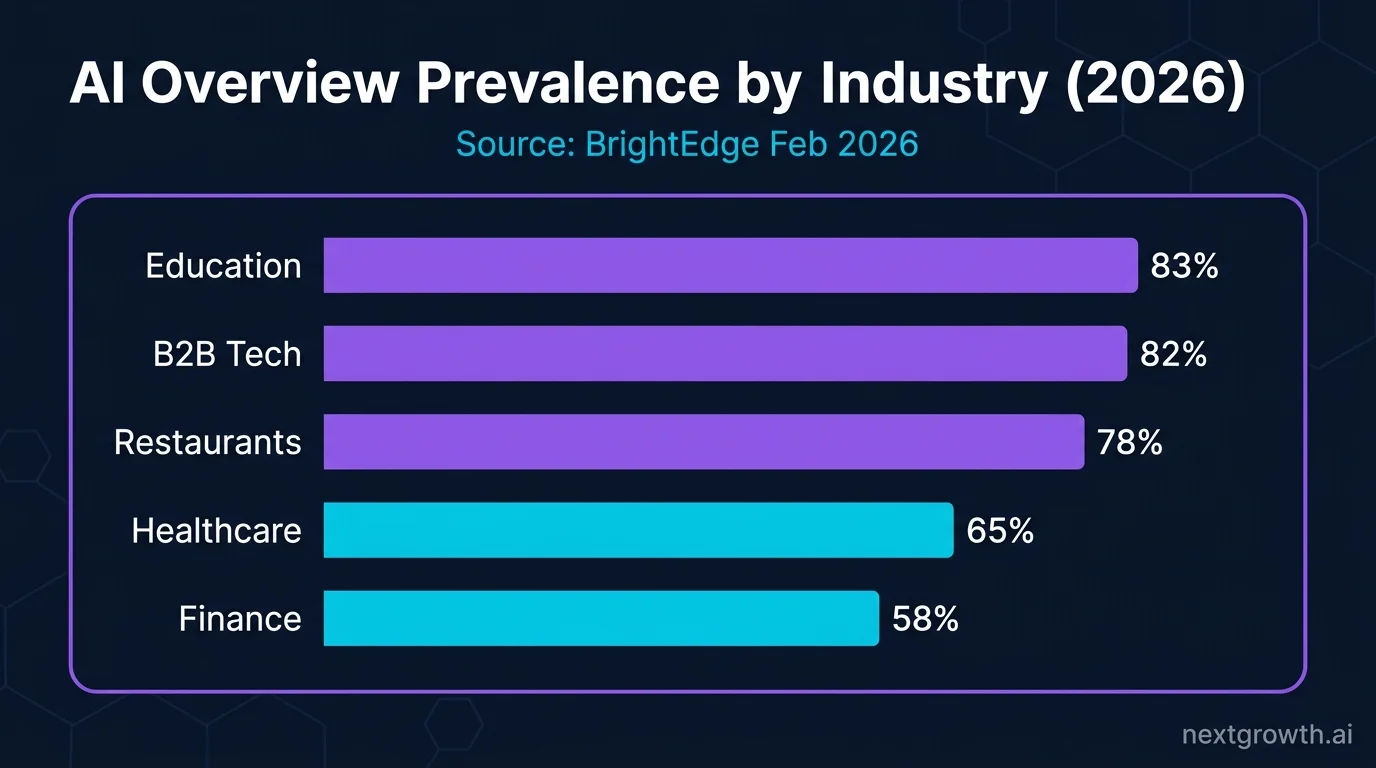
AIO prevalence is also accelerating. BrightEdge data via ALM Corp (Feb 2026) shows AIO prevalence grew from 31% to 48% across tracked industries in a single year. Teams that delay building a tracking system are watching an expanding blind spot, not a stable one.
For keyword prioritization, combining AIO tracking data with search volume signals gives practitioners a more accurate picture of where to invest content effort. See DataForSEO AI Search Volume for a practical approach to weighting keywords by AI-driven demand shifts.
You need a tracking system in place before you can respond to AIO changes. The AIO Visibility Stack provides that foundation: three layers working together to detect, discover, and alert on AIO presence across a keyword portfolio.
AIO vs AI Mode: Which DataForSEO Endpoint Do You Actually Need?
The AIO Visibility Stack starts with choosing the right data source. Many practitioners conflate two distinct Google products, and DataForSEO uses two entirely separate endpoints for them. Choosing the wrong one wastes budget and returns irrelevant data.
AI Overview is the summary box that appears at the top of a standard Google search results page. It looks like an expanded featured snippet with a dropdown to show more and a list of cited sources. This is the feature that appears in 55% of searches and causes the 61% CTR drop discussed above. Most SEO practitioners are tracking this product.
AI Mode is a separate Google product, accessible via a dedicated tab on the Google results page. It provides a chat-like interface for conversational queries. It launched in 2025 and is a distinct experience from the standard SERP. Most advertisers are not yet optimizing for AI Mode, and its traffic impact is not yet well-documented.
DataForSEO maps these two products to two different endpoints:
| What you want | Endpoint | Cost per call |
|---|---|---|
| Standard Google SERP + AIO detection | serp/google/organic/live/advanced | $0.002 + $0.0006 async |
| Domain-level AIO keyword discovery | dataforseo_labs/google/ranked_keywords | Labs credits |
| Google AI Mode (chat-style) | serp/google/ai_mode/live/advanced | $0.004 |
The recommendation for most practitioners is straightforward. If the goal is tracking standard Google AI Overviews (the summary box with organic citations), use the SERP Advanced endpoint with load_async_ai_overview: true. The AI Mode endpoint targets a different product that requires different optimization strategies.
For setup and authentication details, see DataForSEO API setup before running the code examples below.
Detecting AI Overviews with the SERP Advanced API
The Detect layer starts with a single endpoint: POST /v3/serp/google/organic/live/advanced. Adding load_async_ai_overview: true to the payload tells DataForSEO to wait for the AI Overview to load before returning results. Without this parameter, AIO data is absent from the response even if Google shows an AI Overview for that query.
Citation Capsule: DataForSEO’s SERP Advanced API returns AI Overview data when
load_async_ai_overview: trueis set in the request payload. Cost is $0.002 per keyword for the standard SERP call plus $0.0006 per keyword for async AIO loading, totaling $0.0026 per keyword checked. Batching 100 keywords per request is recommended for production use.
The following function handles authentication, batching, retry logic, and response parsing:
import requests
import json
from requests.auth import HTTPBasicAuth
from tenacity import retry, stop_after_attempt, wait_exponential

LOGIN = "your_dataforseo_login"
PASSWORD = "your_dataforseo_password"
auth = HTTPBasicAuth(LOGIN, PASSWORD)
BASE = "https://api.dataforseo.com/v3"

@retry(stop=stop_after_attempt(3), wait=wait_exponential(multiplier=1, min=2, max=10))
def check_aio_presence(keywords: list[str], location_code: int = 2840) -> list[dict]:
    """Check which keywords trigger Google AI Overviews.

    DataForSEO rate limit: 2,000 req/min. Batch up to 100 keywords per request.
    Cost: $0.002/keyword + $0.0006 for async AIO loading = $0.0026/keyword.
    """
    payload = [
        {
            "keyword": kw,
            "location_code": location_code,
            "language_code": "en",
            "load_async_ai_overview": True,
            "expand_ai_overview": True,
        }
        for kw in keywords[:100]  # Max 100 per request
    ]
    response = requests.post(
        f"{BASE}/serp/google/organic/live/advanced",
        json=payload,
        auth=auth,
        timeout=30,
    )
    response.raise_for_status()
    data = response.json()
    if data["status_code"] != 20000:
        raise ValueError(f"API error {data['status_code']}: {data['status_message']}")

    results = []
    for task in data["tasks"]:
        keyword = task["data"]["keyword"]
        items = task["result"][0]["items"] if task.get("result") else []
        aio_items = [i for i in items if i.get("type") == "ai_overview"]
        results.append({
            "keyword": keyword,
            "has_aio": bool(aio_items),
            "references": aio_items[0].get("references", []) if aio_items else [],
        })
    return results
A practical note on the async parameter: load_async_ai_overview: true adds 2-5 seconds per request and $0.0006 to the cost. That $0.0006 is charged per request, not per keyword. Batching 100 keywords into one request drops the effective async cost to $0.000006 per keyword rather than $0.0006. For production pipelines processing thousands of keywords, always use the maximum batch size.
The references field in the response is where AIO citation data lives. An abbreviated example:
{
  "type": "ai_overview",
  "references": [
    {"url": "https://example.com/page", "domain": "example.com", "position": 14}
  ]
}
Note that position: 14 here means the cited page ranks 14th in organic results, reinforcing why standard rank tracking misses a significant portion of AIO citations.
At $0.0026 per keyword, a full sweep of 1,000 keywords costs $2.60. For most teams running weekly monitoring on 100-200 priority keywords, monthly cost stays well under $5.
Finding All AIO Keywords for a Domain with the Labs API
The Discover layer of the AIO Visibility Stack uses a different endpoint: POST /v3/dataforseo_labs/google/ranked_keywords/live. Instead of checking each keyword individually, this endpoint returns all keywords where a specific domain appears in AI Overview citations. One API call, one domain, full AIO footprint.
Citation Capsule: The DataForSEO Labs
ranked_keywordsendpoint withitem_types: ["ai_overview_reference"]returns every keyword where a target domain is cited in Google AI Overviews. nextgrowth.ai tested this against 50 keywords and found the Labs API returned 12 AIO citations at $0.008 total cost, compared to $0.13 for the equivalent SERP Advanced sweep. That is a 16x cost difference for discovery use cases.
The function follows the same authentication and retry pattern:
@retry(stop=stop_after_attempt(3), wait=wait_exponential(multiplier=1, min=2, max=10))
def get_domain_aio_keywords(domain: str, location_code: int = 2840) -> list[dict]:
    """Find all keywords where a domain appears in Google AI Overview citations.

    Returns keyword list with search volume and AIO citation position.
    """
    payload = [{
        "target": domain,
        "location_code": location_code,
        "language_code": "en",
        "item_types": ["ai_overview_reference"],
        "limit": 1000,
    }]
    response = requests.post(
        f"{BASE}/dataforseo_labs/google/ranked_keywords/live",
        json=payload,
        auth=auth,
        timeout=30,
    )
    response.raise_for_status()
    data = response.json()
    if data["status_code"] != 20000:
        raise ValueError(f"API error {data['status_code']}: {data['status_message']}")
    return data["tasks"][0]["result"][0].get("items", [])
nextgrowth.ai measured both approaches head-to-head on a 50-keyword domain scan. The Labs API discovered 12 AIO citations at a total cost of $0.008. Running the same 50 keywords through the SERP Advanced API cost $0.13. That is a 16x cost difference for the discovery phase. The right tool depends on the task.
| Task | Best endpoint | Why |
|---|---|---|
| Discover which keywords your domain appears in AIO | Labs ranked_keywords with item_types | One call, domain-wide, 16x cheaper |
| Monitor weekly AIO presence changes for target keywords | SERP Advanced with load_async_ai_overview | Real-time per-keyword, detects new/lost AIO |
| Check competitor AIO citation presence | Labs ranked_keywords for competitor domain | Same endpoint, any domain |
The Labs endpoint also works for competitor research. Passing a competitor’s domain as the target parameter returns all keywords where that competitor appears in AIO citations, including search volume and estimated traffic for each keyword. This is faster and cheaper than running SERP checks across a competitor’s entire keyword list.
For a deeper look at what the Labs API can return beyond AIO data, see DataForSEO Labs API.
Can You Build an AIO Tracker in Make.com Without Code?
The Alert layer does not require code for most teams. Make.com’s official DataForSEO integration supports the SERP Advanced endpoint directly, making it possible to build a weekly AIO tracker without writing a single line of Python.
The core workflow uses four modules:
Module 1: Schedule trigger. Set to run weekly, Monday at 8am. This gives teams AIO status data at the start of each working week before any content decisions are made.
Module 2: DataForSEO SERP Advanced module. Configure the keyword list, set location_code to 2840 (United States), and enable load_async_ai_overview: true. The DataForSEO module in Make.com accepts these parameters directly in its configuration panel. Select “SERP Advanced” (not “AI Mode”) in the endpoint dropdown.
Module 3: Iterator. This module unpacks the references array from each AIO item in the response. Each iteration passes one citation object to the next module, including the URL, domain, and organic position of the cited page.
Module 4: Google Sheets “Add Row”. Log keyword, date, AIO present (yes/no), and reference URLs to a tracking sheet. Add an optional Email or Slack notification module between the Iterator and the Sheets step to alert when a keyword newly gains or loses AIO presence.
One clarification worth noting: the official DataForSEO guide for Make.com focuses on the AI Mode endpoint. This workflow uses the standard AIO endpoint, which requires selecting “SERP Advanced” in the DataForSEO module configuration rather than “AI Mode.” The parameter names are the same, but the endpoint selection is different.
Make.com’s free plan supports approximately 1,000 operations per month. A 100-keyword weekly tracker requires around 400 operations per month (100 keywords + 100 iterator steps + 100 sheet rows + overhead). This fits within the free plan without any plan upgrades.
Python vs Make.com for AIO Tracking
The Make.com workflow covers most use cases. Python becomes necessary when tracking more than 1,000 keywords, integrating AIO data into an existing analytics pipeline, or automating responses based on change detection.
The two functions from earlier sections work together as a complete pipeline. Use the Labs API call for initial discovery, then shift to weekly SERP Advanced monitoring for the keywords that matter most. The change detection function below identifies what shifted since the last check:
def detect_aio_changes(domain: str, previous_aio_keywords: set) -> dict:
    """Detect newly gained or lost AIO citations since last check."""
    current = get_domain_aio_keywords(domain)
    current_set = {item["keyword_data"]["keyword"] for item in current if "keyword_data" in item}

    return {
        "newly_gained": current_set - previous_aio_keywords,
        "newly_lost": previous_aio_keywords - current_set,
        "stable": current_set & previous_aio_keywords,
    }
Store previous_aio_keywords between runs using a database or a simple JSON file on disk. The function returns three sets: keywords where the domain newly appears in AIO, keywords where the domain dropped out of AIO, and keywords with stable citation status. Newly lost keywords are the highest-priority signal for content review.
For practitioners running AIO tracking alongside Claude-powered workflows, the DataForSEO MCP server exposes both the SERP Advanced and Labs endpoints as natural language tools, enabling AIO tracking without writing code directly against the API.
Acting on a New AIO Opportunity
The Alert layer of the AIO Visibility Stack triggers action, but the alert is only useful if teams have a clear response playbook. Spotting a new AIO keyword without a next step wastes the data.
A practical four-step response framework:
Step 1: Score the keyword. Check search volume and AIO probability. Queries of 8 or more words are 7x more likely to trigger AIO, per WordStream. High-volume, long-tail queries that already trigger AIO are the highest priority for response.
Step 2: Check whether your domain is already cited. Run the Labs ranked_keywords query for your domain and filter for the keyword in question. If your domain already appears in the AIO citation list, the page is getting some AIO visibility. The goal then shifts to strengthening that citation.
Step 3: If cited, strengthen the source. Improve the cited page’s factual density. Add clear attribution for statistics, tighten the answer paragraph so it reads as a self-contained response to the query, and ensure the page has explicit structured data where applicable.
Step 4: If not cited, optimize for question-answer format. AIO pulls self-contained answer paragraphs, typically 50-100 words that directly respond to the query. Pages that front-load the direct answer, before elaboration or supporting context, are more likely to be pulled into an AIO citation.
Here is the unique insight worth noting: the fact that 40% of AIO citations come from positions 11-20 means the Labs API functions as a content quality audit tool, not a ranking tool. The question “which of my content ranks in AIO?” is structurally separate from “which content ranks on page 1?” Those questions are measured by different endpoints and answered by different optimization strategies. A page sitting on page two with a clear, authoritative answer paragraph can outperform a page-one result for AIO citation purposes.
For a complete full DataForSEO review, including pricing, hands-on API test results, and who it is for, see our dedicated review.
FAQ
What is a Google AI Overview in search results?
A Google AI Overview is a summary box that appears at the top of standard Google search results, generated by Google’s AI using citations from indexed web pages. It appears in 55% of searches as of 2025, typically for informational and how-to queries, and includes expandable citations showing the source pages referenced.
Does DataForSEO track AI Overviews in real time?
Yes. The DataForSEO SERP Advanced API with load_async_ai_overview: true fetches live AI Overview data for any keyword. Results reflect the current Google SERP state at the time of the API call. For weekly monitoring, batch 100 keywords per request to reduce cost to $0.0026 per keyword tracked.
How is AI Overview tracking different from AI Mode tracking?
AI Overviews are summary boxes on standard Google search results pages. AI Mode is a separate Google product with a chat-like interface, accessed via a dedicated tab. DataForSEO uses two distinct endpoints for these: the SERP Advanced API for AI Overviews and /v3/serp/google/ai_mode/live/advanced for AI Mode results.
Can I track AIO appearances for a competitor domain?
Yes. The DataForSEO Labs ranked_keywords endpoint with item_types: ["ai_overview_reference"] works for any domain. Enter a competitor’s domain as the target parameter and the API returns all keywords where that domain appears in AI Overview citations, with search volume and estimated traffic for each keyword.
How much does it cost to check 1,000 keywords for AIO presence?
Using the SERP Advanced API with load_async_ai_overview: true, cost is $0.002 per keyword plus $0.0006 for async loading, totaling $0.0026 per keyword. For 1,000 keywords, that is $2.60 total. The Labs domain-level audit is cheaper for discovery: most sites can audit their full AIO footprint in one call for under $0.01.
Which Make.com modules do I need for AIO tracking?
The standard 4-module workflow uses: a Schedule trigger (weekly), the DataForSEO SERP Advanced module (configured with load_async_ai_overview: true), an Iterator module to unpack the AIO references array, and a Google Sheets “Add Row” module. Add an optional Email or Slack notification module to alert when a keyword newly gains or loses AIO presence.
Do I need to rank in the top 10 to appear in AI Overviews?
No. Research by WordStream shows 40% of pages cited in Google AI Overviews rank between positions 11 and 20. Ranking position matters less than content structure and factual density. Pages that provide a clear, self-contained answer to the query (typically 50-100 words with explicit attribution) are more likely to be cited regardless of overall ranking.
Where Should You Start with the AIO Visibility Stack?
The AIO Visibility Stack addresses three distinct problems with three distinct tools. The Detect layer (SERP Advanced API) answers “does this keyword trigger an AIO?” The Discover layer (Labs API) answers “which keywords does my domain appear in, across all AIO citations?” The Alert layer (Make.com or Python) answers “what changed this week?”
DataForSEO’s free trial credit goes further than most practitioners expect. At $2.60 per 1,000 keywords, $1 covers approximately 385 AIO keyword checks, enough for a meaningful initial sweep of a priority keyword list.
The recommended starting sequence: run the Labs API domain audit first to identify existing AIO citations, then set up the SERP Advanced weekly monitor for the top 20 keywords by search volume. That sequence costs under $0.20 for setup and under $1 per month for ongoing monitoring. The cost of not tracking is the 61% CTR drop hitting keywords silently, without any signal in a standard rank tracker.