What Is n8n? The Complete Workflow Automation & AI Agent Guide (2026)
I’ve been running n8n in production since August 2025 — self-hosted on a VPS for client SEO reporting and internal automation. What follows is based on that hands-on experience.
Traditional automation tools lock you in, charging for every step your workflow takes and keeping your data on their servers. n8n is a source-available platform that breaks that model entirely. Moreover, it’s free to deploy on your own server, endlessly customizable, and has rapidly become the go-to platform for developers building AI agents and automated systems. In October 2025, n8n closed a $180 million Series C round at a $2.5 billion valuation — a signal that the developer community has already voted with its attention.
Every week you spend paying Zapier per-task fees — or simply not building automation skills — is money and opportunity left on the table. For developers and technical freelancers, that gap is closing fast.
By the end of this guide, you’ll know exactly how n8n works, how to deploy it securely, and how developers are turning n8n expertise into real, recurring income. We’ll cover the core architecture, deployment options, AI agent construction, monetization models, a direct comparison against Zapier and Make.com, and a clear breakdown of what n8n costs in 2026.
What is n8n? It’s a source-available workflow automation tool that connects apps like Gmail, ChatGPT, and Google Sheets — letting them “talk to each other” and trigger automated actions without expensive per-task fees.
- It’s free: Self-host n8n forever using the Community Edition — no execution limits, no time expiry
- It’s flexible: 400+ native integrations, custom JavaScript/Python code nodes, and native AI model orchestration built in
- Cloud starts at $20/month: n8n Cloud offers managed hosting from $20/month for 2,500 executions — still far cheaper than Zapier’s per-task model at scale
- AI-native: Build autonomous AI agents with memory, tool use, and multi-model support (OpenAI, Anthropic, Gemini, Ollama) — a capability Zapier and Make.com lack entirely
- Monetizable skill: Freelancers charge $500–$5,000 per n8n automation build, with recurring maintenance contracts adding $200–$500/month
Contents
- What Is n8n and How Does It Work?
- n8n Deployment Options: Cloud vs. Self-Hosting
- n8n and AI: Building Intelligent Agent Systems
- n8n Pricing: Is It Free?
- What to Build with n8n: Use Cases & Monetization
- Is n8n Secure and Scalable for Production Use?
- n8n vs. Zapier vs. Make.com: Which Tool to Choose?
- n8n’s Limitations: What to Know Before You Commit
- Frequently Asked Questions
- Conclusion: Should You Start Using n8n in 2026?
What Is n8n and How Does It Work?
n8n is a source-available workflow automation platform that connects 400+ apps through a visual node-based editor, letting you build everything from simple data syncs to complex AI agent pipelines. It runs on your own server (free) or on n8n Cloud ($20+/month). We run it on a $6/month Hetzner VPS handling 200+ daily workflow executions without issues.
Historically, the platform emerged in 2019 as a response to the limitations of existing automation tools. While competitors like Zapier and Make offered convenience, they came with significant trade-offs: escalating costs at scale, limited customization options, and zero control over where your data lives. n8n solved these problems by making the platform deployable on your own infrastructure, extensible with custom code, and transparent in its pricing model.
The Core Architecture: How the Node-Based System Works
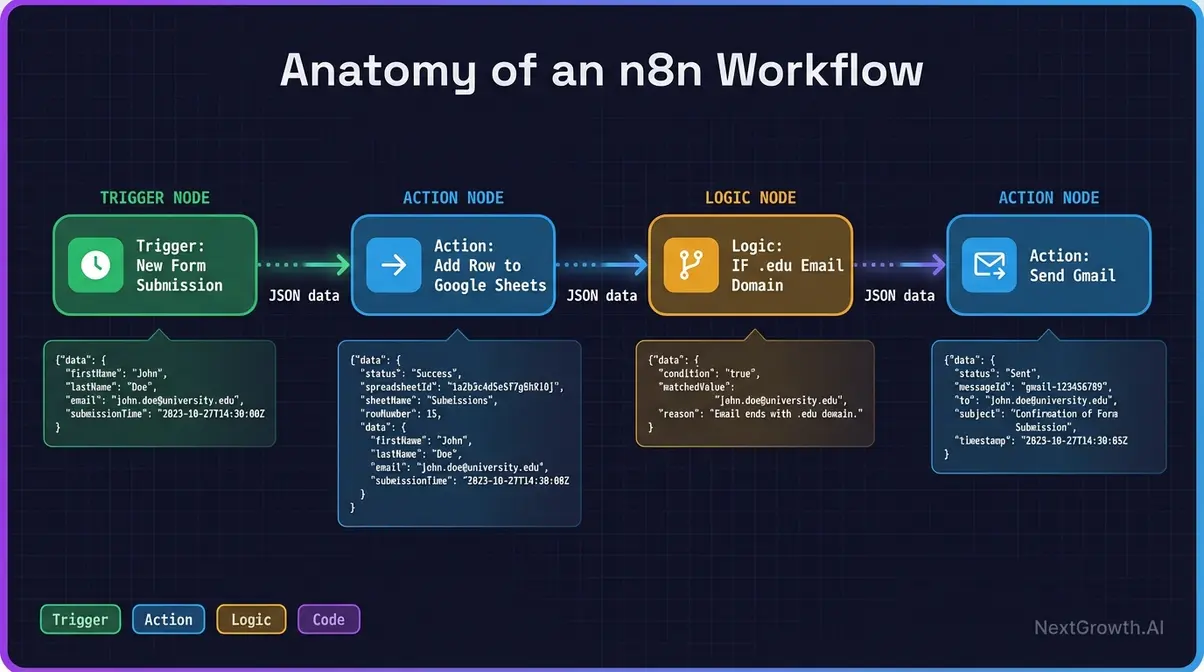
Essentially, the node-based editor transforms complex automation logic into visual flowcharts that anyone can understand. Specifically, each workflow consists of nodes — individual building blocks that represent specific actions, triggers, or logic operations. Subsequently, data flows between these nodes sequentially, with each node processing, transforming, or routing information based on your configuration.
First, a workflow begins with a trigger node that initiates execution. For instance, this could be a manual button click, a scheduled time (e.g., “every Monday at 9 AM”), or an external event like a webhook receiving data from another application.
Next, once triggered, the workflow proceeds through action nodes that perform specific tasks: sending an email, writing to a database, calling an API, or running custom JavaScript code. Logic nodes add conditional branching, loops, and data transformation capabilities.
Nodes: The Building Blocks of Every Automation
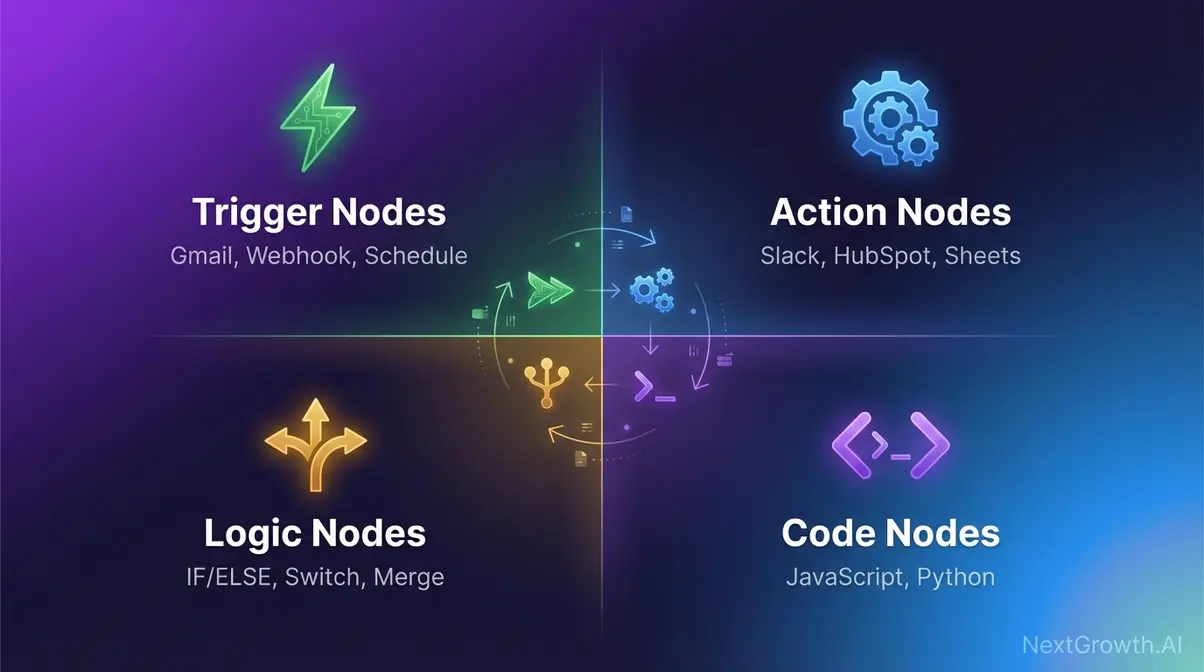
A node is a single, discrete unit of work within a workflow. Every node has one job: receive input data, do something with it, and pass output data to the next node. n8n provides four core node types:
- Trigger Nodes — Start the workflow. Examples: “When a new email arrives in Gmail,” “When a Webhook receives a POST request,” “On a schedule every morning at 9 AM”
- Action Nodes — Perform an operation in an external app. Examples: “Create a row in Google Sheets,” “Send a Slack message,” “Create a contact in HubSpot”
- Logic Nodes — Control the flow of data. Examples: IF/ELSE conditions, Merge (combine multiple data streams), Switch (route data based on value matching)
- Code Nodes — Run custom JavaScript or Python for anything the built-in nodes don’t cover — the “escape hatch” for power users
Additionally, the platform provides 400+ pre-built integration nodes, plus an HTTP Request node that can connect to any REST API that isn’t natively supported. As a result, n8n can connect to virtually any web service, with or without a dedicated integration. According to the official GitHub repository, this architecture supports native AI capabilities and a growing integration ecosystem.
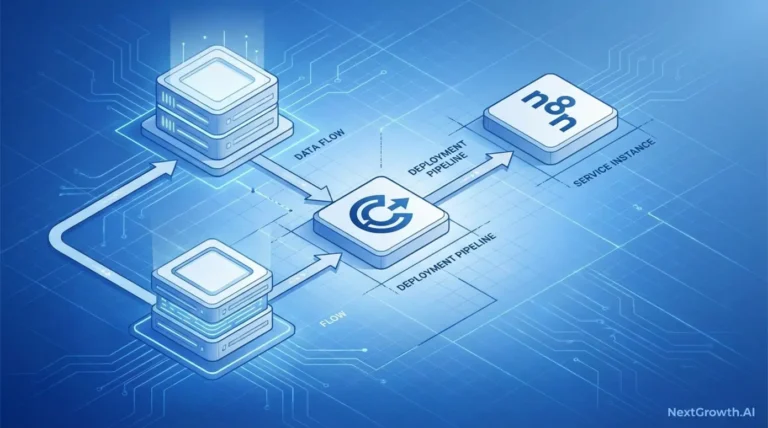
To illustrate, consider a practical example: When a new email arrives in your inbox (trigger node), the platform extracts any attachments (action node), uploads them to Google Drive (action node), and sends a Slack notification with the file link (action node). Consequently, the entire process executes automatically, with each node passing data to the next in a clear, traceable sequence.
Triggers, Webhooks & Cron: How Automations Start
Webhook triggers are where n8n opens up to the entire web. A webhook is a URL that external services POST data to, instantly firing your workflow the moment an event occurs. Example: when a Stripe payment succeeds, Stripe fires a webhook → n8n receives it → a workflow triggers a CRM update, a Slack alert, and an invoice generation sequence simultaneously.
The official Webhook node documentation describes it as “a trigger that starts a workflow when it receives an external HTTP request.”
Meanwhile, Cron/Schedule triggers run workflows on a fixed time interval — every morning at 9 AM, every 15 minutes, once a week on Monday. In other words, the Cron node is named after the Unix cron scheduler. Non-developers: think of it as a recurring calendar event for your automation. Most reporting workflows, data syncs, and health checks use this trigger type.
Finally, App triggers are the most beginner-friendly option. Major integrations — Gmail, Slack, GitHub, Airtable — include dedicated trigger nodes that either poll for new events or subscribe via webhooks under the hood. Put simply, you configure them through a UI; no URL management required.
Data Flow, Executions & Licensing
A workflow execution is one complete run of a workflow from trigger to final action — regardless of node count. Indeed, this single concept explains why n8n’s cost structure is so different from Zapier’s:
- Zapier model: 10-step workflow = 10 tasks consumed per run
- n8n model: 10-step workflow = 1 execution consumed per run
For example, at 1,000 workflow runs per month, Zapier bills for 10,000 tasks. n8n Cloud bills for 1,000 executions. For complex workflows — 15, 20, 30 steps — the cost difference compounds dramatically.
Notably, n8n operates under a fair-code license called the Sustainable Use License — a model that balances open access with sustainable business practices. This license grants you the freedom to use, modify, and deploy on your own servers without restrictions, with one key limitation: you cannot sell n8n as a competing service.
For the vast majority of users — from solo developers to Fortune 500 enterprises — this restriction is irrelevant.
Furthermore, the fair-code model differs from both traditional open-source and proprietary software. Unlike fully open-source projects (Apache, MIT licenses), the license prevents competitors from repackaging the software. Unlike proprietary SaaS tools, it gives you complete access to the source code, the ability to run it on your own infrastructure, and zero vendor lock-in.
As confirmed by the licensing details on GitHub, you get the transparency and flexibility of open source with the reliability and innovation of a well-funded commercial product.
Critically, this matters for organizations with strict data governance requirements. When you run n8n on your own servers, sensitive customer data, API credentials, and business logic never leave your network. For instance, financial institutions use this to automate processes involving PII without exposing data to third-party SaaS providers.
Healthcare organizations build HIPAA-compliant workflows that process patient information entirely within their own infrastructure.
Who Uses n8n? From Startups to Enterprises
In fact, n8n serves a remarkably diverse user base, from individual developers to global enterprises. This breadth reflects the platform’s unique positioning: powerful enough for complex enterprise use cases, yet accessible enough for solo practitioners to deploy in minutes.
Solo developers and freelancers use n8n to automate client reporting, invoice generation, and project management workflows. For example, a typical setup might involve pulling data from Google Analytics, enriching it with custom calculations, generating PDF reports, and emailing them to clients — all on a schedule.
Because the Community Edition costs nothing beyond server hosting, these users build sophisticated automations without recurring SaaS fees eating into their margins.
Next, Mid-sized marketing and operations teams orchestrate multi-step campaigns and data pipelines. Specifically, a marketing team might build a workflow that monitors social media mentions, scores sentiment using an AI model, routes high-priority mentions to sales via Slack, and logs everything to a CRM. As a result, the visual editor enables non-technical marketers to modify and extend these workflows without depending on engineering resources.
Beyond that, Enterprise DevOps and IT teams deploy n8n for incident response, monitoring, and infrastructure automation. In particular, a production-grade setup might include workflows that detect anomalies in application logs, automatically create Jira tickets, trigger remediation scripts, and notify on-call engineers via PagerDuty.
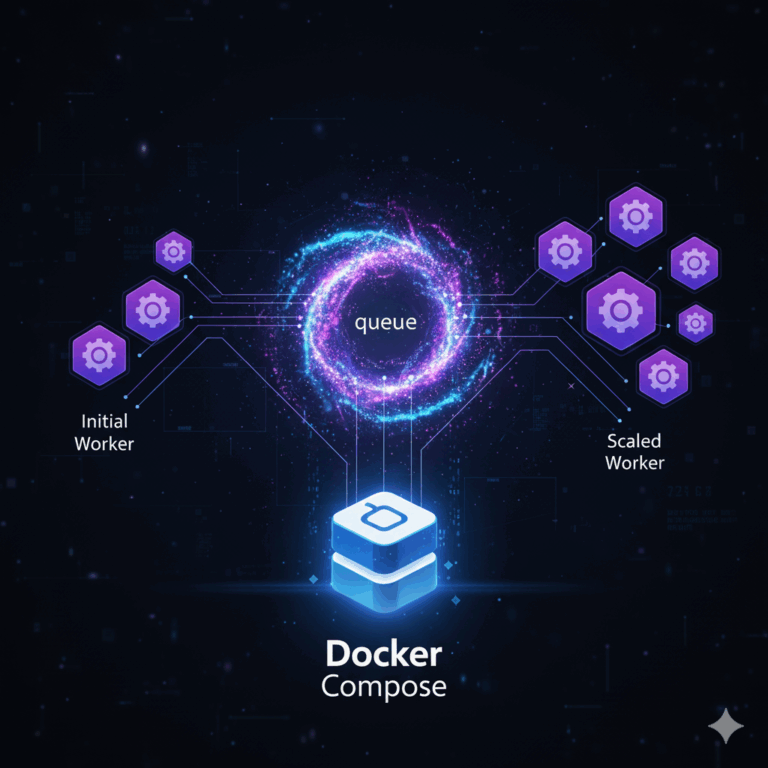
These organizations often run the platform in Queue Mode with multiple worker nodes to handle thousands of executions per day, taking advantage of horizontal scalability and fault tolerance.
Ultimately, the common thread across these use cases is control. Whether you’re a solo developer protecting client data, a marketing team avoiding per-execution pricing, or an enterprise meeting compliance requirements, n8n provides infrastructure ownership that proprietary tools cannot offer.
n8n Deployment Options: Cloud vs. Self-Hosting
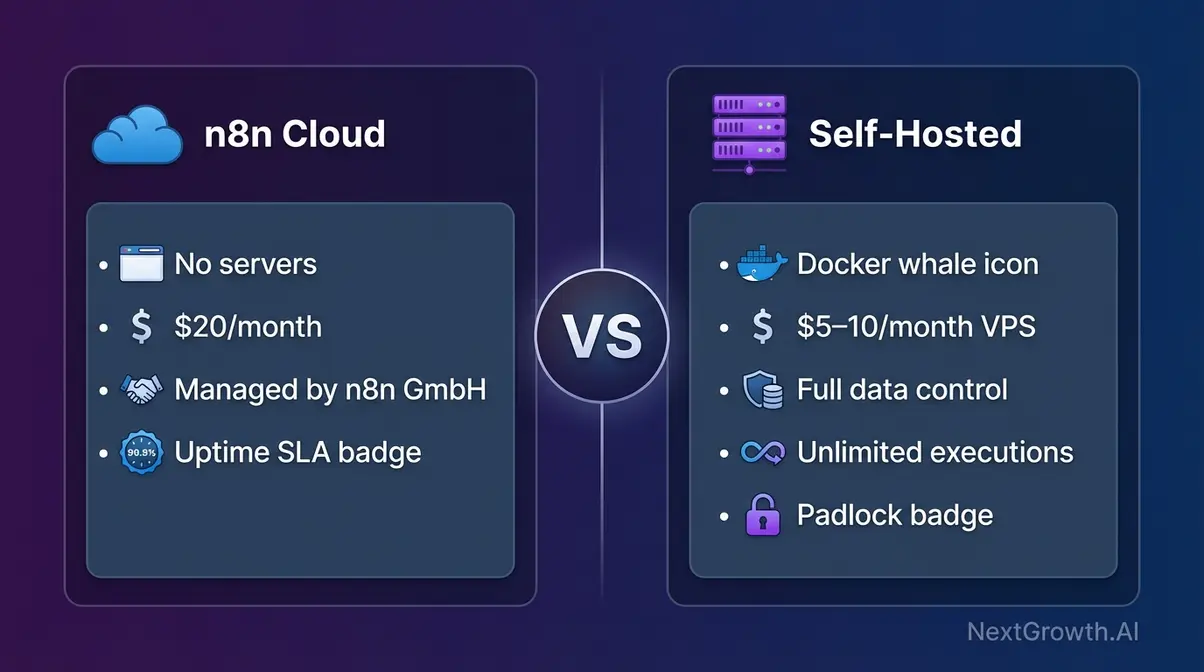
Fundamentally, there are two ways to run n8n — and the choice changes everything about your costs, data privacy, and infrastructure flexibility. Cloud gives you simplicity and an ongoing subscription. Running n8n on your own server gives you free, permanent access with full control over where your data lives.
Option 1: Docker Deployment (Recommended)
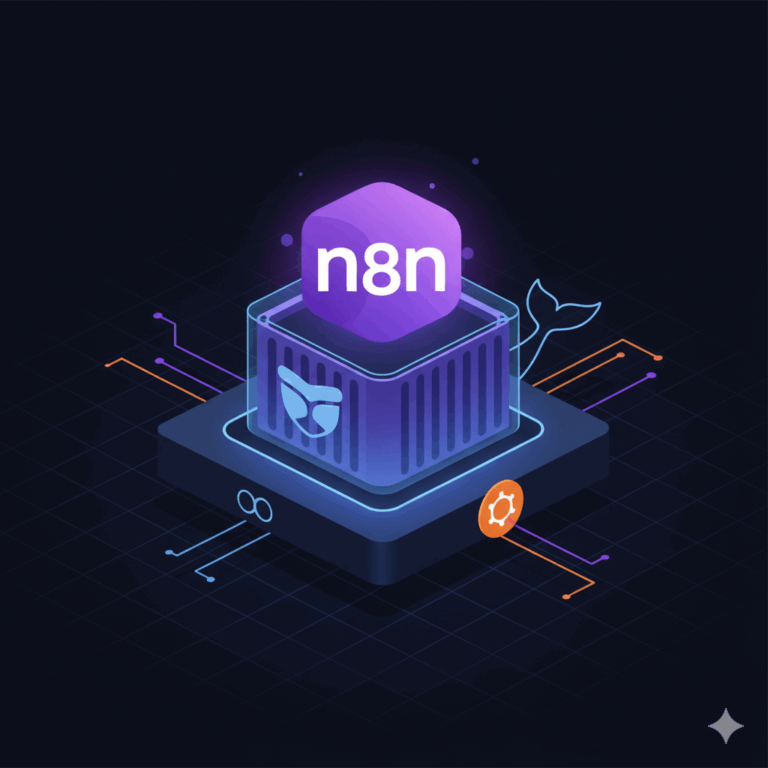
In particular, deploying with Docker provides the optimal balance of simplicity and control for technical users. Docker packages n8n and all its dependencies into a single container that runs identically across different operating systems and cloud providers.
Considering deploying on a PaaS you control? Our Coolify vs Dokploy comparison benchmarks both platforms on identical VPS hardware.
What You’ll Need:
- A VPS (DigitalOcean, Hetzner, AWS EC2 — $5–15/month) OR a local machine for testing
- Docker installed (the recommended and officially supported method)
- A domain name (required for SSL/HTTPS on a public-facing instance)
- ~30–60 minutes for initial setup
The following Docker Compose configuration provides a production-ready setup with basic authentication enabled:
version: '3.8'
services:
  n8n:
    image: n8nio/n8n
    restart: always
    ports:
      - "5678:5678"
    environment:
      - N8N_BASIC_AUTH_ACTIVE=true
      - N8N_BASIC_AUTH_USER=admin
      - N8N_BASIC_AUTH_PASSWORD=your_secure_password_here
      - N8N_HOST=localhost
      - N8N_PORT=5678
      - N8N_PROTOCOL=http
      - WEBHOOK_URL=http://localhost:5678/
    volumes:
      - ~/.n8n:/home/node/.n8n
💡 Pro Tip
For production deployments, always set a unique N8N_ENCRYPTION_KEY and store it securely. Losing this key means losing access to all saved credentials.
Configuration breakdown:
image: n8nio/n8n— Uses the official Docker image, ensuring verified, up-to-date softwarerestart: always— Automatically restarts the container if it crashes or after system rebootsports: "5678:5678"— Maps port 5678, making n8n accessible at http://localhost:5678N8N_BASIC_AUTH_ACTIVE=true— Enables password protection for the interfacevolumes: ~/.n8n:/home/node/.n8n— Persists workflows, credentials, and execution data
To deploy:
- Install Docker and Docker Compose on your system
- Save the configuration above as
docker-compose.yml - Run
docker-compose up -dfrom that directory - Access n8n at http://localhost:5678 and log in with your configured credentials
As a result, within 30 seconds n8n should be accessible in your browser. This Docker setup forms the foundation for production deployments. You can run it on a $5/month VPS, a corporate server, or a Kubernetes cluster — the configuration remains identical, ensuring you’re never locked into a specific cloud provider.
For production deployments with HTTPS, reverse proxies, and advanced security, see our complete guide to self-hosting n8n on Ubuntu.
Securing Your Instance
However, most deployment guides end at “run the Docker command.” This is where most operators leave themselves exposed. Follow these four steps to harden your instance before exposing it publicly:
- Enable HTTPS/SSL: Use Nginx or Caddy as a reverse proxy with a free Let’s Encrypt SSL certificate. Never expose n8n directly on port 5678 to the public internet
- Set Up Authentication: Enable built-in basic auth, or configure Single Sign-On (SSO) via SAML for team instances. Require 2-Factor Authentication (2FA) for all accounts
- Restrict Access by IP: Use firewall rules — UFW on Ubuntu, security groups on AWS — to limit which IP addresses can reach your admin port
- Encrypt Credentials: n8n stores API keys and credentials encrypted using an
N8N_ENCRYPTION_KEYenvironment variable. Set this to a long, random string on setup and never lose it
Importantly, the most commonly reported mistake in the community: running an instance with no authentication on a public VPS. Automated scanners routinely discover exposed instances on default ports, giving attackers access to your entire workflow logic and connected credentials.
Option 2: Desktop App for Local Development
Alternatively, the desktop application provides the fastest path to experimentation. Download it from n8n.io and install it like any standard application. Moreover, it runs entirely on your local machine with zero configuration. The desktop app is ideal for testing workflows locally, learning the platform, and prototyping AI agents using local LLM models via Ollama. However, it’s not suitable for production — workflows only run when the app is open, and there’s no remote access or collaboration.
Option 3: n8n Cloud (5-Minute Start)
n8n Cloud provides the fastest path to production-ready automation with zero infrastructure management:
- Navigate to n8n.cloud
- Click “Start Free” and sign up using email or Google authentication
- Choose a plan (free trial available for Pro features)
- Access your dedicated instance at https://app.n8n.cloud
- Start building workflows immediately
In addition, your Cloud instance includes automatic SSL, managed backups, automatic updates, 99.9% uptime SLA (Pro and Enterprise), and collaborative workflow editing.
Which Deployment Is Right for You?
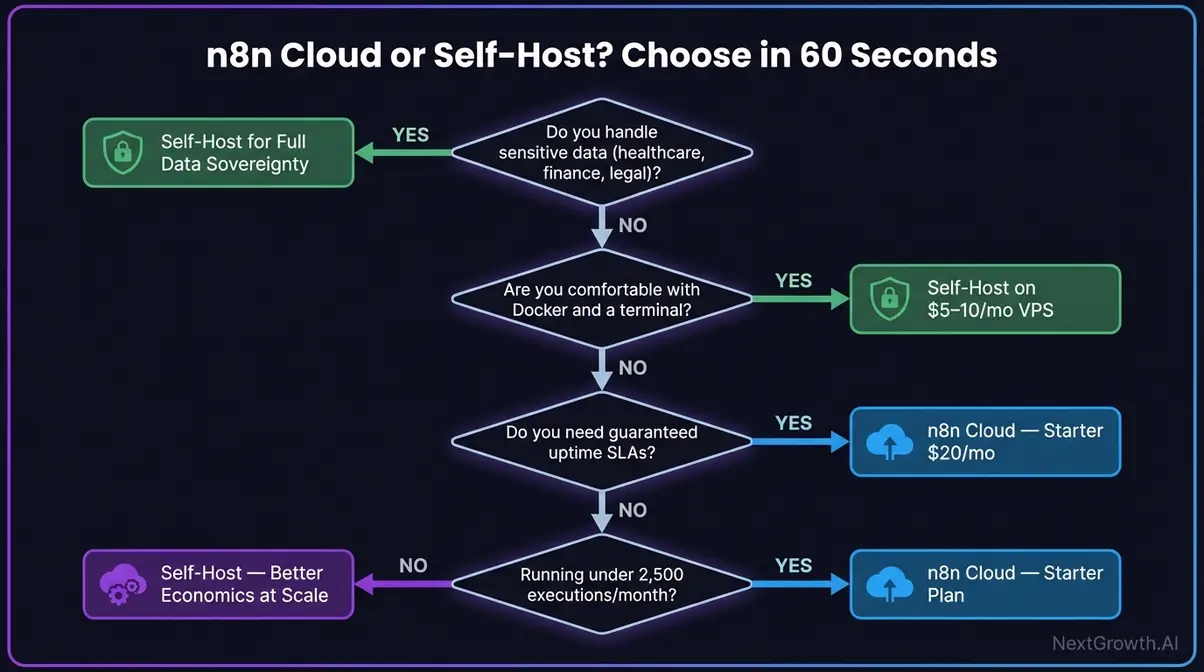
Use this decision framework:
- Choose n8n Cloud if: You don’t want to manage servers, your team is non-technical, you’re just getting started, or your monthly execution volume is under 2,500 runs
- Choose Docker Deployment if: You handle sensitive data that cannot leave your servers, you’re running high-volume automations, you want zero vendor dependency, or you’re comfortable with a 30–60 minute setup
An n8n instance on a Hetzner or DigitalOcean VPS costs $5–10/month — often less than a single Cloud plan tier for teams with meaningful execution volumes.
n8n and AI: Building Intelligent Agent Systems
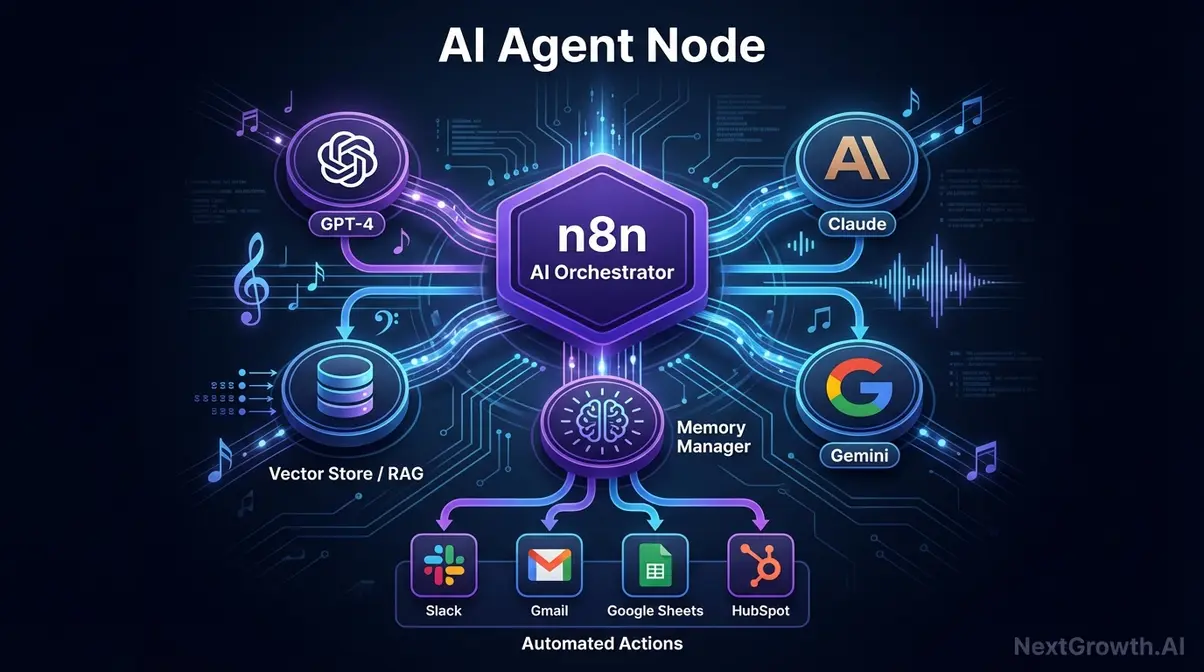
Notably, n8n raised $180M in Series C funding in October 2025 — backed by Nvidia’s NVentures — specifically to expand its AI orchestration capabilities. Consequently, that investment reflects where the platform is heading: from workflow automation tool to the infrastructure layer that connects, directs, and coordinates AI systems at scale.
n8n includes a built-in AI agent builder that connects to OpenAI, Anthropic, Google Gemini, and local models via Ollama, with tool-use support for web search, file operations, and database queries. We built a keyword research agent that processes 500+ keywords per run using AI nodes chained with Google Sheets and DataForSEO. See our n8n keyword research automation guide for the full implementation.
n8n is not an AI model — it’s an AI orchestrator that chains together multiple models from OpenAI, Anthropic, and Google within a single automated workflow. Think of n8n as the conductor, and the AI models as the musicians in the orchestra.
What Makes n8n an AI Orchestration Tool
n8n’s native AI nodes include:
- LLM Chain node: Sends a prompt to an AI model (GPT-4, Claude, Gemini) and captures the response as output data for the next node
- AI Agent node: Creates an autonomous agent with memory, access to tools, and the ability to decide which tool to use based on user input
- Memory Manager: Stores conversation context so agents can reference prior exchanges within a session
- Vector Store nodes: Enable retrieval-augmented generation (RAG) — querying a knowledge base before generating a response
The architecture enables provider flexibility: you can swap AI providers by changing a single node setting. Move from OpenAI to Anthropic without rebuilding your workflow. n8n’s AI capabilities page outlines all native nodes and supported providers.
Building Your First AI Agent
Importantly, the AI Agent node is where n8n moves beyond automation into autonomous reasoning. Here’s how to build a basic agent:
- Add an AI Agent node to your workflow canvas from the node picker
- Connect it to an LLM — select OpenAI GPT-4 or Anthropic Claude, then configure your API key in the credential manager
- Add at least one Tool — this gives the agent the ability to take actions (e.g., “Search the web,” “Run a code snippet,” “Query a Google Sheet”). The agent decides which tool to use based on the input it receives
- Add a Memory node so the agent remembers context from prior messages — essential for any conversational or multi-turn use case
- Connect a trigger and output node — a Webhook trigger receives incoming requests; a Gmail or Slack node sends the agent’s response back to the user
💡 Pro Tip
Start with a simple two-tool agent before building complex multi-tool setups. The most common mistake is overloading an agent with tools it doesn’t need — this increases latency and reduces accuracy.
In essence, the key distinction: the Agent node is autonomous. You don’t hard-code which tools it uses — you describe the agent’s goal in a system prompt, and it reasons about which tools to invoke and in what sequence. This is fundamentally different from a deterministic workflow where every step is explicit.
For example, consider a customer support agent that receives incoming emails via Gmail trigger, classifies the email type with GPT-4, looks up the customer record in a CRM via tool call, drafts a personalized reply, and sends it — all without human intervention.
Multi-Agent Architectures: Chaining AI Models
On its own, one AI agent is powerful. A multi-agent system — where multiple agents collaborate within a single workflow — is where n8n moves beyond anything Zapier or Make.com can offer.
In a multi-agent architecture, multiple AI Agent nodes work sequentially or in parallel. In this model, Agent A’s output becomes Agent B’s input prompt. A practical example: Agent A analyzes a document and extracts key claims → Agent B cross-references those claims against a web search tool → Agent C synthesizes the findings and routes a summary to the appropriate team member.
n8n supports this via native subworkflow calls: one workflow can invoke another as a “sub-agent” using the Execute Workflow node. This enables modular, maintainable AI pipelines — the equivalent of microservices architecture applied to AI reasoning systems.
n8n Pricing: Is It Free?
Yes — n8n is free. The Community Edition is free to use forever with no execution limits when you run it on your own server. n8n also offers paid Cloud plans for users who want a fully managed solution.
Community Edition: Free Forever
Specifically, the Community Edition provides the full feature set at zero software cost. You can deploy it on any infrastructure — from a $6/month VPS to enterprise Kubernetes clusters — and run unlimited workflows with unlimited executions.
According to the official documentation, the Community Edition includes all core automation capabilities, the AI agent builder, 400+ integrations, and custom code support. The primary limitations are operational:
| Feature | Community Edition | Cloud/Enterprise |
|---|---|---|
| Unlimited workflows | ✓ | ✓ |
| Self-hosted | ✓ | ✗ |
| Execution history (days) | 7 | 30+ |
| SSO/SAML | ✗ | ✓ (Enterprise) |
| Priority support | ✗ | ✓ |
| Credential encryption | ✓ | ✓ |
| Queue mode (scalability) | ✓ | ✓ |
Cloud Pricing Plans
As of 2026, n8n Cloud plans are structured around monthly workflow executions — not per-step or per-task. As detailed on the official pricing page:
| Plan | Monthly Price | Execution Limit | Notes |
|---|---|---|---|
| Community (Self-hosted) | Free | Unlimited | You pay only for infrastructure ($5–10/month VPS) |
| Cloud Starter | $20/month | 2,500 executions | Best for individuals and small projects |
| Cloud Pro | $50/month | 10,000 executions | For growing teams, 99.9% uptime SLA |
| Enterprise | Custom pricing | 50,000+ | SSO, RBAC, dedicated support, SOC 2 |
Notably, all plans include unlimited users and unlimited workflows. Costs scale with execution volume, not with team size or workflow complexity — a 30-node workflow and a 2-node workflow cost identically per run.
The execution-based billing advantage at scale:
| Billing Model | 10-step workflow, 1,000 runs/month |
|---|---|
| n8n Cloud (execution-based) | = 1,000 executions |
| Zapier (task-based) | = 10,000 tasks |
For complex workflows running at meaningful volume, this pricing difference compounds dramatically. Verify current pricing on the official page before budgeting.
Enterprise Plan: Advanced Security & Support
The Enterprise plan targets organizations with strict security, compliance, and support requirements. According to n8n’s security documentation, Enterprise features include:
- Single Sign-On (SSO): SAML and LDAP integration for centralized authentication
- Advanced Role-Based Access Control (RBAC): Granular permissions for workflow editing, execution, and credential access
- Dedicated Support SLAs: Guaranteed response times (1-hour for critical issues)
- SOC 2 Type II Compliance: Annual third-party security audits
- Custom Data Retention: Extended execution history and audit logs
- Private Hosting Options: Deploy in your own cloud account (AWS, GCP, Azure) with n8n managing the application layer
In practice, organizations typically engage with Enterprise when the Community Edition becomes operationally complex at scale, or when shared Cloud infrastructure doesn’t meet security requirements.
What to Build with n8n: Use Cases & Monetization
However, the question most tutorials never answer: can you actually make money with this skill? The answer is yes — and this section covers both what you can build and how developers are converting expertise into real income.
Common Business Automations
Here are seven concrete examples across domains:
- Marketing: Auto-publish new blog posts to LinkedIn, Twitter/X, and Instagram simultaneously the moment a post goes live
- Sales: Enrich new leads in HubSpot with company data from Clearbit, then trigger a personalized email sequence based on company size
- Customer Support: Classify incoming support emails with AI, draft responses for simple queries, and route complex tickets to the right team member
- DevOps: Monitor GitHub for failed CI/CD pipelines and simultaneously trigger Slack alerts and auto-create Jira tickets with failure details
- Data Operations: Scrape competitor pricing weekly, store results in Google Sheets, and email a summary report every Monday morning
- HR/Recruiting: Auto-screen incoming resumes with AI, score them against defined job requirements, and notify hiring managers only when a candidate clears the threshold
- SEO Automation: Pull keyword data from DataForSEO, score opportunities with custom calculations, filter by difficulty, and push results to a content planning database. For more approaches, see our guide on best SEO automation tools and whether SEO can be fully automated
The n8n workflow template library at n8n.io/workflows hosts over 500 community-contributed workflows spanning marketing, data synchronization, AI/ML operations, and DevOps monitoring. Each template includes a complete workflow configuration you can import directly into your instance with a single click.
Integrations: Connecting 400+ Apps and APIs
n8n’s integration ecosystem covers virtually every major SaaS application and API:
CRM & Sales: Salesforce, HubSpot, Pipedrive for customer management; Stripe, PayPal for payment processing; Calendly for scheduling.
Marketing & Communication: Mailchimp, ActiveCampaign, SendGrid for email; Google Ads, Facebook Ads, LinkedIn Ads for paid advertising; Slack, Discord, Microsoft Teams for team communication.
Productivity & Data: Notion, Airtable, Google Sheets for databases; Dropbox, Google Drive for file storage; Jira, Asana, Monday.com for project management.
AI & Machine Learning: OpenAI (GPT-4, DALL-E), Anthropic (Claude), Google (Gemini) for LLM capabilities; Pinecone, Qdrant, Weaviate for vector databases; Hugging Face for open-source model hosting.
Developer & DevOps: GitHub, GitLab, Bitbucket for version control; AWS, Google Cloud, Azure for cloud infrastructure; Datadog, Prometheus, Grafana for monitoring.
Furthermore, if an application doesn’t have a native node, you can use the HTTP Request node to call any REST API directly. This universal fallback ensures you’re never blocked by missing integrations.
How People Make Money with n8n
The community has developed four distinct monetization paths:
Freelance automation builds are the most accessible entry point. Developers build custom workflows for businesses — typical projects include CRM integrations, AI chatbot setups, and reporting pipelines. Freelancers commonly charge in the $500–$5,000 range per build, depending on complexity.
The skill is learnable in 2–4 weeks, and a first client project is often sourced from an existing professional network.
Additionally, recurring maintenance contracts turn a one-time build into ongoing revenue. After delivering a workflow, offer the client monthly monitoring, updates, and feature additions for $200–$500/month. Workflows quickly become infrastructure the client depends on — churn is low when the automation actively saves staff time every day.
Moreover, workflow templates and content build portfolio credibility at scale. Some creators sell premium templates and documentation packages via Gumroad or their own websites — a low-overhead, passive revenue stream once built.
Finally, n8n-powered micro-SaaS is the most advanced model. Build a product using n8n as the backend automation engine. Running your own instance keeps infrastructure costs below $15/month even at moderate user volumes, making the unit economics genuinely attractive.
Calculating Your n8n ROI
Annual value = Hours saved per week × Hourly rate × 52
Annual cost = VPS hosting (~$120/year) or Cloud plan cost
ROI = Annual value ÷ Annual cost
A workflow that saves 5 hours per week, for someone whose time is worth $50/hour: 5 × $50 × 52 = $13,000/year in value recovered, against a $120/year hosting cost. That’s a ~108× ROI.
This formula also works for freelance project pricing: identify the client’s weekly hours saved, calculate their annual value, and price your build at 10–20% of that figure.
A workflow saving a marketing team 10 hours/week at $60/hour delivers $31,200/year in value — a $3,000–$6,000 project fee is defensible and reasonable.
Is n8n Secure and Scalable for Production Use?
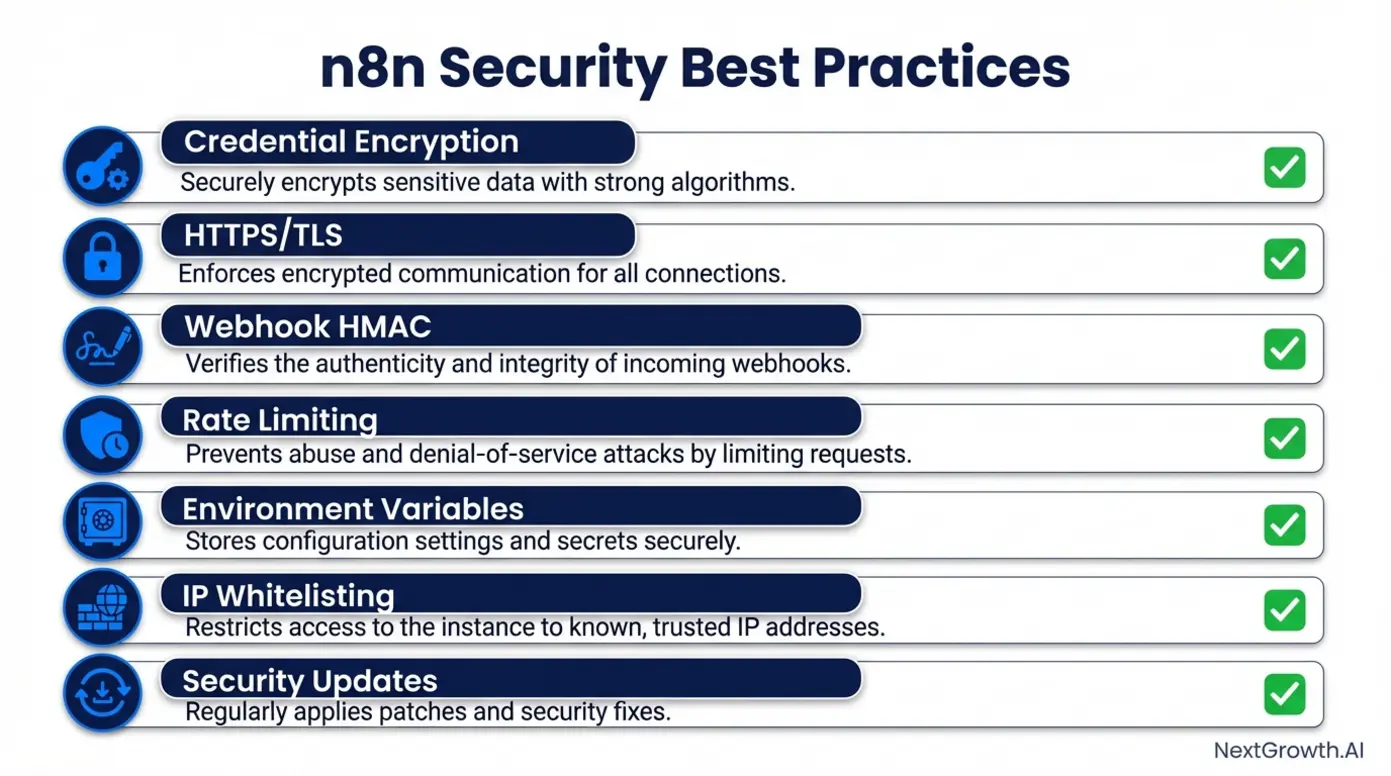
Yes. n8n supports encrypted credentials, role-based access control, SSO/SAML, and scales horizontally via Queue Mode with Redis and worker nodes. We run Queue Mode in production to handle bursty workloads across 3 worker containers, keeping execution times under 2 seconds even during peak hours.
Security Best Practices
Self-hosted instances handle sensitive data — API keys, database passwords, customer information. Implementing comprehensive security controls is essential:
Credential Encryption: Enable built-in credential encryption by setting the N8N_ENCRYPTION_KEY environment variable to a secure, randomly generated string. Without this, credentials are stored in plain text. Generate a key using: openssl rand -base64 32
HTTPS/TLS: Never expose the HTTP port directly to the internet. Run n8n behind a reverse proxy (Nginx, Traefik, Caddy) that terminates SSL/TLS connections. Use Let’s Encrypt for free, automated SSL certificate management.
Webhook HMAC Validation: Implement HMAC signature validation to verify incoming requests originate from legitimate sources. Configure HMAC secrets in your webhook providers (GitHub, Stripe) and validate signatures before processing data.
IP Whitelisting: Restrict access to the admin interface to known IP addresses using firewall rules. For cloud deployments, use VPN or bastion hosts.
Environment Variables for Secrets: Never hardcode API keys in workflow nodes. Use environment variables referenced via {{$env.VARIABLE_NAME}} syntax. This separates secrets from workflow logic and prevents accidental exposure when exporting workflows.
Regular Updates: Subscribe to n8n’s GitHub releases and apply security patches within 48 hours of release.
Scaling with Queue Mode
Initially, the default deployment runs all workflows within a single process. This works for small-scale deployments (under 1,000 executions per day) but creates bottlenecks at scale. Queue Mode solves this by separating workflow execution from the main process.
In Queue Mode, the main instance acts as a coordinator that adds jobs to a Redis queue. Separate worker processes pull jobs, execute workflows, and report results back. This provides:
- Horizontal Scalability: Add more worker nodes to increase capacity. Doubling workers approximately doubles throughput
- Fault Tolerance: If a worker crashes mid-execution, the job remains in the queue and gets retried by another worker
- Resource Isolation: Heavy workflows (AI processing, large data transformations) run on dedicated workers without impacting the main instance
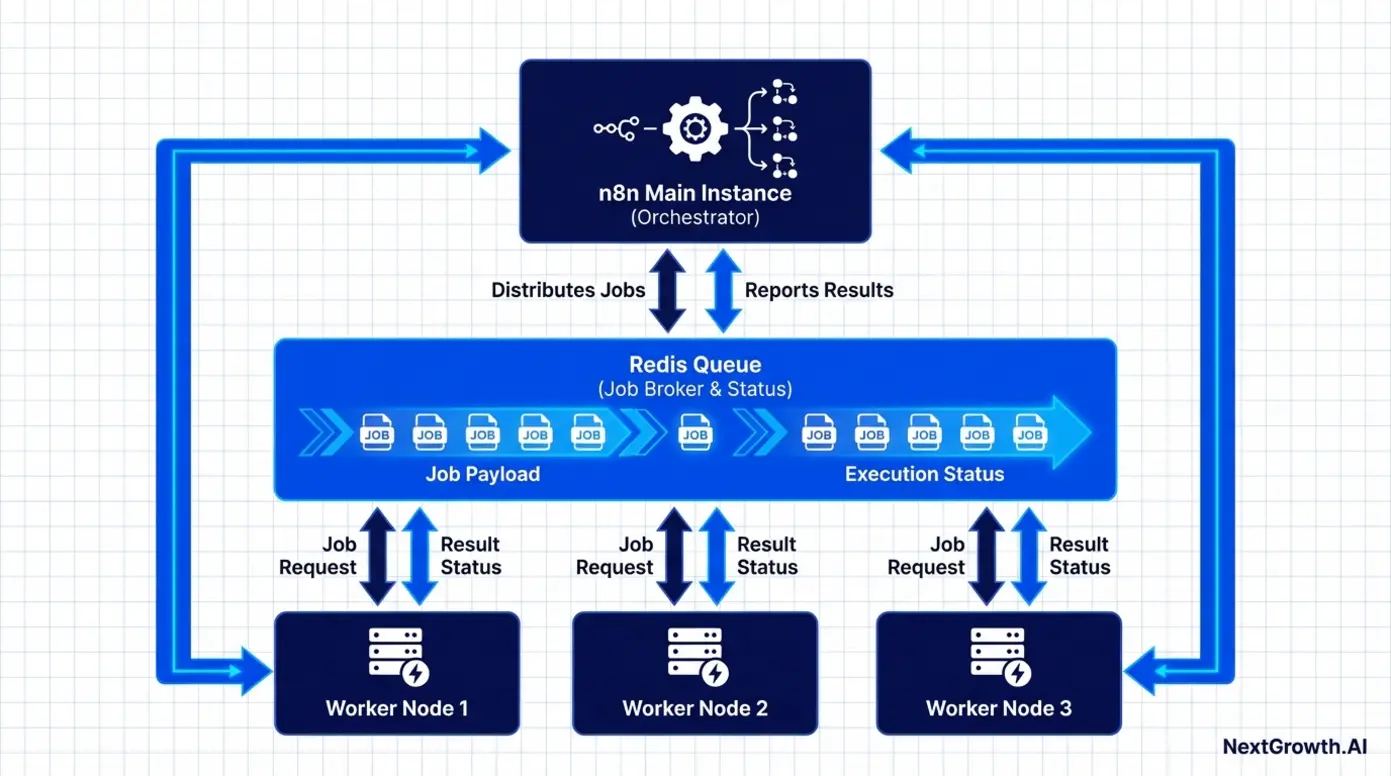
According to an official benchmark, Queue Mode handled 72 requests per second in testing. Real-world deployments report handling 10,000+ daily executions with three worker nodes and a single Redis instance. For detailed implementation, see our guide on scaling n8n with Queue Mode.
Monitoring, Logging, and Reliability
Production deployments require comprehensive observability. The Community Edition retains execution logs for 7 days; Cloud and Enterprise extend this to 30+ days. For long-term retention, export logs to Elasticsearch + Kibana, Loki + Grafana, or your cloud provider’s native logging.
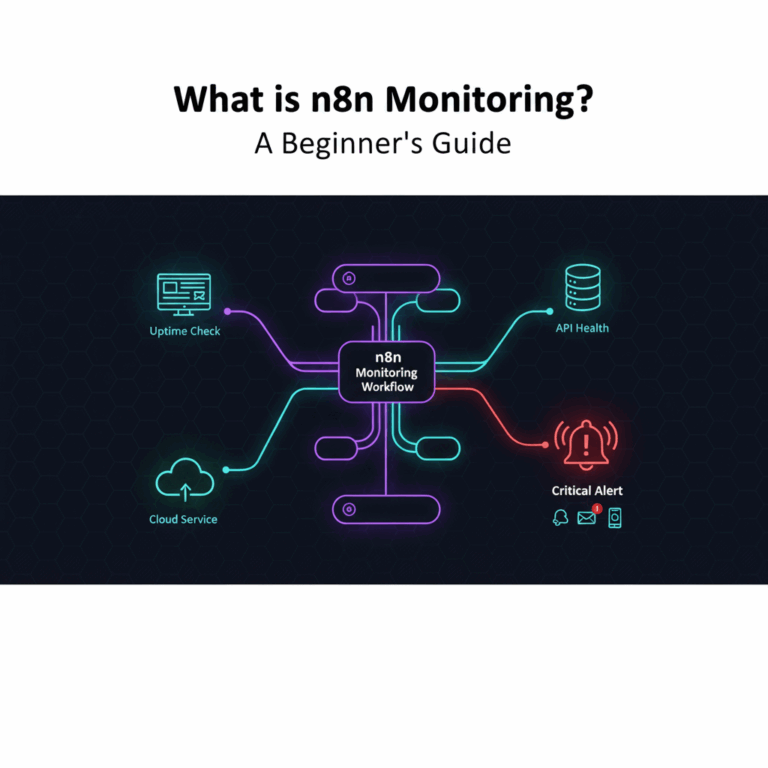
In addition, integrate with Prometheus to collect metrics on execution counts, success rates, and queue depth. Visualize in Grafana dashboards and set up alerts for failure rate spikes, queue depth growth, and resource usage. For detailed guidance, see our articles on n8n monitoring fundamentals and n8n monitoring with Prometheus and Grafana.
Health Check Workflows: Create dedicated “canary” workflows that run every 5 minutes to verify critical system components:
- Test database connectivity
- Verify external API accessibility
- Validate credential encryption
- Check worker node availability (in Queue Mode)
- Send Slack or email alerts if any check fails
Error Tracking: Integrate Sentry or similar platforms to capture detailed stack traces when workflows fail. This accelerates debugging by providing the exact code path and variable state at the point of failure. These operational practices transform n8n from a development tool into mission-critical infrastructure capable of supporting enterprise-scale automation.
n8n vs. Zapier vs. Make.com: Which Tool to Choose?
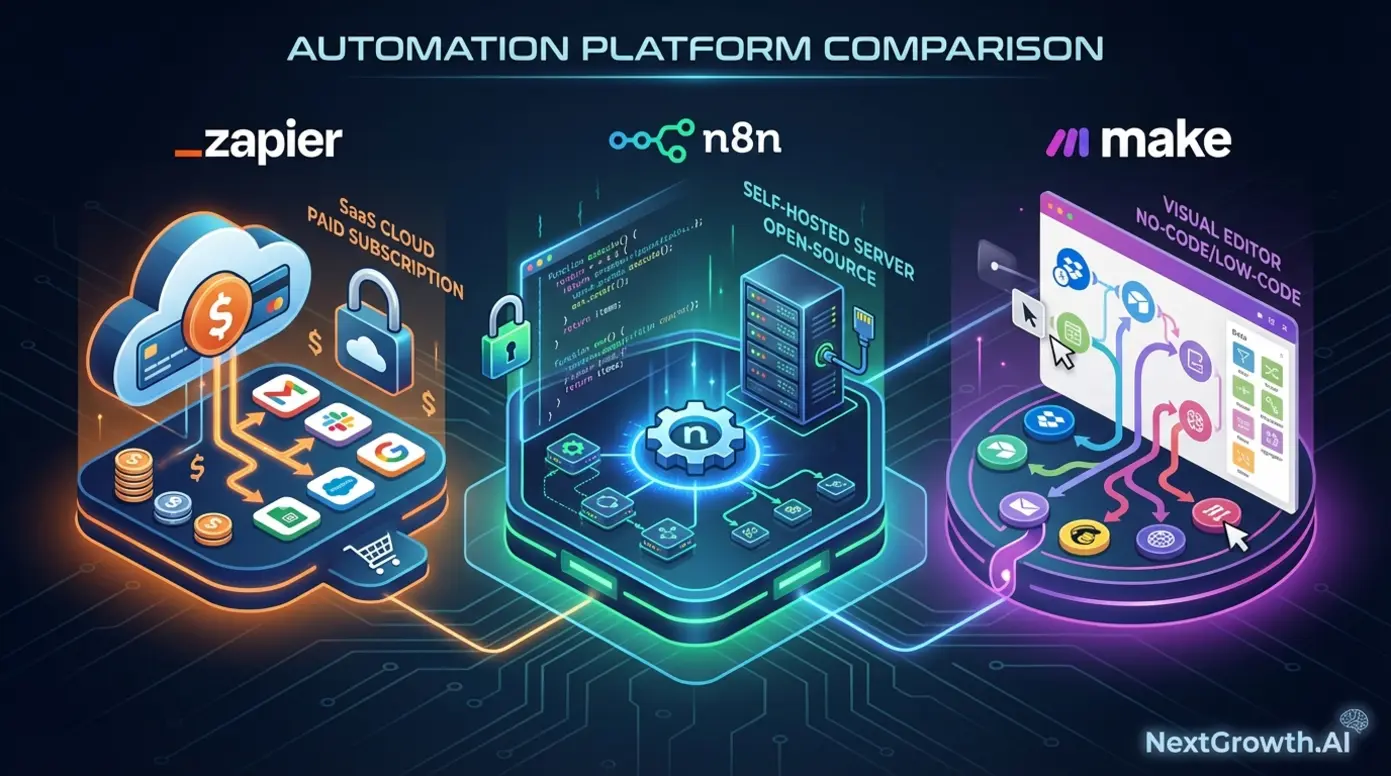
Fundamentally, n8n and Zapier are not the same type of tool, and comparing them on “number of integrations” alone misses the point entirely. Understanding what is n8n versus its competitors requires looking beyond feature lists — the key question is which tool belongs in your stack for your specific use case.
The Key Differences at a Glance
| Feature | n8n | Zapier | Make.com |
|---|---|---|---|
| Pricing Model | Per execution (Cloud); Free (self-hosted) | Per task (each step = 1 task) | Per operation (similar to Zapier) |
| Self-Hosting | Yes — full data control | No | No |
| Target User | Developers, technical teams | Non-technical users, SMBs | Semi-technical, visual builders |
| Customization | Very high (custom code nodes, HTTP Request) | Low (predefined triggers/actions) | Medium (custom HTTP modules) |
| AI Agent Support | Native (AI Agent, Memory, Vector Store nodes) | Limited (via integrations only) | Limited (via AI modules) |
| Best For | Complex workflows, AI pipelines, data-sensitive ops | Simple automations, quick setup | Visual builders needing moderate customization |
n8n’s comparison with Zapier highlights source-available licensing, infrastructure ownership, and node-based logic as primary differentiators. The integration count gap — 400+ vs. 7,000+ — is real but frequently overstated: the HTTP Request node connects to any REST API, covering the vast majority of tools without a dedicated node.
n8n vs. Zapier: Cost, Flexibility, and Control
| Dimension | n8n (Self-Hosted) | Zapier |
|---|---|---|
| Cost (10,000 tasks/mo) | ~$10 (VPS hosting) | ~$50 (Professional plan) |
| Data ownership | Full (your infrastructure) | Zapier’s servers |
| Custom code | Full JavaScript/Python support | Limited (Code by Zapier step) |
| AI agent builder | Native with tool orchestration | No agent capabilities |
| Self-hosting | Complete control | SaaS only |
| Learning curve | Moderate (requires Docker knowledge) | Easy (visual editor only) |
| Version control | Export/import JSON workflows | No Git integration |
Cost at scale: For 50,000 tasks per month, n8n might require a $20/month VPS, while Zapier’s Team plan jumps to $299/month. Over a year, that’s $3,588 in savings.
AI capabilities: n8n’s native AI agent builder treats LLMs as reasoning engines that can orchestrate tools autonomously. Zapier requires manual workflow design for every AI interaction. For organizations building agentic AI systems, this is a fundamental architectural difference.
n8n vs. Make (Integromat)
| Feature | n8n | Make |
|---|---|---|
| Self-hosting | Full source access | SaaS only |
| Pricing model | Execution-based or free | Operation-based (per action) |
| AI/LLM nodes | Native AI agents with tool orchestration | HTTP requests only |
| Open-source | Fair-code licensed | Proprietary |
| Custom code | JavaScript/Python nodes | JavaScript (limited) |
Make charges per operation (each action), while n8n Cloud charges per execution (complete workflow run). For a 10-step workflow at 1,000 runs/month, Make counts 10,000 operations; n8n counts 1,000 executions. Make offers a more polished interface, but n8n wins on AI features, deployment flexibility, and cost efficiency at scale.
When to Choose n8n Over Competitors
- Sensitive data: Healthcare, legal, or financial workflows where data cannot leave your servers
- Complex, high-volume workflows: Multi-step automations running thousands of times monthly
- Custom code requirements: JavaScript or Python runs natively inside the Code node
- AI agent orchestration: Chain multiple AI model calls, use memory, build RAG pipelines
- Freelancer building for clients: n8n skills are monetizable with established market rates
When Zapier or Make.com Is the Better Choice
Choose Zapier when your team is non-technical and needs to build automations without developer involvement. Zapier’s UI is simpler, its documentation is more beginner-friendly, and its 7,000+ native integrations cover niche apps that n8n doesn’t yet support with dedicated nodes.
Conversely, choose Make.com when you want a visual, flowchart-style editor that provides more power than Zapier but without the terminal-level comfort that n8n occasionally requires.
The honest summary: if you’re not comfortable with JSON, a command-line interface, or occasional error-message troubleshooting, start with Zapier. n8n’s power comes with a steeper learning curve.
The community at community.n8n.io is excellent, but you will hit errors that require thinking through, not just clicking through. For user reviews and ratings, see n8n reviews on G2.
n8n’s Limitations: What to Know Before You Commit
Nevertheless, every honest evaluation includes the cases where the tool is the wrong choice. Knowing these in advance saves hours of troubleshooting.
Common Pitfalls When Getting Started
Pitfall 1: Running without authentication on a public VPS. Automated scanners routinely discover exposed instances on default ports, giving attackers access to your entire workflow logic and credentials. Configure SSL via a reverse proxy AND enable basic auth before exposing any port to the public internet.
Pitfall 2: Assuming your deployment is “set it and forget it.” n8n releases updates frequently, including security patches. Set a monthly reminder to check for Docker image updates, or use a container management tool like Portainer.
Pitfall 3: Building monolithic workflows. A 30-node single workflow becomes nearly impossible to debug. Break workflows into logical subworkflows called via the Execute Workflow node — the automation equivalent of writing functions instead of one giant script.
Pitfall 4: Not testing error handling. A workflow fails silently when an API key expires or a downstream service returns an unexpected response. Add Error Trigger workflows that fire a Slack notification whenever any workflow fails. This is a five-minute setup that saves significant pain.
When to Consider Alternatives
Extremely High-Throughput Processing: If your workflows require more than 10,000 executions per minute with sub-100ms latency, consider stream processing platforms like Apache Kafka or Apache Flink. n8n is optimized for business process automation, not real-time event streaming.
Regulated Industry Compliance: While n8n provides the technical foundation for secure deployments, achieving HIPAA or SOC 2 compliance requires specialized expertise. Consider the Enterprise plan with dedicated support for regulated industries.
Zero Technical Expertise: If your team has no familiarity with Docker, environment variables, or command-line tools, fully managed tools like Zapier provide faster time-to-value despite higher costs.
Complex Enterprise Integrations: Some enterprise systems (SAP, Oracle, legacy mainframes) require specialized connectors with complex authentication and data transformation. Enterprise iPaaS platforms like MuleSoft, Workato, or Boomi provide certified, pre-built connectors and dedicated support for enterprise integration patterns that would require significant custom development in n8n.
Potential Drawbacks of Running Your Own Instance
Ongoing Maintenance: Operating your own instance requires continuous attention: applying security patches, monitoring performance, backing up data, and troubleshooting failures. If your team lacks DevOps expertise or is already at capacity, this burden can lead to neglected updates and reliability issues.
n8n Cloud eliminates this operational overhead entirely.
Mission-Critical Reliability: For workflows that directly impact revenue (payment processing, order fulfillment) or customer experience (support routing, real-time notifications), achieving 99.99% uptime requires sophisticated deployment patterns: multi-region redundancy, automated failover, and comprehensive monitoring.
If your team cannot implement these, consider the Enterprise plan with guaranteed SLAs.
Database Scalability: n8n stores workflow definitions, execution history, and credentials in PostgreSQL or SQLite. As execution volume grows, database performance can become a bottleneck. Organizations running 100,000+ executions per day should implement proper indexing, partitioning, and archival strategies.
That said, these limitations don’t invalidate the platform’s value — they clarify when additional expertise or alternative approaches are necessary.
If your primary need is deploying web applications rather than automating workflows, consider Coolify as a self-hosted PaaS alternative. For analytics specifically, see our guide on best website analytics tools.
Frequently Asked Questions
What is n8n used for?
n8n is used to automate repetitive tasks by visually connecting apps, APIs, and AI models into workflows. Common use cases include syncing data between CRMs, automating marketing campaigns, building AI-powered chatbots, and orchestrating DevOps pipelines. Because the platform can run on your own infrastructure and supports custom code, it’s particularly popular among technical teams that need full control over their automation infrastructure.
Is n8n free to use?
Yes, n8n offers a permanent free tier through the Community Edition, which includes unlimited workflows and executions on your own infrastructure. You run it on a VPS starting around $5–10/month, or locally on your own machine for testing. For managed hosting, Cloud plans start at $20/month based on monthly execution volume — not per task or step.
Why is everyone using n8n?
Adoption is accelerating because n8n combines three advantages no competitor offers simultaneously: a free, deployable-anywhere Community Edition for data control, a full-code escape hatch for complex logic, and native AI agent orchestration. The platform raised $180 million in Series C funding in October 2025 and reached a $2.5 billion valuation — signals of rapid community adoption.
Is n8n considered AI?
n8n is not an AI model — it is an AI orchestration platform. It contains no proprietary intelligence; instead, it provides native nodes for connecting AI providers like OpenAI, Anthropic, and Google Gemini within automated workflows. Think of n8n as the conductor that directs which AI models perform which tasks and when — the intelligence comes from the models, the coordination comes from n8n.
What does n8n stand for?
n8n is a numeronym for ‘Nodemation,’ combining ‘Node’ (the node-based visual editor) and ‘Automation’ (its core function). The format follows the same pattern as ‘i18n’ (internationalization) and ‘k8s’ (Kubernetes). It’s pronounced “en-eight-en.”
Is n8n a Chinese company?
No, n8n was founded in Berlin, Germany, in 2019. The company is headquartered in Germany and operates as a global project with contributors worldwide. Its European origin and fair-code licensing model make it a strong choice for privacy-conscious organizations evaluating GDPR compliance.
How does n8n compare to Zapier on cost?
For a 10-step workflow running 1,000 times per month, Zapier bills for 10,000 tasks while n8n counts 1,000 executions. Self-hosting the Community Edition costs only $5–10/month for VPS infrastructure with zero per-execution fees. Cloud Starter begins at $20/month for 2,500 executions. At high volumes, n8n can reduce automation costs by 80% or more compared to Zapier’s per-task model.
Can I use n8n locally?
Yes. Run the Docker image on your laptop for development and testing — it won’t be publicly accessible, but the full workflow engine is operational. Alternatively, download the desktop app from n8n.io for zero-config local use. This is the recommended starting point before committing to server infrastructure.
Conclusion: Should You Start Using n8n in 2026?
If you’ve been asking “what is n8n?” — the answer in 2026 is clear. n8n delivers what no single competitor currently matches: a free Community Edition with unlimited executions on your own infrastructure, native AI agent orchestration across multiple model providers, and execution-based pricing that stays economical as workflow complexity scales. The platform has over 230,000 active users and is backed by $240 million in total funding.
Therefore, the most effective approach: start with the Community Edition on a $5–10/month VPS, build the workflow your business needs most, and add an AI agent layer once you’re comfortable with node-based logic.
Ready to get started? If you’re technical, deploy n8n with Docker using the configuration in this guide — the setup takes under 30 minutes. If you prefer managed hosting, sign up for a free Cloud trial at n8n.cloud and start building immediately. The community at community.n8n.io is exceptionally active — your first troubleshooting question will rarely wait long for an answer.