DataForSEO On-Page API: The Complete Technical Guide (2026)
Screaming Frog costs $259/year and caps you at 500 URLs on the free plan. If you crawl more than one site regularly, you’re either paying the subscription or living with the URL ceiling. The DataForSEO On-Page API removes both constraints: pay $0.000125 per page for the base crawl, scale to millions of URLs, and get 120 structured metrics back via REST, with no desktop software, no seat limit.
I’ve integrated this API into NextGrowth’s audit pipeline and it returns the same broken link, duplicate content, and Core Web Vitals data that would cost $30+ in monthly tool subscriptions, for pennies per run. This guide walks through the async task flow, the 4-tier pricing stack, and working Python examples so you can wire it into your own pipeline today.
TL;DR
- DataForSEO On-Page API crawls sites returning 120 metrics per page starting at $0.000125/page (base tier); JavaScript rendering bumps that to $0.00125, browser rendering to $0.00425.
- 21 endpoints cover site-wide crawls (task_post), single-page checks (instant_pages), Lighthouse CWV, duplicate content detection, redirect chains, and raw HTML extraction.
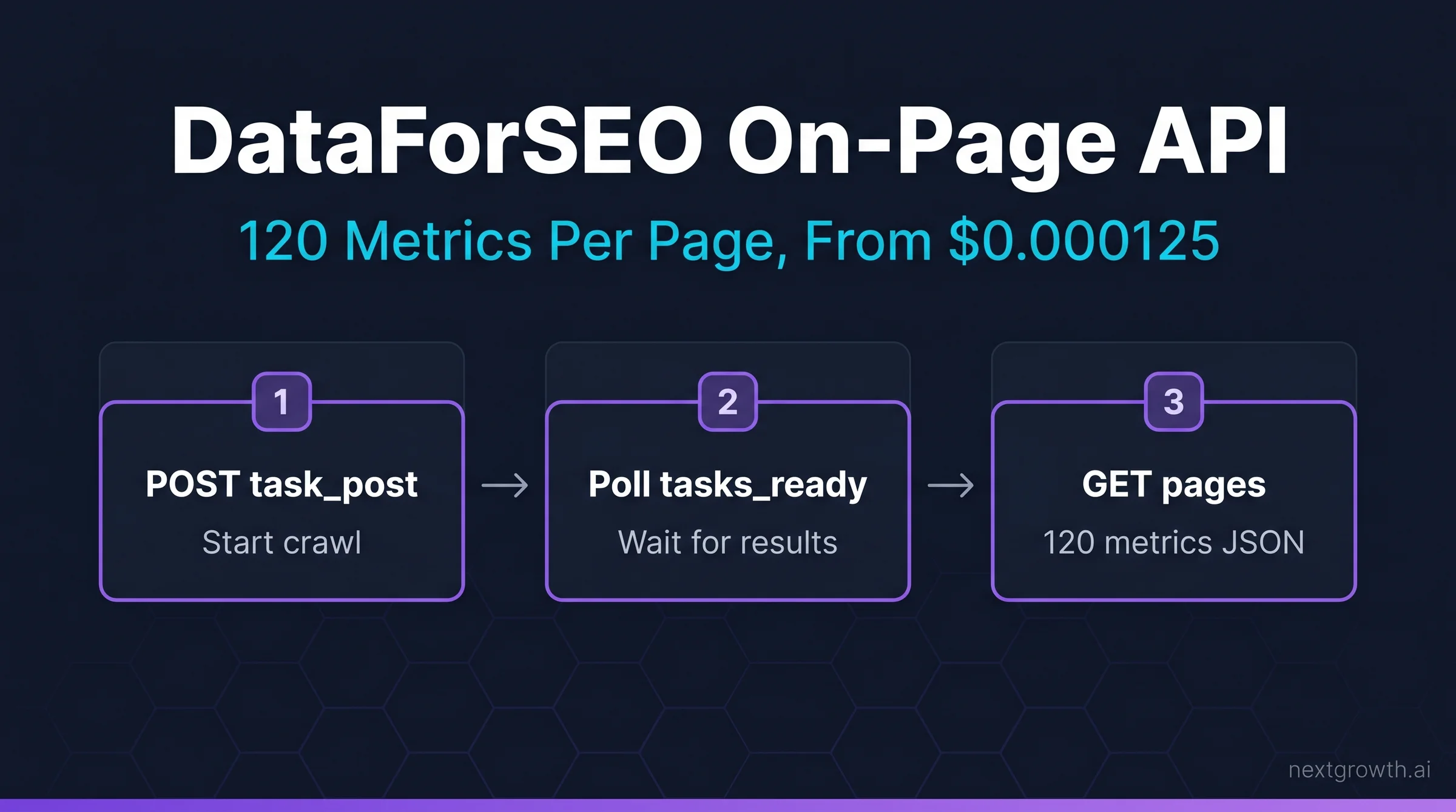
- The async task flow (POST task → poll tasks_ready → GET results) is how 99% of production crawls work. Use
instant_pagesonly for single-URL checks or real-time audits. - At $0.000125/page base, crawling a 10,000-page site costs $1.25, or 207x cheaper than a Screaming Frog Pro seat per crawl.
- Rate limits: 2,000 requests/min, 30 simultaneous crawls, 20 URLs per task POST.
Contents
- Key Takeaways
- What Does the DataForSEO On-Page API Actually Do?
- How Much Does the On-Page API Cost?
- What Are the 21 On-Page API Endpoints?
- task_post vs instant_pages: Which Should You Use?
- How Do You Crawl a Site with the On-Page API?
- How Do You Extract the 120 Metrics Per Page?
- What SEO Issues Can the On-Page API Detect?
- Does the On-Page API Support JavaScript Rendering?
- How Does DataForSEO On-Page Compare to Screaming Frog?
- FAQ
- What is the DataForSEO On-Page API?
- How much does the DataForSEO On-Page API cost per page?
- What is the difference between task_post and instant_pages?
- Does DataForSEO On-Page API support JavaScript rendering?
- How does DataForSEO On-Page API compare to Screaming Frog?
- What are the rate limits for the On-Page API?
- Can I use the On-Page API with n8n or Claude Code?
- Conclusion
Key Takeaways
- The On-Page API has a 4-tier pricing structure ($0.000125 → $0.00425). Most sites only need tier 1 or tier 2.
task_post+tasks_ready+pagesis the correct async flow for any crawl over 20 URLs.instant_pagesskips the task queue but only accepts one URL at a time, useful for CI/CD checks.- The
lighthouseendpoint runs Google Lighthouse in a headless browser and returns LCP, CLS, TBT, and FID scores, which costs $0.00425/page (browser rendering tier). - 120 metrics span 6 categories: errors, non-indexable signals, speed, security, usability, and content.
120
Metrics per page
$0.000125
Base price/page
21
API endpoints
34x
Price range (base to browser)
What Does the DataForSEO On-Page API Actually Do?
The DataForSEO On-Page API is a headless crawler that audits any URL or full site and returns 120 structured metrics per page, covering technical errors, content quality, performance, and security, all via REST API with no browser or desktop software required.
Traditional site auditing tools like Screaming Frog or Sitebulb download a desktop app, run crawls locally, and export CSVs. The On-Page API is the opposite: you POST a crawl task, the DataForSEO infrastructure handles the crawling, and you GET structured JSON results. This means you can trigger audits from any script, CI/CD pipeline, n8n workflow, or Claude Code session, and the results are already machine-readable. It’s a fundamentally different workflow.
At NextGrowth, I use the On-Page API as the data layer behind automated weekly site health reports. A single POST with our production domain returns broken links, duplicate meta tags, missing canonical URLs, and CWV scores without any manual export step.
The API connects to the broader DataForSEO ecosystem. Once you have crawl results, you can cross-reference them with the DataForSEO SERP and Backlinks APIs in the same pipeline, flagging, for example, which broken-link pages also rank for keywords worth fixing.
How Much Does the On-Page API Cost?
The On-Page API has four price tiers depending on rendering depth, from $0.000125/page for plain HTML to $0.00425/page for full browser rendering. Most sites never need the top two tiers.
This is the most misquoted number in third-party coverage of DataForSEO. “$0.00125 per page” is the JavaScript-enabled tier, not the base price. The correct base crawl price is $0.000125, ten times cheaper. Here’s the full 4-Tier Crawl Stack:
| Tier | Parameter | Price/page | When to use |
|---|---|---|---|
| Base crawl | default |
$0.000125 | Links, meta tags, headings, images, status codes, covering 90%+ of audits |
| Load resources | load_resources: true |
$0.000375 | CSS, JS, image resources, needed for page size and request waterfalls |
| JavaScript rendering | enable_javascript: true |
$0.00125 | SPAs, React/Vue/Angular sites where HTML is client-rendered |
| Browser rendering | enable_browser_rendering: true |
$0.00425 | Lighthouse CWV scores (LCP, CLS, TBT, FID), via full headless browser |
Tip
Start with base tier for every crawl. Only add enable_javascript after confirming the site is a JavaScript-heavy SPA. For a typical WordPress or static site, tier 1 catches every technical SEO issue you care about at $0.000125/page.
Cost modeling: A 10,000-page site at base tier = $1.25 per crawl. Run it weekly for a year = $65. A Screaming Frog Pro license is $259/year. The DataForSEO approach costs 75% less and returns structured JSON instead of a CSV you’ve still got to parse.
Source:
DataForSEO On-Page API pricing page. Base crawl: $0.000125/page. JavaScript rendering: $0.00125/page. Browser rendering (Lighthouse): $0.00425/page. Verified April 2026. dataforseo.com/pricing/on-page/onpage-api
What Are the 21 On-Page API Endpoints?
The 21 On-Page API endpoints fall into four groups: task flow (async crawl management), analysis (structured data extraction), live/instant (synchronous single-URL checks), and control (crawl management). You only need 3-4 of them for most use cases.
Understanding the endpoint landscape prevents a common mistake: developers hit task_post for async crawls and instant_pages for single URLs, then wonder why there are 19 other endpoints they’ve never used. Here’s the complete map:
Group 1: Task flow (async, bulk crawls):
task_post → tasks_ready → summary → pages → resources → links → redirect_chains → non_indexable → duplicate_tags → duplicate_content → keyword_density → raw_html → waterfall
Group 2: Live/instant (synchronous, single URLs):
instant_pages → page_screenshot → lighthouse → content_parsing → microdata
Group 3: Control:
force_stop → filters_and_thresholds
For a production site audit, you use: task_post + tasks_ready + pages + links + duplicate_content. That’s five endpoints covering every issue that affects rankings. The rest are for specialized use cases like waterfall analysis, raw HTML extraction, or microdata parsing.
task_post vs instant_pages: Which Should You Use?
Use task_post for anything over one URL. Use instant_pages only for real-time single-page checks in CI/CD pipelines or live dashboards; it’s synchronous, which means it blocks your script until the result returns.
The confusion between these two endpoints causes more broken integrations than any other On-Page API misunderstanding. Here’s the decision logic so you don’t fall into that trap:
| Scenario | Use | Why |
|---|---|---|
| Weekly full-site crawl (1,000+ pages) | task_post | Async, non-blocking, handles multi-page crawls automatically |
| CI/CD: check one URL before deploy | instant_pages | Synchronous; returns in one call, no polling needed |
| New page published, quick check | instant_pages | One URL, result in seconds, no task management overhead |
| Monthly technical audit (100-10K pages) | task_post | Max crawl depth and breadth, follows internal links automatically |
| Lighthouse CWV scores | lighthouse | Separate endpoint, requires browser_rendering tier ($0.00425/page) |
How Do You Crawl a Site with the On-Page API?
A complete site audit follows three API calls: POST a task to start the crawl, poll tasks_ready until complete, then GET results from pages or links. The whole flow runs in under 10 lines of production Python.
Here’s the full async crawl pattern I use for weekly audits at NextGrowth:
import requests
import time
from tenacity import retry, stop_after_attempt, wait_exponential

LOGIN = "your_login"
PASSWORD = "your_password"
BASE = "https://api.dataforseo.com/v3/on_page"

# Step 1: POST task
def start_crawl(target_url: str, max_crawl_pages: int = 500) -> str:
    payload = [{
        "target": target_url,
        "max_crawl_pages": max_crawl_pages,
        "load_resources": False,       # base tier: $0.000125/page
        "enable_javascript": False,    # set True only for SPAs
        "check_spell": False,
        "calculate_keyword_density": True,
        "checks_threshold": {
            "no_content_encoding": False
        }
    }]
    try:
        r = requests.post(
            f"{BASE}/task_post",
            json=payload,
            auth=(LOGIN, PASSWORD),
            timeout=30
        )
        r.raise_for_status()
        return r.json()["tasks"][0]["id"]
    except requests.exceptions.Timeout:
        raise RuntimeError(f"Timeout starting crawl for {target_url}")
    except requests.exceptions.ConnectionError as e:
        raise RuntimeError(f"Connection error: {e}")
    except requests.exceptions.HTTPError as e:
        raise RuntimeError(f"HTTP {e.response.status_code}: {e.response.text[:200]}")

# Step 2: Poll until ready (max 10 min)
def wait_for_task(task_id: str, timeout_sec: int = 600) -> bool:
    deadline = time.time() + timeout_sec
    while time.time() < deadline:
        r = requests.get(
            f"{BASE}/tasks_ready",
            auth=(LOGIN, PASSWORD),
            timeout=30
        )
        r.raise_for_status()
        ready_ids = [t["id"] for t in r.json().get("tasks", [])]
        if task_id in ready_ids:
            return True
        time.sleep(15)
    return False

# Step 3: GET page-level results
@retry(stop=stop_after_attempt(3), wait=wait_exponential(multiplier=1, min=2, max=10))
def get_pages(task_id: str, limit: int = 100, offset: int = 0) -> list:
    r = requests.get(
        f"{BASE}/pages/{task_id}",
        params={"limit": limit, "offset": offset},
        auth=(LOGIN, PASSWORD),
        timeout=30
    )
    r.raise_for_status()
    return r.json()["tasks"][0]["result"]

# Usage
task_id = start_crawl("nextgrowth.ai")
if wait_for_task(task_id):
    pages = get_pages(task_id)
    for page in pages:
        print(page["url"], page["status_code"], page["checks"]["is_broken"])
Warning
The tasks_ready endpoint returns ALL ready tasks for your account, not just the one you started. Filter by task_id to avoid processing stale tasks from previous runs. Also: each task_post call creates a new crawl; if you call it twice for the same domain, you’ll be billed twice.
Rate limits for the On-Page API: 2,000 requests per minute, 30 simultaneous crawls, 20 URLs per task_post call. For single-domain audits you’ll never hit these limits. Multi-tenant systems (auditing hundreds of client sites) should implement a queue to stay under 30 concurrent crawls. It’s a generous ceiling for most teams, but don’t ignore it when you’re scaling out.
How Do You Extract the 120 Metrics Per Page?
The 120 metrics are nested inside the items array from the pages endpoint and span six categories: errors (broken links, 404s), non-indexable signals (noindex, canonical mismatch), speed (page size, resource count), security (HTTPS, mixed content), usability (mobile viewport, tap targets), and content (thin pages, duplicate title/description).
Every page object from GET /on_page/pages/{task_id} looks like this at the top level:
{
  "url": "https://example.com/blog/post-1",
  "status_code": 200,
  "location": null,
  "checks": {
    "is_broken": false,
    "is_www": false,
    "is_https": true,
    "is_http": false,
    "no_content_encoding": false,
    "high_loading_time": false,
    "is_redirect": false,
    "is_4xx_code": false,
    "is_5xx_code": false,
    "no_doctype": false,
    "canonical_to_redirect": false,
    "no_encoding_meta_tag": false,
    "no_h1_tag": false,
    "duplicate_meta_tags": false,
    "duplicate_content": false,
    "no_favicon": false,
    "has_links_to_redirects": false,
    "is_orphan_page": false,       // zero inbound internal links
    "has_meta_refresh_redirect": false,
    "has_render_blocking_resources": false,
    "low_content_rate": false,
    "high_external_links_rate": false
  },
  "meta": {
    "title": "Post Title",
    "description": "Meta description text",
    "canonical": "https://example.com/blog/post-1",
    "robots": "index, follow"
  },
  "page_timing": {
    "time_to_interactive": 1420,
    "dom_complete": 1200,
    "connection_time": 38
  }
}
The checks object is the most immediately useful. Scan it for any true values to flag issues automatically. At NextGrowth, I filter pages where is_broken: true, is_orphan_page: true, or duplicate_content: true and route them directly into a Notion database for review. It’s the simplest triage pattern that’s saved hours of manual work.
Source:
DataForSEO: “120 OnPage API Metrics Explained.” Published September 18, 2023. Covers all metric categories from the pages endpoint. dataforseo.com/blog/120-onpage-api-metrics-explained
What SEO Issues Can the On-Page API Detect?
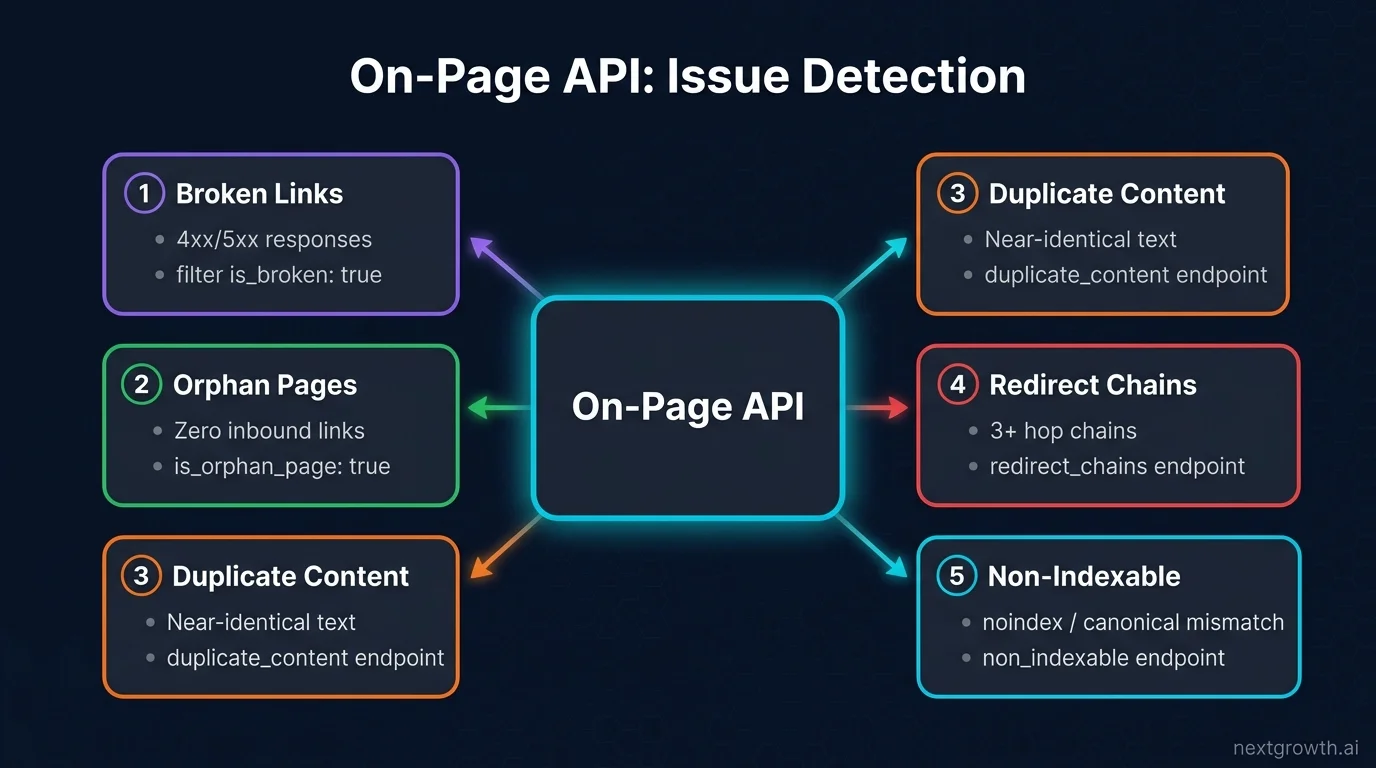
The On-Page API detects every issue category that causes ranking and crawl problems: broken links, duplicate title and description tags, orphan pages, missing canonical URLs, redirect chains, non-indexable pages, thin content, and mixed HTTPS/HTTP content, all in one crawl pass.
Here are the five most actionable issue types and how to extract them from the API:
Broken links (4xx/5xx responses): Filter pages where checks.is_broken: true or checks.is_4xx_code: true. You can also call the links endpoint (GET /on_page/links/{task_id}) to get a flat list of every internal and external link with its source URL, anchor text, and status code.
Orphan pages: Filter checks.is_orphan_page: true. Orphan pages have zero inbound internal links and they’re rarely crawled or ranked well. At NextGrowth, I found 14 orphan pages after our first audit; all had keyword-rich content that was just invisible to the link graph.
Duplicate content: Call GET /on_page/duplicate_content/{task_id} for a grouped list of pages sharing near-identical body text. The duplicate_tags endpoint does the same for title and description duplicates.
Redirect chains: GET /on_page/redirect_chains/{task_id} returns chains of 3+ hops, exactly the bloated redirect paths that waste crawl budget and bleed PageRank.
Non-indexable pages: GET /on_page/non_indexable/{task_id} returns all pages that Googlebot would skip: noindex directives, canonical pointing elsewhere, meta refresh redirects, and password-protected URLs.
Does the On-Page API Support JavaScript Rendering?
Yes. Set enable_javascript: true in your task_post payload to activate JavaScript rendering at $0.00125/page. For full Lighthouse CWV scores (LCP, CLS, TBT, FID), use the separate lighthouse endpoint with enable_browser_rendering: true at $0.00425/page.
JavaScript rendering covers SPAs and React/Vue/Angular sites where content is injected into the DOM after page load. Without it, the base crawler sees only the initial HTML shell, typically missing navigation links, product listings, and blog content in headless CMS setups. If you’re running a Next.js or Nuxt site, you’ll want this tier.
The lighthouse endpoint is a separate call from the main crawl flow. It runs Google Lighthouse in a headless Chromium browser and returns the same performance scores you’d get from PageSpeed Insights. It’s not part of task_post, so don’t try to chain them in the same request:
import requests

def get_lighthouse_scores(url: str) -> dict:
    try:
        payload = [{
            "url": url,
            "for": ["performance", "accessibility", "best_practices", "seo"]
        }]
        r = requests.post(
            "https://api.dataforseo.com/v3/on_page/lighthouse/task_post",
            json=payload,
            auth=(LOGIN, PASSWORD),
            timeout=60   # headless browser is slower than base crawl
        )
        r.raise_for_status()
        task_id = r.json()["tasks"][0]["id"]
        # poll tasks_ready same as above...
        return task_id
    except requests.RequestException as e:
        raise RuntimeError(f"Lighthouse task failed: {e}") from e

# Note: $0.00425 per URL; use selectively on key landing pages only
In practice, I run Lighthouse only on the top 20 pages (by organic traffic from GSC), not the full site. That brings the CWV audit cost to under $0.09 per run. There’s no reason to spend $0.00425 on a page that doesn’t rank.
How Does DataForSEO On-Page Compare to Screaming Frog?
DataForSEO On-Page API wins on cost for large sites, API integration, and multi-site scalability. Screaming Frog wins on interactive UX, visual sitemap rendering, and click-depth analysis. For automated pipelines, it’s the clear choice.
| Factor | DataForSEO On-Page API | Screaming Frog Pro |
|---|---|---|
| Pricing model | $0.000125/page (pay per use) | $259/year flat |
| URL limit | Unlimited | 500 (free), unlimited (Pro) |
| Automation | REST API, n8n, MCP, CI/CD | CLI only, no REST API |
| Output format | Structured JSON | CSV/Excel export |
| Visual UX | None (API only) | Full GUI, site tree, click-depth charts |
| Multi-site | 30 simultaneous crawls | One site at a time per instance |
| JS rendering | $0.00125/page (optional) | Included in Pro license |
| Cost: 10K page site/month | $1.25/crawl × 4 = $5/month | ~$21.58/month ($259/year) |
The right answer for most agencies and developers: use DataForSEO On-Page API for automated weekly monitoring and Screaming Frog for ad-hoc hands-on audits when you need the visual interface.
For the broader picture of what DataForSEO’s full API suite covers beyond On-Page: SERP, Keywords, Backlinks, the DataForSEO review has a complete feature and pricing breakdown. If you’re integrating the On-Page API with Claude Code or n8n workflows, the DataForSEO MCP server setup guide covers connecting all DataForSEO endpoints to your AI pipeline in one config.
FAQ
What is the DataForSEO On-Page API?
The DataForSEO On-Page API is a REST API that crawls any website and returns 120 technical SEO metrics per page including broken links, duplicate content, missing meta tags, Core Web Vitals scores, and non-indexable signals. It uses an async task-flow architecture: POST a task, poll until ready, then GET results.
How much does the DataForSEO On-Page API cost per page?
The base crawl costs $0.000125 per page. Loading external resources (CSS, JS, images) is $0.000375. JavaScript rendering for SPAs is $0.00125. Full browser rendering with Lighthouse CWV scores is $0.00425. Most sites use the base tier. A 10,000-page site costs $1.25.
What is the difference between task_post and instant_pages?
task_post is asynchronous. You submit a crawl job and poll for results. It handles multi-page crawls and follows internal links automatically. instant_pages is synchronous. It crawls one URL and returns results immediately in the same response. Use instant_pages for single-URL real-time checks; use task_post for everything else.
Does DataForSEO On-Page API support JavaScript rendering?
Yes. Add "enable_javascript": true to your task_post payload to render JavaScript before crawling. This activates the $0.00125/page tier. For full Lighthouse CWV performance scores (LCP, CLS, TBT, FID), use the separate lighthouse endpoint with "enable_browser_rendering": true at $0.00425/page.
How does DataForSEO On-Page API compare to Screaming Frog?
DataForSEO costs 75% less for large sites (pay per use vs $259/year), returns structured JSON instead of CSV, and supports 30 simultaneous crawls for multi-site automation. Screaming Frog wins on visual UX and click-depth analysis. For automated pipelines and agencies managing multiple sites, DataForSEO On-Page API is the better choice.
What are the rate limits for the On-Page API?
2,000 requests per minute, 30 simultaneous active crawls, and 20 URLs per task_post request. For single-site audits, you’ll never approach these limits. Multi-tenant systems auditing hundreds of client sites should queue crawls to stay under the 30-concurrent-crawl ceiling.
Can I use the On-Page API with n8n or Claude Code?
Yes. The DataForSEO AI integration guide covers using the On-Page API via n8n’s native DataForSEO nodes (30+ available) and via the MCP server in Claude Code. The n8n approach is ideal for scheduled weekly audits; Claude Code MCP works well for ad-hoc analysis and reporting.
Conclusion
The DataForSEO On-Page API gives you Screaming Frog-level coverage at a fraction of the cost, with the added advantage of structured JSON output that plugs directly into automation pipelines. The 4-Tier Crawl Stack: base at $0.000125, load_resources at $0.000375, JavaScript at $0.00125, browser rendering at $0.00425, meaning you only pay for the rendering depth you actually need.
For most technical SEO workflows, the base tier plus the pages, links, and duplicate_content endpoints cover everything. Start there, run your first crawl on a 100-page test domain for $0.013, and scale from there. You don’t need a $259/year subscription to get professional-grade audit data; you need a few lines of Python and a DataForSEO account. If you’re building a keyword research layer on top of your site audit pipeline, the DataForSEO Labs API guide has the complete endpoint reference for keyword data with cost examples for every query type.