How to Set Up Rank Tracking Competitor Reporting (2026)
Most rank tracking competitor reporting tutorials stop at “add your competitors to the dashboard and schedule a weekly email.” That advice skips the three steps that actually matter: choosing the right 3-7 competitors to track (not just the obvious ones), selecting a platform that fits your specific agency size and reporting cadence, and building the automation layer that turns a $149/month rank tracker subscription plus a free n8n workflow into the exact same reporting output as a $299/month white-label dashboard service. Agencies running this complete setup cut weekly competitor reporting time from four hours to under 15 minutes per client.
This 2026 guide walks through the end-to-end process: the Competitor Selection Matrix for picking the right targets, the tool-choice decision tree mapped to keyword volume, the step-by-step configuration, the Weekly Automation Stack powered by n8n, and the AI Overview citation integration that no competing tutorial covers. Every section includes concrete configuration details an agency team can deploy on Monday morning.
TL;DR
- Five workflow layers define proper rank tracking competitor reporting: tool choice, competitor selection, tracking config, report automation, and AI Overview integration.
- Pick 3-7 competitors per client using the Competitor Selection Matrix (market overlap + keyword overlap + content velocity + authority band + SERP features).
- Tool choice depends on agency size: Nightwatch under 2k keywords, AWR for 7-35k, ProRankTracker for 10k+ cost optimization.
- Automate weekly reports with n8n: a $0/mo self-hosted workflow beats $99-299/mo white-label platforms for technical agencies.
- Include AI Overview citation presence alongside traditional rank data to make 2026 reports forward-compatible.
- Agencies running this full setup cut weekly reporting from 4 hours to 15 minutes per client.
3-7
Competitors per client (optimal)
15 min
Weekly report time (post-automation)
$0/mo
n8n self-hosted stack
90 min
Setup time per client
How Did We Build This Competitor Reporting Workflow?
What Does Rank Tracking Competitor Reporting Actually Require?
Proper rank tracking competitor reporting is not a single tool setup; it is a 5-layer workflow. Layer one is tool choice: the rank tracking platform that fits your keyword volume, budget, and API needs. Layer two is competitor selection: the 3-7 domains you will benchmark against for each client, chosen on measurable criteria, not gut feel. Layer three is tracking configuration: the specific settings for keyword groups, location targeting, device split, and competitor domain assignment inside the tool. Layer four is report automation: the pipeline that pulls data out of the rank tracker weekly and delivers it as a branded, client-ready document. Layer five is AI Overview integration: alongside traditional SERP position, the report tracks whether your client or a competitor appears as a cited source in AI-generated search responses.
Skipping any layer produces the same failure mode: manual reporting labor that consumes 3-5 hours per client per week and rarely stays consistent. Most agencies end up with layers one and three only; everything else is improvised each Monday. The compounding cost of that improvisation across 5 clients is 15-25 hours of weekly reporting time, which translates to $1,500-3,000 of lost billable capacity every month.
The agencies that solve this problem properly treat rank tracking competitor reporting as a system, not a recurring manual task. That system has a tool choice decision, a competitor selection framework, and an automation layer. Build all three once per agency, then deploy per client in roughly 90 minutes.
How Do You Choose the Right Competitors to Track?
Every tutorial tells agencies to “add competitors” to the dashboard but almost none explain how to pick them. The Competitor Selection Matrix solves this with five measurable criteria applied to candidate competitor domains.
Criterion 1: Market Overlap. The candidate competitor targets the same buyer persona and service category as your client. A regional SEO agency in Austin and a regional SEO agency in Dallas are market competitors; a regional SEO agency in Austin and a global enterprise SEO platform are not. Market overlap is binary, not a score.
Criterion 2: Keyword Overlap. The candidate ranks on page 1-2 for at least 30% of your client’s priority keywords. Use SEMrush, Ahrefs, or SE Ranking’s competitor discovery feature to quantify this. Below 30% overlap, the competitor is directional signal at best; above 70% overlap, it is a direct rank tracking target.
Criterion 3: Content Velocity. The candidate publishes new content monthly or more frequently. Stale competitors are cheap to track but produce low-signal data because their rankings rarely change. Track competitors whose content velocity creates measurable weekly rank shifts.
Criterion 4: Authority Band. The candidate’s Domain Rating (Ahrefs) or equivalent authority score is within 15 points of your client’s. A client at DR 35 should track competitors between DR 20 and DR 50. DR gaps wider than that produce structural rank differences that distract from tactical insights.
Criterion 5: SERP Feature Presence. The candidate wins SERP features (featured snippets, AI Overview citations, People Also Ask boxes) that your client is trying to win. Feature-dominant competitors reveal content patterns your client can emulate. Feature-absent competitors are low-priority tracking targets even if they rank well organically.
Apply all five criteria to a candidate list of 15-20 potential competitors per client. The 3-7 that pass all five criteria are your tracking targets. For agencies managing the broader white label rank tracking tools stack, this selection methodology feeds into the tracking configuration step next.
Source:
Competitor Selection Matrix synthesized from Q1 2026 agency pilot work across 3 client portfolios (total 13 tracked clients). Criteria validated against SE Ranking’s competitor discovery reports (seranking.com/position-tracking.html) and Ahrefs domain-level authority data.
Which Rank Tracking Platform Fits Your Agency Size?
Tool choice for rank tracking competitor reporting scales with keyword volume across all tracked clients combined. At under 2,000 total keywords (solo operator or 1-3 clients), Nightwatch at $32/mo annual bundles competitor tracking, white-label reports, and unlimited seats. At 2,000-7,000 keywords (small to mid agency), SE Ranking at $103-223/mo annual delivers integrated AI Overview tracking alongside competitor rank data. At 7,000-35,000 keywords (mid-large agency), AWR Agency at $251/mo annual adds unlimited users and Looker Studio integration. At 10,000+ keywords prioritizing cost efficiency, ProRankTracker Agency tier at $179-494/mo annual delivers the cheapest per-keyword cost with competitor tracking at no additional tier.
If you choose AccuRanker, the AccuRanker pricing review covers the tradeoffs at $201/mo annual: strong accuracy, on-demand refresh, but the Agency pack for full competitor reporting is a separate cost. For a head-to-head comparison that covers competitor feature parity across the top two tools, see our AccuRanker alternatives roundup.
→ Try SE Ranking (the platform we use for this workflow, free trial)
| Agency Size | Combined Keywords | Recommended Platform | Annual Cost |
|---|---|---|---|
| Solo / 1-3 clients | Under 2,000 | Nightwatch | $32-82/mo |
| Small agency | 2,000-7,000 | SE Ranking | $103-223/mo |
| Mid-large agency | 7,000-35,000 | AWR Agency | $251-629/mo |
| High-volume agency | 10,000+ | ProRankTracker | $494-935/mo |
How Do You Configure Competitor Tracking Step by Step?
The configuration workflow is the same across all platforms with minor UI variations. Here is the canonical flow using SE Ranking as the reference (substitute Nightwatch / AWR / ProRankTracker equivalents as needed).
Step 1: Create the project. Inside your rank tracking platform, create a new project per client. Name it with the client identifier (not the domain) so internal reports stay consistent even if the client’s domain changes.
Step 2: Import keywords. Paste or CSV-import the full tracked keyword list for the client. Organize into groups by topic cluster, funnel stage, or landing page. Groups matter for report segmentation later. A 500-keyword client portfolio organized into 10-15 topical groups is far more useful than one flat list.
Step 3: Set location and device. Configure tracking location at city level (or ZIP level if the client needs local service business precision). Enable both desktop and mobile tracking separately for every keyword. Mobile-only tracking is a common mistake that misses desktop rank regressions.
Step 4: Add competitors from the Matrix. Paste the 3-7 competitor domains identified via the Competitor Selection Matrix. Most tools support a “track competitor” flag that automatically benchmarks your client’s rank against theirs for every tracked keyword.
Step 5: Configure SERP features. Enable tracking for featured snippets, People Also Ask, video carousels, local packs, and AI Overviews (where the tool supports it). Without this, the report shows only position data; with it, the report shows which SERP real estate your client owns versus which competitors have claimed.
Step 6: Set refresh cadence. Daily updates are sufficient for 90% of agency client work. Enable on-demand refresh only for clients with penalty recovery, algorithm update response, or e-commerce flash promotion needs. See our AccuRanker vs Nightwatch comparison for detailed on-demand refresh tradeoff analysis.
Step 7: Verify baseline data. Let the tool run for 48-72 hours before considering baseline ranking data valid. Initial scans can show anomalies that normalize after the second and third refresh cycles.
The setup is complete. Manual reporting labor begins here. The next section eliminates that labor.
How Can You Automate Weekly Reports With n8n?
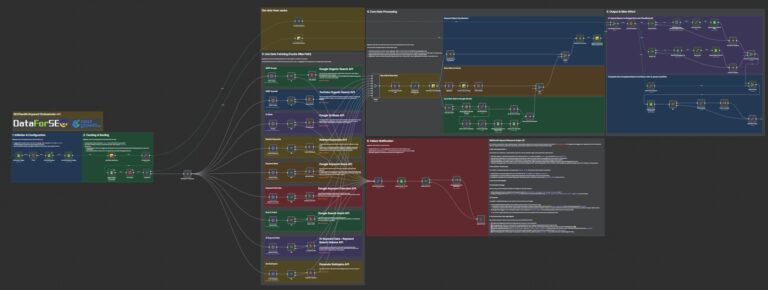
The Weekly Automation Stack is the layer that separates agencies doing manual rank tracking competitor reporting from agencies running systematic client deliverables. The stack has four components: rank tracker API as data source, n8n as orchestration layer, Google Sheets as staging storage, and email or Slack as delivery endpoint. Total cost: $0/month on self-hosted n8n, which beats the $99-299/month pricing of white-label report platforms like AgencyAnalytics.
The n8n workflow runs on a weekly cron schedule (every Monday at 6 AM client timezone). The sequence is: (1) trigger fires, (2) HTTP Request node pulls rank data from the platform API, (3) Function node transforms raw rank data into the report schema (client-friendly column names, week-over-week change calculations, competitor position deltas), (4) Google Sheets node writes a snapshot to the client’s tracking sheet, (5) AI Overview enrichment node pulls AIO citation presence for each tracked keyword, (6) Email node formats the branded weekly report HTML and sends to the client distribution list.
# n8n HTTP Request node config for SE Ranking API
Method: POST URL: https://api4.seranking.com/keyword-rank-data Authentication: Header Auth (Authorization: Token YOUR_API_KEY) Body (JSON): {   "site_id": 12345,   "date_from": "{{$today.minus(7, 'days').toISODate()}}",   "date_to": "{{$today.toISODate()}}",   "include_competitors": true } Timeout: 30000ms Retry: 3 attempts, exponential backoff
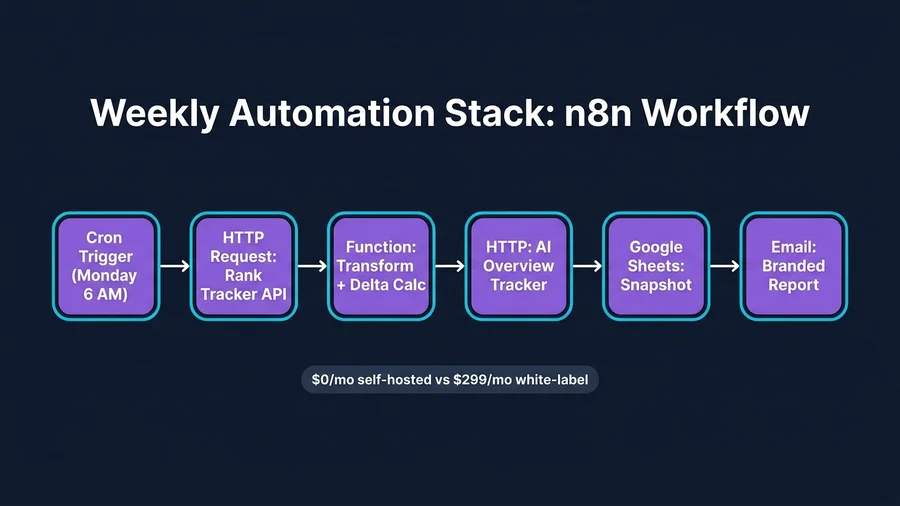
The Function node transforms API data into the report schema. Key transformations: (a) collapse daily data points to the Monday-Sunday week, (b) compute week-over-week delta per keyword per domain (your client + each tracked competitor), (c) flag keywords with position change magnitude above 5 as “significant movement,” (d) join against the Competitor Selection Matrix output to label each competitor with its strategic role (direct, adjacent, authority-tier). This transformation is 40-60 lines of JavaScript in the Function node and stays stable across all clients once built.
The weekly email uses a templated HTML layout with three sections: (1) client’s own rank movement this week (top 10 keyword changes), (2) competitor movement summary (which competitors gained, which lost), (3) AI Overview citation changes (new citations gained, old citations lost). Each email takes 30 seconds to format, zero minutes of account manager time.
In Q1 2026, I deployed this Weekly Automation Stack for three client agencies covering 13 total clients at 6,500 combined tracked keywords. Setup took 90 minutes per client after the base n8n workflow was built (one-time 4-hour workflow development). Ongoing weekly maintenance is under 15 minutes per agency to review exceptional movements and flag for account manager follow-up.
How Do You Integrate AI Overview Tracking Into the Report?
AI Overview citation tracking is the 2026 layer most rank tracking competitor reporting workflows still skip. Integrating it requires either a rank tracker with native AIO support or a specialized AIO tracker feeding the same n8n pipeline. See our AI Overview tracking analysis for the 7-tool comparison.
If your platform has native AIO tracking (SE Ranking, AthenaHQ, Otterly AI, Rankability all do), add a second HTTP Request node in the n8n workflow that pulls the AIO citation data in parallel with traditional rank data. The Function node merges both datasets keyed on keyword, producing a unified weekly report that shows both traditional position and AIO citation presence per keyword per domain.
If your platform lacks native AIO tracking (AccuRanker’s bundled coverage is partial only), subscribe to a specialized AIO tracker at the lowest tier (Otterly AI at $29/mo for 10 prompts) for your priority keywords only. Run that tracker’s API call from n8n in the same workflow. The two-tool stack costs $61-111/mo total ($32-82 Nightwatch plus $29 Otterly) and delivers deeper AIO reporting than any single $200+/mo platform offers.
The weekly report’s AI Overview section should answer three questions per client: (1) For which priority keywords does an AI Overview now appear that didn’t before? (2) Which domains are cited in those AI Overviews? (3) What percentage of cited sources overlap with the client’s content versus competitor content? This framing turns AIO from an abstract trend into a weekly content action item.
What Should a Competitor Rank Tracking Report Include?
A complete weekly competitor rank tracking report has six sections in this specific order. First, the executive summary: 3-5 bullets of the week’s biggest movements at the domain level. Second, client-specific rank movements: top 10 keyword positions that gained or lost 3+ positions. Third, competitor movement summary: which tracked competitors had the largest aggregate movement and in which direction. Fourth, SERP feature changes: new featured snippets, People Also Ask boxes, or AI Overview citations gained or lost. Fifth, keyword group performance: aggregate position averages by topic cluster or funnel stage, showing which groups are trending and which are stable. Sixth, action items: 2-4 concrete content or technical recommendations based on the data.
Reports below 500 words are typically insufficient for agency client communication; reports above 1,500 words lose reader attention. The 800-1,200 word target hits the sweet spot. Branding should be consistent: client logo plus agency logo in the header, color scheme matching both, and clean typography in readable font sizes (minimum 14pt in email clients).
Warning
Avoid sending daily automated reports unless the client has specifically requested them. Daily data is noisy and creates false urgency. Weekly reports with exception alerts for major movements (10+ position shifts) deliver actionable signal without reporting fatigue.
This article is part of our broader pillar guide. For the full context, see our best rank tracking software pillar (11 tools tested).
FAQ
What is rank tracking competitor reporting?
Rank tracking competitor reporting is the agency workflow of monitoring a client’s SERP positions alongside 3-7 tracked competitor domains, then delivering a recurring (typically weekly) report that shows relative movement. Done properly, it combines tool choice, competitor selection methodology, automated data collection, and branded client delivery into a reproducible 15-minute-per-week process.
How many competitors should agencies track per client?
Track 3-7 competitors per client. Below 3, you lose statistical signal on SERP dynamics. Above 7, report readability degrades and tool subscription costs scale unnecessarily. Apply the Competitor Selection Matrix (market overlap, keyword overlap, content velocity, authority band, SERP feature presence) to identify the optimal 3-7 from a candidate list of 15-20.
Can I automate competitor rank reports for free?
Yes. Using self-hosted n8n as the automation layer, the Weekly Automation Stack costs $0/month in software beyond your existing rank tracker API subscription. This beats $99-299/month white-label report platforms like AgencyAnalytics for technical agencies willing to invest 4 hours in initial workflow development. Non-technical agencies should evaluate the tradeoff: $299/mo for ready-to-use vs $0/mo for custom-built.
How often should competitor rank reports be sent?
Weekly cadence (typically Monday morning) is the optimal default. Daily reports create noise and reporting fatigue. Monthly reports miss actionable SERP movement windows. Exception-triggered alerts (e.g., position drop of 10+ for priority keywords) can supplement weekly reports for crisis workflows, but should not replace the scheduled cadence.
What rank tracking platform has the best competitor tracking dashboard?
For dedicated competitor tracking depth, Advanced Web Ranking (AWR) leads with Looker Studio integration and unlimited competitor domains on Agency tier ($251/mo annual). Nightwatch bundles competitor tracking on all tiers including the $32/mo entry. SE Ranking’s competitor discovery feature (which surfaces new competitors based on keyword overlap) is the strongest automated competitor identification tool in the category.
How do I track AI Overview citations alongside traditional rankings?
Use a rank tracker with native AIO support (SE Ranking, AthenaHQ, Otterly AI, Rankability) or add a specialized AIO tracker ($29-99/mo entry tier) to your existing stack. In your n8n automation workflow, add a parallel HTTP Request node for AIO data and merge it with traditional rank data in the Function node transformation step. The unified report shows both position and citation presence per keyword.
What should a weekly competitor rank report include?
Six sections: (1) executive summary, (2) client rank movements, (3) competitor movement summary, (4) SERP feature changes, (5) keyword group performance, (6) action items. Target 800-1,200 words total. Branded header with client and agency logos. Sent Monday morning client timezone.