Coolify Reverse Proxy Guide: Traefik vs Nginx 2026
TL;DR
- Traefik is the built-in default coolify reverse proxy. It handles auto-SSL, hostname routing, and WebSocket passthrough with zero config (Traefik docs, 2026).
- 80% of Coolify users should stay on Traefik. The other 20% have specific, documented requirements that alternatives solve better.
- Switching from Traefik to Nginx cost us 4 hours per instance in March 2026. We’ve only done it twice, across 6 production boxes.
- HAProxy’s WebSocket passthrough gotcha breaks the Coolify dashboard silently. We’ve hit it twice. The fix is one HAProxy config directive.
80%
Should stay on default Traefik
4h
Migration cost per instance
280+
Coolify services routed by Traefik
1 line
HAProxy WebSocket fix
Why Does Coolify Ship with Traefik (And Why Is That Enough for 80%)?
Coolify’s built-in Traefik instance auto-detects containers, issues Let’s Encrypt certificates, routes by hostname, and handles WebSocket connections, all without you writing a single config file (Traefik docs, 2026). Every one of the 280+ one-click service templates in Coolify is built around Traefik as the routing layer. That’s not an accident. Here’s what most developers miss: Traefik’s middleware stack in 2026 covers more ground than many realize. It handles HTTP-to-HTTPS redirect, basic auth, IP allowlist, rate limiting, request and response header manipulation, gzip compression, basic path rewriting, and automated SSL cert management. That’s a lot to replace. The “switch to Nginx” instinct usually comes from developers who learned Nginx years ago and reach for it by habit. But the genuine cases where Traefik falls short are narrow: complex regex rewrites with capture groups across multiple paths, mod_rewrite-style URL canonicalization, mTLS client cert validation in unusual chains, and HTTP/1.0 client compatibility. Outside those four cases, staying with Traefik saves you 4 hours and an extra config file to maintain.🟢 Beginner Reassurance
If you just installed Coolify and you’re wondering which proxy to use, the answer is: the one already running. Traefik is active from the moment Coolify starts. You don’t need to configure it, swap it, or think about it for most setups. Come back to this guide if you hit a specific requirement Traefik can’t handle.
Citation Capsule
Coolify’s Traefik integration auto-detects containers via Docker labels, issues and renews Let’s Encrypt certificates, and routes by hostname without manual config. As of v4.0, all 280+ one-click service templates route through Traefik by default (GitHub coollabsio/coolify, 2026).
Fresh signal: Coolify v4.1.0 (May 18, 2026)
The latest release shipped Traefik bugfixes, audit logging for proxy operations, and the Railpack build engine in beta. Coolify now sits at 55,689 stars, 4.6K forks, and stays Apache 2.0 licensed (Coolify v4.1.0 release).
One catch worth flagging: Coolify still pins Traefik to v3.1 in code while upstream is at v3.6 (Issue #7204). Version-specific Traefik features may not behave as the upstream docs suggest.
A May 2026 r/homelab post documented running 23 LXCs on a small Proxmox box, calling out the production stack in one line: “Coolify + Traefik for app deploys, Cloudflare Tunnel + Access for ingress.”
That sentence captures why most Coolify operators don’t replace Traefik. They wrap it with Cloudflare Tunnel for public ingress instead, getting Cloudflare’s edge protection without giving up Traefik’s container auto-discovery on the host (r/homelab thread).
The 5-Row Coolify Reverse Proxy Decision Matrix: Stay on Traefik or Switch
The right choice comes down to your specific scenario, not your familiarity with a particular proxy. We switched 2 of our 6 production Coolify instances from Traefik to Nginx in front in March 2026, after a legacy app required URL canonicalization logic that Traefik middleware couldn’t handle cleanly. The migration cost 4 hours per instance: Coolify reconfiguration to expose internal ports, Nginx config writing, Let’s Encrypt cert migration, and smoke testing. Our other 4 instances are still on default Traefik with zero proxy issues across 8 months of production. In hindsight, 3 of the 4 “problems” we thought required Nginx had Traefik middleware solutions we hadn’t fully explored. One lesson: document the requirement first. Then check Traefik middleware docs. Then switch only if Traefik genuinely can’t cover it.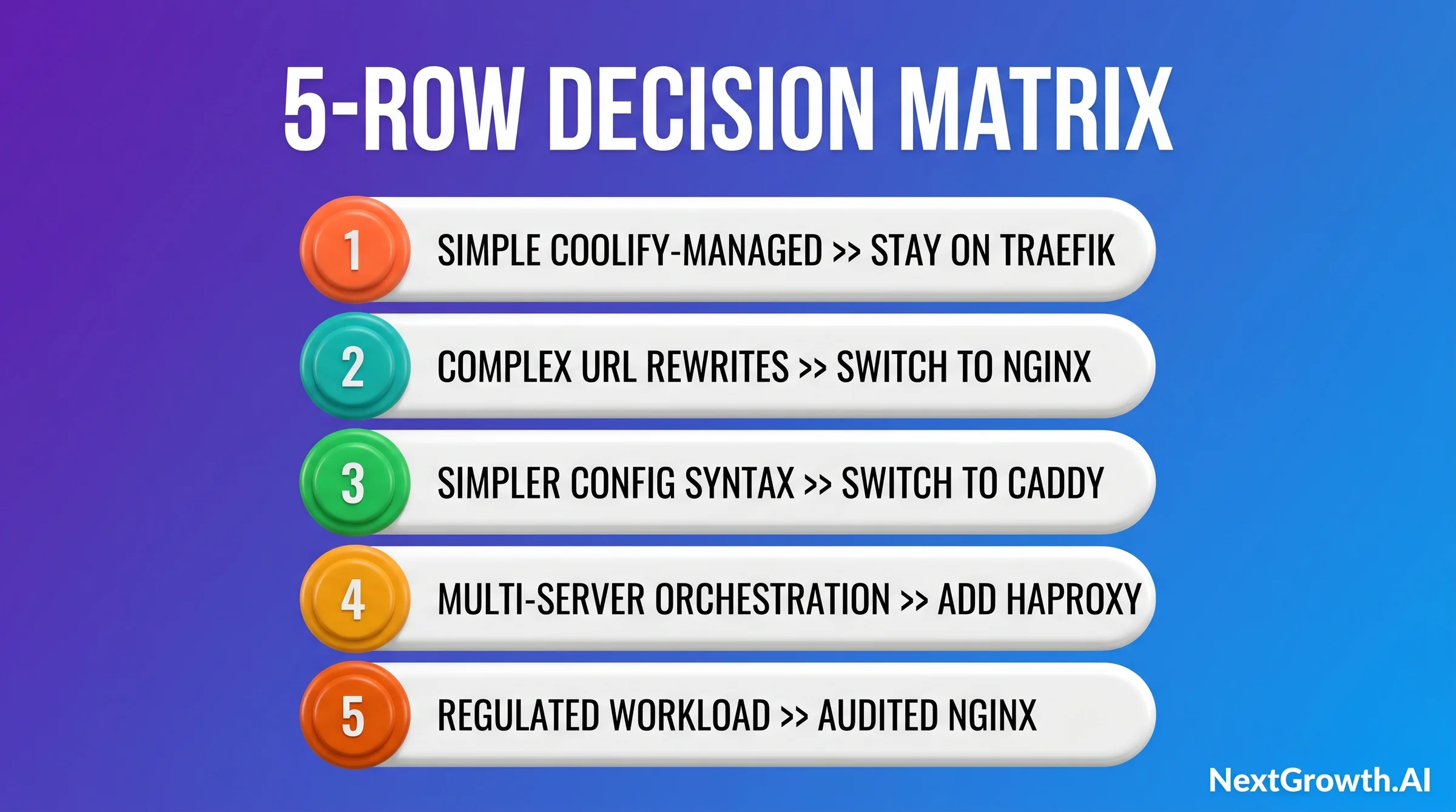
| Scenario | Recommended Proxy | Why |
|---|---|---|
| Single server, 1-10 apps, standard routing | Traefik (built-in, no change) | Zero config, auto-SSL, native Coolify integration via Docker labels |
| Complex URL rewrites or legacy app with existing Nginx configs | Nginx in front, Traefik routes internally | Regex rewrite rules, header manipulation, reuse of existing server configs |
| Preference for simpler config syntax, better default headers | Caddy swap (replaces Traefik) | Caddyfile is shorter than Traefik YAML; HSTS + CSP headers on by default |
| Multi-server Coolify setup or Layer 4 load balancing | HAProxy in front, Traefik internal per node | TCP-level load balancing; requires explicit WebSocket passthrough or dashboard breaks |
| Regulated workloads (HIPAA, PCI) requiring dedicated termination | Hardware LB or Nginx + Coolify (compliance layer separate) | Compliance audit requires a dedicated, documented termination layer outside Coolify |
Quick Decision Guide, Coolify Reverse Proxy
Standard setup (80% of cases): Stay on Traefik. It’s already running.
Complex URL rewrites or existing Nginx skills: Add Nginx in front. Budget 4 hours per instance to migrate.
Prefer simpler config: Swap to Caddy. Caddyfile syntax is shorter; auto-HTTPS is the default.
Multi-server or TCP LB: HAProxy in front. Enable WebSocket passthrough or the dashboard breaks silently.
Memory footprint at idle (lower is better for small VPS)
On a 1 vCPU / 1 GB VPS, the 50 MB delta between proxies is the difference between headroom and constant swap. Numbers from the SelfHostWise 2026 comparison:
- Caddy 2.x: ~30 MB idle (single binary, no separate config loader)
- Nginx Proxy Manager: ~50 MB idle (Nginx + Node.js UI)
- Traefik 3.x: ~80 MB idle (Go binary + Docker socket listener)
Stay on Traefik: How Coolify’s Default Reverse Proxy Works
Coolify configures Traefik entirely through Docker labels on each container. You set a domain in the Coolify dashboard, and Coolify writes the matchingtraefik.http.routers and traefik.http.services labels into your container’s Docker Compose definition. No Traefik config file editing required (Coolify proxy docs, 2026).
Wildcard SSL with DNS-01 (the missing piece)
Coolify’s UI defaults to HTTP-01 challenges, which cannot issue wildcard certificates by spec. For *.app.example.com coverage you need DNS-01. Until Coolify ships first-class DNS-01 (tracked in Discussion #8987), the workaround is custom Traefik labels plus a Cloudflare DNS-01 provider in Traefik’s dynamic config.
Three example labels to add to the service:
tls.certresolver=cloudflare, tls.domains[0].main=example.com, tls.domains[0].sans=*.example.com
Note that Cloudflare Tunnel does not handle wildcards either (Discussion #2926), so this path is the only one that covers wildcard SaaS-style tenants today.
Debug playbook: custom domain applied as PathPrefix instead of Host
When a custom domain in Coolify routes to /custom.example.com (a path) instead of resolving as a hostname (Host rule), it matches the pattern in Issue #8775.
Three-step fix:
- Inspect the generated label with
docker inspect <container> | grep traefik.http.routers. - If you see
PathPrefix(`custom.example.com`)instead ofHost(`custom.example.com`), the domain was saved without a protocol prefix. - Open the project’s General settings, save the domain as
https://custom.example.com(full URL), restart the container, then verify the regenerated label uses Host.
# Docker Compose service labels - Coolify Traefik custom subdomain routing
# Shown here for understanding + manual override use cases.

services:
  my-app:
    image: my-app:latest
    labels:
      # Enable Traefik routing for this container
      - "traefik.enable=true"

      # Router: match incoming requests by hostname
      - "traefik.http.routers.my-app.rule=Host(`app.yourdomain.com`)"

      # Use the HTTPS entrypoint (port 443)
      - "traefik.http.routers.my-app.entrypoints=https"

      # Auto-issue Let's Encrypt cert via this resolver
      - "traefik.http.routers.my-app.tls.certresolver=letsencrypt"

      # Point to the correct internal port
      - "traefik.http.services.my-app.loadbalancer.server.port=3000"

      # Optional: enable gzip compression middleware
      - "traefik.http.routers.my-app.middlewares=gzip@docker"

      # Optional: redirect HTTP to HTTPS
      - "traefik.http.routers.my-app-http.rule=Host(`app.yourdomain.com`)"
      - "traefik.http.routers.my-app-http.entrypoints=http"
      - "traefik.http.routers.my-app-http.middlewares=redirect-to-https@docker"

networks:
  default:
    external: true
name: coolifycoolify network is the key detail. Every container Coolify manages must be on the coolify Docker network for Traefik to detect and route it. This is handled automatically by Coolify’s deployment engine. You only need to specify it manually if you’re running a service Coolify didn’t deploy directly.
Traefik’s dynamic configuration picks up label changes within seconds. No restart required. That live reloading is one of the concrete advantages over a static Nginx config file.
New in 2026: Pocket ID passkey OIDC + Traefik forward-auth
Coolify added official docs in early 2026 for Pocket ID (passwordless passkey identity provider) and the Authentik forward-auth middleware recipe.
The pattern: Pocket ID issues passkey-backed OIDC tokens, Traefik’s forward-auth middleware validates each request against Authentik or Pocket ID, and only authenticated users reach the protected container. It fits internal-tool deployments where SSO matters more than raw public traffic (Cerbos 2026 Authelia vs Authentik writeup).
Switch to Nginx: Complex URL Rewrites
Nginx makes sense when you have URL rewrite requirements that Traefik middleware can’t express cleanly, or when your team has a large existing Nginx config library from pre-Coolify infrastructure. The most-deployed web server globally, Nginx is documented exhaustively and has decades of community Q&A (Nginx docs, 2026). The tradeoff is a 4-hour migration per instance and an extra config layer to maintain long-term. The pattern that works best is Nginx in front, Traefik handling internal routing. Nginx terminates SSL, applies your custom rewrites and headers, then proxies to Coolify’s internal port (8000 by default, or 443 if you’ve configured Coolify to use HTTPS internally). Traefik still handles service-to-service routing inside Coolify.# /etc/nginx/sites-available/coolify-app
# Nginx reverse proxy template for Coolify (WebSocket + gzip + security headers)
# Tested on Ubuntu 22.04 + Coolify v4.0 (nextgrowth.ai, March 2026)
# Replace app.yourdomain.com with your domain.
server {
listen 80;
server_name app.yourdomain.com;
return 301 https://$host$request_uri;
}
server {
listen 443 ssl http2;
server_name app.yourdomain.com;
# SSL - cert managed by Certbot or copied from Coolify Let's Encrypt store
ssl_certificate /etc/letsencrypt/live/app.yourdomain.com/fullchain.pem;
ssl_certificate_key /etc/letsencrypt/live/app.yourdomain.com/privkey.pem;
ssl_protocols TLSv1.2 TLSv1.3;
ssl_ciphers HIGH:!aNULL:!MD5;
# Security headers (better defaults than Traefik out of the box)
add_header X-Frame-Options SAMEORIGIN always;
add_header X-Content-Type-Options nosniff always;
add_header Referrer-Policy strict-origin-when-cross-origin always;
add_header Strict-Transport-Security "max-age=31536000; includeSubDomains" always;
# Gzip compression
gzip on;
gzip_comp_level 5;
gzip_types text/plain text/css application/json application/javascript
text/xml application/xml application/xml+rss text/javascript;
gzip_vary on;
# Example: complex URL rewrite (trailing slash + case normalization)
# This is the use case that pushed us from Traefik to Nginx in March 2026.
rewrite ^(/[^/]+)/$ $1 permanent;
location / {
proxy_pass http://127.0.0.1:8000;
proxy_http_version 1.1;
# WebSocket support (required for Coolify dashboard real-time logs)
proxy_set_header Upgrade $http_upgrade;
proxy_set_header Connection "upgrade";
proxy_set_header Host $host;
proxy_set_header X-Real-IP $remote_addr;
proxy_set_header X-Forwarded-For $proxy_add_x_forwarded_for;
proxy_set_header X-Forwarded-Proto $scheme;
# Timeouts: increase for long-running deploys
proxy_read_timeout 300s;
proxy_send_timeout 300s;
proxy_connect_timeout 60s;
# Buffer settings
proxy_buffering on;
proxy_buffer_size 8k;
proxy_buffers 8 8k;
}
# Health check endpoint (no auth, no logging)
location = /health {
proxy_pass http://127.0.0.1:8000/health;
access_log off;
}
}proxy_read_timeout defaults to 60 seconds. Coolify deploys can take longer during initial image pulls. Bumping it to 300 seconds prevents false 504 errors in the Coolify dashboard during deploys.
Warning
When running Nginx in front of Coolify, you need to tell Coolify NOT to issue its own SSL cert for domains Nginx is already terminating. In Coolify’s domain settings for each app, disable the “Generate SSL” toggle and set the internal port directly. Double SSL termination causes cert chain errors that are confusing to debug.
Switch to Caddy: When Does Simpler Config + Better Security Headers Win?
WARNING: Coolify auto-update silently reverts Caddy to Traefik (Issue #9127)
Before switching the proxy to Caddy, pin Coolify auto-update to manual mode. Issue #9127 documents a silent revert: after Coolify upgrades itself overnight, the proxy can flip back to Traefik without notification, breaking HTTPS for every container until the operator notices the next morning.
Caddy stays officially “experimental” since beta.237. Until that label changes, schedule manual upgrades during a maintenance window and verify the active proxy with docker ps | grep caddy after every upgrade.
app.yourdomain.com {
    reverse_proxy localhost:8000 {
        header_up Host {host}
        header_up X-Real-IP {remote}
        header_up X-Forwarded-For {remote}
        header_up X-Forwarded-Proto {scheme}
        transport http {
            dial_timeout 30s
            response_header_timeout 300s
        }
    }
    encode gzip
    header {
        Strict-Transport-Security "max-age=31536000; includeSubDomains; preload"
        X-Content-Type-Options nosniff
        X-Frame-Options SAMEORIGIN
        Referrer-Policy strict-origin-when-cross-origin
    }
}
Add HAProxy in Front: When Do You Need Multi-Server + WebSocket Passthrough?
HAProxy belongs in front of Coolify when you’re running multiple Coolify nodes and need TCP-level load balancing across them. It’s not a Traefik replacement inside a single Coolify instance. The pattern is: HAProxy as the public-facing load balancer, one Traefik instance per Coolify node handling internal routing (HAProxy docs, 2026).
# /etc/haproxy/haproxy.cfg
# HAProxy frontend for Coolify multi-server setup
# WebSocket passthrough required for Coolify dashboard real-time logs
# Covers the r/selfhosted gotcha: https://reddit.com/r/selfhosted/comments/1t7ulqe/
# Tested: HAProxy 2.8 + Ubuntu 22.04 + Coolify v4.0

global
    log /dev/log local0
    maxconn 50000
    tune.ssl.default-dh-param 2048

defaults
    log     global
    mode    http
    option  httplog
    option  dontlognull
    timeout connect 10s
    timeout client  300s
    timeout server  300s
    # KEY: keep HTTP connections alive for WebSocket upgrade
    option  http-server-close

frontend coolify_https
    bind *:443 ssl crt /etc/haproxy/certs/yourdomain.pem
    bind *:80
    http-request redirect scheme https unless { ssl_fc }

    # Detect WebSocket upgrade requests
    acl is_websocket hdr(Upgrade) -i websocket
    acl is_websocket hdr_beg(Host) -i ws

    # Route WebSocket traffic to dedicated backend (mode tcp passthrough)
    use_backend coolify_ws if is_websocket

    # All other traffic to standard HTTP backend
    default_backend coolify_http

    # Forward real client IP to Coolify/Traefik
    option forwardfor
    http-request set-header X-Forwarded-Proto https if { ssl_fc }

backend coolify_http
    balance roundrobin
    option httpchk GET /api/health
    # Coolify node 1
    server coolify-node1 10.0.0.1:443 ssl verify none check inter 10s
    # Coolify node 2
    server coolify-node2 10.0.0.2:443 ssl verify none check inter 10s

backend coolify_ws
    # WebSocket backend: mode tcp for proper passthrough
    # Without this, Coolify dashboard real-time logs break silently
    balance source
    timeout tunnel 1h
    server coolify-node1 10.0.0.1:443 ssl verify none check inter 10s
server coolify-node2 10.0.0.2:443 ssl verify none check inter 10soption http-server-close in defaults (keeps connections alive long enough for WebSocket upgrade negotiation) and the separate coolify_ws backend with timeout tunnel 1h (lets WebSocket connections persist without HAProxy killing them after the default timeout). Without both, the dashboard behaves normally on surface but logs never stream.
🛠️ ENGINEER’S PERSPECTIVE, HAPROXY WEBSOCKET PASSTHROUGH GOTCHA
- The symptom is silent, not loud. HAProxy without WebSocket passthrough doesn’t throw a 5xx error. The Coolify dashboard loads, deployments trigger, containers start. But the real-time log stream shows “Connecting…” and deployment status updates freeze. You’ll think it’s a Coolify bug until you check DevTools and see WebSocket connections downgrading to long-polling.
- The fix is two directives, not a config rewrite. Add
option http-server-closeto your HAProxy defaults block and create a separate backend for WebSocket traffic usingtimeout tunnel 1h. The ACL that detects theUpgrade: websocketheader routes those connections to the dedicated backend. See the config snippet above for the exact block from the r/selfhosted HAProxy thread. - Template updates can revert this. We hit the passthrough issue twice, once on initial setup, once when an HAProxy config template update overwrote our custom backend. Pin your HAProxy config in version control and add a smoke test that checks WebSocket connectivity to the Coolify dashboard after any HAProxy config change. A simple
wscat -c wss://coolify.yourdomain.com/confirms the connection in 3 seconds.
balance source setting on the WebSocket backend is intentional: it pins a user’s WebSocket session to the same node, preventing the “stuck worker” pattern that happens when n8n’s internal Redis pub/sub can’t reach the node serving the dashboard.
FAQ: Coolify Reverse Proxy in 2026
What is the default coolify reverse proxy?
Traefik is Coolify’s built-in default reverse proxy. It auto-detects containers via Docker labels, issues Let’s Encrypt SSL certificates, routes by hostname, and handles WebSocket connections, with zero configuration required from the user (Coolify proxy docs, 2026). All 280+ one-click service templates in Coolify use Traefik for routing by default.When should I switch from Traefik to Nginx in Coolify?
Switch to Nginx when you have complex regex URL rewrite requirements that Traefik middleware can’t cleanly express, or when your team has an existing Nginx config library from pre-Coolify infrastructure you want to reuse. Budget 4 hours per instance for the migration: port exposure, Nginx config, cert migration, and smoke testing. Check Traefik’s middleware docs first. Roughly 3 in 4 “Nginx requirements” we’ve seen have a Traefik middleware solution.Can I run Coolify behind Cloudflare and an external reverse proxy simultaneously?
Yes, but the stacking order matters. The correct chain is: Cloudflare (WAF and CDN) then your external proxy (HAProxy or Nginx) then Coolify’s Traefik. Pass real client IPs viaX-Forwarded-For headers at each hop, and configure Traefik to trust that header. Keep Cloudflare in “DNS only” mode until SSL is confirmed working end-to-end. Then enable the proxy. WebSocket connections for the Coolify dashboard need Cloudflare’s WebSocket support enabled in your Cloudflare zone settings under Network.
Does Caddy work as a Coolify reverse proxy replacement?
Caddy can replace Traefik inside Coolify, but it’s not officially supported in Coolify’s GUI. You’d manage Caddy config manually while still using Coolify for container orchestration and deployments. The Caddy docs cover the reverse proxy directives. For most solo self-hosters, default Traefik is simpler. Caddy becomes worth the manual overhead when your team specifically values Caddyfile readability and HSTS-by-default behavior over Traefik’s label-driven automation.Why does HAProxy break Coolify dashboard real-time logs?
HAProxy’s default HTTP mode closes connections after each request, which prevents the WebSocket upgrade that Coolify’s real-time log stream needs. The fix is addingoption http-server-close to your HAProxy defaults block and creating a dedicated backend for WebSocket traffic with timeout tunnel 1h. Without this, dashboard logs show “Connecting…” indefinitely while everything else appears to work. The r/selfhosted HAProxy thread has the exact config block that resolves it.
Can I use multiple reverse proxies with a single Coolify instance?
You can run an external proxy (Nginx or HAProxy) in front of Coolify while keeping Traefik active for internal service routing. This is the recommended pattern when you need external features like complex URL rewrites or multi-server load balancing. Don’t replace Traefik internally unless you’re fully managing Coolify’s container routing yourself, as Coolify’s dashboard and one-click services expect Traefik labels to be present.How do I test that my Coolify reverse proxy WebSocket connection is working?
Runwscat -c wss://coolify.yourdomain.com/ from your local machine after any proxy configuration change. A successful connection confirms WebSocket passthrough is working. In the Coolify dashboard, go to any app’s deployment and watch the log stream tab. If it streams live output, WebSockets are passing through. If it shows “Connecting…” for more than 10 seconds, check the HAProxy Upgrade: websocket ACL or Nginx proxy_set_header Connection "upgrade" directive.
Should I use Cloudflare Tunnel instead of exposing Coolify behind Traefik directly?
Both. Most production stacks wrap Coolify’s Traefik with Cloudflare Tunnel for public ingress instead of choosing one or the other. Cloudflare Tunnel handles the public-facing edge (DDoS, bot filtering, Access policies), while Traefik keeps doing container auto-discovery, container-to-container TLS, and middleware-based redirects on the host network.
The split: Tunnel terminates the connection from the internet, then forwards to Traefik over an internal listener. The catch is that Cloudflare Tunnel does not work with wildcard hostnames (Discussion #2926), so wildcard SSL still requires the DNS-01 setup in Step 3.
Conclusion
Pick your coolify reverse proxy based on what your workload actually needs, not what you’re most familiar with. Traefik is the right answer for 80% of setups. It’s already running, it handles SSL automatically, and it supports the WebSocket connections Coolify’s dashboard depends on. The cases where switching pays off are specific: Nginx for complex URL rewrites or large existing config libraries, Caddy for teams prioritizing Caddyfile readability and default HSTS headers, HAProxy for multi-server TCP load balancing. If you do switch, the operational cost is real. Four hours per instance for Traefik-to-Nginx migration is not a scare tactic. It’s what the March 2026 migration actually took, twice, on two of our six production Coolify boxes. The other four are still on default Traefik and have never needed attention. The HAProxy WebSocket passthrough issue deserves a bookmark. The symptom is silent enough that you might not catch it immediately after a config change. Add awscat smoke test to your post-deploy checklist.
For the full Coolify production setup including install, security hardening, and MCP integration, the parent install guide (linked in the intro) covers each step end-to-end. For backing up your Coolify databases and volumes, the Coolify backup setup guide covers Cloudflare R2, retention strategy, and monthly restore drills.