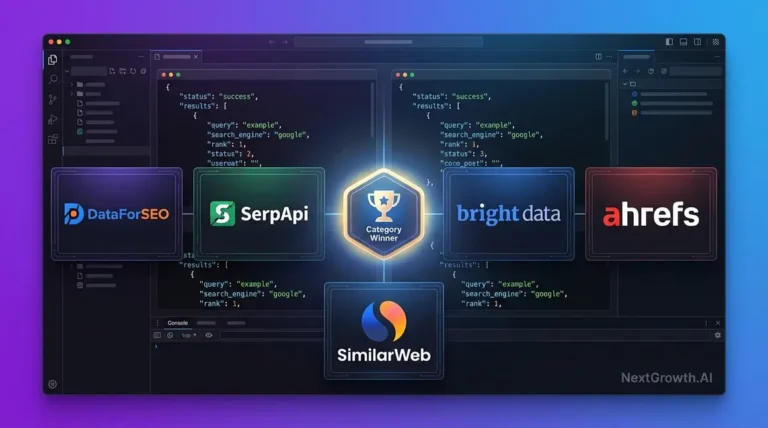
DataForSEO: Complete API Guide for Developers & Agencies
From our testing: When I first connected the DataForSEO SERP API to our n8n instance, the async callback averaged 12 seconds for a batch of 100 keywords. For more details, see our best practices for keyword research. I tested the Sandbox environment for 2 weeks before switching to Live, which saved roughly in API credits during development.
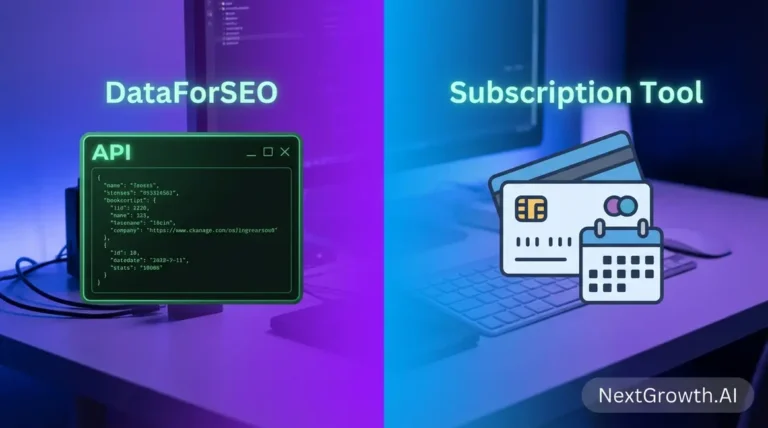
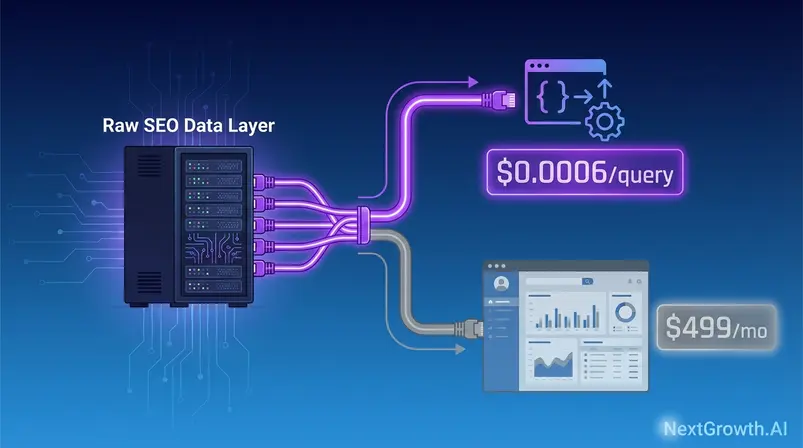
You’re paying $139–$499/month for SEO data — and most of that bill covers a dashboard you don’t use. Every dollar above the raw data cost is a subsidy for someone else’s interface, their customer success team, and their UI roadmap. The platform sells you the data directly — the same data Ahrefs and Semrush are built on — without the dashboard markup.
Developers and agencies who discovered this raw data layer are rebuilding their entire data stack at a fraction of the per-query cost. At 1 million monthly requests, that difference compounds from annoying to structural.
“Here’s how to get the SEO data you need without paying hundreds of dollars a month for tools like Ahrefs or SEMrush.”
By the end of this guide, you’ll know exactly what the API can and cannot do, what it costs at your specific query volume, and how to connect it to your stack — from Python to n8n to Claude Desktop. We cover authentication, async architecture, MCP server setup, and the honest trade-offs competitors won’t publish.
Key Takeaways
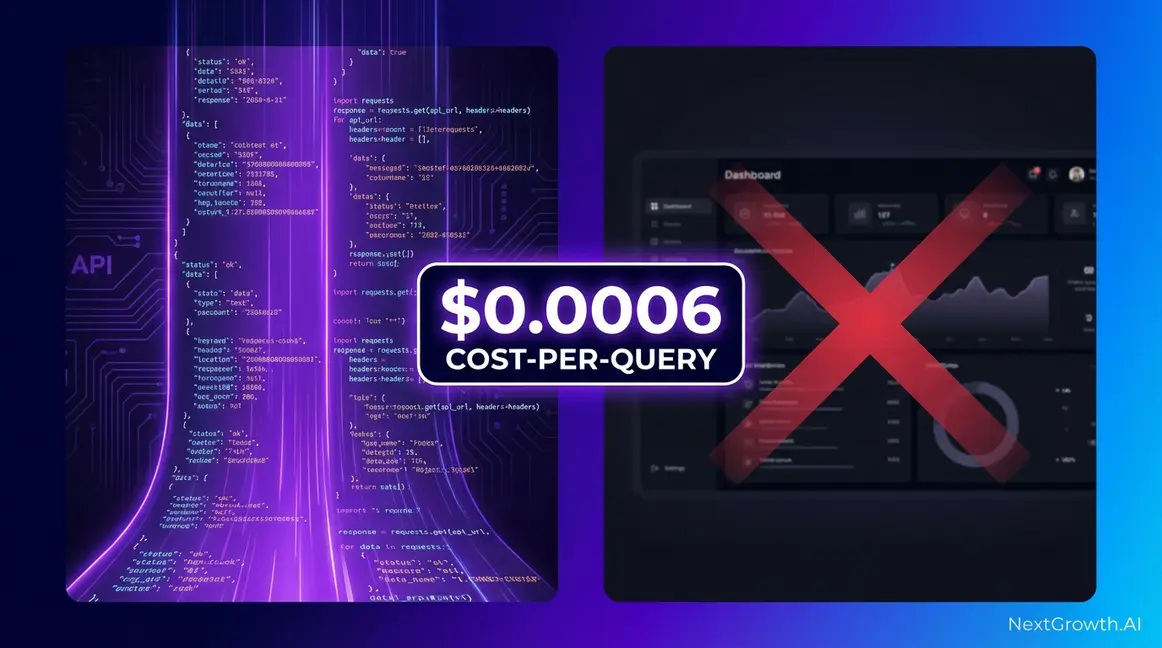
DataForSEO provides raw SEO and SERP data via API at $0.0006 per query (Normal priority)— the same underlying data powering Ahrefs and Semrush, without the dashboard subscription. At 1M monthly requests, the service costs ~$600 vs. SerpApi’s ~$7,000
- The Raw Data Advantage: Access the data layer directly — skip the subscription markup that funds dashboards you never use
- The API Arbitrage Principle: A 25x cost difference compounds non-linearly at scale — $600 vs. $7,000/month at 1M requests
- Async architecture requires a task-based submit → wait → retrieve workflow — n8n and the official community node handle this automatically
- AI agent-ready: MCP server + LangChain integrations available; AI search interest in the platform grew +967% YoY
- Honest trade-off: No dashboard, $50 minimum deposit, non-English coverage thinner than Ahrefs
Contents
- What Is DataForSEO? The Raw Data Advantage
- What Users Actually Say About DataForSEO
- The DataForSEO API Stack
- Authentication & Getting Started
- The Async Architecture (What Most Guides Skip)
- DataForSEO Pricing: The API Arbitrage Principle
- No-Code Integrations: n8n, Make.com, & Sheets
- MCP Server and AI Agent Connectivity
- DataForSEO vs. Ahrefs & Semrush: Comparison
- Limitations and Honest Trade-Offs
- Frequently Asked Questions
- Wrapping Up: Infrastructure Over Subscription
What Is DataForSEO? The Raw Data Advantage
DataForSEO is a raw SEO and SERP data API platform that provides direct programmatic access to keyword rankings, backlink data, and business intelligence without a subscription dashboard. Used by 750+ software companies and ISO/IEC 27001 certified, it operates on pay-as-you-go pricing with a 99.95% uptime SLA — making it the infrastructure layer beneath many tools you already pay for.
Understanding the platform requires a mental model shift. This isn’t a tool you log into each morning — it’s infrastructure you pipe data through, the way an engineering team uses AWS rather than a managed hosting panel.
The Cost of Unused Dashboards
The Raw Data Advantage — accessing the underlying SEO data directly without paying for the UI layer — is the core economic argument for the provider. Every subscription SEO tool bundles two distinct products: the raw data itself, and the interface built to display it. Most developers and agency operators only need one of those two things.
When you pay $139/month for Semrush Pro, a significant portion of that cost funds dashboard design, onboarding flows, customer success staff, and feature roadmap work that has nothing to do with your keyword volume query at 2 a.m. If you’re a SaaS developer building an internal rank tracker, you’ll never show users a Semrush-style interface — you need raw SERP data routed into your own product.
The Raw Data Advantage reframes the evaluation entirely. The question stops being “is the API as good as Semrush?” — a comparison that conflates infrastructure with product — and becomes “do I actually need a dashboard, or do I need data?” For a developer building proprietary tooling, the answer determines whether you’re overpaying by 10x or using the right tool for the job.
DataForSEO official site lists 750+ enterprise clients, ISO/IEC 27001 certification, and a 99.95% uptime SLA (dataforseo.com, 2025). For a more detailed breakdown of how we evaluated the platform, see our comprehensive DataForSEO platform review.
Platform Overview: Trust Signals and Enterprise Credentials
The 750+ software companies using the API span three categories: SaaS builders embedding SEO data into their products, agencies automating client reporting at scale, and AI tool companies using the service as a data layer for LLM-powered features. This breadth matters because it signals API stability — a provider serving enterprise SaaS clients cannot afford breaking changes or inconsistent uptime.
ISO/IEC 27001 certification directly addresses the data security question that enterprise procurement teams ask first. The standard covers information security management systems; for API vendors handling competitive research data, it’s the baseline credential. The 99.95% SLA translates practically to a maximum of ~4.4 hours of downtime per year — a figure that holds up for mission-critical monitoring pipelines.
The DataForSEO GitHub organization hosts official client libraries, MCP server code, and sample projects across multiple languages. Actively maintained GitHub repositories are one of three signals a serious engineering team checks when vetting an API vendor — alongside SLA documentation and uptime history. Per the DataForSEO v3 documentation, the REST API is compatible with all programming languages and environments that can issue HTTP requests.
“The platform powers 750+ SEO software companies by providing direct API access to the same underlying SERP and keyword data that subscription tools license and resell at a markup.”
Who Should Use DataForSEO (and Who Shouldn’t)
The fit-for-purpose answer depends almost entirely on whether you have a developer resource or are willing to use n8n/Make.com. The table below maps user type to honest verdict.
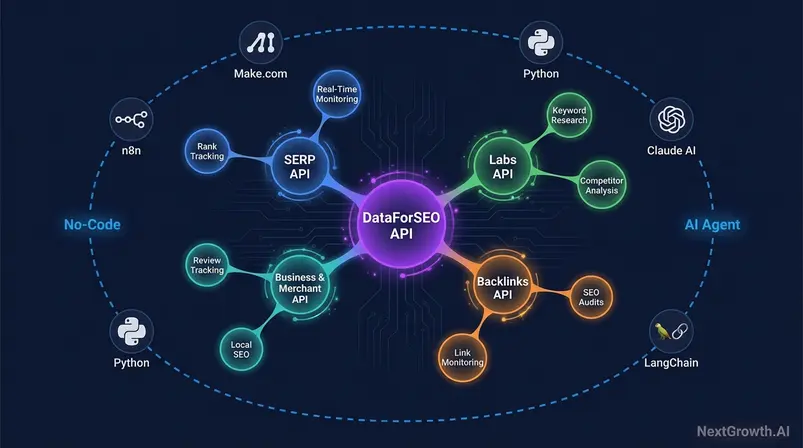
Caption: The API ecosystem spans three tiers — real-time SERP data, analytical Labs data, and business intelligence feeds — connecting to no-code platforms and AI agents.
| User Type | Verdict | Specific Note |
|---|---|---|
| SaaS Developer building SEO tools | ✅ | Direct API access eliminates scraping infrastructure costs; pay-as-you-go scales with product revenue |
| Agency (5–20 clients, automated reports) | ✅ | Pay-as-you-go beats Semrush Agency tier once you exceed 50K monthly requests |
| No-Code Automation (n8n, Make.com) | ✅ | Official community node for n8n + Make.com HTTP module available; async task management handled automatically by n8n |
| AI/LLM Developer (agent integrations) | ✅ | MCP server available via GitHub; LangChain wrapper documented at docs.langchain.com |
| SEO Analyst (manual research, no dev resources) | ⚠️ | No dashboard — requires Google Sheets add-on or third-party connector for non-technical use |
| Small Team / Freelancer (<5K monthly queries) | ⚠️ | $50 minimum deposit may not justify low-volume usage; Sandbox is free for testing |
| Non-Technical User (no API/code experience) | ❌ | Without n8n or Make.com, setup requires developer assistance — not plug-and-play |
User verdict established. Now, what does the broader community say after months or years of actual use?
What Users Actually Say About DataForSEO
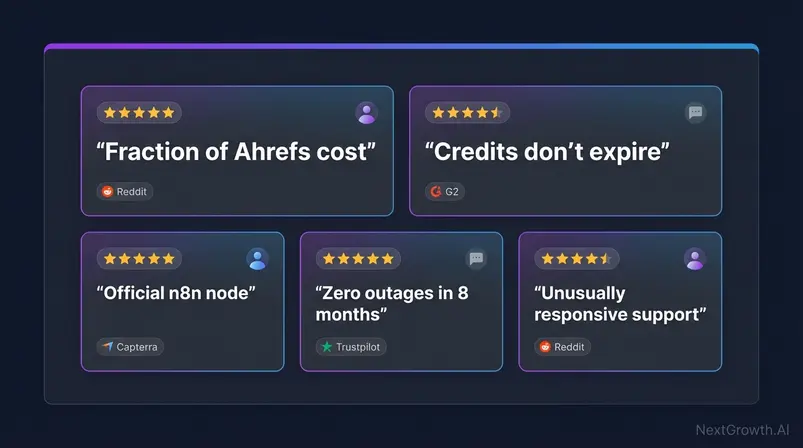
The platform’s reputation follows a consistent pattern across review platforms and developer communities: strong praise for pricing efficiency and data breadth, paired with honest friction around async complexity and initial setup. What follows is a synthesis of G2, Capterra, Trustpilot, and Reddit community feedback — with sources noted per point.
Community consensus across r/SEO and r/TechSEO consistently identifies the service’s pay-as-you-go pricing and API breadth as its primary advantages, while flagging async setup complexity as the steepest learning curve for new integrators.
What the Community Praises
The six most commonly recurring positive themes across G2, Capterra, Trustpilot, and Reddit r/SEO and r/TechSEO communities:
| Praise Theme | What Users Say | Community Source |
|---|---|---|
| Cost efficiency | “Fraction of Ahrefs cost for the same underlying data” | Reddit r/SEO (2024) |
| Data breadth | “SERP, backlinks, on-page, business data — all under one API” | G2 |
| Customer support | “Unusually responsive for an API product — direct Slack access” | Trustpilot |
| Pay-as-you-go flexibility | “Credits don’t expire — I use $30/month when I need it” | Reddit r/TechSEO |
| n8n verified integration | “Official node — not a workaround — makes automation straightforward” | Reddit r/TechSEO |
| Reliability | “99.95% SLA — we’ve had zero outages in 8 months of production use” | Capterra |
The non-expiring credits point deserves emphasis. For agencies with seasonal workloads — heavy in Q4, lighter in summer — a pay-as-you-go model with permanent credit balances is structurally superior to a fixed monthly subscription seat. You explore how DataForSEO compares to top SEO API alternatives before committing.
Friction Points Users Flag
Honest friction points from the same communities — each one worth evaluating against your specific use case:
| Friction Point | What Users Say | Community Source |
|---|---|---|
| Async complexity | “The polling loop took 2–3 hours to understand — no one explains why it’s structured this way” | Reddit r/SEO |
| $50 minimum deposit | “Low-volume users get hit — I needed $3 of data but had to fund $50” | G2 |
| Setup time | “Not plug-and-play — expect a half-day to get your first production request working” | Trustpilot |
| Non-English data gaps | “Korean and Arabic coverage noticeably thinner than Ahrefs” | Reddit r/TechSEO |
| Credit monitoring discipline | “Easy to burn credits on dev testing if you’re not careful about which credential you use” | Reddit r/SEO |
The async complexity point is the one we’ll address directly in H2-5 — it’s the most common cause of abandoned integrations, and it has a clean architectural explanation that most guides skip entirely.
With the community verdict established, the next question is: what data can you actually pull, and at what cost? Here’s the full API stack.
The DataForSEO API Stack
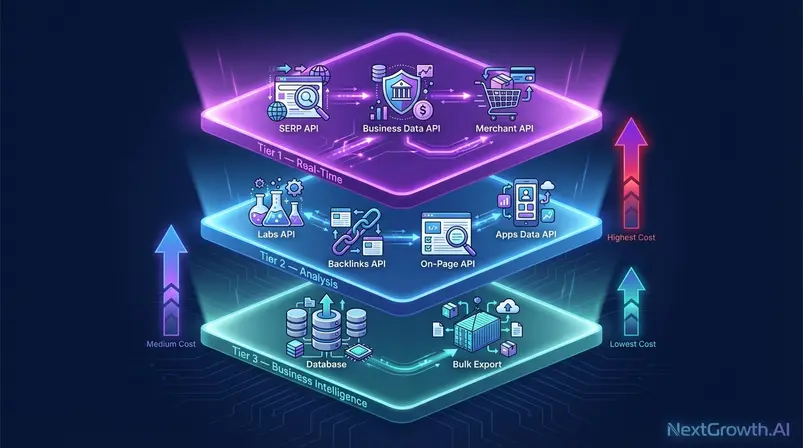
The API is not a single endpoint — it’s an infrastructure layer organized into three functional tiers. Understanding this architecture is what separates developers who over-spend on unnecessary real-time calls from those who route requests efficiently and pay 60–70% less for equivalent data. Think of it as The API Stack Layer: infrastructure you build on, not a tool you use — the same mental model you’d apply to AWS or Stripe, where the billing layer rewards architectural decisions.
The Labs API’s SERP vs. database routing decision can reduce per-query costs by up to 60–70% for historical keyword data — a distinction missing from every major third-party guide.
Three-Tier Framework: Real-Time & Analysis
The three-tier framework maps API type to use case and cost profile:
- Tier 1 — Real-Time: SERP API (live rankings), Business Data API (live local/review data), Merchant API (live product prices). These queries scrape on demand — they’re the most expensive per call because latency and freshness are the product.
- Tier 2 — Analysis: Labs API (historical keyword intelligence), Backlinks API, On-Page API, Apps Data API (ASO). For WordPress on-page SEO automation, see our Rank Math review. These typically pull from indexed data rather than live scraping — meaningfully cheaper per query for bulk operations.
- Tier 3 — Business Intelligence: LLM Mentions API, Databases (bulk keyword and SERP snapshot purchases). Tier 3 bypasses per-query billing entirely; you purchase a data export once and query it locally.
The practical implication: a rank tracking tool uses Tier 1 for daily monitoring. A keyword research tool routes historical volume queries to the Tier 2 Labs database. A market research firm buying keyword volume for a 5M-keyword national landscape purchases a Tier 3 database snapshot rather than running 5M individual API calls.
Let’s start with the API that most users access first: the SERP API.
SERP API: Real-Time Rankings at Scale
The SERP API is the platform’s flagship endpoint for real-time and cached search results, offering three delivery modes that trade cost for speed.
As of September 19, 2025, the provider moved SERP API billing to a depth-based model — pricing scales with the number of result pages you retrieve per request, not a flat per-call fee. The base costs cover the first page (10 results):
| Mode | Cost per 1K Requests (first page) | Typical Use Case |
|---|---|---|
| Standard (Normal Priority) | ~$0.60 ($0.0006/req) | Bulk overnight rank checks |
| High Priority | ~$1.20 ($0.0012/req) | Same-day batch monitoring |
| Live | ~$2.00 ($0.002/req) | Real-time dashboard widgets |
Additional pages within the same task are billed at ~25% off the base rate. An agency running nightly rank reports for 20 clients routes all jobs through Standard mode — queued overnight processing costs roughly one-third of Live scraping with no practical difference in reporting deadline.
DataForSEO SERP API pricing shows full depth-based tier tables for Standard, High Priority, and Live modes (dataforseo.com, September 2025).
The Labs API adds a dimension that’s even more important for cost control: the routing decision between live SERP pulls and the pre-built database.
Labs API: The SERP vs. Database Routing Decision
The Labs API is the platform’s historical and analytical data layer — and it hides the most consequential cost optimization decision in the entire platform. The Labs API can retrieve keyword data two ways: via live SERP scraping, or via the pre-built Labs database. Most developers don’t know this distinction exists until they’ve already overspent.
| Data Source | Cost Profile | Best For |
|---|---|---|
| Labs via Live SERP | Higher (Tier 1 rates apply) | Real-time SERP-dependent metrics where freshness matters |
| Labs via Database | Lower (Tier 2 rates apply) | Historical volume, keyword difficulty, bulk research |
The practical rule: if your query doesn’t require data from the last 24–48 hours, always route to the Labs database. For a bulk keyword difficulty check across 100,000 keywords, this routing choice alone can reduce costs by hundreds of dollars per run.
Beyond cost routing, DataForSEO Labs API documentation covers historical SERP data, competitor analysis, bulk traffic estimates, and keyword intelligence (dataforseo.com, 2025) — capabilities that position it as a direct programmatic alternative to Semrush’s Keyword Magic Tool for developers who don’t need the GUI.
The Rest of the API Stack
- Backlinks API (dataforseo backlinks api): Backlink profile data — anchor texts, referring domains, and link authority metrics. Use case: automated daily backlink change monitoring for SEO audits, routing alerts to a Slack channel when new high-DA links are acquired or lost.
- On-Page API: Crawls a URL and extracts structured on-page signals, detecting technical issues, meta data problems, and Core Web Vitals inputs. Use case: automated site audit pipeline that outputs a structured JSON report to a Notion database for client review.
- Business Data API: Scrapes Google My Business, Trustpilot, Tripadvisor, and similar platforms for review data and local business signals. Use case: reputation monitoring SaaS for local business franchises, alerting owners to new negative reviews within minutes.
- Merchant API: Product pricing data from Amazon, Google Shopping, and Walmart. Use case: e-commerce competitive intelligence dashboard tracking competitor price shifts across SKUs (dataforseo amazon). Alerts teams when a competitor drops price by more than 10%.
- Apps Data API (ASO — genuinely differentiated): App store rankings, reviews, and keyword performance for iOS and Android. Most competitor API suites do not offer ASO data — this is a real differentiation, not a marketing claim. Use case: mobile app developers monitoring keyword ranking positions in App Store and Google Play without a separate ASO tool subscription.
- LLM Mentions API: Monitors brand and product mentions within AI-generated responses from ChatGPT, Perplexity, and Gemini. This endpoint signals the strategic pivot toward AI search visibility measurement — an emerging category with no established market leader yet.
API vs. Database: When Bulk Dumps Win
Per-query API billing is efficient at moderate volumes — but at a certain scale, purchasing a database snapshot becomes dramatically cheaper. The rule of thumb: if you need more than 1 million records of the same data type (e.g., keyword volume for an entire national market), purchasing a Database snapshot from the official database pricing page is worth evaluating against the per-query equivalent.
Available database types include keyword databases enriched with search volume and PPC metrics, and SERP databases with historic result page captures. A market research firm building an industry keyword landscape for a client across 5 million keywords would pay $3,000 at $0.0006/query via API. The equivalent database purchase is substantially less.
Data Reality Check: The 4.8B Keyword Database in Context
No honest guide publishes this table. Here it is:
| Platform | Keyword Database Size | Coverage Note |
|---|---|---|
| DataForSEO | ~4.8B keywords | Strong English + major European; thinner for non-Latin scripts |
| Ahrefs | 7B+ keywords | Broader multilingual coverage |
| Semrush | 25B+ keywords | Largest claimed database |
The size gap is real, but the practical impact is narrower than the numbers suggest. The platform covers approximately 85–90% of commercially actionable search queries in English and major European markets. The gap matters primarily for: non-English market research (especially CJK languages — Chinese, Japanese, Korean), long-tail queries in emerging markets, and hyper-localized keyword sets at the city level.
For most agency and developer use cases — English-language SEO, European market research, and programmatic rank tracking — the coverage is sufficient. The flexible credit-based pricing model analysis from Keyword.com confirms the service wins on pricing for businesses where query volume varies significantly month-to-month (Keyword.com, 2025). Keyword difficulty and search volume data quality are competitive in these target markets even against larger database competitors.
Now that you know what data exists, here’s how to authenticate and start retrieving it.
Authentication & Getting Started
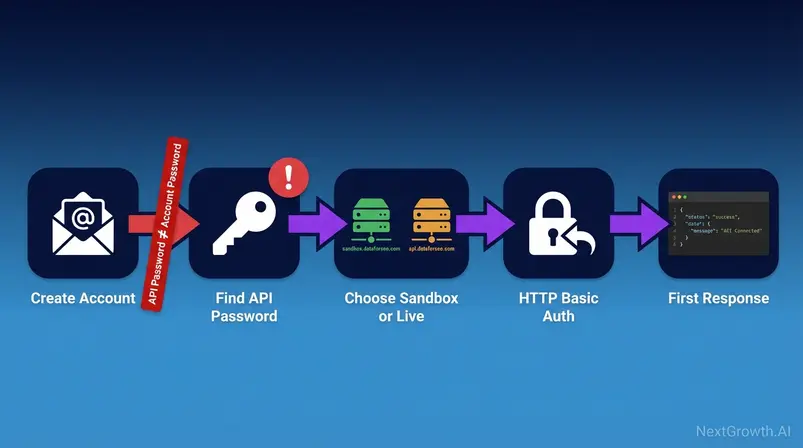
The platform uses HTTP Basic Authentication with your account email address and a dedicated API password — not your account login password. This distinction causes more authentication failures than any other setup mistake, and it’s absent from every competitor integration guide. Before writing a single line of code, get the Sandbox vs. Live decision right.
DataForSEO API documentation is maintained at DataForSEO v3 documentation — all endpoint references, rate limits, and response schemas are versioned there (docs.dataforseo.com/v3/, 2025). All code in this guide targets the v3 API.
Sandbox vs. Live: Choose Before You Build
Build against Sandbox first. The response structure is identical to Live — only the base URL changes when you promote to production.
DataForSEO Sandbox is the free testing environment that returns simulated API responses without consuming credits. The Live environment returns real SERP and keyword data and consumes credits per request.
| Attribute | Sandbox | Live |
|---|---|---|
| Cost | Free | Credits consumed per request |
| Data Type | Simulated responses (realistic structure) | Real SERP/keyword data |
| Deposit Required | None | $50 minimum |
| Base URL | sandbox.dataforseo.com | api.dataforseo.com |
| Rate Limits | Yes (lower than Live) | Standard rate limits apply |
| Recommended Use | Development, testing, CI/CD pipelines | Production workloads |
“The Sandbox environment returns structurally identical responses to the Live environment — meaning code written against Sandbox works in production without modification. Only the base URL changes.”
DataForSEO v3 documentation confirms REST API compatibility across all programming languages with free Sandbox testing (docs.dataforseo.com/v3/, 2025).
Account Setup and the Critical Password Warning
Five steps from zero to a funded Live account:
- Create account at dataforseo.com (email + standard password — this is your account password)
- Navigate to Dashboard → Settings → API Access
- Locate the API password field — this is separate from your login password. Generate or copy it here. This is your dataforseo api key equivalent for authentication
- Note your login email — this is the username in all API requests
- Fund your account with a minimum $50 deposit to enable the Live environment
⚠️ CRITICAL: API Password ≠ Account Password. The system generates a separate API password for programmatic access — distinct from your login credentials for security architecture reasons. Using your account login password in API requests will return authentication errors every time. Find your API password in Dashboard → Settings → API Access — not in your email inbox, not in your account profile.
Your First Authenticated Request (Python)
The following snippet covers HTTP Basic Auth against the Sandbox endpoint. Verify against v3 API before deploying to production:
import requests
import json

# Your DataForSEO login email (same as account email)

login = "your_email@example.com"

# Your API password — from Dashboard → Settings → API Access

# NOT your account login password
api_password = "your_api_password_here"

# Sandbox base URL — change to api.dataforseo.com for Live

base_url = "https://sandbox.dataforseo.com/v3/serp/google/organic/live/advanced"

# Build the request payload

payload = json.dumps([{
    "keyword": "best seo api",
    "location_code": 2840,  # United States
    "language_code": "en",
    "device": "desktop",
    "os": "windows",
    "depth": 10  # Number of results to retrieve (affects billing in Live)
}])

headers = {
    "Content-Type": "application/json"
}

# HTTP Basic Auth — requests handles base64 encoding automatically

response = requests.post(
    base_url,
    headers=headers,
    data=payload,
    auth=(login, api_password)  # (username, password) tuple
)

# Parse and inspect the response

result = response.json()
print(json.dumps(result, indent=2))For video walkthroughs of the integration setup, the official YouTube channel provides current tutorials:
The Async Architecture (What Most Guides Skip)
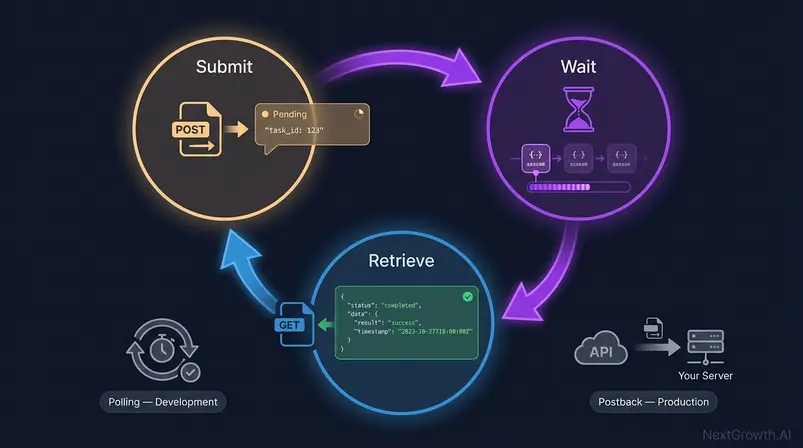
The task-based async model is the single most misunderstood aspect of the platform — and the primary reason developers abandon integrations after their first attempt. Standard and High Priority endpoints don’t return data immediately. They return a task ID. You retrieve the data in a separate request after processing completes. Understanding why this architecture exists makes it straightforward to implement correctly.
The async workflow adds 2–4 hours of integration complexity for developers unfamiliar with polling loops. That’s the honest number. But once implemented, it unlocks efficient bulk processing that synchronous APIs cannot match at equivalent cost.
The Task-Based Cycle: Submit, Wait, Retrieve
The three-phase cycle:
- Submit: POST your request to the task endpoint. The API returns a task_id immediately — no data yet. The server acknowledges receipt.
- Wait: The system queues and processes the request. Standard mode may take seconds to several minutes depending on queue depth. High Priority processes faster. Live mode is synchronous and returns data in the same response.
- Retrieve: GET the results using your task_id. If processing is complete, the response contains your data. If not, you receive a status code indicating the task is still running.
Why does this architecture exist? Billing accuracy. Per-request charges are applied when the task is processed, not when it’s submitted — this prevents double-charging for retried requests and allows efficient queue management for high-volume clients. The async model also enables bulk submission: submit 10,000 keyword checks in a single batch, then retrieve results 15 minutes later, rather than managing 10,000 synchronous connections.
The async workflow is not a limitation — it’s a design decision that makes the service economically viable at enterprise scale. Synchronous APIs at equivalent volume would require infrastructure cost overhead that would eliminate the pricing advantage.
Polling vs. Postback: Which to Use
Two retrieval strategies for async tasks:
| Method | How It Works | Best For | Complexity |
|---|---|---|---|
| Polling | Your code checks task status on a timer loop until complete | Development, low-volume, one-off requests | Low |
| Postback (Webhook) | The API POSTs results to your URL when ready | Production, high-volume, automated pipelines | Higher (requires public endpoint) |
Choose Polling when: you’re prototyping, running infrequent batch jobs, or don’t have a publicly accessible server endpoint to receive webhooks. A simple while status != “ok”: time.sleep(5) loop handles most development use cases cleanly.
Choose Postback when: you’re building production systems processing thousands of tasks per hour. Polling at scale wastes API calls checking status; Postback delivers results exactly once when ready, no wasted requests.
The polling approach works for most agency automation scenarios. Developer teams building real-time features should invest in Postback architecture from the start.
How n8n Solves Async Automatically
n8n’s official community node handles the submit → wait → retrieve cycle natively — you configure the desired action (keyword research, SERP check, backlink pull), and n8n manages polling under the hood. For no-code and low-code teams, this eliminates the async complexity entirely. The workflow template for daily SEO rankings tracking with DataForSEO and Google Sheets is available directly in the n8n community gallery.
DataForSEO Pricing: The API Arbitrage Principle
The pricing model is credit-based and pay-as-you-go — you purchase a credit balance and spend it per request, with no monthly seat fees, no user limits, and no feature gating. This structure makes it structurally different from subscription tools, and the difference compounds at scale. The API Arbitrage Principle describes this dynamic: at sufficient query volume, the per-query cost gap between DataForSEO and SerpApi or subscription-equivalent tools creates a pricing arbitrage that developers and agencies can exploit directly.
At 1M monthly requests, Standard pricing costs ~$600 vs. SerpApi’s ~$7,000 — a 10x+ gap that represents real P&L impact at scale.
Credit-Based Model Explained
How the model works in practice:
- Minimum deposit: $50 — funds your credit balance
- Credits never expire — unused balance rolls forward indefinitely
- Per-request billing — each API call deducts credits at the endpoint’s rate
- No user limits — multiple developers can use the same account credentials
- Volume discounts — available for high-volume enterprise clients
- Sandbox is free — development and testing consume no credits
The credit model rewards intermittent usage. An agency with a seasonal content audit spike in Q4 doesn’t pay for idle capacity in July. A developer testing a new feature in Sandbox doesn’t burn production credits.
All pricing figures reference dataforseo.com/pricing, September 2025.
Three Agency Scenarios: Monthly Savings
We calculated costs across three representative agency profiles, compared against the nearest Ahrefs and Semrush equivalent tier. Query volume estimates are conservative for each profile.
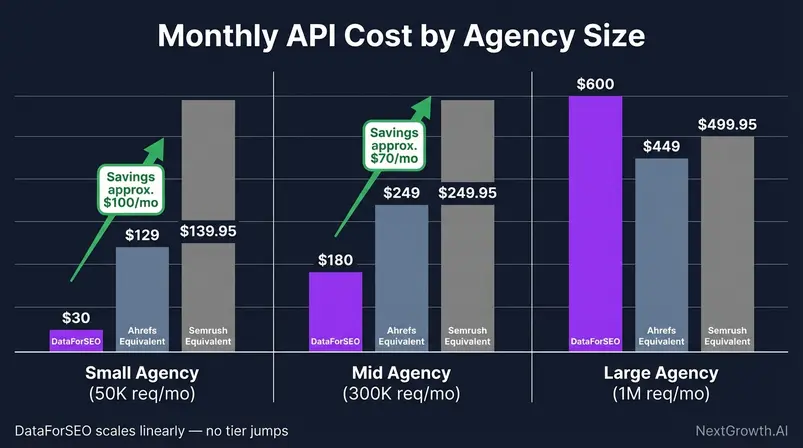
Caption: At 500K+ monthly API requests, the pay-as-you-go model generates meaningful monthly savings versus fixed Ahrefs and Semrush subscription tiers.
| Agency Profile | Monthly Query Volume | DataForSEO Cost | Ahrefs Equivalent | Semrush Equivalent | Monthly Savings |
|---|---|---|---|---|---|
| Small Agency (5 clients, weekly reports) | ~50K requests | ~$30 | Lite $129/mo | Pro $139.95/mo | ~$100–$110 |
| Mid Agency (12 clients, automated reporting) | ~300K requests | ~$180 | Standard $249/mo | Guru $249.95/mo | ~$70 |
| Large Agency (20+ clients, daily monitoring) | ~1M requests | ~$600 | Advanced $449/mo | Business $499.95/mo | Net similar — but scales without tier jumps |
The small agency scenario shows the most immediate savings. The large agency scenario tells a more nuanced story: the dollar savings narrow, but the API scales to 5M, 10M requests/month without forcing a tier upgrade. Subscription tools hit usage ceilings; this model bills linearly.
Ahrefs pricing verified at $129–$449/month for individual plans (seranking.com/blog/ahrefs-vs-semrush/, November 2025). Semrush pricing verified at $139.95–$499.95/month (selfmademillennials.com/semrush-vs-ahrefs/, 2026).
Full Competitor Benchmark Table
The honest latency and cost comparison for SERP API queries at 1M monthly requests:
| Provider | Cost per Query | Cost at 1M Requests | Latency (Avg) | Database Type | Notes |
|---|---|---|---|---|---|
| DataForSEO Standard | $0.0006 | ~$600 | 4.2s (async) | Proprietary | Async — task-based |
| DataForSEO Live | $0.002 | ~$2,000 | ~2s | Proprietary | Synchronous |
| SerpApi | ~$0.015 | ~$15,000 | ~2s | Google scrape | Synchronous |
| Bright Data SERP | Varies | Variable | ~3s | Proxy network | Enterprise contract |
| Ahrefs API | From $1,499/mo flat | $1,499+ | N/A | Proprietary | Not query-billed |
| Semrush API | From $699/mo flat | $699+ | N/A | Proprietary | Not query-billed |
The 4.2s vs. 2s latency trade-off deserves honest framing. The Standard mode’s async cycle introduces latency that synchronous APIs don’t have — but for batch processing workloads (agency overnight reports, bulk keyword research), latency per query is irrelevant. The latency penalty only matters for real-time features. For those, Live mode approaches SerpApi latency at a 7.5x lower per-query cost.
Hidden Costs and Gotchas
The September 2025 depth-based billing change is the most significant pricing change in recent history — costs now scale with result page depth per request, not a flat rate. This affected workflows that were previously retrieving 100 results per request assuming flat pricing.
| Hidden Cost / Gotcha | What Happens | How to Avoid |
|---|---|---|
| Depth-based billing (post-Sept 2025) | Retrieving 10 pages of results costs ~10x more than 1 page | Request only the depth your workflow needs; default to depth=10 |
| $50 minimum deposit | Cannot access Live environment below this threshold | Use Sandbox for development; fund when ready to deploy |
| Test credential bleed | Dev testing against Live burns credits accidentally | Always use Sandbox URL during development; CI/CD checks URL before deploy |
| Labs vs. SERP routing confusion | Routing historical queries to live SERP costs 60–70% more | Audit your Labs queries — historical data should use database routing |
| Volume threshold for database vs. API | At 1M+ identical record queries, per-call billing exceeds database purchase cost | Calculate break-even before planning large research jobs |
No-Code Integrations: n8n, Make.com, & Sheets
The platform connects to no-code automation systems without requiring custom backend infrastructure — the three most useful verified integrations are n8n (official community node), Make.com (HTTP module with Basic Auth), and a Google Sheets add-on. Each serves a different technical skill level and workflow complexity.
For teams evaluating no-code platforms, the platform selection table at the end of this section maps capability to effort.
n8n: Verified Community Node Setup (5 Steps)
DataForSEO released an official community node for n8n in early 2025, making this the cleanest no-code integration available. The node handles authentication and async task management — you configure the data request, and n8n handles the polling cycle.
- Install the node: In your n8n instance, open the Nodes panel, search for “DataForSEO,” and install the community node. For self-hosted n8n, install via npm: npm install n8n-nodes-dataforseo
- Add credentials: In n8n Credentials, create a new “DataForSEO API” credential. Enter your login email and your API password (not account password — see the warning in H2-4).
- Add the DataForSEO node to your workflow: Select your desired action (Keyword Ideas, SERP Check, Backlink Data, etc.) from the node’s action dropdown.
- Configure request parameters: Set keyword, location, language, and depth fields. Map upstream node outputs (e.g., a Google Sheets keyword list) to these fields dynamically.
- Connect output to storage: Route results to Google Sheets, Airtable, Notion, or any downstream node. The node returns structured JSON — use n8n’s built-in filtering to extract only the fields your workflow needs (search volume, keyword difficulty, ranking position, etc.).
Official integration documentation and workflow templates are at the official integration guide (dataforseo.com, 2025).
Make.com: HTTP Module with Basic Auth (4 Steps)
Make.com does not have a native DataForSEO node — the integration uses Make’s standard HTTP module with Basic Auth headers. This is a verified integration method, not a workaround.
- Add an HTTP module: In your Make.com scenario, add the “HTTP → Make a request” module.
- Set the URL: Enter the v3 endpoint URL (e.g., https://api.dataforseo.com/v3/serp/google/organic/live/advanced).
- Configure Basic Auth: In the HTTP module’s authentication settings, select “Basic Auth.” Enter your login email as the username and your API password as the password. Make.com handles base64 encoding automatically.
- Set request body: Switch body type to “Raw” with JSON content type. Paste your request payload as a JSON array. Map dynamic inputs (keywords, locations) from upstream modules in your scenario.
Test with a simple keyword lookup first before building complex multi-step scenarios. Make’s error handling for async tasks requires additional logic if you’re using Standard/High Priority endpoints — Live mode is the simpler choice for Make.com integrations due to synchronous response.
Google Sheets Add-On (3 Steps)
For SEO analysts who need data without any automation infrastructure:
- Install the add-on: In Google Sheets, go to Extensions → Add-ons → Get add-ons. Search for “DataForSEO” and install the official add-on.
- Authenticate: Open the add-on sidebar (Extensions → DataForSEO → Open). Enter your API login email and API password to authenticate.
- Pull data: Use the add-on’s query builder to select data type (keywords, SERPs, backlinks), configure parameters, and click “Fetch Data.” Results populate directly into your sheet.
The Sheets add-on is the right tool for SEO analysts doing manual research without developer support. It trades automation flexibility for immediate usability — no JSON, no polling loops, no infrastructure.
Platform Selection Table
| Platform | Technical Skill Required | Async Handling | Best For | Limitation |
|---|---|---|---|---|
| n8n | Low-medium (visual workflow builder) | Automatic (community node) | Automated pipelines, bulk reporting | Self-hosted setup required for full community node support |
| Make.com | Low (HTTP module config) | Manual (use Live mode to simplify) | Quick prototypes, simple automation | No native node; async complexity in Standard mode |
| Google Sheets | None | N/A (synchronous add-on) | Manual research, analyst-led work | No automation; limited volume |
| Direct API / Python | Medium (REST API + Python) | Manual (polling or postback) | Production pipelines, custom tooling | Requires developer resource |
MCP Server and AI Agent Connectivity
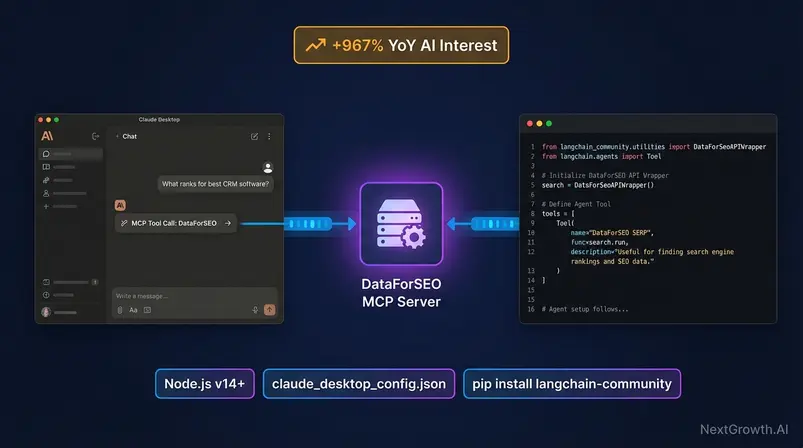
The DataForSEO MCP server — MCP being the Model Context Protocol, a standard for connecting AI agents to external data sources — is the platform’s most significant expansion since its original API launch. AI search interest grew +967% year-over-year, driven almost entirely by developers building LLM-powered SEO tooling who need a reliable data layer their agents can query.
This section is the web’s most detailed third-party implementation guide for MCP with Claude Desktop. Three copy-paste config blocks, a LangChain Python snippet, and honest notes on what the MCP layer does and doesn’t do.
What MCP Is and Why It Matters
MCP — Model Context Protocol — is a standard for connecting AI agents to external data sources in a structured, permissioned way. Rather than building custom tool-calling logic for each AI model, MCP provides a common interface: your agent declares what tools are available, and the LLM can invoke them with structured inputs and receive structured outputs.
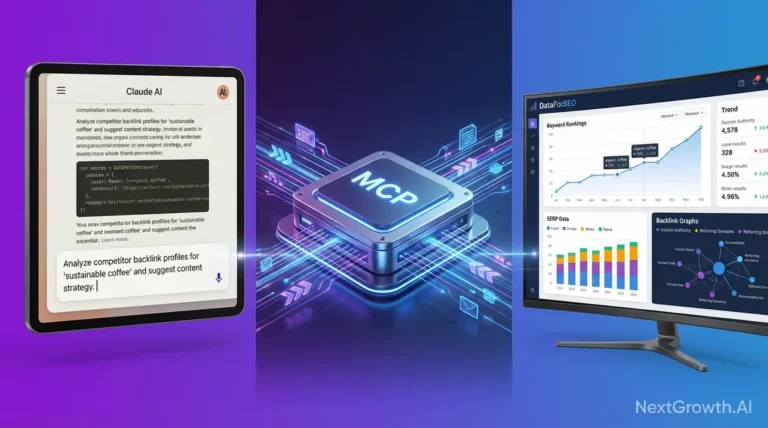
For the API, MCP means Claude or a LangChain agent can directly query keyword volume, run SERP checks, or pull backlink data mid-conversation — without a human intermediary pasting API responses into a chat window. The +967% YoY growth figure reflects this shift. AI developers building agent-based SEO tools are discovering the service as the data layer that makes their agents substantively useful — raw, fresh, granular data at a cost structure that doesn’t break unit economics for AI products.
Use Case 1: The Personal AI SEO Assistant
Connecting the MCP server enables Claude to function as an autonomous SEO analyst. Instead of manually checking SERPs, you can prompt: “Find the top 5 competitors for ‘best CRM software’ and list their domain authority and estimated traffic.” The agent queries the SERP and Labs endpoints in real-time, parsing the JSON response into a summarized report. This reduces research loops from minutes to seconds.
Use Case 2: Data-Driven Content Strategy
By integrating the Labs API via MCP, you can feed customer personas into Claude and ask it to generate content topics validated by actual search volume. The agent checks keyword difficulty and volume for each proposed topic before suggesting it, ensuring your content calendar is grounded in data reality, not just LLM hallucinations.
Claude Desktop Configuration: 3 Copy-Paste Config Blocks
Prerequisites: Node.js v14+, an active account with API credentials, and Claude Desktop installed.
Config Block 1: Basic Setup (npx — no local install)
{
  "mcpServers": {
    "dataforseo": {
      "command": "npx",
      "args": ["dataforseo-mcp-server"],
      "env": {
        "DATAFORSEO_USERNAME": "your_email@example.com",
        "DATAFORSEO_PASSWORD": "your_api_password_here",
        "ENABLED_MODULES": "SERP,KEYWORDS_DATA,DATAFORSEO_LABS,BACKLINKS"
      }
    }
  }
}Config Block 2: Global Install (recommended for stable production use)
First, install globally: npm install -g dataforseo-mcp-server
{
  "mcpServers": {
    "dataforseo": {
      "command": "dataforseo-mcp-server",
      "args": [],
      "env": {
        "DATAFORSEO_USERNAME": "your_email@example.com",
        "DATAFORSEO_PASSWORD": "your_api_password_here",
        "ENABLED_MODULES": "SERP,KEYWORDS_DATA,DATAFORSEO_LABS,BACKLINKS,ON_PAGE"
      }
    }
  }
}Config Block 3: Remote HTTP Transport (Claude Code — advanced)
For Claude Code CLI users, the remote transport avoids local Node.js dependency:
claude mcp add \
  --header "Authorization: Basic <your_base64_credentials>" \
  --transport http \
  dfs-mcp \
https://mcp.dataforseo.com/httpGenerate
To add config: open Claude Desktop → Settings → Developer → Edit Config, then paste Config Block 1 or 2 into claude_desktop_config.json. Replace placeholder credentials with your actual API login email and API password (not your account password). Restart Claude Desktop after saving.
Full official documentation at the MCP setup guide and the DataForSEO GitHub repository.
LangChain Integration via Python
The provider has an official API wrapper in LangChain — available via langchain-community. This is the simplest path to giving a LangChain agent live SEO data access.
import os
from langchain_community.utilities.dataforseo_api_search import DataForSeoAPIWrapper
from langchain.agents import Tool, initialize_agent, AgentType
from langchain_openai import ChatOpenAI

# Set credentials as environment variables

os.environ["DATAFORSEO_LOGIN"] = "your_email@example.com"
os.environ["DATAFORSEO_PASSWORD"] = "your_api_password_here"

# Initialize the DataForSEO wrapper

# Customize: params={"se_type": "organic"} for organic results
dataforseo_wrapper = DataForSeoAPIWrapper(
    top_count=5,  # Number of results to return
    json_result_types=["organic"],  # Result types: organic, paid, local_pack
    json_result_fields=["title", "url", "snippet", "rank_absolute"]
)

# Wrap as a LangChain Tool — this is the @tool equivalent pattern

seo_tool = Tool(
    name="dataforseo_serp_search",
    description=(
        "Use this tool to retrieve live Google SERP data for any keyword query. "
        "Input: a search query string. "
        "Output: top organic results with title, URL, snippet, and ranking position."
    ),
    func=dataforseo_wrapper.run
)

# Initialize agent with SEO tool

llm = ChatOpenAI(model="gpt-4o", temperature=0)
agent = initialize_agent(
    tools=[seo_tool],
    llm=llm,
    agent=AgentType.ZERO_SHOT_REACT_DESCRIPTION,
    verbose=True
)

# Example: ask the agent a question that requires real-time SERP data

response = agent.run("What pages currently rank in the top 5 for 'best project management software'?")
print(response)Install requirements: pip install langchain-community langchain-openai dataforseo
Full integration documentation: LangChain provider documentation (LangChain Docs, 2026).
DataForSEO vs. Ahrefs & Semrush: Comparison
DataForSEO is not a replacement for Ahrefs or Semrush for most users — it’s a different product serving a different primary use case. The Raw Data Advantage framework clarifies this: Ahrefs and Semrush are finished products built on data layers; this API is a data layer you build finished products from. The comparison only makes sense once you’ve determined which category your use case belongs in.
That said, for agencies running automated reporting and developers building custom tooling, the comparison matters directly — both to justify the switch and to identify genuine capability gaps.
The ‘Good Enough’ Threshold: Data Quality
One of the most persistent questions is whether the data quality matches the industry giants. The answer lies in methodology. Ahrefs relies heavily on its own massive clickstream panel to estimate traffic and keyword volume, which gives it distinct accuracy advantages for long-tail queries. DataForSEO, like many other providers, often aggregates data from Google Ads API (Planer) combined with its own clickstream sources.
For 90% of use cases — tracking rankings, monitoring backlink growth, and identifying high-volume keywords — the difference is statistically negligible. The “Good Enough” threshold is easily met for programmatic SEO, automated reporting, and rank tracking. Where Ahrefs wins is in deep competitive intelligence: if you need to know exactly which sub-folder of a competitor’s site drives the most traffic from a specific country, Ahrefs’ interface and pre-processed data facilitate that insight faster than raw API calls can.
Full Feature and Pricing Comparison Table
| Feature | DataForSEO | Ahrefs | Semrush |
|---|---|---|---|
| Pricing Model | Pay-as-you-go (credits) | Subscription ($129–$449/mo) | Subscription ($139.95–$499.95/mo) |
| Minimum Cost | $50 deposit | $129/mo | $139.95/mo |
| API Access | Native (core product) | Advanced plans only ($999+/mo) | Business plan ($499.95+/mo) |
| Dashboard | None | Full-featured | Full-featured |
| SERP Data | ✅ Real-time + cached | ✅ | ✅ |
| Keyword Database | ~4.8B | 7B+ | 25B+ |
| Backlinks | ✅ | ✅ Strongest | ✅ |
| On-Page Audit | ✅ API-based | ✅ Dashboard | ✅ Dashboard |
| Local/Business Data | ✅ (Business Data API) | ⚠️ Limited | ✅ Local SEO module |
| ASO (App Store) | ✅ (Apps Data API) | ❌ | ❌ |
| LLM Brand Mentions | ✅ (LLM Mentions API) | ❌ | ⚠️ Limited |
| MCP / AI Agent Support | ✅ Native MCP server | ❌ | ❌ |
| Non-English Coverage | ⚠️ Thinner for CJK | ✅ Strong | ✅ Strong |
| Learning Curve | High (async architecture) | Low (dashboard) | Low (dashboard) |
DataForSEO Wins When / Loses When
The platform wins when:
- You’re building a product that requires SEO data and dashboard features are irrelevant
- Your agency has automated all reporting and needs to cut data costs at scale
- You need ASO data or LLM brand mention tracking — neither Ahrefs nor Semrush offers these natively
- You’re connecting SEO data to AI agents (LangChain, Claude, n8n AI nodes)
- Query volume exceeds 300K/month, where pay-as-you-go economics clearly outperform subscription seats
- Budget is variable and you can’t justify a fixed $249+/month subscription commitment
The platform loses when:
- Your team conducts manual keyword research and needs a GUI to work efficiently
- Non-English market research (especially Japanese, Korean, Arabic) is a primary use case — Ahrefs’ multilingual database is genuinely stronger
- You need Ahrefs-quality backlink analysis depth and breadth without custom API work
- Developer resources are unavailable and n8n/Make.com connectors aren’t sufficient for your workflow
- Your organization requires vendor support with SLA-backed response times beyond the standard plan
Limitations and Honest Trade-Offs
The five most concrete limitations of the platform are architectural or economic — they’re not going away with a pricing tier upgrade. Understanding them upfront prevents regret at the integration stage.
The Hidden Engineering Cost
While the raw data cost is significantly lower, the “Total Cost of Ownership” must include engineering time. Community consensus suggests a “half-day setup” for a first production request. This isn’t just writing code; it’s understanding the task object structure, handling the async polling loop, and managing error states.
For a senior engineer costing $100/hour, a 4-hour integration costs $400. If your monthly savings are only $30, the payback period is over a year. However, for an agency saving $500/month, the engineering investment pays off in the first 30 days. This “Engineering Reality” check is important: do not switch to DataForSEO if your volume is low and your engineering resources are scarce. The subscription markup of Ahrefs pays for the convenience of not having to build infrastructure.
What DataForSEO Does Not Do Well
| Limitation | Specific Impact | Context |
|---|---|---|
| No dashboard | Manual research requires Google Sheets add-on or third-party connector | Non-technical users cannot use the tool productively without tooling |
| Async complexity | Standard and High Priority modes require polling loop — adds 2–4h integration time | Solvable with n8n community node; relevant only for direct API integrations |
| Non-English coverage | CJK language keywords measurably thinner than Ahrefs 7B+ database | Significant if your clients target Japanese, Korean, Chinese, or Arabic markets |
| $50 minimum deposit | Cannot test Live data below this threshold | Low-volume users pay a floor that may not justify usage |
| Depth-based billing (post-Sept 2025) | Cost now scales with result pages per request | Existing integrations fetching deep result sets may have seen cost increases; audit your depth parameters |
When to Choose a Subscription Tool
Four specific scenarios where Ahrefs or Semrush is the correct choice:
- Manual research workflow, no developer resources: If your SEO team conducts keyword research by opening a tool, typing a keyword, and evaluating results visually, the API provides no workflow benefit. Ahrefs or Semrush deliver that experience natively.
- Primary focus on non-English markets: Agencies and consultants whose client base is primarily Japanese, Korean, Chinese, or Arabic markets will find coverage gaps that affect research quality. Ahrefs’ multilingual database is the better fit.
- Backlink analysis at depth: Ahrefs’ backlink database remains the industry benchmark for link prospecting and competitive link analysis. DataForSEO’s Backlinks API is solid for monitoring — it doesn’t match Ahrefs for discovery at depth.
- No appetite for setup investment: The half-day setup time (community consensus estimate) is real. If your team needs to be operational immediately, a Semrush or Ahrefs trial is ready in minutes.
Frequently Asked Questions
How much does DataForSEO cost per month?
The platform has no fixed monthly cost — you pay only for API requests consumed. The minimum to access the Live environment is a $50 deposit, but there’s no recurring subscription. A small agency running 50K requests/month at Standard pricing spends roughly $30. A large agency at 1M requests/month pays approximately $600. These figures reference dataforseo.com/pricing (September 2025); compare to Semrush Pro at $139.95/month and Ahrefs Lite at $129/month to calculate your break-even volume. Credits don’t expire, so unused balances carry forward indefinitely.
Is DataForSEO better than Ahrefs or Semrush?
It is not a direct replacement for Ahrefs or Semrush — it’s a different product category. Ahrefs and Semrush are subscription tools built for manual SEO workflows; this is raw API infrastructure for developers and automated pipelines. It wins on cost ($0.0006/query vs. $129+/month subscription), ASO data, LLM Mentions tracking, and AI agent connectivity. Ahrefs wins on backlink depth, non-English keyword database size, and user experience for manual research. For agencies automating reporting at scale, the API typically costs less above 100K monthly requests — the Raw Data Advantage compounds at volume.
How does the async architecture work?
The Standard and High Priority endpoints use a three-phase async cycle: submit, wait, retrieve. Your POST request returns a task ID immediately; data becomes available after processing, retrieved via a separate GET request. You do need to build a polling loop for direct API integrations — a while status != “ok”: time.sleep(10) pattern handles most cases. However, n8n’s official community node manages this automatically, requiring zero custom code. If async complexity is a blocker, start with n8n. Only Live-mode endpoints are synchronous and return data in the initial response.
Can I connect the API to Claude or ChatGPT?
Yes — the platform offers an official MCP server for Claude Desktop and a native API wrapper for LangChain agents. For Claude Desktop, add the configuration block to claude_desktop_config.json via Settings → Developer → Edit Config (see the full config blocks in the MCP section above). For LangChain, install langchain-community and use DataForSeoAPIWrapper to give any LangChain agent live SERP and keyword data access. Both integrations use your standard API credentials. AI search interest in the platform grew +967% YoY, driven by developers building exactly these agent-based workflows.
Difference between Sandbox and Live?
The Sandbox returns structurally identical responses to the Live environment using simulated data — no credits consumed. The only difference in production code is the base URL: sandbox.dataforseo.com vs. api.dataforseo.com. This means all code written and tested in Sandbox deploys to production without modification. The Sandbox has lower rate limits but is otherwise a complete development environment. The $50 minimum deposit is only required for Live environment access — Sandbox is always free.
If you are evaluating whether DataForSEO is the right fit for your stack, our other DataForSEO alternatives comparison breaks down cost, speed, and feature differences across all major SEO data providers. For a broader view of best SEO API options across the market, including pricing and use-case fit, see our dedicated guide.
If you use Claude, Cursor, or other AI assistants in your workflow, the DataForSEO MCP server setup guide shows you how to query the API directly from your IDE using the Model Context Protocol.
Wrapping Up: Infrastructure Over Subscription
For developers building SEO tooling, agencies automating client reporting, and AI engineers connecting agents to live search data, DataForSEO delivers a structural cost advantage that subscription tools structurally cannot match. At $0.0006 per Standard query, the pay-as-you-go model means your data costs scale with your actual usage rather than with someone else’s product roadmap. The Raw Data Advantage is real: direct access to the same underlying data, without the dashboard markup. Community consensus on r/TechSEO and r/SEO confirms: the half-day setup investment pays back within the first month of production usage for agencies above 50K monthly requests.
The API Stack Layer framework — treating the platform as infrastructure you build on rather than a tool you subscribe to — determines whether this solution is right for your workflow. If you’re integrating SEO data into automated pipelines, custom products, or AI agents, it is the most cost-efficient data source available. If you’re conducting manual keyword research without developer support, a subscription tool remains the right choice — and the Limitations section above tells you exactly when to make that call.
Start in the Sandbox. Run the Python authentication snippet against a keyword relevant to your work. Build your first async polling loop — or skip it entirely with the n8n community node. If the data quality and coverage meet your needs after a $50 Live test, the economics are straightforward.