Competitor Analysis in 5 Minutes: Automated SEO Intelligence with n8n and dataforSEO
Most SEO agencies spend 10-15 hours manually analyzing competitors for each client.
You’re opening 47 browser tabs across Ahrefs, SEMrush, and Google Search Console. Copy-pasting keywords into spreadsheets. Exporting CSV files. Piecing together a strategy from fragmented data.
By the time you finish, the SERP has shifted.
Your client is waiting. Your team needs direction. And you still haven’t transformed raw competitor data into an actionable content plan that your writers can actually execute.
The real cost isn’t just time—it’s opportunity:
- 15 hours × $150/hour = $2,250 in billable time wasted per client
- Or: 15 hours you could spend landing 3 new clients
- Or: 15 hours of weekend work while competitors scale with automation
What if you could compress competitor analysis from 15 hours to 5 minutes?
I built an n8n workflow that automates the entire competitor intelligence process: discovering market leaders, extracting their winning keywords from top-performing pages, and generating a complete pillar-cluster content strategy—delivered as both a Word document for stakeholders and a Google Sheets production database for your content team.
The result: From seed keyword to content roadmap in 2-5 minutes (Free workflow)
Contents
- The Problem: Manual Competitor Analysis Doesn’t Scale
- The Solution: Automated Competitor Intelligence in 5 Minutes
- How the Strategy Architect Works: 3 Analysis Modes
- What Happens During the 2-5 Minute Analysis
- Dual Output: Executive Reports + Production Databases
- Common Pitfalls to Avoid (And How the Workflow Prevents Them)
- Who This Is For (And Who It’s NOT For)
- FAQs
- Conclusion
The Problem: Manual Competitor Analysis Doesn’t Scale
Every SEO professional knows the competitor analysis grind:
Step 1: Discovery (2-3 hours)
Manually search seed keywords in Google, identify top-ranking domains, filter out Wikipedia/Reddit/Pinterest spam, compile competitor list in spreadsheet
Step 2: Data Collection (4-6 hours)
Export Ahrefs data for each competitor, copy rankings into master spreadsheet, pull keyword metrics (volume, difficulty, CPC), identify their top-performing pages
Step 3: Keyword Extraction (3-4 hours)
Review each competitor’s keyword portfolio (10,000+ keywords), manually filter out branded terms, identify replicable opportunities, categorize by search intent
Step 4: Strategy Synthesis (4-6 hours)
Group keywords into topical clusters, define pillar content topics, assign cluster articles per pillar, calculate addressable search volume, prioritize based on difficulty/volume
Total time: 13-19 hours (average: 15 hours)
Total cost at $150/hour: $1,950-2,850 per client
And here’s the worst part: By the time you present the strategy, rankings have shifted. Competitors have published new content. Your analysis is already partially outdated.
This doesn’t just cost time—it costs client results.
The Solution: Automated Competitor Intelligence in 5 Minutes
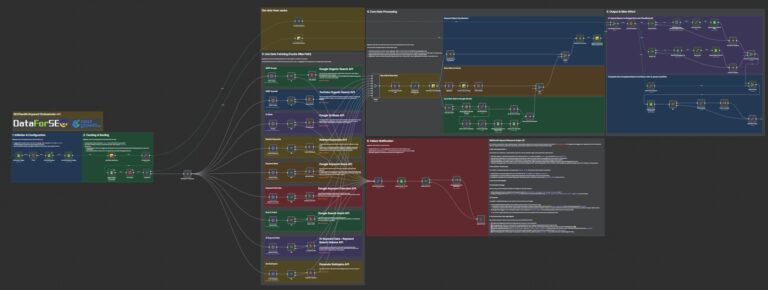
The Strategy Architect is an n8n workflow that automates the entire competitor analysis pipeline using DataForSEO’s APIs and AI-powered strategy generation.
What it does:
✅ Auto-discovers market leaders via seed keywords or your domain
✅ Filters out 24 directory platforms (Wikipedia, Pinterest, Reddit, Yelp) to isolate real competitors
✅ Extracts winning keywords from competitors’ top-performing pages (ranked by Estimated Traffic Value)
✅ Removes branded terms to reveal replicable opportunities
✅ Generates pillar-cluster strategy using AI (GPT-4 or Gemini) with volume calculations and priority rankings
✅ Outputs dual formats: Executive Word document + production Google Sheets database
The workflow handles everything you currently do manually in 2-5 minutes.
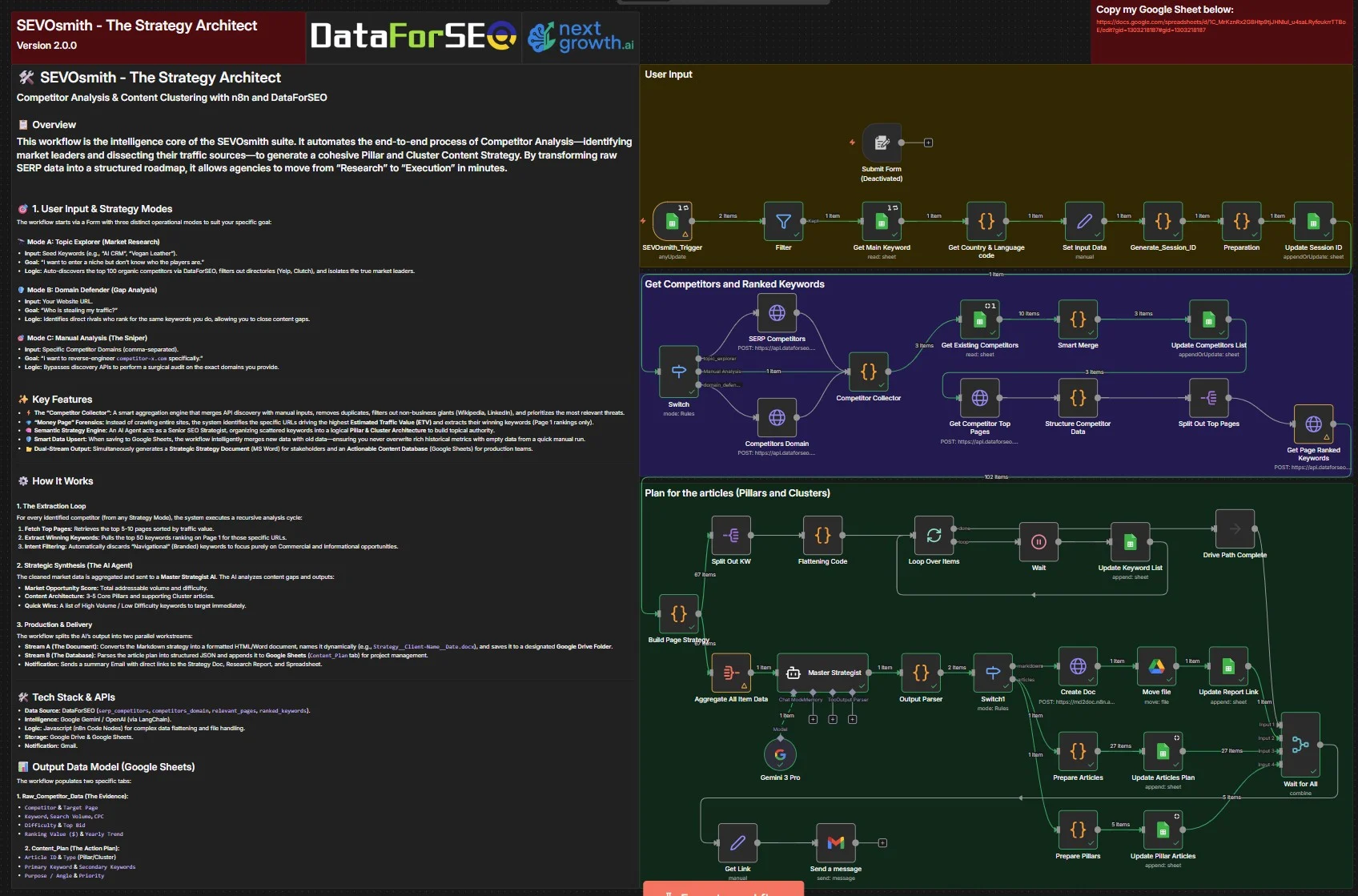
Get Free template HERE
How the Strategy Architect Works: 3 Analysis Modes
The workflow starts with a Google Sheets command center where you select one of three analysis modes. Each mode solves a different strategic question.
🔭 Mode A: Topic Explorer (Market Discovery)
When to use: You’re entering a new niche and don’t know the competitive landscape
Input: Seed keywords (e.g., “AI CRM”, “vegan leather”, “golden retriever training”)
What it does:
Queries DataForSEO’s competitors_domain API to auto-discover the top 100 organic competitors, then filters out 24 directory platforms (Wikipedia, Pinterest, Reddit, Yelp, Clutch, Amazon, Quora, YouTube) to isolate genuine business competitors.
Output: 3-10 real market leaders ready for deep analysis
Example use case:
Client wants to launch a new AI CRM. You input “AI CRM software” → Workflow discovers HubSpot, Salesforce, Pipedrive, Close.com, Freshsales as top competitors → Extracts their winning keywords → Generates 30-article content strategy.
🛡️ Mode B: Domain Defender (Gap Analysis)
When to use: You want to identify who’s outranking you and stealing your traffic
Input: Your website URL (e.g., yoursite.com)
What it does:
Analyzes your current keyword rankings, identifies competitors with significant keyword overlap, then calculates shared keyword counts and median rank differences to highlight systematic content gaps.
Output: Competitor comparison table showing who ranks better for your target keywords and by how much
Example use case:
Your client ranks #8-12 for most keywords. Mode B reveals that 3 specific competitors consistently outrank you by 5+ positions. Workflow extracts their strategy → You close the gap with targeted content.
🎯 Mode C: Manual Sniper (Surgical Audit)
When to use: You already know your primary threat and want surgical competitive intelligence
Input: Specific competitor domains (comma-separated: competitor1.com, competitor2.com)
What it does:
Bypasses discovery APIs entirely to perform deep analysis on exact domains you specify—faster execution, zero noise from irrelevant competitors.
Output: Complete keyword strategy breakdown for your specified threats only
Example use case:
Client is losing rankings to 2 specific domains. You input those exact competitors → Workflow extracts their complete Page 1 keyword portfolio → AI generates counter-strategy focusing on their gaps.
Mode selection guide:
- New to the niche? → Mode A (Topic Explorer)
- Losing rankings? → Mode B (Domain Defender)
- Know your enemy? → Mode C (Manual Sniper)
Configure your choice in the Manager tab’s Strategy_Mode column, set Action to “Planning”, and let the workflow run
What Happens During the 2-5 Minute Analysis
Once you trigger the workflow, three automated stages execute in sequence:
Stage 1: Money Page Forensics (60 seconds)
The problem with traditional analysis: Crawling entire competitor sites (400-500 pages) wastes time analyzing low-value blog posts and category pages.
The smart approach: DataForSEO’s relevant_pages endpoint identifies only the top 5-10 pages ranked by Estimated Traffic Value (ETV)—the URLs actually driving revenue, not vanity traffic.
What you get: The workflow pinpoints each competitor’s highest-performing pages, extracts their total search volume potential, and ranks them by monetary value.
Configuration:
Pages_Per_Competitor: 5-10 (analyze top money pages only)Keywords_Per_Page: 50 (extract top-ranking keywords per page)
Stage 2: Winning Keyword Extraction (90 seconds)
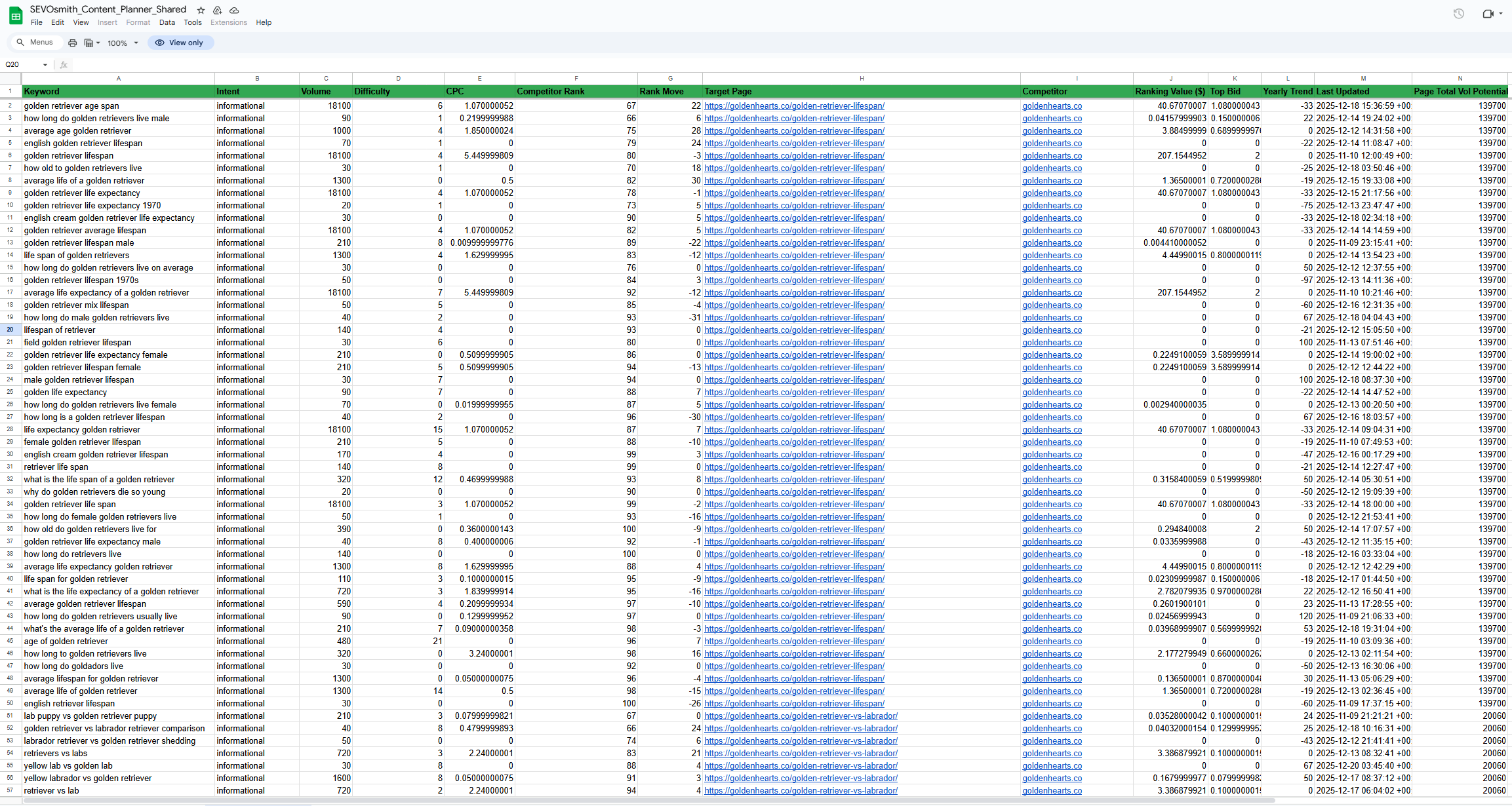
DataForSEO’s ranked_keywords endpoint pulls all keywords for each high-value URL, then the workflow applies intelligent filters:
Position Filter: Extracts only Page 1 rankings (positions 1-10)
Intent Filter: Removes “Navigational” (branded) keywords
Focus: Commercial and Informational intent only
Why this matters: You’re not copying their entire 10,000+ keyword portfolio. You’re extracting proven Page 1 winners while filtering out branded terms like “Nike shoes” (which you can’t rank for anyway).
Data captured per keyword:
- Keyword text
- Search intent (Informational/Commercial)
- Monthly search volume
- Keyword difficulty (0-100)
- Cost per click ($)
- Competitor’s current rank
- Rank movement (momentum tracking)
- Target page URL
- Estimated ranking value ($)
- Top bid price
- 12-month trend data
Everything needed for strategic keyword targeting decisions—automatically organized in the Raw_Competitor_Data sheet.
Stage 3: AI Strategy Synthesis (90 seconds)
The workflow aggregates 200-600 competitor keywords and sends them to a LangChain AI agent (Google Gemini or GPT-4) configured as a Senior SEO Strategist.
Required outputs (enforced by prompt engineering):
✅ Identify semantic keyword clusters (topical themes)
✅ Propose 3-5 core pillar topics
✅ Define 15-30 supporting cluster articles per pillar
✅ Calculate total addressable search volume per pillar
✅ Assign priority rankings (High/Medium/Low)
✅ Write strategic purpose for each article
Output structure:
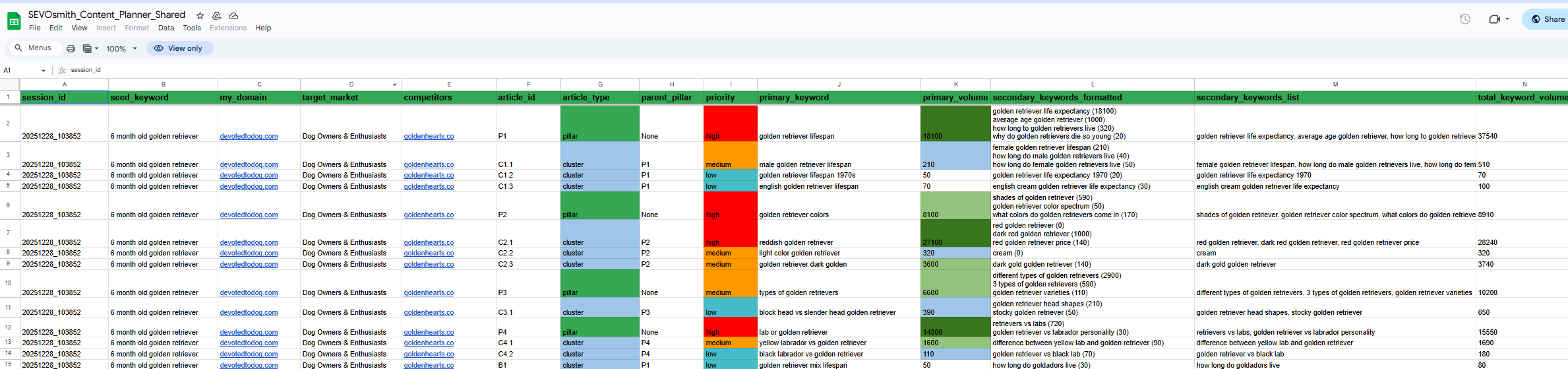
Prepare_Pillars Sheet: Shows pillar-level strategy with primary keywords, total volume potential, cluster count, and priority ranking
Prepare_Articles Sheet: Breaks strategy into individual writing assignments with:
- Article ID
- Article type (Pillar/Cluster)
- Parent pillar relationship
- Primary keyword
- Search volume
- Secondary keywords (5-10 per article)
- Strategic purpose (why this article matters)
- Priority (High/Medium/Low)
Market Intelligence Summary:
- Total strategy coverage (number of articles)
- Total addressable volume (combined monthly searches)
- Quick wins (high-volume, low-difficulty opportunities)
Dual Output: Executive Reports + Production Databases
The workflow delivers two synchronized outputs from the same AI analysis:
For Stakeholders: Word Document Strategy Report
File: Strategy_ClientName_Date.docx
Auto-saved to: Google Drive
Delivery: Direct Gmail notification with download link
Contents:
- Executive summary (market overview, opportunity size)
- Competitor breakdown (who ranks, their strengths, vulnerabilities)
- Content architecture (pillar-cluster structure with visual hierarchy)
- Priority recommendations (High/Medium/Low with rationale)
- Quick wins (low-difficulty, high-volume opportunities to capture fast)
Use case: Print-ready for client presentations, stakeholder meetings, strategy pitches
Example: https://docs.google.com/document/d/1rA_4MD5CMA6VIk1j5TW93fylSPUvLRoKd1kY_cfBFUc/
For Production Teams: Google Sheets Database
File: SEVOsmith_Content_Planner_Shared – Google Sheets
Format: 7 interconnected tabs for complete operational intelligence
Tab breakdown:
- Manager: Command center for configuring modes, competitors, and extraction limits
- Competitor_Overview: High-level metrics
- Total organic traffic estimate
- Estimated traffic value ($)
- Number of ranking keywords
- Average position
- Traffic momentum (month-over-month change)
- Raw_Competitor_Data: 200-600 rows of keyword intelligence
- Every keyword ranking in top 10
- Full metrics (volume, difficulty, CPC, intent, trend)
- Competitor rank and rank movement
- Target page and ranking value
- Strategy_Dashboard: Visual analytics
- Quick wins matrix (volume vs difficulty)
- Content gap opportunities
- Priority distribution chart
- Prepare_Articles: Production-ready writing assignments
- Complete article briefs (1 row = 1 assignment)
- Primary keyword + 5-10 secondaries
- Strategic purpose + expected impact
- Pillar relationship for internal linking
- Prepare_Pillars: Pillar-level planning
- Core pillar topics (3-5 total)
- Total volume potential per pillar
- Cluster article count
- Priority and rationale
- REF_Locations: DataForSEO reference codes
- 117 supported countries
- Language codes for international SEO
Get the Strategy Architect Workflow
Free template: https://nextgrowth.gumroad.com/l/competitor-analysis-content-clustering-with-n8n-DataForSEO
Common Pitfalls to Avoid (And How the Workflow Prevents Them)
After running this workflow across 12 different niches (Golden Retrievers, AI tools, DevOps, SaaS, e-commerce), I’ve debugged several critical failure modes that plague manual competitor analysis.
Pitfall 1: Directory Spam Pollution
The problem: DataForSEO returns Wikipedia, Pinterest, Reddit, and Amazon as “competitors” because these platforms rank for everything.
Why this breaks analysis: These aren’t true competitors—they operate without a competing business model. Analyzing them wastes API credits and pollutes your strategy with irrelevant keywords.
How the workflow prevents it: Built-in domain blacklist automatically filters 24 platforms:
- Wikipedia, Wiktionary
- Pinterest, Instagram
- Reddit, Quora
- Amazon, eBay, Etsy
- Yelp, TripAdvisor, Clutch
- YouTube (unless you specifically want video competitors)
- Dictionary.com, Thesaurus.com
- And 10+ more
Validation: Check the Competitor_Overview tab—you should only see actual businesses, not content platforms.
Pitfall 2: Branded Keyword Contamination
The problem: Manual analysis often includes branded terms like “Nike shoes” when analyzing Nike.com. These reveal zero opportunities since you can’t rank for their brand.
Why this happens: SEO tools export ALL rankings, including navigational queries users search to find specific brands.
How the workflow prevents it: Automatic intent filtering in the Raw_Competitor_Data sheet removes all keywords with intent = "navigational".
Result: Only Informational and Commercial keywords pass through to the AI strategy—actual replicable opportunities.
Pitfall 3: Generic AI Strategy Output
The problem: AI returns vague advice like “Create high-quality content about golden retrievers” with no actionable structure.
Why this happens: Insufficient prompt engineering with no constraints on output format.
How the workflow prevents it: Engineered LangChain prompts demand specific structure:
Required outputs: ✅ Pillar and cluster hierarchy (parent-child relationships)
✅ Primary keyword + volume per article (no generic topics)
✅ Strategic purpose per article (why it matters)
✅ Total addressable volume per pillar (market size calculation)
✅ Priority ranking with rationale (High/Medium/Low + why)
Validation: Check Prepare_Articles—every row should contain a concrete primary_keyword and article_purpose, not generic recommendations.
Pitfall 4: Unrealistic Speed Expectations
The problem: Users expect instant results in 5 seconds, then think the workflow is broken when it takes 4 minutes.
Why this expectation is wrong: DataForSEO APIs process real-time SERP data, not cached information. Each API call queries Google’s live index.
Realistic timing:
- 1 competitor: ~2 minutes (5 pages × 50 keywords = 250 API calls)
- 5 competitors: ~5 minutes (1,250 API calls total)
- 10 competitors: ~8 minutes (2,500 API calls total)
The workflow prevents frustration: Session tracking via session_id column in Manager tab shows progress during execution. Check Raw_Competitor_Data to see rows populating in real-time.
Pro tip: Run analysis overnight for 20+ competitors, review the Strategy Dashboard in the morning.
Who This Is For (And Who It’s NOT For)
✅ Perfect For:
SEO Agencies
Reduce competitor analysis from 15 hours to 5 minutes per client. Deliver strategic content plans faster, take on more clients without hiring.
Freelance SEO Consultants
Compete with agencies by delivering enterprise-quality competitor intelligence at freelance speed. ROI in first client project.
Content Marketing Teams
Get production-ready article briefs automatically. No more “what should we write?”
FAQs
How long does the workflow take to run?
Execution time ranges from 2-5 minutes depending on competitor count and pages analyzed. Analyzing 1 competitor with 5 top pages takes approximately 2 minutes. Analyzing 5 competitors takes 4-5 minutes due to sequential API calls as DataForSEO processes roughly 250 keywords per competitor. You control scope through the Manager tab by setting Competitor_Limit (1-10 competitors) and Pages_Per_Competitor (5-10 pages). The workflow includes session tracking via the session_id column—check the Raw_Competitor_Data sheet to monitor progress during execution.
Do I need a paid DataForSEO account?
Yes. The workflow uses 4 DataForSEO API endpoints: competitors_domain, relevant_pages, ranked_keywords, and keyword_overview. A standard DataForSEO subscription ($20-50 monthly) provides sufficient credits for 20-30 comprehensive competitor analyses each month. Each analysis consumes approximately 300-500 credits depending on competitor count and page depth. Free tiers don’t support bulk operations at this scale. See the DataForSEO cost comparison for detailed subscription versus pay-per-use analysis.
Can I customize the AI strategy output?
Absolutely. The LangChain node uses a system prompt defining content architecture rules. You can modify the prompt to enforce different pillar and cluster ratios (5 pillars instead of 3), target specific content types (listicles versus comprehensive guides), adjust quick-win thresholds (volume above 1000 and difficulty below 10), or change language output for international markets. The AI agent processes all competitor data through your custom strategy framework. Edit the LangChain prompt in n8n’s visual editor—changes apply immediately to the next analysis run without requiring workflow republishing.
How does this compare to Ahrefs/Semrush competitor tools?
Traditional SEO tools show competitor data dashboards but don’t generate executable strategy. Ahrefs Site Explorer reveals a competitor’s 10,000 keywords—but you still manually decide which keywords to target and how to structure content. This workflow extracts the same SERP data via DataForSEO, then uses AI to transform raw data into an actionable content plan with pillar-cluster architecture, article assignments with strategic purpose per piece, and production-ready databases. Output includes both executive reports in Word format and production databases in Google Sheets. The difference: “here’s raw data you need to analyze” versus “here’s your 90-day content roadmap with writer assignments ready to execute.”
What’s included in the Google Sheets output?
The workflow populates 7 interconnected tabs serving different functions. The Manager tab is your command center for configuring analysis modes and competitors. Competitor_Overview provides high-level metrics like traffic, value, and momentum. Raw_Competitor_Data contains 200-600 rows of keyword rankings with volume, difficulty, CPC, ranking value, and yearly trends. Strategy_Dashboard offers visual analytics for quick wins and content gaps. Prepare_Articles delivers production-ready article assignments with primary keywords, secondary keywords, volumes, and strategic purpose. Prepare_Pillars handles pillar-level planning with cluster counts and total volume calculations. REF_Locations provides DataForSEO location and language codes reference for 117 supported countries.
Can I analyze competitors in non-English markets?
Yes. The Manager tab includes Location Code and Language Code columns mapping to DataForSEO’s 117 supported countries. The REF_Locations tab provides the complete reference list—for example, France uses location code 2250 with language “fr”. Set these codes before running analysis, and the workflow queries DataForSEO for region-specific SERP data. Example: analyzing Vietnamese Golden Retriever competitors requires Location Code 2704 (Vietnam) and Language Code “vi”. The AI strategy output adapts to your target market automatically, generating content plans relevant to local search behavior and competitive landscape.
Conclusion
The Strategy Architect workflow demonstrates that competitor analysis doesn’t have to consume 10-15 hours per client. By automating discovery through Mode A, B, or C, extraction of money pages plus winning keywords, and synthesis into pillar-cluster architecture, you compress strategic planning from weeks to minutes.
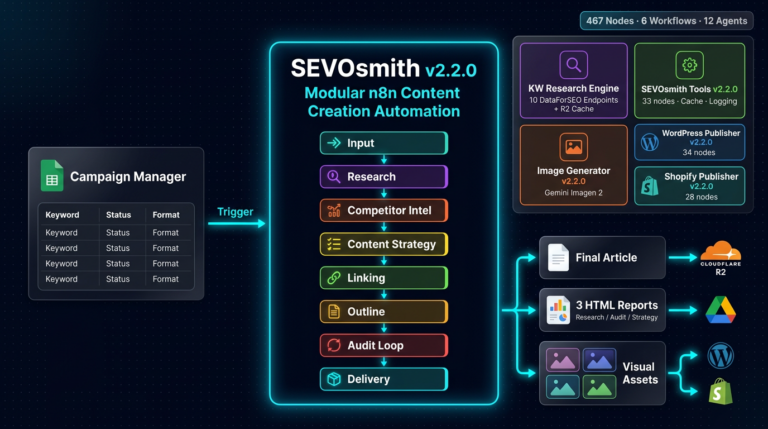
This is the middle piece of a complete SEO automation system. Keyword research feeds seed keywords into the Strategy Architect, which generates content plans that flow into SEVOsmith for article production. Each component solves a different bottleneck in the agency production pipeline, creating an end-to-end system that moves from research to published content in hours instead of weeks.
The workflow is available as a free n8n template on Gumroad with optional tips appreciated to support continued development. If you’ve built the keyword research automation, this is your natural next step. Questions about implementation? Find me on Reddit (r/n8n) or LinkedIn where I actively share workflow improvements and debugging strategies with the automation community.