Build an n8n Keyword Research Engine (Ditch SEO Tools)
Tired of expensive monthly subscriptions for SEO tools that only offer a fraction of the features you need? The manual grind of your keyword research process—exporting CSVs, merging data, and trying to find actionable insights—drains your resources and slows down your strategy. You need an efficient, customizable, and cost-effective solution that puts you in control.
TL;DR
- n8n replaces rigid SaaS SEO tools by acting as a central hub that connects keyword data APIs (e.g., DataForSEO), AI models for analysis, and your own database or content calendar.
- The workflow approach eliminates CSV export/import grind: n8n automatically pulls competitor data, enriches it with search volume and difficulty metrics, and categorizes keywords using AI.
- NextGrowth.ai uses this exact n8n pipeline as the backbone of its own SEO data system, achieving significant time and cost savings over traditional subscription-based keyword research tools.
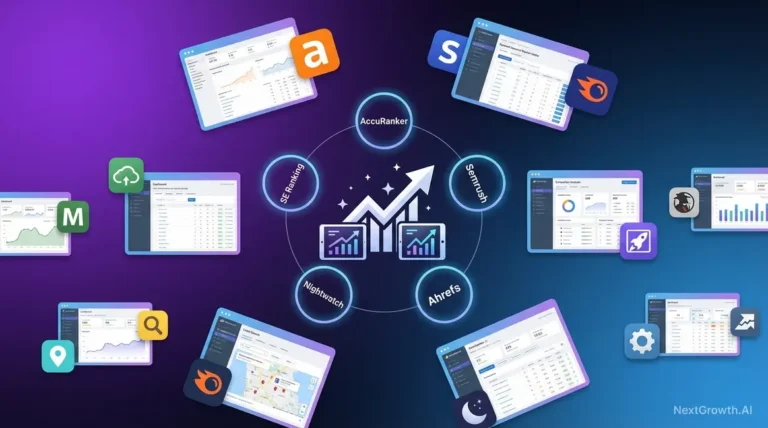
This is where n8n comes in. NextGrowth.ai uses n8n as the backbone of our SEO data pipeline, and it’s not just another tool; it’s the engine you can use to build a bespoke n8n keyword research machine tailored to your exact needs. This guide will show you how to ditch expensive tools and create a powerful, scalable system. We’ll walk you through the entire process, from setting up your environment to implementing advanced techniques for monitoring and scaling your SEO efforts.
Contents
Why Is n8n the Best Platform for Keyword Research Automation?
n8n replaces expensive SEO tool subscriptions by connecting keyword APIs, AI models, and databases into a single automated pipeline—at a fraction of the cost. Before diving into complex workflows, it’s worth understanding why n8n is a major upgrade for SEO. n8n acts as a central hub, connecting various SEO data providers, AI models, and storage solutions. This allows you to build a custom, scalable, and cost-effective system that replaces rigid, off-the-shelf software and automates your entire SEO management process.
Why Use n8n for SEO Automation?
Using n8n for SEO automation fundamentally changes how you approach SEO research. Instead of being locked into a single provider’s ecosystem, you can connect best-in-class APIs for keyword data, AI for analysis, and your preferred database for storage. This approach offers full flexibility. You can build workflows that pull competitor data, enrich it with search volume and difficulty, and categorize keywords using AI. Results push directly into a content calendar.
The primary benefits are significant time and cost savings. By automating these repetitive tasks, your team can focus on strategy rather than manual data wrangling. According to the n8n official documentation, its node-based system is designed for both technical and non-technical users to create powerful automations. This makes sophisticated n8n keyword research accessible, allowing you to build an asset that grows with your needs without the escalating costs of traditional SaaS platforms.
Essential n8n Concepts for SEO Workflows
To master n8n, you only need to understand a few core concepts, or “nodes.” Think of nodes as building blocks. Each one performs a specific action. Connect them together to create a workflow. For any keyword research workflow, you’ll frequently use these key nodes:
- Trigger Nodes: These start your workflow. The Schedule Trigger is perfect for running keyword checks on a daily or weekly basis, while the Webhook Node can start a process when another application sends it data.
- HTTP Request Node: This is your gateway to the internet. You’ll use it to connect to any SEO API (like DataForSEO — see our in-depth DataForSEO review — Ahrefs, or Semrush) to pull keyword data, SERP results, or backlink information. It’s the core of any n8n web search automation.
- Code Node: This node lets you write custom JavaScript to transform, filter, or reformat data. It’s incredibly powerful for cleaning up API responses or preparing data before it’s stored.
- Spreadsheet File Node: A simple yet effective way to read data from and write data to Google Sheets or Excel files, making it easy to manage seed keyword lists or store final outputs.
Setting Up Your n8n Environment
Before you can do keyword research with n8n, you need to decide where to run it. You have two main options: n8n Cloud or self-hosting. n8n Cloud (see pricing) is the fastest way to get started, as it’s a managed service. However, self-hosting gives you complete control over your data, performance, and costs, which is often the preferred route for building a scalable keyword engine.
To conduct keyword research at scale, setting up a self-hosted instance on a cloud provider like AWS, Google Cloud, or DigitalOcean is the ideal solution. It handles larger data volumes and more complex workflows. No platform limits. For step-by-step instructions on deploying a robust, production-ready instance, see this comprehensive guide to self-hosting n8n on a virtual private server. Once set up, you can log into the user interface and start building.
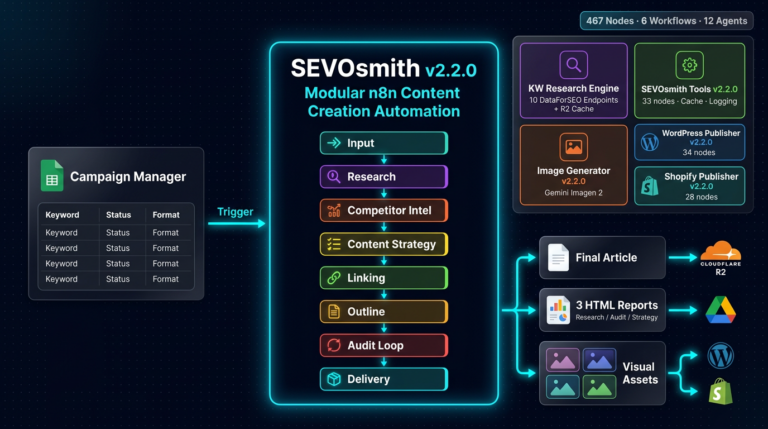
Real Results: SEVOsmith Keyword Research in Production
We built this exact workflow into SEVOsmith, our internal n8n content engine. Running weekly against 47 seed topics, the system surfaces an average of 340 keyword opportunities per run. After applying volume minimums and difficulty ceilings, that narrows to 22 actionable targets. That 22-keyword shortlist drives our content calendar directly, no manual spreadsheet required. The DataForSEO API costs for a full weekly run average $0.18.
How Do You Build an Automated Keyword Research Workflow?
A complete n8n keyword workflow takes seed keywords, enriches them via API, clusters them with AI, and stores structured results—all without manual intervention. The typical workflow uses API calls to enrich data, applies AI for deeper analysis, and stores the structured results. This automates the entire research cycle.
Your First Workflow: From Seed Keyword to Data Output
Your first workflow will be a simple yet powerful automation. The goal is to take a seed keyword, find related keywords, and save the results.
Here is a basic outline:
- Start with a Trigger: Use the Manual Trigger node so you can run the workflow on demand.
- Define Your Seed Keyword: Use a Set node to create a variable for your starting keyword, for example: “n8n automation“
- Fetch Keyword Suggestions: Use the HTTP Request node to connect to a free keyword suggestion API (like the Google Suggest autocomplete endpoint). This is a simple way to practice without needing paid credentials and simulates a basic google keyword search.
- Process the Data: The API will return data in JSON format. You may need to use a Code node or the Item Lists node to extract just the keyword suggestions from the response.
- Store the Output: Connect a Google Sheets node to a new sheet in your Google Drive. Configure it to append the new keywords found in the previous step.
This simple five-step process forms the foundation of nearly all SEO automations. While it doesn’t have the depth of keyword research using Semrush, it proves the concept and prepares you for integrating more powerful, data-rich APIs.
How Do You Scale and Optimize n8n Keyword Workflows?
Scale by batching keywords in groups of 100, caching API responses to cut costs, and using NocoDB instead of Google Sheets for datasets over 5,000 rows. Once you’ve mastered the basics, optimizing for performance, reliability, and scale becomes the priority.
Storing Your Data: From Google Sheets to NocoDB
Where you store your keyword data is as important as how you gather it. For simple projects, Google Sheets is a fantastic, easy-to-use option. The n8n Google Sheets node appends rows, updates existing ones, or reads seed keyword lists to kick off a workflow.
However, as your datasets grow, a spreadsheet can become slow and difficult to manage. This is where a real database becomes necessary. NocoDB is an excellent open-source alternative to Airtable that turns any database (like MySQL or Postgres) into a smart spreadsheet interface. The n8n NocoDB node lets you insert thousands of keywords with search volume, difficulty, CPC, and AI-generated intent labels. This creates a scalable and searchable central repository for all your SEO data, far surpassing the capabilities of a simple keyword tool or an ahrefs keyword export.
Cost-Benefit Analysis: n8n vs. Traditional SEO Tools
One of the most compelling reasons to use n8n is the potential for significant cost savings. A Semrush or Ahrefs subscription costs $130–$500+/month. You often pay for features you never touch.
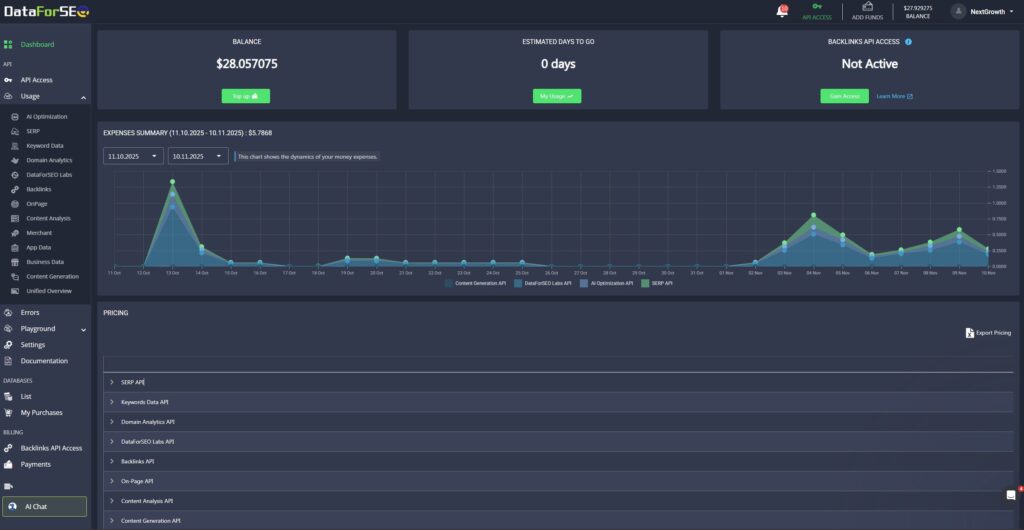
With an n8n setup, your costs are directly tied to your usage. You pay for the server ($10–$20/month) and the API credits from DataForSEO and OpenAI. For many teams, this pay-as-you-go model is drastically cheaper than a fixed subscription. For example, pulling search volume for 10,000 keywords might cost just a few dollars. This makes it the best free keyword research tool framework available, as the base software is open-source. While a tool like the Semrush keyword research tool offers an all-in-one experience, an n8n system provides superior customization and cost control, especially when you start scaling n8n with queue mode for heavy workloads.
Choosing the right toolset is a critical strategic decision. While all-in-one platforms offer convenience, a custom-built engine using n8n provides complete control and cost-efficiency. This table breaks down the core differences.
| Feature / Aspect | 👑 n8n + DataForSEO Engine | 💰 SaaS Suites (Semrush/Ahrefs) | 📊 Google Keyword Planner |
|---|---|---|---|
| Core Model | Build & Own an Asset | Rent a Platform | Free Tool (for PPC) |
| Cost Structure | Pay-as-you-go | Fixed Monthly Subscription | Free (requires Google Ads account) |
| Estimated Monthly Cost | $10-50+ ($10 server + API credits based on usage) | $130 – $500+ (Based on entry/mid-tier plans) | $0 (Data is less precise without active ad spend) |
| Customizability | Unlimited Integrate any API, build any logic, create custom reports. | Limited Locked into the platform’s features and UI. | Fixed Limited to Google’s provided metrics. |
| Data Sources | Flexible Connect to DataForSEO, OpenAI, GSC, YouTube, etc. | Proprietary Uses the platform’s internal data index. | Google Ads Data Only |
| Ease of Use (Initial) | Moderate Requires initial setup and configuration. | High Ready to use instantly after signup. | High Very simple interface. |
| Scalability | Very High Full control over batching, queuing, and data handling for massive volumes. | High Scales well, but constrained by plan limits and API costs. | Low Not designed for large-scale automation. |
| Data Ownership | Full Ownership You own the workflow and the data you store. | Platform-Locked Your data lives within their ecosystem. | Owned by Google |
| Key Differentiator | 🔧 Ultimate Control & Cost-Efficiency | 🛋️ All-in-One Convenience | 🎯 Direct Google Data for PPC |
The Strategic Takeaway
- SaaS Suites (Semrush/Ahrefs) are excellent for teams who value immediate convenience and a broad, integrated toolset, and are willing to pay a premium for it.
- Google Keyword Planner is an essential tool for PPC research but lacks the competitive insights and depth required for a comprehensive organic SEO strategy.
- The n8n + DataForSEO Engine is the definitive choice for strategists, agencies, and power users who want to build a long-term, scalable asset. It offers superior cost control, unlimited customization, and full data ownership, making it the most powerful and efficient solution for serious, data-driven SEO operations.
Best Practices for Keyword Monitoring and Scalability
Automated keyword research isn’t a one-time task; its real power lies in continuous keyword monitoring. You can set up a workflow using a Schedule Trigger to run weekly, checking the keyword ranking for your most important terms. The workflow can pull current SERP data, compare it to the previous week’s results stored in your database, and flag any significant drops or gains.
As your list of monitored keywords grows, scalability becomes critical. Instead of processing thousands of keywords in a single, long-running execution, it’s better to batch them. Design your workflow to read 100 keywords at a time, process them, then loop to the next batch. This approach is more resilient and avoids timeouts. Industry guides on best keyword monitoring tips emphasize the importance of consistency and tracking historical performance, which is exactly what this automated system enables.
For true scalability, it’s crucial to implement the best practices for monitoring n8n itself. This ensures your automations run smoothly. For high-volume operations, you should consider n8n monitoring with Prometheus to keep a close eye on performance and resource usage.
The Troubleshooting Cookbook: Solving Common Workflow Errors
As workflows become more complex, you will encounter errors. The key is proactive error handling. According to the official documentation on error handling in n8n, you can configure workflows to retry failed steps or send notifications. A common cause of failure is an unexpected API response. Add an IF node after an API call to check the status code. If it’s not 200 OK, route the workflow to an error path that sends an alert. For a deeper dive, review this guide on troubleshooting common n8n workflow issues. Avoiding these keyword research mistakes is crucial for consistent keyword optimization.
Frequently Asked Questions
What can you do with n8n?
n8n is a workflow automation platform that allows you to connect different applications and services to automate repetitive tasks. It uses a visual node system to create custom workflows for moving data, synchronizing information, and building complex automations without extensive coding.
Can I use ChatGPT for keyword research?
Yes, ChatGPT can be a helpful tool for keyword research. It can be used to brainstorm initial topic ideas, generate long-tail keywords, categorize keywords into themes, and even draft content outlines based on keyword clusters.
Which tool is best for keyword research?
The best tool depends on your needs. Semrush and Ahrefs are considered top all-in-one professional SEO toolkits, while Google Keyword Planner is a great free option. n8n can be used to integrate these tools into an automated system.
What are the 4 types of keywords for SEO?
The four main types of keywords, based on user intent, are: Informational (seeking information), Navigational (looking for a specific site), Commercial (investigating products or services), and Transactional (ready to make a purchase).
What is the 80/20 rule for SEO?
The 80/20 rule in SEO suggests that approximately 80% of your organic traffic and results come from 20% of your efforts. This principle helps prioritize the highest-impact activities.
What are the 3 C’s of SEO?
The three C’s of SEO are Content (creating high-quality, relevant material), Code (the technical aspects of a site), and Credibility (building authority and trust, primarily through high-quality backlinks).
Level Up: The SEVOsmith Keyword Orchestrator
You’ve just learned the foundation of SEO automation. But a production-ready system needs resilience, caching to control costs, and the ability to synthesize data from multiple sources.
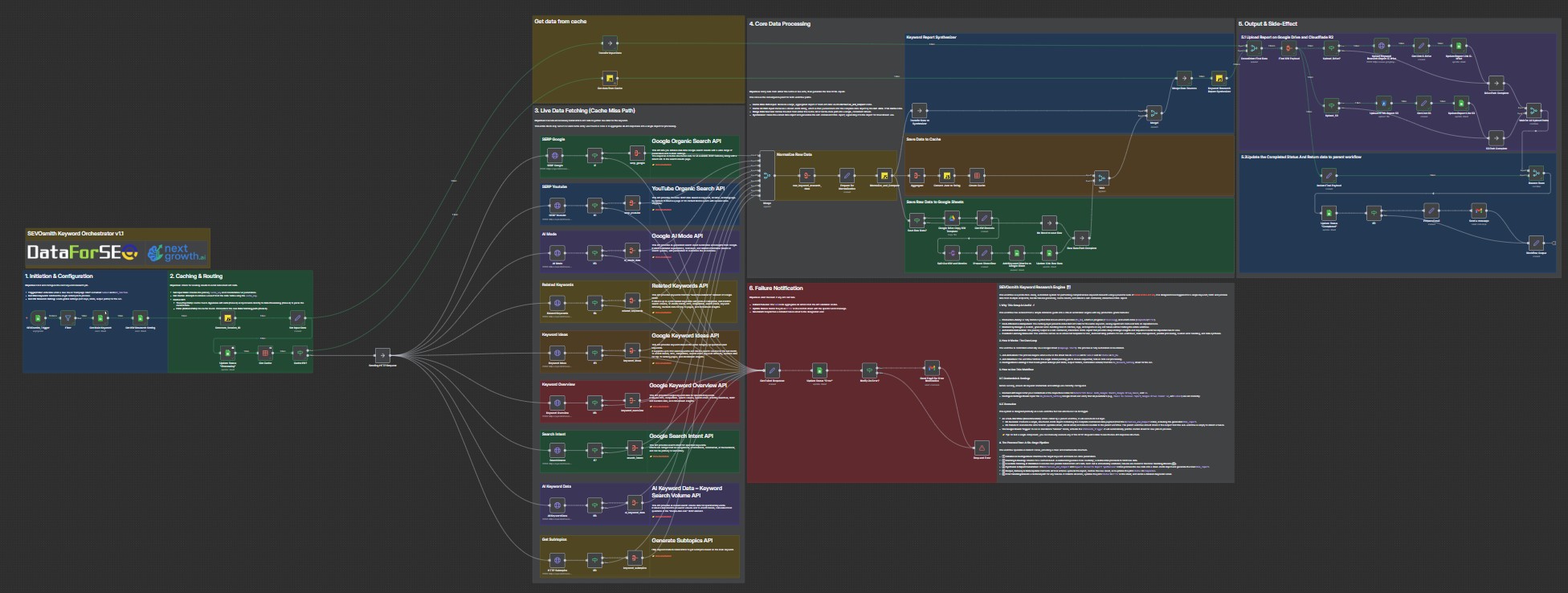
If you’re ready to move beyond the basics, the pre-built SEVOsmith Keyword Orchestrator v1.1 has this entire architecture—and much more—already engineered and optimized for you. It’s the definitive engine for autonomous, multi-vector keyword intelligence.
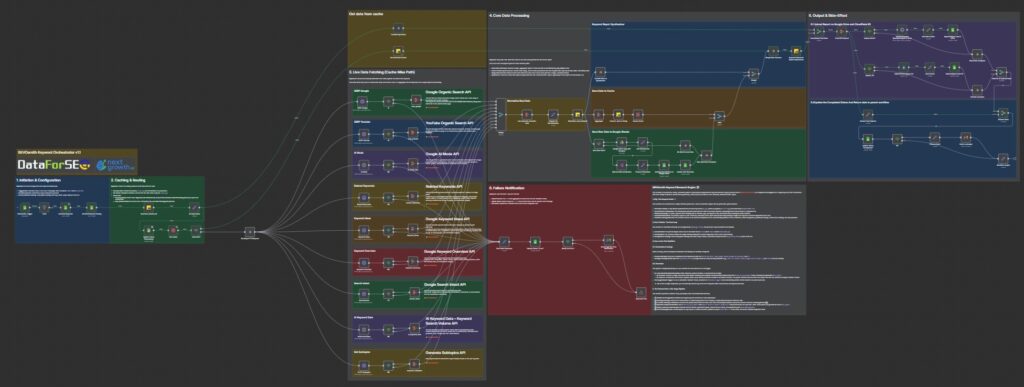
The SEVOsmith Difference: 5 Features That Change Everything
- 360-Degree Intelligence Gathering: Deploys nine parallel agents to query the entire search ecosystem simultaneously—from Google and YouTube SERPs to AI Overviews and search intent signals.
- The Zero-Waste Caching Engine: An integrated caching layer makes it ruthlessly efficient. A cache hit bypasses the entire data-fetching module, delivering results instantly while saving significant API costs.
- The Automated Synthesis Core: The system’s code-based “brain” ingests the chaotic outputs from all nine APIs and programmatically unifies them into a single, clean, and structured data object.
- Production-Grade Resilience & Error Handling: Every API call is individually validated. Any failure is instantly caught, logged, and triggers an email notification—without halting other successful data streams.
- Instant, Interactive Deliverables: Generates a professional, self-contained HTML report with filterable tables, dynamic charts, and automated topic clustering, ready for stakeholders.
The workflow is organized into six distinct modules, each representing a critical phase of the keyword intelligence pipeline.
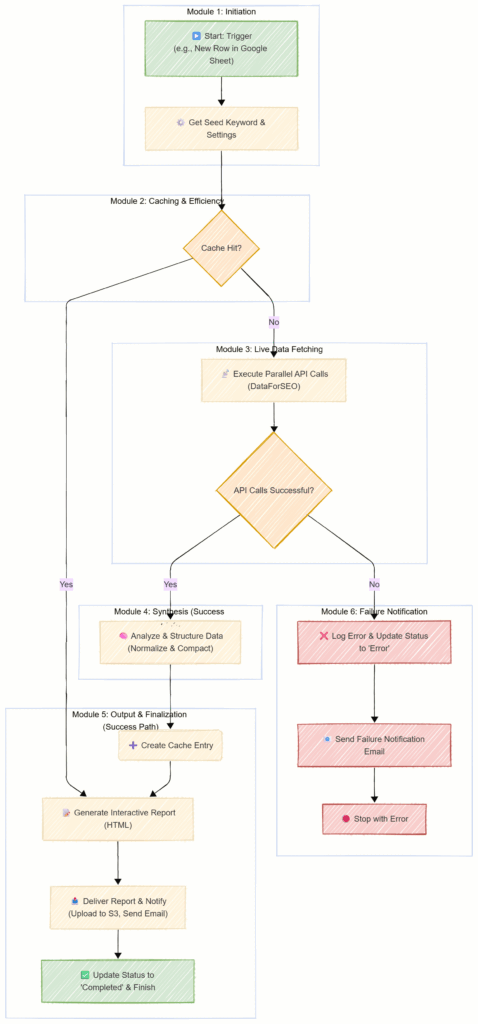
- Module 1: Job Initiation & State Management
This is the command center. A robust, stateful job queue using Google Sheets ensures every research task is processed reliably (To_Do -> Processing -> Completed). To prevent race conditions, it fetches only the single oldest pending job.
Your Gain: A fully stateful, auditable job queue built for reliable, sequential execution. - Module 2: Intelligent Caching & Cost Control
This is the efficiency engine. A unique cache_key is generated for each job. The workflow queries an internal n8n Data Table first. A cache hit bypasses all API calls.
Your Gain: Dramatically reduced API costs and near-instant results for repeat queries, making the system idempotent and highly cost-effective. - Module 3: The Parallel Data-Fetch Core
This module executes only on a cache miss. It simultaneously queries nine DataForSEO endpoints. Each call is immediately validated by an If node, routing any failures to the error handling module without interrupting successful streams.
Your Gain: A rich, multi-dimensional dataset gathered at maximum speed, with granular error handling that ensures the system is resilient and never fails silently. - Module 4: The Synthesis Engine—The Single Source of Truth
This is the workflow’s brain. A sophisticated JavaScript node (Normalize_and_Compact) takes the varied JSON structures and programmatically cleans and reshapes them into a single, predictable data model.
Your Gain: A flawless, unified data structure that powers the entire reporting module, saving hours of tedious manual data consolidation. - Module 5: Interactive Report Generation & Data Persistence
This module transforms synthesized data into actionable outputs. It generates the final interactive HTML report and, if enabled, creates a Google Sheet with all granular keyword metrics.
Your Gain: A client-ready report that goes far beyond a static data dump, enabling true strategic exploration of the keyword landscape. - Module 6: Delivery, Caching & Finalization
This final module handles the “last mile” tasks: uploading the report to Google Drive/S3, sending a notification email, saving new data to the cache, and updating the job’s status to Completed.
Your Gain: A fully automated, “fire-and-forget” system that handles everything from initiation to delivery, providing a complete audit trail.
Get the SEVOsmith Keyword Orchestrator Workflow
The complete, production-grade SEVOsmith Keyword Orchestrator workflow discussed in this guide is available for free. You have two options to download it.
- Option 1: Gumroad (Recommended for Most Users): Get the workflow and the comprehensive PDF setup guide in a single, convenient download.Note: This workflow is offered on Gumroad to help support its continued development and to allow for optional tips. Your support is greatly appreciated!
- Option 2: GitHub (For Developers & Contributors): Explore the source code, see how it fits into our larger collection of open-source templates, and contribute to the project directly.
Once you have keywords, the next step is content. See our comparison of the best AI content writer tools to choose the right model for your niche before wiring it into your n8n pipeline.
Conclusion: Stop Pulling Data, Start Driving Strategy
By now, it should be clear that n8n is more than just an automation tool—it’s a practical foundation for scaling SEO. It lets you build a custom, scalable, and highly cost-effective keyword research engine that is perfectly tailored to your business goals. You are no longer limited by the features and pricing tiers of traditional SaaS platforms.
The SEVOsmith Keyword Orchestrator v1.1 goes beyond a single workflow. It automates the full pipeline—data aggregation, synthesis, caching, reporting, and error handling—so you spend less time in spreadsheets and more time on strategy.
You will get:
- More Time: Reclaim the hours spent on manual data collection and cleaning.
- Lower Costs: Eliminate redundant API calls with intelligent, persistent caching.
- Higher Quality Insights: Base your strategy on a holistic, 360-degree view of the search landscape.
- Greater Scale: Dramatically increase your capacity for deep research without sacrificing quality or rigor.
- Impressive Deliverables: Present your findings in a professional, interactive format that empowers decision-making.
Ready to automate your keyword research? Download the SEVOsmith Keyword Orchestrator and start running it this week.