SEVOsmith v2.2.0: n8n Content Creation Automation for Multi-Site Publishing
I ran SEVOsmith on “DataForSEO review” on a Wednesday morning. Thirty-six minutes later: a 4,800-word DataForSEO review was live in WordPress — six images attached, Rank Math metadata injected, pricing tables formatted, and a full audit trail in my inbox showing every source the research agent pulled. I didn’t touch the keyboard once.
The day after, I queued “best AI content writer tools” — a competitive listicle covering 16 tools. SEVOsmith switched to listicle format automatically, pulled live pricing data for each tool, ran the audit loop, and returned a 5,600-word draft with feature comparison tables already formatted. Forty-one minutes. Same workflow, no changes.
That’s the baseline. Most AI writing tools have one setting: generate. Give them a keyword, get back 2,000 words with no audit trail, no quality gate, no verification that the stat in paragraph 3 came from a real source. SEVOsmith is the opposite of that — a 6-workflow production system you own outright, running on your own n8n instance, with a full paper trail on every decision the agents made. Here’s exactly how it works.
SEVOsmith v2.2.0 at a Glance
- What it is: A 6-workflow, 467-node n8n automation system that goes from keyword to published CMS draft in 31–43 minutes
- Who it’s for: SEO freelancers, agencies, and solopreneurs who run n8n (self-hosted or Cloud) and manage multiple WordPress or Shopify sites
- What you own: The full workflow — no SaaS subscription, no per-article fees, runs on your own n8n instance
- Key upgrade from v1.5.0: 3 workflows → 6, 326 nodes → 467, added Shopify, multi-language, and Cloudflare R2 caching
- Output per run: Research report, audit trail, published draft with images + metadata, completion email
- Price: $99.99 — includes 6 months of free updates. Major version updates after 6 months available at a discount for existing customers. No monthly fees, no per-article charges.
- Delivery: Instant via Gumroad — 6 workflow JSON files, Google Sheets Content Planner, Apps Script trigger, and full documentation. No refunds — use the $19 demo to verify the system on your keyword before purchasing.
New to SEVOsmith v2.2.0?
Upgrading from v1.5? Reference the SEVOsmith v1.5 setup guide for migration context.
You’re in the right place. This article covers the full system from the ground up — what it produces, how the 12 agents work, the 9 content formats, multi-site publishing, and how the Google Sheet drives everything from trigger to published draft.
Already using SEVOsmith v1.5.0?
The architecture is a full rebuild — 5 independent sub-workflows, Cloudflare R2 caching, and WordPress + Shopify support replace the single monolithic workflow. Jump to: What Changed in v2.2.0 →
Contents
- Who Is SEVOsmith v2.2.0 For?
- What You Get After Every Run
- What Is in the Full System — 6 Workflows, 467 Nodes, 12 Agents?
- What Does Each SEVOsmith AI Agent for Content Creation Do?
- What Content Quality & SEO Capabilities Are Built Into Every Agent?
- How Does the AI Citation & GEO Layer Work?
- The Intelligence Layer — KW Research Engine v2.2.0
- The Infrastructure Layer — Tools Sub-Workflow v2.2.0
- How Does Multi-Site Publishing Work for WordPress and Shopify?
- The Image Generator v2.2.0
- The Google Sheet as Command Center
- The n8n Content Creation Automation Workflow — From Keyword to Draft
- See It in Action — Real Runs, Real Output
- Already Using v1.5.0? Here’s What Changed
- Frequently Asked Questions
- What exactly is SEVOsmith — is it a SaaS tool or something I own?
- Do I need coding experience to use SEVOsmith?
- How many API credentials do I need to set up?
- Can I run multiple client sites from one SEVOsmith instance?
- Do I pay for keyword research on every article run?
- What if I already have a published article I want to update?
- Does SEVOsmith support languages other than English?
- Can I use this without WordPress or Shopify?
- What does the quality score actually measure?
- How is v2.2.0 different from v1.5.0?
- Build Your Content Engine — Three Ways to Start
Who Is SEVOsmith v2.2.0 For?
SEVOsmith is designed for operators — people running content production as a repeatable system, not a one-off task. If you run n8n — self-hosted or Cloud — and manage more than one site, this was built for you.
SEVOsmith is built for:
- Content agencies running 20–200 articles/month across multiple client sites — DataTable credential management means one workflow instance serves every client, every site
- SEO-focused brands that need consistent, audited quality at volume without a 10-person writing team
- n8n developers who want to understand, extend, and build on a production-grade content automation architecture — every sub-workflow is independently editable
- Publishers targeting AI citation — the GEO layer, stat+consequence pairings, and brand proximity rules are designed specifically for ChatGPT, Perplexity, and Google AI Overview inclusion
- Multi-language content operations — set
target_languagein Project_Setting and every agent outputs in that language. Active in production for English and Vietnamese.
Not the right fit for: users who want a one-click SaaS tool (this requires API credential setup and n8n configuration), or single-article use cases where setup overhead outweighs the value.
What SEVOsmith v2.2.0 Does
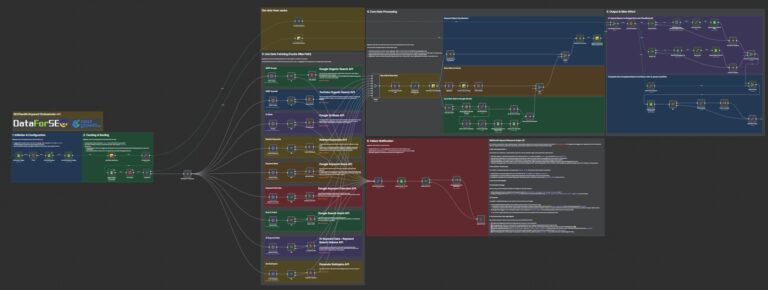
A 467-node, 12-agent n8n automation that turns a Google Sheet row into a published WordPress or Shopify draft in 31–43 minutes. Six workflows — one main orchestrator and five independent sub-workflows. A deterministic Forensic Accountant that counts keyword density, stat density, and URL validity exactly — not approximately. Cloudflare R2 caching so repeat runs on the same keyword cluster cost near zero. Nine content formats, each with format-specific audit rules. WordPress and Shopify publishing with multi-site DataTable credential management. One-time purchase, runs on your own n8n instance.
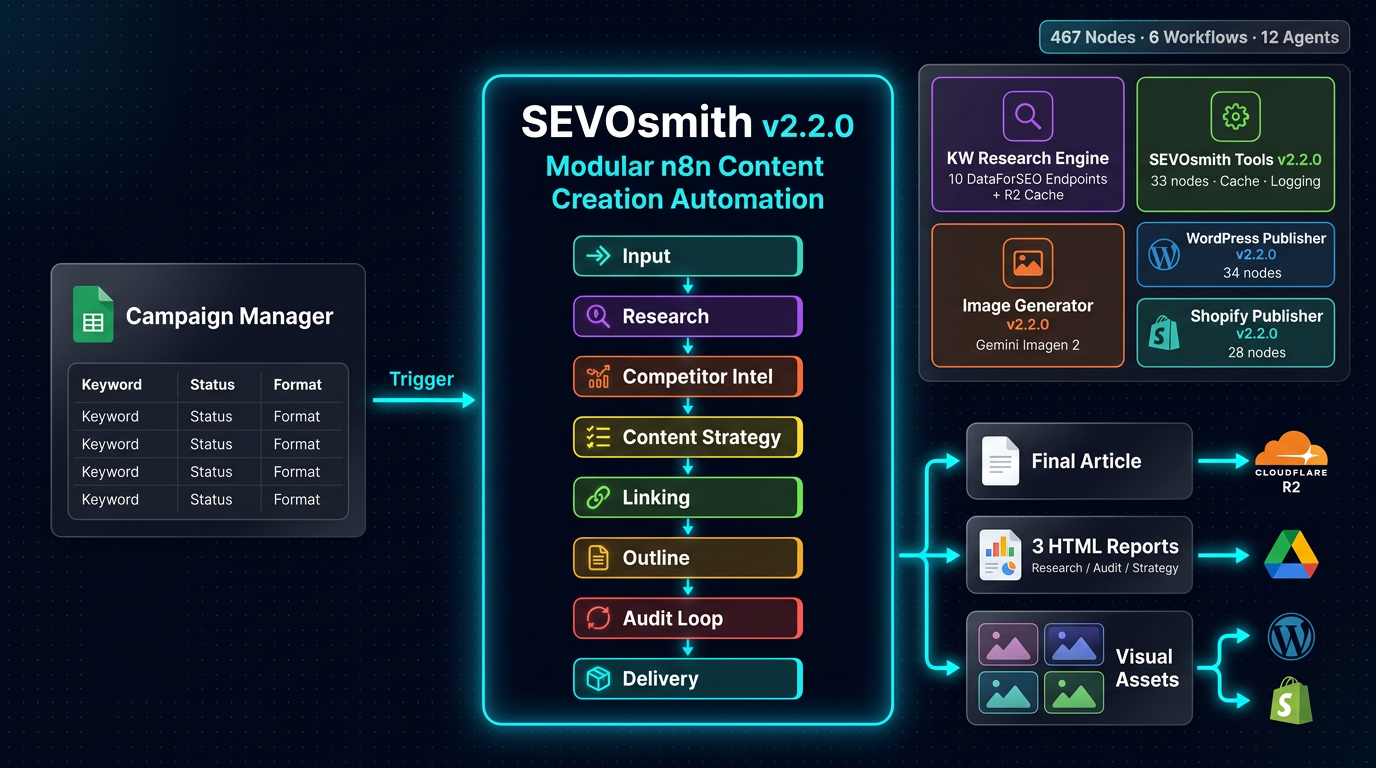
What You Get After Every Run
A completed run produces four deliverables. Here’s exactly what each one contains.
Research & Intelligence Report
Stored to Cloudflare R2 and your Google Drive folder. URL included in the completion email. Contains:
- Keyword metrics: volume, difficulty, CPC, search intent classification
- SERP analysis: Page 1 results, featured snippets, full SERP feature inventory
- YouTube SERP: video competition signals — informs whether video embeds strengthen the article
- AI Overview presence signals via Google AI Mode and AI Keyword Data endpoints
- Competitor landscape: gap analysis, negative space, battle plan sourced from Perplexity sonar-pro
- Audience profile: knowledge level, pain points, decision criteria
- E-E-A-T source list: curated citations, tier classification (primary / secondary / supporting), CRAAP test scores
- Content cluster map: topic cluster and subtopic structure
- Internal link map: existing site pages matched to anchor opportunities (via Firecrawl sitemap scan)
- Content blueprint: UVP angle, SEvO strategy, brand proximity plan
Article & Audit Trail Report
Also stored to Cloudflare R2 and Google Drive. This is the compliance record — not a summary, a forensic log:
- Quality score breakdown across 5 categories: Content Architecture, SEO Compliance, E-E-A-T & Citations, GEO & AI Citability, Anti-AI Detection
- Forensic Accountant raw metrics: exact keyword counts, URL validation results, paragraph length distribution, stat density per 100 words
- Issue log with codes: each compliance issue listed with severity, location, and fix applied
- Human review suggestions: edge cases the system flagged but left for editorial judgment — distinct from auto-applied fixes
- Content lifecycle assessment: freshness classification, update triggers, and evergreen viability rating
Published CMS Draft
WordPress: post created as draft, featured and section images attached to the media library, RankMath SEO title / meta description / slug injected via REST API post-creation.
Shopify: article published in draft status, Gemini post-processing step applied to convert the article HTML to Shopify-compatible format before publishing.
A standalone HTML article file is also saved to Cloudflare R2 on every run — independent of the CMS. Useful if you need the article outside the CMS or want to feed it into another workflow.
Completion Email
Sent to the configured notification address in Project_Setting. Contains: article title, meta description, CMS draft link, research report link, audit trail link, quality score, word count, execution time, project name, and keyword. Everything you need without opening the CMS.
Every run also logs automatically to the Article_Report tab in your Content Planner — one row per article across every project. Your cumulative content production ledger.
Three Ways to Get Started
Not sure yet?
$19 — Live Demo
Give us a keyword. We run SEVOsmith and deliver the 2,000-word article + Research Report + Audit Trail to your Google Drive. See the output before buying.
Book a Demo →Most Popular
$99.99 — Buy the Flow
All 6 workflow files, Google Sheets Content Planner, Apps Script trigger, full docs, 6 months updates, 30-day support. Import and run.
Get on Gumroad →Hands-off
$279 — Done For You
Flow license included. We configure all 9 API credentials, DataTables, Google Sheet, Apps Script, and run your first test article. Day-one ready.
Request Setup →See SEVOsmith running on real client sites
Every week we publish a breakdown of a live SEVOsmith run — keyword chosen, output produced, quality score, and what we tweaked. Real campaigns, real results, no cherry-picking. Browse the SEVOsmith in Action series →
What Is in the Full System — 6 Workflows, 467 Nodes, 12 Agents?
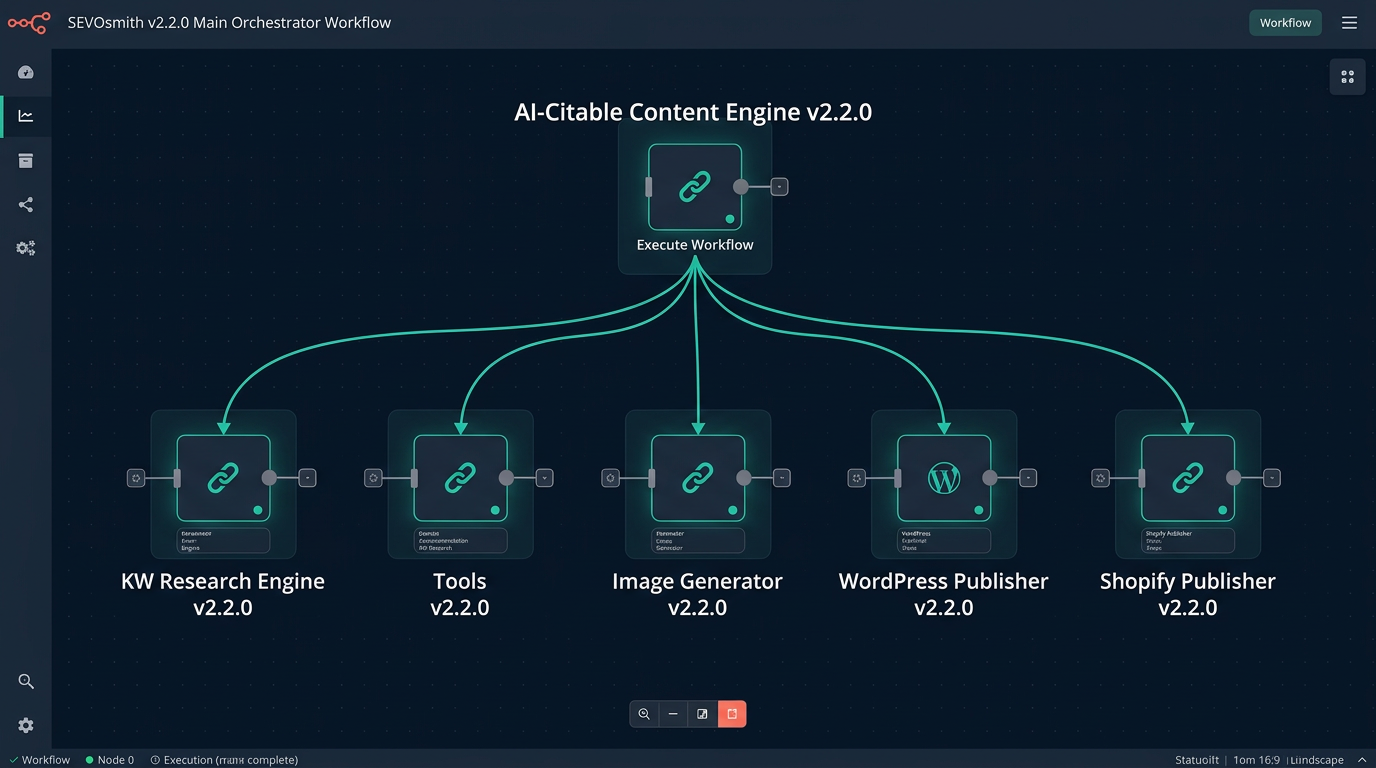
SEVOsmith v2.2.0 ships as 6 workflow files. The main orchestrator calls 5 independent sub-workflows — each with one job, each independently maintainable, each callable from any workflow you build on top.
YOUR GOOGLE SHEET  (Manager tab — one row per article)
         │  Run Now = TRUE  or  Scheduled DateTime
         ▼
AI-Citable Content Engine v2.2.0  (194 nodes · 12 agents)
    │
    ├──▶  KW Research Engine v2.2.0   (126 nodes · 10 <a href="https://nextgrowth.ai/dataforseo-review/">DataForSEO</a> endpoints)
    │         └── all results cached in Cloudflare R2 per keyword
    │
    ├──▶  Tools v2.2.0               (33 nodes · ~33 calls per run)
    │         └── cache check / store / run logging for every agent stage
    │
    ├──▶  Image Generator v2.2.0     (29 nodes · Gemini Imagen API)
    │         └── fails safely — article still publishes if this fails
    │
    ├──▶  WordPress Publisher v2.2.0  (34 nodes)
    │         └── DataTable auth · images · RankMath meta injection
    │
    └──▶  Shopify Publisher v2.2.0   (28 nodes)
              └── DataTable auth · Shopify-compatible HTML post-processing
    │
    ▼
Published Draft + Research Report + Audit Trail + Completion Email| Workflow | Role | Nodes |
|---|---|---|
| SEVOsmith AI-Citable Content Engine v2.2.0 | Main orchestrator — 12 agents, audit loop, flow control | 194 |
| SEVOsmith Tools v2.2.0 | Cache check, store, run logging | 33 |
| SEVOsmith KW Research Engine v2.2.0 | 10-endpoint keyword intelligence | 126 |
| SEVOsmith Image Generator v2.2.0 | Gemini Imagen generation + upload | 29 |
| SEVOsmith WordPress Publisher v2.2.0 | Post creation, image upload, RankMath meta | 34 |
| SEVOsmith Shopify Publisher v2.2.0 | Shopify blog publish, HTML post-processing | 28 |
Technology Stack
Seven external services, coordinated by n8n. Each is swappable independently — switch LLM providers, data sources, or storage without touching workflow logic.
| Layer | Technology |
|---|---|
| Orchestration | n8n (self-hosted or Cloud) |
| LLM — Research & strategy agents | Gemini Pro / Flash |
| LLM — Writing, outline, revision | Claude Sonnet via OpenRouter |
| LLM — Competitor research | Perplexity sonar-pro |
| Keyword & SERP data | DataForSEO (10 endpoints) |
| Web scraping & sitemaps | Firecrawl |
| Image generation | Gemini Imagen 2 |
| File storage & caching | Cloudflare R2 (S3-compatible) |
| Publishing | WordPress REST API / Shopify Admin API |
| SEO metadata injection | RankMath REST API |
| Credentials & config | Google Sheets + n8n DataTables |
What Does Each SEVOsmith AI Agent for Content Creation Do?
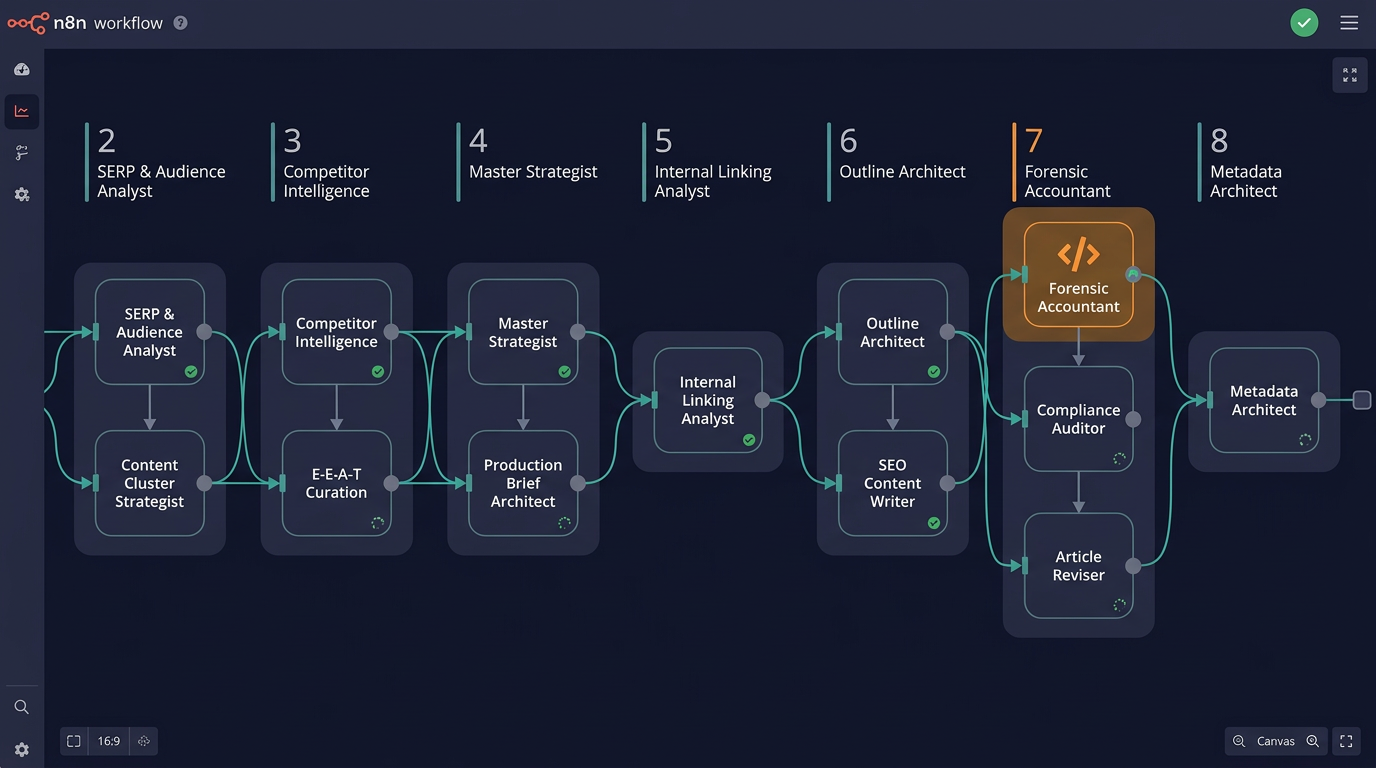
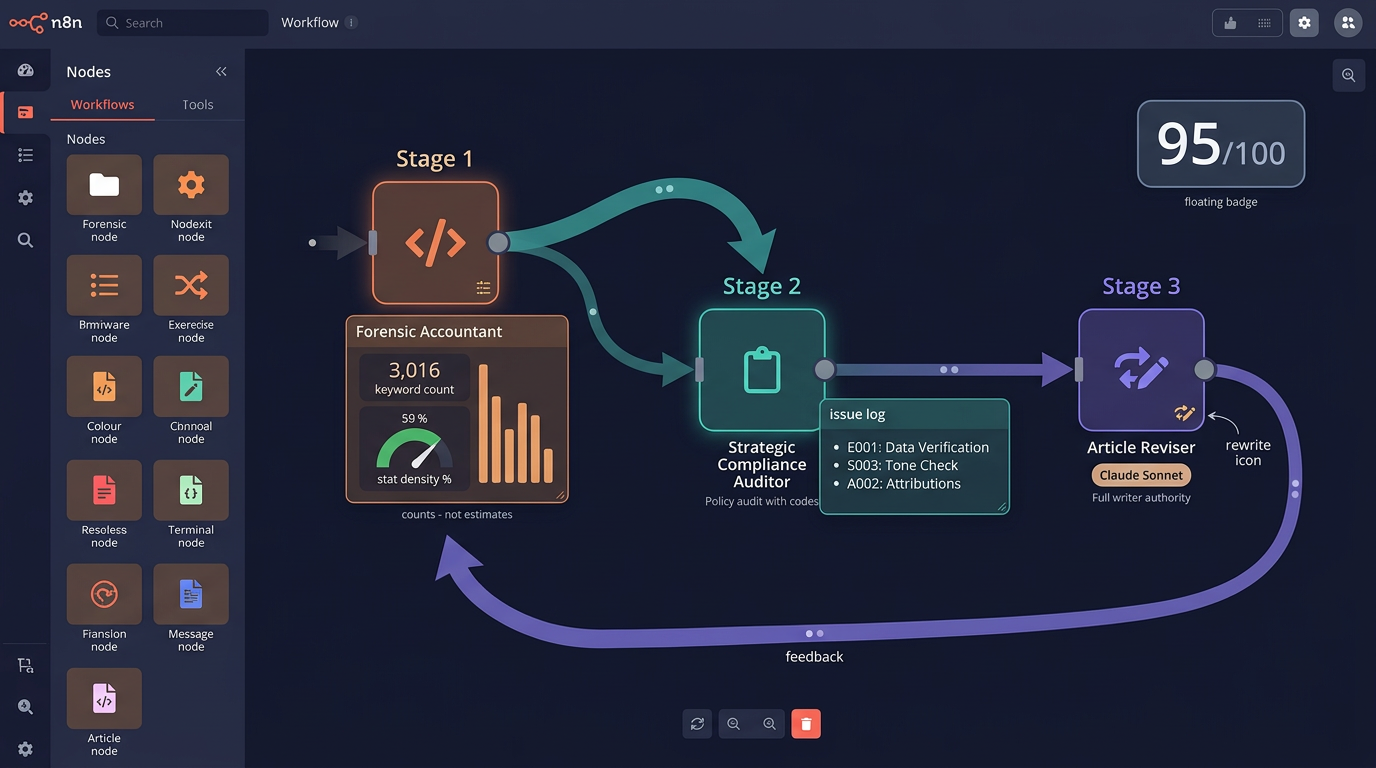
12 agents. Each specialized. Each with a distinct system prompt, a defined input format, and a verifiable output contract. The Forensic Accountant is not an LLM — it’s deterministic code that counts, measures, and validates. Quality scores you can reproduce.
| Agent | Job | LLM Model |
|---|---|---|
| SERP & Audience Analyst | Search intent classification, SERP feature mapping, audience profiling | Gemini |
| Content Cluster Strategist | Topic clusters, multimedia strategy, keyword allocation per section | Gemini |
| Competitor Intelligence Analyst | Gap probes via Perplexity, battle plan, negative space analysis | Perplexity sonar-pro |
| Elite E-E-A-T Curation Agent | Citation sourcing, authority tier ranking, CRAAP test scoring | Gemini |
| Internal Linking Analyst | Sitemap scan via Firecrawl, link map to existing pages and anchor opportunities | Gemini + Firecrawl |
| Master Content & SEvO Strategist | Content blueprint, UVP angle, SEvO strategy, brand proximity plan | Gemini |
| Production Brief Architect | Packages all intelligence into a final brief for Writer and Outline Architect | Gemini |
| Outline Architect | Article structure, word count per section, format-specific rules, visual asset markers | Claude Sonnet (OpenRouter) |
| SEO Content Writer | Full article draft, GEO optimization, anti-AI variation, stat+consequence pairings | Claude Sonnet (OpenRouter) |
| Forensic Accountant | Deterministic audit: exact keyword counts, URL validation, paragraph metrics, stat density | Code node (not LLM) |
| Strategic Compliance Auditor | Policy audit, issue detection with codes, fix list generation for Reviser | Claude Sonnet (OpenRouter) |
| Article Reviser | Applies auditor fix list — rewrites flagged sections from scratch using production brief | Claude Sonnet (OpenRouter) |
| Metadata Architect | SEO title, meta description, slug, schema recommendations | Gemini |
Why a code node for the audit? LLMs cannot count reliably. Ask one how many times a keyword appears in a 4,000-word article and it estimates. The Forensic Accountant counts — exactly. Keyword density, stat density, paragraph length distribution, anchor text length — measured deterministically. That’s why the quality score is reproducible, not approximate.
The Article Reviser has full writer authority. It receives the original production brief and rewrites entire flagged sections from scratch when the Compliance Auditor flags structural issues. This is not a copy editor making surface-level tweaks. If a section fails stat density or uses a prohibited opener pattern, the Reviser generates new content.
What Content Quality & SEO Capabilities Are Built Into Every Agent?
Most AI content tools are a black box. SEVOsmith’s agents have documented, verifiable SEO logic in every system prompt — enforcement rules with audit codes, not suggestions.
9 Content Formats with Format-Specific Intelligence
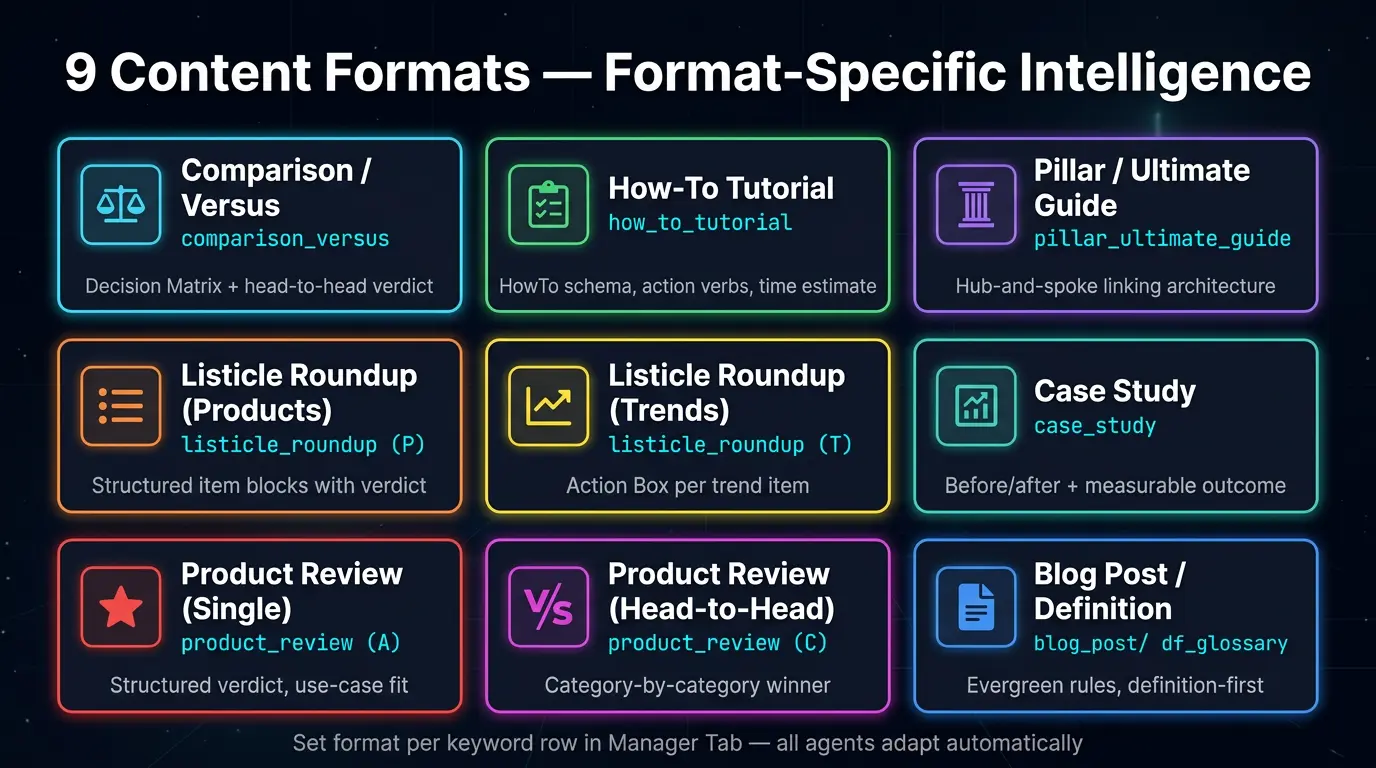
Set the content format in the Manager tab per keyword row. All agents — outline, writing, audit, revision — adapt automatically. Each format has its own structural rules, word count ranges, required elements, and prohibited patterns.
| Format | Machine ID | Key structural requirement |
|---|---|---|
| Comparison / Versus | comparison_versus |
Decision Matrix, head-to-head verdict section |
| How-To Tutorial | how_to_tutorial |
HowTo schema fields — action verbs, time estimate, tools/materials list |
| Pillar / Ultimate Guide | pillar_ultimate_guide |
Topic cluster coverage, hub-and-spoke linking architecture |
| Listicle Roundup (Products) | listicle_roundup (P) |
Structured item blocks with verdict per item |
| Listicle Roundup (Trends) | listicle_roundup (T) |
Action Box per trend — what it means, what to do |
| Case Study | case_study |
Before/after structure, measurable outcome statement |
| Product Review (Single) | product_review (A) |
Structured verdict, use-case fit sections |
| Product Review (Head-to-Head) | product_review (C) |
Category-by-category comparison, winner declaration per category |
| Blog Post | blog_post |
Evergreen rules — year references prohibited by audit |
| Definition / Glossary | definition_glossary |
Entity clarity, definition-first structure |
| News / Trend Analysis | news_trend_analysis |
Freshness signals allowed, recency language required |
E-E-A-T Universal Mandate
Post-December 2025 Core Update: E-E-A-T applies to all competitive content, not just YMYL. SEVOsmith enforces this unconditionally across every content format:
- Minimum 3 external citations for all competitive content
- Per-format Experience Signal Minimums — each format has documented, audited requirements
- Elite E-E-A-T Curation Agent: three-tier citation system, CRAAP test criteria, domain extension prioritization
Anti-AI Detection — Structural Variation Directive
Both the Content Writer and Compliance Auditor enforce these rules independently — a failed check at writing gets caught again at audit:
- Varied list lengths across sections — no uniform bullet counts throughout
- Mixed paragraph lengths — no consistent 3-sentence paragraph pattern
- Varied opener styles — sections cannot start the same way consecutively
- Rhetorical variety — questions, statements, imperatives mixed across sections
Technical SEO Built Into the Audit
The Strategic Compliance Auditor checks these on every article, every run:
- Anchor text length: 2–8 words (single-word brand names excepted)
- Stat density: minimum 1 sourced statistic per 100–150 words
- Mobile heading length: H2 under 50 characters, H3 under 40 characters
- PAA (People Also Ask) distribution across body sections, not concentrated only in FAQ
- Search intent cross-check: article structure must match detected intent classification
- Format-conditional freshness policy: “we update this annually” language is a violation in evergreen formats
- Helpful Content Self-Assessment: 4-item checklist on every run
How Does the AI Citation & GEO Layer Work?
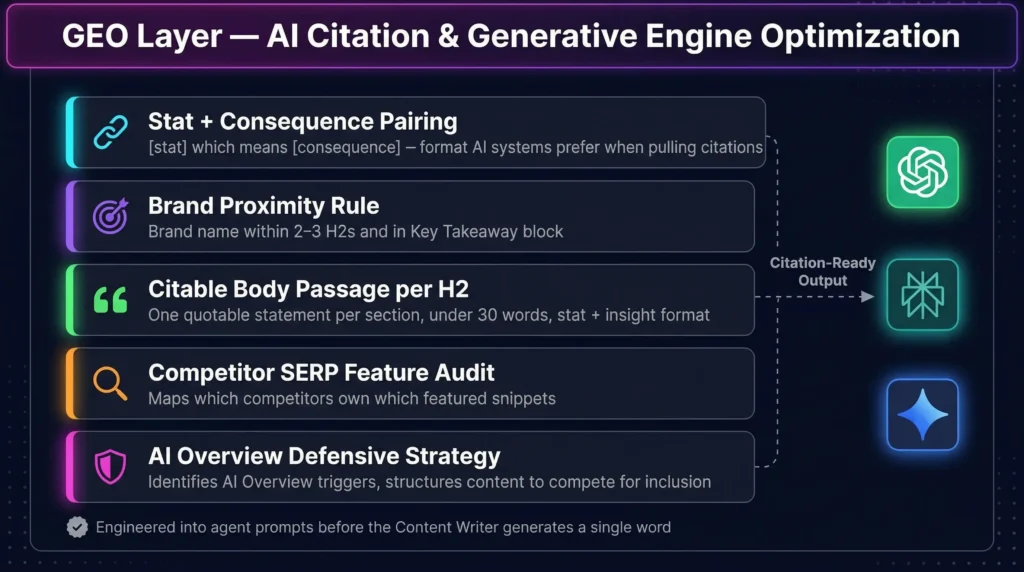
GEO — Generative Engine Optimization — is a distinct layer, not a footnote to traditional SEO. The Master Content & SEvO Strategist’s entire job is structuring content to be cited by AI systems. This is designed into the article before the Content Writer generates a single word.
What’s built into agent prompts specifically for AI citation readiness:
- Stat + consequence pairings: every claim structured as “[stat] which means [consequence]” — the format AI systems prefer when pulling citations into generated answers
- Brand proximity rule: brand name mentioned within 2–3 H2s and in the Key Takeaway block — ensures the brand is cited alongside the insight, not just buried in the intro
- Citable body passage per H2: one quotable statement per section, under 30 words, stat + insight format — extraction-ready for AI answer generation
- Competitor SERP Feature Audit: maps which competitors own which featured snippets for the target keyword
- AI Overview Defensive Strategy: identifies AI Overview triggers and structures content to compete for inclusion or defend against displacement
The Intelligence Layer — KW Research Engine v2.2.0
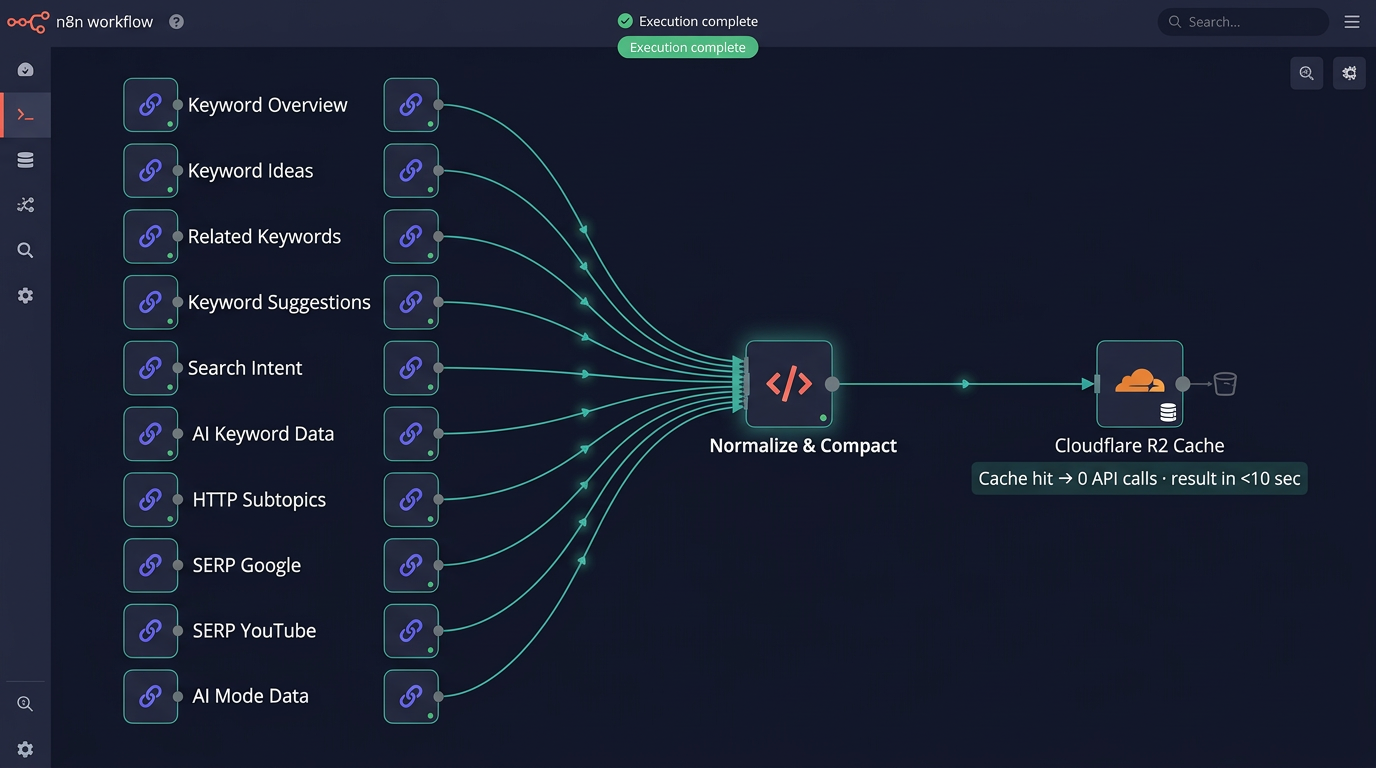
Every article starts here. The KW Research Engine is called once per run. It hits 10 DataForSEO endpoints, normalizes everything into a single keyword_research_orchestrator JSON object, and caches the result in Cloudflare R2. Every downstream agent reads from this object — no agent calls DataForSEO directly.
- Keyword Overview — volume, difficulty, CPC baseline
- Keyword Ideas — semantic expansion of the primary term
- Related Keywords — SERP co-occurrence signals
- Keyword Suggestions — intent-adjacent terms
- Search Intent — informational / commercial / transactional classification
- AI Keyword Data — AI Overview presence signals for this term
- HTTP Subtopics — topic cluster map for the keyword
- SERP Google — live Page 1 results, featured snippets, full SERP feature inventory
- SERP YouTube — video competition signals (informs whether to add video embeds)
- AI Mode Data — Google AI Mode presence signals
The Cloudflare R2 Cache Layer
Every DataForSEO result is cached per keyword. Same keyword on second run: all 10 API calls skipped — cached results returned in seconds. Running 50 articles on the same topic cluster doesn’t mean paying for 50 identical keyword research calls. The first run pays. Every subsequent run on cached keywords costs near zero for that stage. For setup instructions, see the Cloudflare R2 + n8n integration guide.
- Cache key: keyword + config hash
- TTL: configurable per project in Cache_Settings tab (default 30 days)
KW_Force_Refreshflag: override per Manager tab row when you need live SERP data
The Infrastructure Layer — Tools Sub-Workflow v2.2.0
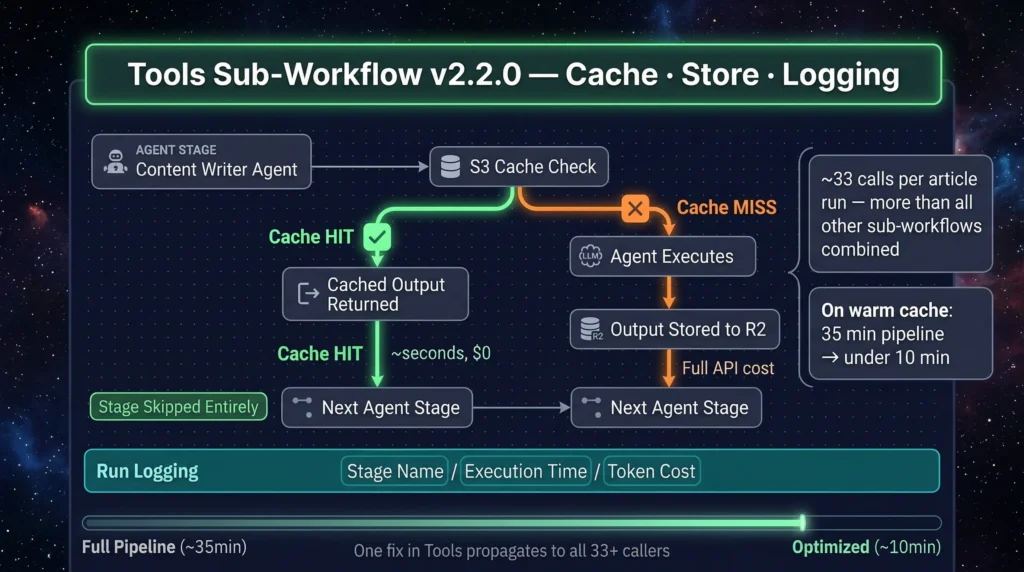
The sub-workflow that runs more than anything else. ~33 calls per article run — more than all other sub-workflows combined. Three operations: cache check (S3 read), parse and store (S3 write), run logging.
It exists as a dedicated sub-workflow rather than inline code for one reason: one fix propagates to all 33+ callers. One log format. One cache TTL logic. One place to change behavior for the entire pipeline. A cache hit on any agent stage means that agent is skipped entirely — its cached output returned and passed forward. On a warm cache, a first-run 35-minute pipeline completes in under 10 minutes.
Error recovery: If an agent fails mid-run, the Tools sub-workflow logs the failure state. On retry, every successfully completed stage is skipped — the run resumes from the last failure point. You don’t re-pay for agents that already ran.
How Does Multi-Site Publishing Work for WordPress and Shopify?
SEVOsmith ends with a published CMS draft — images attached, metadata injected, correct slug set. Two dedicated publisher sub-workflows, each targeting one CMS. Both use n8n DataTables so credential management scales without workflow copies.
In practice: we run SEVOsmith across three client sites from one n8n instance. Adding a fourth took 90 seconds — one new row in WordPress_Credentials, one new project row in Project_Setting. No workflow edits, no credential re-wiring, no duplicated workflows.
Multi-Site Management via DataTables
n8n DataTables are built-in database tables inside your n8n instance. Each site is one row. No credential per workflow copy, no duplicate workflows per client.
WordPress_Credentials table: project_name, wp_api_url, wp_username, wp_app_password, wp_author_id. Add a new WordPress site: add one row. Zero workflow edits. The publisher looks up credentials at runtime from the project_name in the Manager tab row that triggered the run.
n8n DataTable: WordPress_Credentials
| project_name | wp_api_url | wp_username | wp_app_password | wp_author_id |
|---|---|---|---|---|
| Nextgrowth | https://nextgrowth.ai/wp-json/wp/v2 | sevo_claude | xxxx xxxx xxxx xxxx xxxx xxxx | 1 |
| ClientA | https://clienta.com/wp-json/wp/v2 | sevo_claude | xxxx xxxx xxxx xxxx xxxx xxxx | 3 |
| ClientB | https://clientb.io/wp-json/wp/v2 | sevo_claude | xxxx xxxx xxxx xxxx xxxx xxxx | 1 |
→ Three WordPress sites. One workflow. Add a fourth: one new row, zero workflow edits.
Same pattern for Shopify: Shopify_Shop_Credentials — store_name, my_shopify_unique_domain_name, my_shopify_admin_token, my_shopify_unique_api, author_name. Ten Shopify stores = ten rows, one workflow.
n8n DataTable: Shopify_Shop_Credentials
| store_name | my_shopify_unique_domain_name | my_shopify_admin_token | my_shopify_unique_api | author_name |
|---|---|---|---|---|
| MyStore | my-store.myshopify.com | shpat_xxxxxxxxxxxxxxxxxxxx | https://my-store.myshopify.com/admin/api/2024-01/graphql.json | Minh Nguyen |
| ClientC | clientc-brand.myshopify.com | shpat_xxxxxxxxxxxxxxxxxxxx | https://clientc-brand.myshopify.com/admin/api/2024-01/graphql.json | Jane Smith |
→ Two Shopify stores. One workflow. my_shopify_unique_api is your store’s GraphQL Admin API endpoint.
WordPress Publisher v2.2.0
- Creates post as draft via WordPress REST API
- Uploads featured and section images to WordPress media library (or embeds R2 URLs directly)
- Injects SEO title and meta description via RankMath REST API post-creation
- Sets correct slug from Metadata Architect output
Shopify Publisher v2.2.0
- Publishes to Shopify blog via Admin API (draft status)
- Gemini post-processing converts the article HTML to Shopify-compatible format before publishing
- Same DataTable auth pattern — credentials looked up at runtime from
Shopify_Shop_Credentials
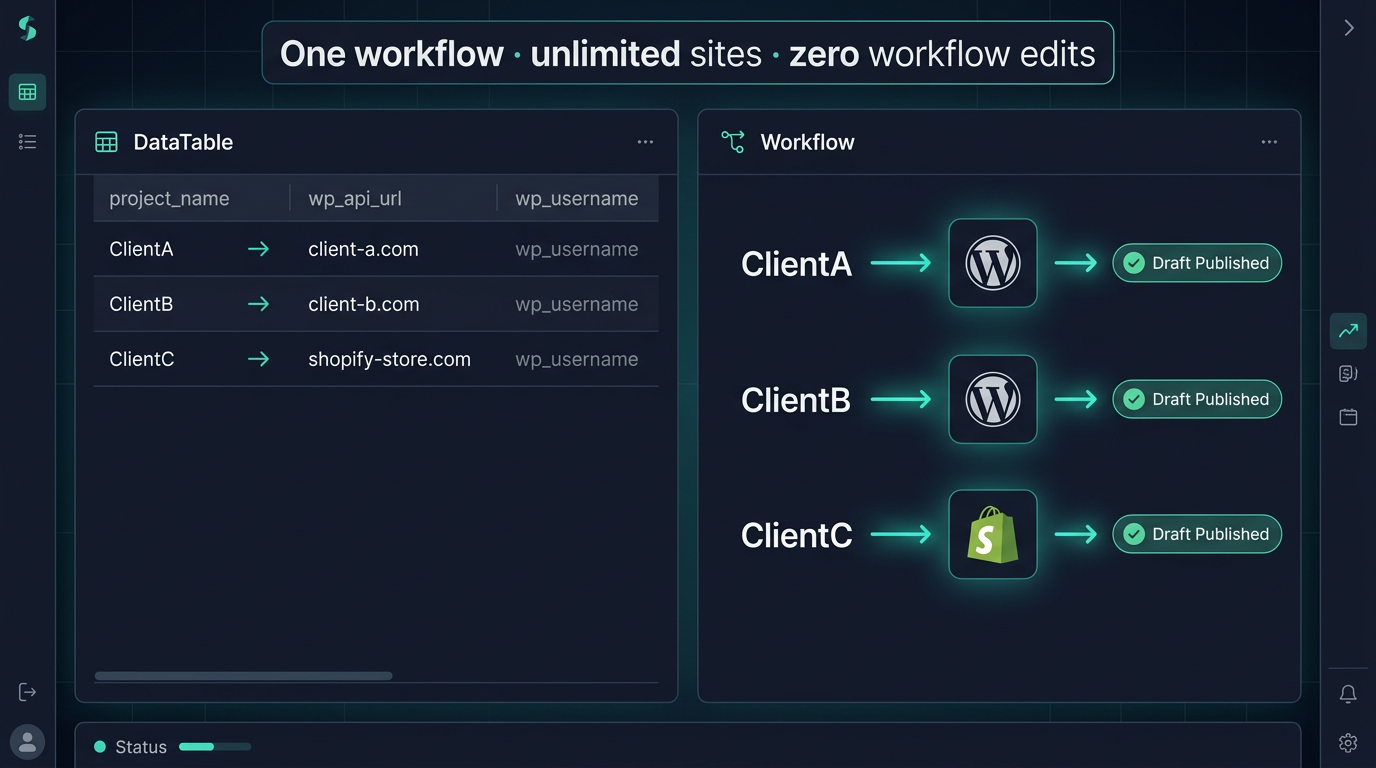
Configuration note: The project_name value in both DataTables must exactly match the Project column in your Manager tab — case-sensitive. One character difference means the publisher cannot find credentials. The Setup Wizard validates this during initial configuration.
The Image Generator v2.2.0
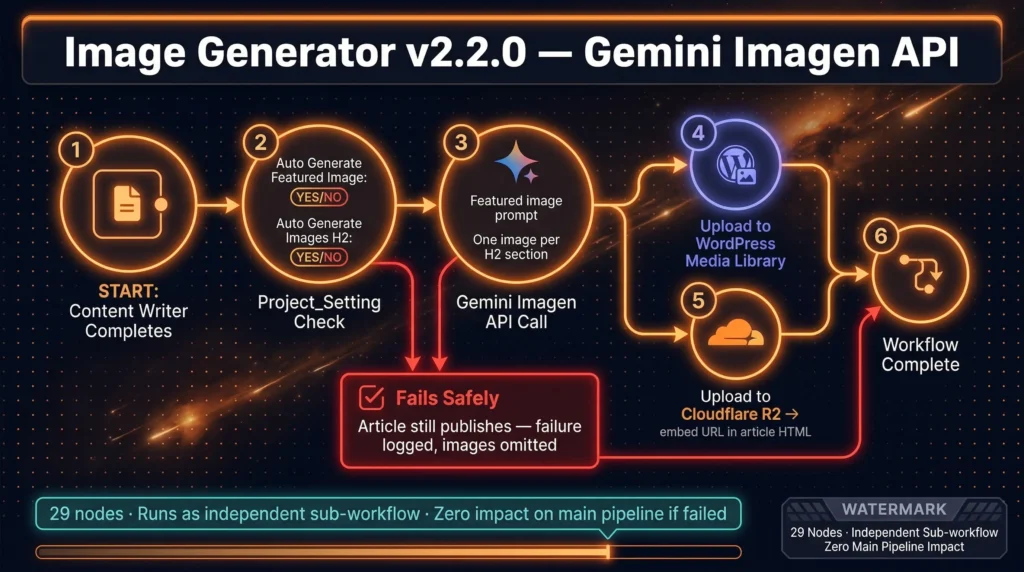
Controlled entirely from Project_Setting — two Yes/No flags: Auto Generate Featured Images and Auto Generate Images H2 (one image per H2 section). Zero workflow edits to enable or disable.
Calls the Gemini Imagen API after the Content Writer completes. Two storage modes: upload to WordPress media library, or upload to Cloudflare R2 and embed the URL in the article HTML. Because Image Generator runs as a separate sub-workflow, an API failure there does not stop the article from publishing — the publisher continues with images omitted and the failure is logged.
The Google Sheet as Command Center
The Google Sheet isn’t just a trigger — it’s the operating system. Multi-project management, content refresh, scheduling, and per-stage cache control all live here. Nothing requires workflow edits for normal operations.
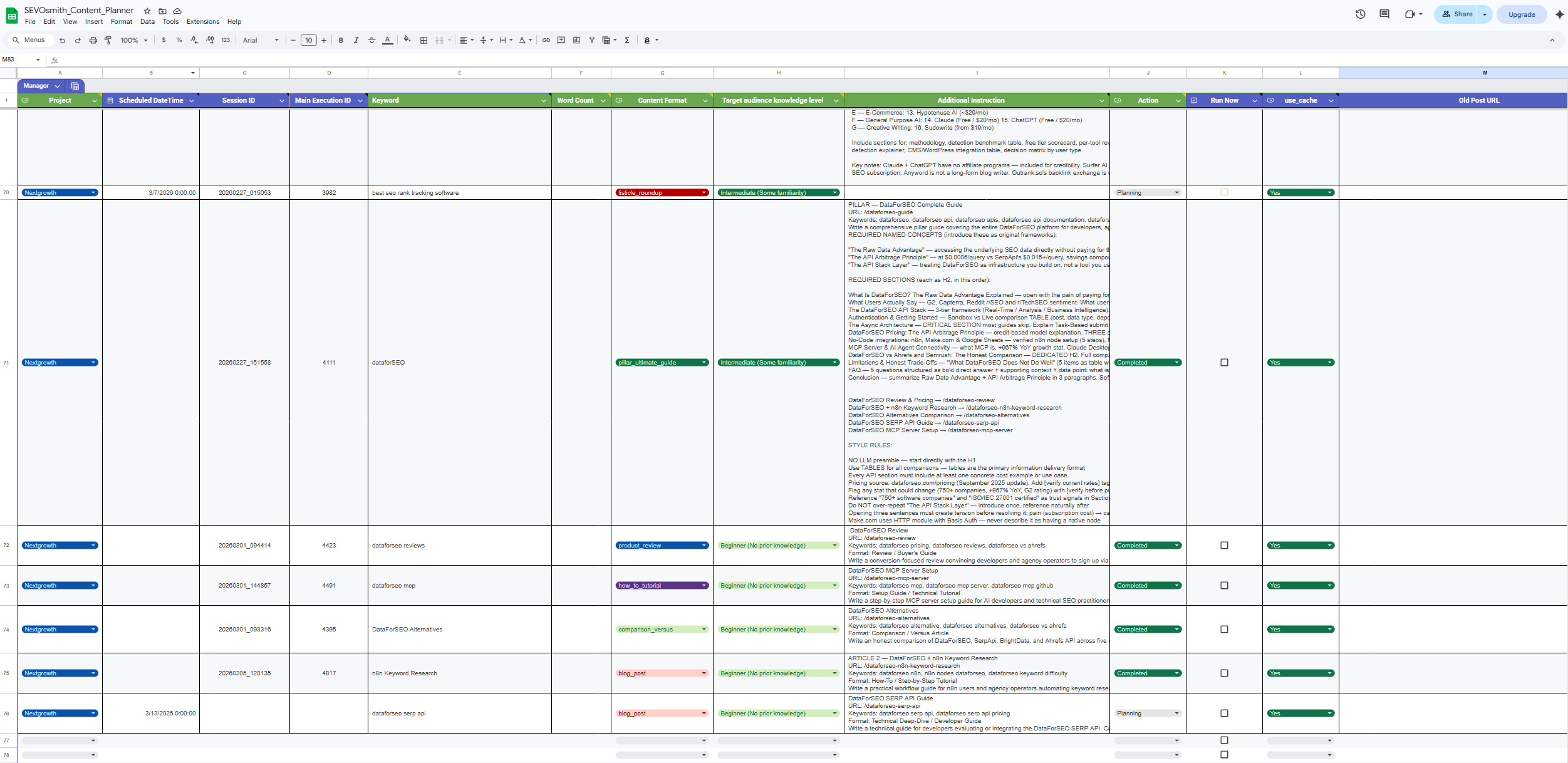
Manager Tab — The Article Queue
One row = one article run. Key columns: Project, Keyword, Word Count, Content Format, Target Audience Knowledge Level, Additional Instruction, Run Now, use_cache, Old Post URL, Scheduled DateTime.
Run Now = TRUEtriggers immediately;Scheduled DateTimetriggers at an exact timeuse_cache = FALSEon any row forces a full fresh run for that article, ignoring all cached agent outputsOld Post URL— paste a URL to an existing article and the Content Writer switches to refresh mode: it reads the existing article and rewrites or extends it rather than generating from scratch. Same audit and publishing pipeline runs on the result.
Project_Setting Tab — Per-Project Configuration
Each unique Project value = one project. Add a row: project name, target domain, S3 bucket, CMS Platform (WordPress or Shopify), language, image generation flags, notification email. That project is live on the next trigger. No workflow edits.
Cache_Settings Tab — Per-Stage TTL Overrides
Set any agent stage TTL to 0 to force re-run on next trigger. Right way to iterate on agent prompts: set the target stage to TTL 0, trigger a run, review the output, restore the TTL. All other stages run from cache — you pay only for the stage you’re testing.
The n8n Content Creation Automation Workflow — From Keyword to Draft
The complete content creation workflow runs 14 steps across 8 execution zones — from a Google Sheet trigger to a published CMS draft with images and metadata. Every stage is logged. Every agent output is cached. Every failure retries only the stage that failed.
Add keyword row → set
Run Now = TRUE or Scheduled DateTimeMain orchestrator reads the row and builds the session config object
10 DataForSEO endpoints — or S3 cache check first:
Zone 1 — search intent, audience profile, content angle
Zone 2 — negative space analysis, competitor weaknesses, winning angle
Zone 3 — vetted external sources, internal link map from your sitemap
Zone 4 — content blueprint, format selection, multi-platform asset briefs
Zones 5–6 — structured brief → full article draft. Each agent output cached by Tools sub-workflow.
Code node — deterministic: exact keyword counts, URL validation, stat density, threshold checks on all metrics
LLM audit — generates issue log with codes and fix instructions for every violation
Full writer authority — rewrites flagged sections from scratch where structural issues are found
Generates SEO title, meta description, slug
Featured image + H2 section images → uploaded to WordPress media library or Cloudflare R2
Draft created → metadata injected → correct slug set
Completion email sent with draft link, quality score, word count, execution time, and all report links
See It in Action — Real Runs, Real Output
Below are real runs. A keyword goes in; a published article comes out. The screenshots show the KW research report, the compliance audit log, and the completion email — with quality score, word count, and execution time. Each linked article was written entirely by SEVOsmith v2.2.0, from brief to published draft.
| Keyword input | Format type | Output | Live published post |
| best ai content writer tools | listicle_roundup | Research & Analysis Article & Audit Report Final Article Draft | https://nextgrowth.ai/best-ai-content-writer-tools/ |
| dataforseo reviews | product_review | Research & Analysis Article & Audit Report Final Article Draft | https://nextgrowth.ai/dataforseo-review/ |
Already Using v1.5.0? Here’s What Changed
SEVOsmith v2.2.0 is a full architecture rebuild — not an update to import over your existing setup. Here’s what drove the rebuild and what the new version ships.
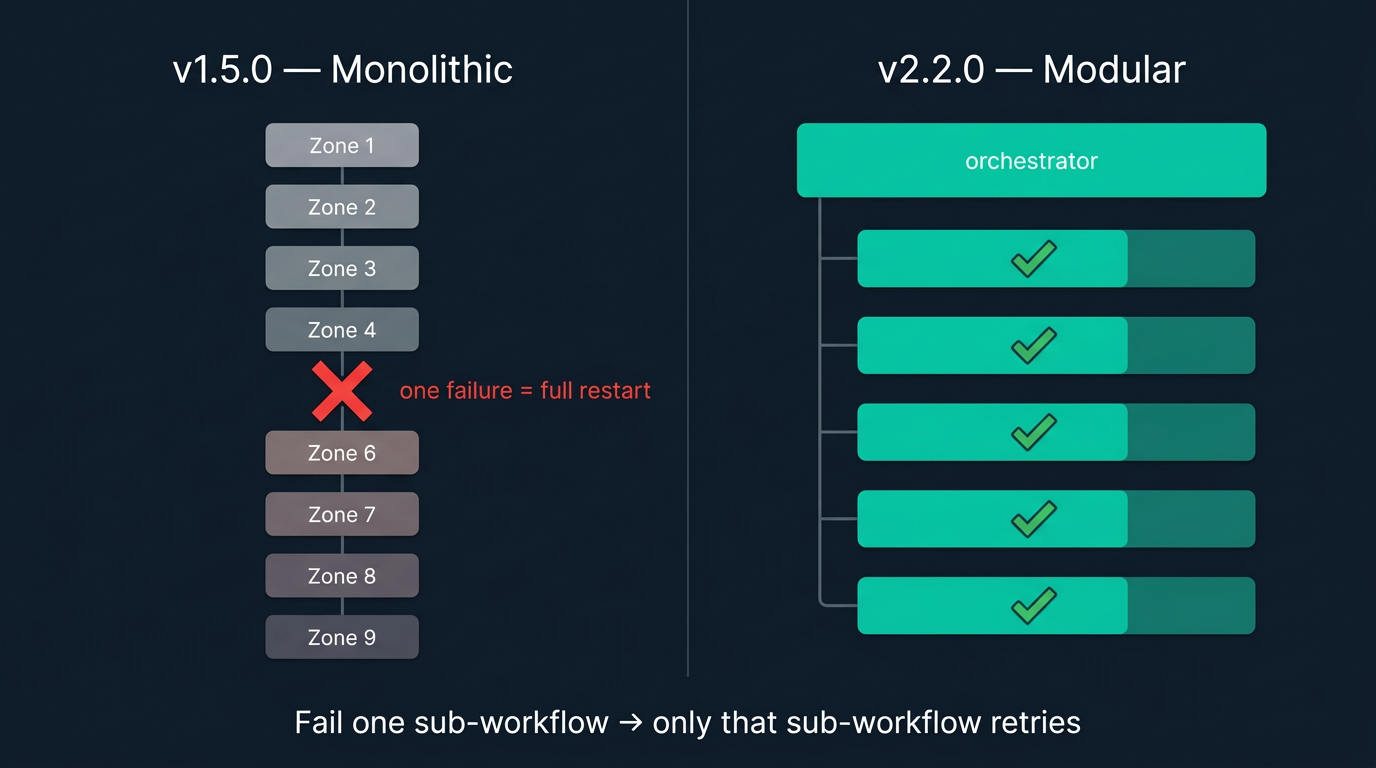
Three problems surfaced consistently in v1.5.0 user feedback. First: when any zone failed inside the monolithic workflow, the entire run was lost — restart meant paying for every API call from the beginning. Second: the single-workflow design made safe customization nearly impossible — editing one section risked breaking something three zones downstream. Third: every run called all 10 DataForSEO endpoints regardless of whether the keyword had been researched days ago.
v2.2.0 was designed around all three. Every major change maps to a user report:
| User Problem (SEVOsmith v1.5.0) | SEVOsmith v2.2.0 Solution |
|---|---|
| Zone crash = full run lost, restart from zero | 5 independent sub-workflows — fail one, only that sub-workflow retries |
| Single workflow too risky to customize | Each sub-workflow has one job, independently editable without downstream risk |
| Same DataForSEO cost on every run, even for repeat keywords | Cloudflare R2 cache — second run on same keyword: 0 API calls, result in seconds |
| Multi-site agencies — one workflow copy per client was unsustainable | n8n DataTables — one row per client site, zero workflow edits |
| Shopify clients had no supported path | Shopify Publisher v2.2.0 — dedicated sub-workflow via Shopify Admin API |
| No way to refresh existing articles | Old Post URL column — Content Writer reads and rewrites existing article |
| Image generation failure stopped the whole run | Image Generator is a separate sub-workflow — fails safely, article still publishes |
| Multi-language content operations | target_language parameter in Project_Setting — every agent outputs in that language |
By the Numbers
Full specification comparison between the two versions.
| SEVOsmith v1.5.0 | SEVOsmith v2.2.0 | |
|---|---|---|
| Workflows | 3 | 6 |
| Total nodes | 326 | 467 |
| AI agents | 10+ | 12 + Forensic Accountant (code node) |
| Architecture | Single monolithic workflow | 5 independent sub-workflows |
| Execution time | 18–25 min | 31–43 min (more stages, more thorough audit) |
| CMS support | WordPress only | WordPress + Shopify |
| Multi-site | One workflow copy per client | DataTable rows — unlimited sites, one workflow |
| Caching | None | Cloudflare R2 — keywords + all agent stages |
| Content refresh | Not supported | Old Post URL column — rewrite mode |
| Content formats | Generic article | 9 structured formats with format-specific audit rules |
See the complete v1.5.0 system breakdown for a detailed look at what the original architecture included.
Already on v1.5.0? You get 50% off the upgrade.
Contact us with your original Gumroad purchase email and we’ll send you the 50% upgrade code.
Upgrade time: ~90 minutes — your API accounts are already set up. You’re importing new workflow files and reconfiguring credentials, not starting from scratch.
Upgrade to v2.2.0 — 50% Off →Frequently Asked Questions
What exactly is SEVOsmith — is it a SaaS tool or something I own?
SEVOsmith is a deployable n8n automation — a set of workflow files you import into your own n8n instance (self-hosted or n8n Cloud). You own it. You configure it. It runs on your infrastructure with your API credentials. There are no usage fees, no per-article charges, and no vendor dependency beyond the underlying APIs (DataForSEO, Gemini, OpenRouter, Cloudflare R2). One-time purchase. Perpetual license.
Do I need coding experience to use SEVOsmith?
You need basic n8n familiarity — enough to import workflow files, connect credentials, and configure nodes. The written setup guide walks through all 9 API credentials in sequence. If you’ve used n8n for other automations, setup is straightforward. If you’d rather skip the configuration entirely, the Done For You option (below) handles every step and hands you a running system.
How many API credentials do I need to set up?
Nine: n8n (self-hosted or Cloud), Google Sheets (OAuth), Google Drive (OAuth), DataForSEO, Firecrawl, Gemini (Google AI Studio), OpenRouter (for Claude Sonnet), Cloudflare R2, and your CMS (WordPress Application Password or Shopify access token). The written setup guide walks through all nine in sequence. See the complete setup guide before purchasing to verify you have access to all required services.
Can I run multiple client sites from one SEVOsmith instance?
Yes. Each row in Project_Setting is one project. Each row in WordPress_Credentials or Shopify_Shop_Credentials is one site. Add a project name, domain, CMS platform, and language — that project is live on the next trigger. The Manager tab routes each article run to the correct credentials and Project_Setting row automatically. No workflow edits per site.
Do I pay for keyword research on every article run?
Not on repeat runs. Every DataForSEO call and every agent output is cached in Cloudflare R2. Second run on the same keyword: all 10 research API calls are skipped — cached results returned in seconds. A full cache hit turns a 35-minute run into under 10 minutes at near-zero API cost. The KW_Force_Refresh flag overrides this per row when you need live SERP data.
What if I already have a published article I want to update?
Paste the URL into the Old Post URL column in the Manager tab. The Content Writer switches to refresh mode — it reads the existing article and rewrites or extends it rather than generating from scratch. The same Forensic Accountant audit, Compliance Auditor review, Reviser pass, and publishing pipeline runs on the result.
Does SEVOsmith support languages other than English?
Yes. Set target_language in Project_Setting. Every agent — headlines, body copy, metadata, citations — outputs in that language. Active in production for English and Vietnamese. Any language supported by Gemini and Claude Sonnet via OpenRouter is available. Different projects can run in different languages from the same n8n instance.
Can I use this without WordPress or Shopify?
Yes. A standalone HTML article file is saved to Cloudflare R2 on every run, independently of the CMS publisher. Pull it from R2 and publish manually to any CMS or feed it into any other workflow. The article, research report, and audit trail are all accessible via R2 links in the completion email regardless of which publisher ran.
What does the quality score actually measure?
Five categories: Content Architecture (structure, heading hierarchy, section balance), SEO Compliance (keyword placement, anchor text, meta readiness), E-E-A-T & Citations (source tier, experience signals, citation density), GEO & AI Citability (stat+consequence pairings, quotable passages, brand proximity), and Anti-AI Detection (paragraph variation, list length diversity, opener style variety). The Forensic Accountant produces the raw metrics deterministically; the Compliance Auditor interprets policy compliance. Production runs score 95–96 / 100. The audit trail report documents every check, its result, and any fix applied — you can see exactly why the score is what it is.
How is v2.2.0 different from v1.5.0?
Three core architectural differences. v1.5.0 was one monolithic workflow — one failure meant restarting everything from the beginning. v2.2.0 has 5 independent sub-workflows; when one fails, only that sub-workflow retries. v1.5.0 had no caching — every run paid for all 10 DataForSEO endpoints and re-ran every agent. v2.2.0 caches at every stage in Cloudflare R2. v1.5.0 published only to WordPress and required a separate workflow copy per client site. v2.2.0 supports WordPress and Shopify with unlimited sites from one workflow via DataTable rows. Full comparison in the “Already Using v1.5.0?” section above.
Ready to set up SEVOsmith?
The complete setup guide covers all 9 API credentials, 6 workflow imports, Google Sheet configuration, and your first test run — start to finish in under 3 hours.
→ Read the Complete Setup GuideBuild Your Content Engine — Three Ways to Start
The full SEVOsmith v2.2.0 bundle includes: AI-Citable Content Engine v2.2.0, all 5 sub-workflows (KW Research Engine, Tools, Image Generator, WordPress Publisher, Shopify Publisher), and the SEVOsmith Content Planner Google Sheet template. One-time purchase. Perpetual license.
Don’t want to configure 467 nodes yourself? We set up the entire system on your n8n instance — all 9 API credentials, DataTables, Google Sheet, Apps Script trigger, and first test run — and hand it over ready to produce articles on day one. Flow license included — $279 all-in. No subscription, no ongoing cost. You focus on the keywords.
Your competitors are running monolithic prompts and calling it a content strategy. This is what the next tier looks like.