Update Rank Math via n8n: 2 Methods That Actually Work
WordPress’s REST API silently drops Rank Math meta fields unless you explicitly register them — here’s how to fix it in 15 minutes with native PHP or 5 minutes with a helper plugin. I discovered this while building a 326-node n8n seo automation workflow that publishes AI-generated content to WordPress. For more, see our guide on GEO and AI citation best practices. Everything worked — titles, content, featured images, categories — except Rank Math stayed completely empty. No errors. No warnings. Just blank SEO fields.
Last updated: March 2026. Tested with WordPress 6.7, Rank Math 1.0.235, and n8n 1.76.
- WordPress’s REST API ignores custom meta fields by default. Rank Math stores SEO data in
rank_math_title,rank_math_description, andrank_math_focus_keyword— but these are blocked unless registered withshow_in_rest => true. - Two fixes: a helper plugin (5-minute install, zero code) or native PHP in functions.php (15 minutes, no dependencies).
- Both methods work with n8n’s HTTP Request node, Make.com webhooks, Zapier, or any REST API client. According to WordPress REST API documentation, custom meta fields must be explicitly registered for API access — this is a security feature, not a bug.
Contents
- Why Does the n8n WordPress Integration Fail for Rank Math?
- Which Method Should You Use: Plugin or Native PHP?
- How Do You Set Up the Native PHP Method?
- How Do You Configure n8n to Send Rank Math Data?
- How Do You Verify the Integration Works?
- How Does the Plugin Method Work?
- What Else Can You Automate with Rank Math’s API?
- Frequently Asked Questions
- Your n8n Rank Math Integration Is Ready
Why Does the n8n WordPress Integration Fail for Rank Math?
WordPress’s REST API blocks all unregistered meta keys from write operations — and Rank Math doesn’t register its fields for API access by default. According to the WordPress REST API Handbook, custom post meta must be explicitly whitelisted with show_in_rest => true to be readable or writable through the API. This is a deliberate security measure that prevents unauthorized plugins or external tools from modifying arbitrary database fields.
Here’s what happens when your n8n workflow tries to set Rank Math fields:
- Your n8n HTTP Request node sends a POST to
/wp-json/wp/v2/posts/123withmeta.rank_math_titlein the payload - WordPress receives the request and authenticates your application password
- WordPress checks if
rank_math_titleis registered for REST API access - It’s not registered — so WordPress silently discards the field
- The post saves successfully (HTTP 200), but all Rank Math fields remain empty
The silent failure is what makes this so frustrating. You get a 200 response. The post title and content update correctly. There’s no error in your n8n execution log. You only discover the problem when you check the Rank Math panel in WordPress and find it empty.
I spent three hours debugging this the first time. I checked n8n’s output, verified the JSON payload, re-read the WordPress Posts endpoint documentation — everything looked correct. The issue isn’t with your workflow. It’s with how WordPress handles unregistered meta keys.
Which Method Should You Use: Plugin or Native PHP?
Both methods achieve the same result — Rank Math fields accessible via REST API — but they differ in setup time, dependencies, and flexibility. The Rank Math API Manager plugin handles registration automatically in 5 minutes. The native PHP approach takes 15 minutes but gives you full control with zero external dependencies.
Here’s my recommendation based on running both approaches across multiple WordPress sites:
- Use the plugin if you’re on managed hosting without file access, your team includes non-technical members, you need WooCommerce product support, or you want the fastest deployment
- Use native PHP if you prefer zero external dependencies, you need custom field configurations beyond the default three, you’re comfortable editing theme files, or you’re building a production automation pipeline where reliability matters most
For my own SEO automation workflows at NextGrowth.ai, I use the native PHP method. One fewer plugin dependency means one fewer thing that can break during WordPress or Rank Math updates. But I’ve set up the plugin for clients who don’t have a developer on staff — it works identically.
How Do You Set Up the Native PHP Method?
Add a single PHP snippet to your theme’s functions.php that registers three Rank Math meta keys for REST API access with three built-in security layers. This tells WordPress: “Allow authenticated API requests to read and update these specific fields, but block public access and sanitize all input.”
Step 1: Add the PHP Code to functions.php
- Log into your WordPress Dashboard
- Navigate to Appearance → Theme File Editor
- Select Theme Functions (functions.php) from the right sidebar
- Scroll to the bottom of the file
- Paste the code below
- Click “Update File”
Troubleshooting: If you don’t see the Theme File Editor, your hosting provider may have disabled it for security (common on WP Engine, Kinsta, and Flywheel). Use SFTP or your host’s file manager instead. If you’re using a child theme — and you should be — add the code to the child theme’s functions.php so it survives parent theme updates.
/**
 * Expose Rank Math SEO fields to REST API for n8n automation.
 * Security: Only allows updates from authenticated users.
 */
add_action( 'rest_api_init', function () {
    // List of Rank Math keys to expose
    $keys = [
        'rank_math_title',
        'rank_math_description',
        'rank_math_focus_keyword'
    ];

    foreach ( $keys as $key ) {
        register_meta( 'post', $key, [
            // 1. Allow n8n to UPDATE the field
            'show_in_rest' => [
                'schema' => [
                    'type'  => 'string',
                    'context' => ['edit'], // CRITICAL: Only visible in 'edit' context (authenticated)
                ],
            ],
            'single'       => true,
            'type'         => 'string',

            // 2. Security Gate: Only allow users with edit permissions to update
            'auth_callback'=> function() {
                return current_user_can( 'edit_posts' );
            },

            // 3. Sanitization: Prevent script injection/XSS attacks
            'sanitize_callback' => 'sanitize_text_field'
        ]);
    }
});What Are the Three Security Layers?
This snippet isn’t just about exposing fields. It includes three security measures that protect your SEO data from unauthorized access:
1. context => ['edit'] — Hides fields from public API responses. Your focus keywords, SEO titles, and meta descriptions are invisible to unauthenticated requests. Competitors can’t scrape your keyword strategy by hitting /wp-json/wp/v2/posts/ publicly. Only authenticated requests with valid WordPress application passwords can see or modify these fields.
2. auth_callback — Requires edit_posts capability. Even if someone obtains your API endpoint URL, they can’t write to these fields without proper WordPress user permissions. This prevents privilege escalation through the API.
3. sanitize_callback — Strips malicious input before saving. The sanitize_text_field function removes HTML tags, script injections, and invalid characters. If your AI content generator accidentally produces <script>alert('xss')</script> in a meta description, WordPress cleans it before it hits the database.
How Do You Configure n8n to Send Rank Math Data?
Use n8n’s HTTP Request node (not the standard WordPress node) to send Rank Math meta fields as part of the post update payload. The built-in WordPress node only supports core fields — it can’t send custom meta. The HTTP Request node gives you full control over the JSON payload, which is what you need for Rank Math integration.
HTTP Request Node Settings
Method: POST (new post) or PUT (update existing)
URL: https://yoursite.com/wp-json/wp/v2/posts
Authentication: Basic Auth (use Application Password)
Content-Type: application/jsonJSON Body Payload
{
  "title": "{{ $json.post_title }}",
  "content": "{{ $json.post_content }}",
  "status": "draft",
  "meta": {
    "rank_math_title": "{{ $json.seo_title }}",
    "rank_math_description": "{{ $json.meta_description }}",
    "rank_math_focus_keyword": "{{ $json.focus_keyword }}"
  }
}Critical detail: The meta field names (rank_math_title, rank_math_description, rank_math_focus_keyword) must match exactly what you registered in the PHP snippet. No underscore prefix. Case-sensitive. If you mistype a field name, WordPress silently ignores it — the same silent failure that caused the original problem.
Complete n8n Workflow (Ready to Import)
Copy the JSON below and import it into n8n: go to your workflow editor, click the three-dot menu → Import from File/URL → paste the JSON. Update the credentials and test values for your site, then run it against a draft post to verify.
{
  "name": "Rank Math API Test",
  "nodes": [
    {
      "parameters": {
        "method": "POST",
        "url": "={{ $json.target_domain }}/wp-json/wp/v2/posts/{{ $json.id }}",
        "authentication": "predefinedCredentialType",
        "nodeCredentialType": "wordpressApi",
        "sendBody": true,
        "bodyParameters": {
          "parameters": [
            {
              "name": "meta",
              "value": "={{ { \"rank_math_title\": $json.meta_title, \"rank_math_description\": $json.meta_description, \"rank_math_focus_keyword\": $json.keyword } }}"
            }
          ]
        },
        "options": {}
      },
      "type": "n8n-nodes-base.httpRequest",
      "typeVersion": 4.2,
      "position": [
        224,
        -336
      ],
      "name": "Update Rank Math",
      "id": "ab5352a8-bc6e-4a4f-ae07-595a789da96e",
      "credentials": {
        "wordpressApi": {
          "id": "splT8wXfzOkGRMHQ",
          "name": "Wordpress NextGrowth.AI"
        }
      }
    },
    {
      "parameters": {
        "assignments": {
          "assignments": [
            {
              "name": "target_domain",
              "value": "https://yoursite.com",
              "type": "string"
            },
            {
              "name": "id",
              "value": 123,
              "type": "number"
            },
            {
              "name": "meta_title",
              "value": "Your SEO Title Here",
              "type": "string"
            },
            {
              "name": "meta_description",
              "value": "Your meta description here",
              "type": "string"
            },
            {
              "name": "keyword",
              "value": "your-focus-keyword",
              "type": "string"
            }
          ]
        },
        "options": {}
      },
      "type": "n8n-nodes-base.set",
      "typeVersion": 3.4,
      "position": [
        16,
        -336
      ],
      "name": "Prepare WordPress",
      "id": "5ded5bd3-2439-4824-b14a-537a69375cfa"
    }
  ],
  "pinData": {},
  "connections": {
    "Prepare WordPress": {
      "main": [
        [
          {
            "node": "Update Rank Math",
            "type": "main",
            "index": 0
          }
        ]
      ]
    }
  },
  "active": false,
  "settings": {
    "executionOrder": "v1",
    "availableInMCP": false
  },
  "versionId": "db537177-ea77-4384-b347-5f044459667e",
  "meta": {
    "instanceId": "ecafe3612490e54547497b912a5ff8791e237be1baa22093b760bb94e6a28be6"
  },
  "id": "DkjX2FL2nG8i7ha1",
  "tags": []
}The workflow has two nodes: Prepare WordPress (sets test variables) and Update Rank Math (sends the HTTP request). In production, the Prepare node’s hardcoded values would come from upstream nodes — an AI content generator, Google Sheets data, or a database query from your self-hosted n8n instance.
Node 1: Edit Fields (Prepare WordPress)
This node defines the variables your HTTP Request needs. Here’s what each field does:
Required Fields:
• target_domain – Your WordPress site URL (e.g., https://yoursite.com)
• id – The WordPress post ID to update
• meta_title – Your SEO title (what appears in search results)
• meta_description – Your meta description (155-160 characters)
• keyword – Your focus keyword for Rank Math analysisNode 2: HTTP Request (Update Rank Math)
The URL dynamically constructs the endpoint using your domain and post ID, so the same workflow can update any post on any WordPress site:
Method: POST
URL Pattern:
={{ $json.target_domain }}/wp-json/wp/v2/posts/{{ $json.id }}Authentication uses n8n’s built-in WordPress credential type. You’ll need to create credentials in n8n using an Application Password generated from your WordPress profile (Users → Profile → Application Passwords).
The key to the whole integration is the meta parameter with Rank Math field mappings:
={{
{
  "rank_math_title": $json.meta_title,
  "rank_math_description": $json.meta_description,
  "rank_math_focus_keyword": $json.keyword
}
}}Important: Field names must match exactly. No underscore prefix. Case-sensitive.
Pre-Flight Checklist
- Install the Rank Math API Manager plugin OR add the PHP snippet to functions.php
- Create WordPress API credentials in n8n (Credentials → New → WordPress API)
- Generate an Application Password in WordPress (Users → Profile)
- Update
target_domainto your WordPress URL (include https://) - Update
idto a real post ID (use a draft post for testing) - Assign your WordPress credentials to the HTTP Request node
How Do You Verify the Integration Works?
Run the workflow against a draft post, then check the Rank Math panel in the WordPress editor to confirm all three fields populated. Here’s what a successful result looks like:
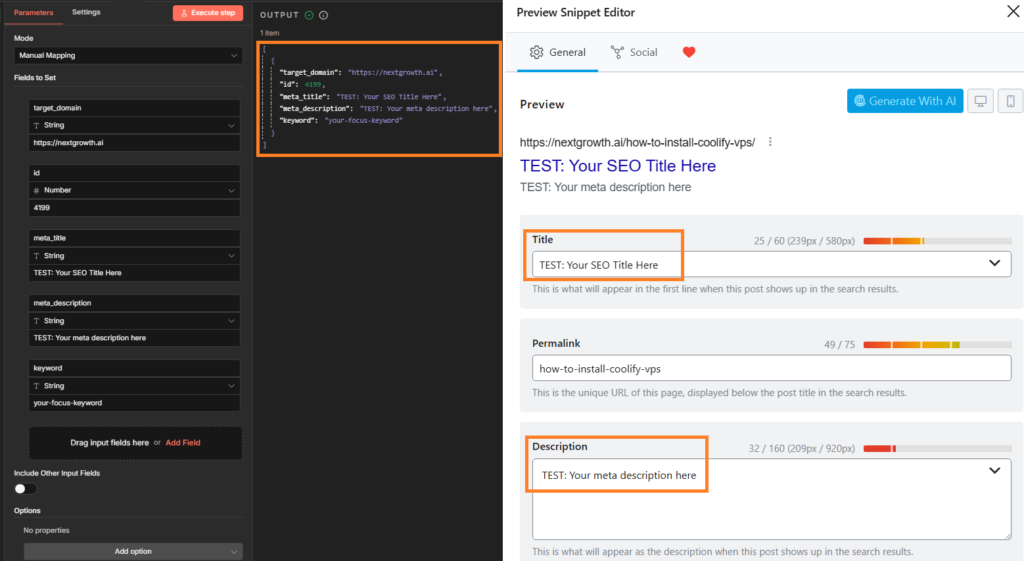
If the fields are still empty after running the workflow, check these common failure points:
- PHP snippet not loaded. Visit
yoursite.com/wp-json/wp/v2/posts/123?context=edit(authenticated) and look forrank_math_titlein the meta object. If it’s not there, the functions.php code isn’t active — check for PHP syntax errors in your error log - Wrong field names. The payload must use
rank_math_title, not_rank_math_title(no leading underscore). WordPress stores these with an underscore internally but the REST API registration uses the clean name - Authentication issue. The n8n workflow must authenticate as a user with
edit_postscapability. Check that your Application Password is valid and the user role is Editor or Administrator - Caching. If you’re using a caching plugin like LiteSpeed Cache or WP Super Cache, purge the object cache after adding the PHP snippet. Cached API responses may not reflect the newly registered meta keys
How Does the Plugin Method Work?
The Rank Math API Manager plugin handles all meta key registration automatically — install, activate, done. It exposes four Rank Math fields to the REST API: rank_math_title, rank_math_description, rank_math_focus_keyword, and rank_math_canonical_url. It supports both standard WordPress posts and WooCommerce products.
Plugin Installation
- Download the plugin from GitHub (Code → Download ZIP)
- In WordPress, go to Plugins → Add New → Upload Plugin
- Upload the ZIP file and click Install Now
- Activate the plugin
No configuration needed. The plugin starts working immediately after activation. The tradeoff: you’re adding a third-party dependency. If the plugin author stops maintaining it, or if a WordPress/Rank Math update introduces a breaking change, you’ll need to switch to the native PHP method anyway. For production automation pipelines where reliability is critical, I’d recommend the native approach.
What Else Can You Automate with Rank Math’s API?
Once you’ve unlocked REST API access to Rank Math fields, you can extend the same pattern to automate canonical URLs, robots meta, schema markup, and OpenGraph tags. The three fields in this guide are the most common starting point, but Rank Math stores dozens of meta keys that follow the same registration pattern.
Additional fields you can register using the same PHP approach:
rank_math_canonical_url— Set canonical URLs programmatically (useful for syndicated content)rank_math_robots— Control indexing directives (noindex, nofollow) per post via APIrank_math_facebook_title/rank_math_facebook_description— Customize OpenGraph tags separately from the main SEO titlerank_math_twitter_title/rank_math_twitter_description— Same for Twitter Card meta
At NextGrowth.ai, my content automation pipeline sets all of these fields in a single API call. The n8n workflow generates the article, creates an SEO-optimized title and meta description via Claude API, and pushes everything to WordPress including full Rank Math SEO metadata — zero manual editing in the WordPress dashboard. The functions.php snippet just needs additional keys added to the $keys array.
If you’re building more complex n8n keyword research workflows or content pipelines, this Rank Math integration becomes a critical piece of the puzzle. Without it, every auto-published post requires a manual pass through the WordPress editor just to set the focus keyword — which defeats the purpose of automation.
Frequently Asked Questions
Why doesn’t the standard n8n WordPress node support Rank Math fields?
The n8n WordPress node uses the core WordPress REST API, which only handles default post fields (title, content, status, categories). Custom meta fields from plugins like Rank Math require explicit registration via register_meta() with show_in_rest => true. This is a WordPress security design, not a limitation of n8n. The HTTP Request node bypasses this by giving you full control over the JSON payload.
Does this method work with Yoast SEO or other SEO plugins?
Yes — the same register_meta() pattern works for any WordPress SEO plugin. Replace the Rank Math field names with the appropriate keys: Yoast uses _yoast_wpseo_title, _yoast_wpseo_metadesc, and _yoast_wpseo_focuskw. SEOPress uses _seopress_titles_title and _seopress_titles_desc. The PHP structure and n8n configuration remain identical.
Will this work with WordPress.com or managed hosting?
The native PHP method requires file system access to edit functions.php — this rules out WordPress.com free/personal plans and some locked-down managed hosts. Use the plugin method instead: it only requires plugin upload access. If your host restricts plugin uploads too (rare), you’ll need to contact their support to whitelist the plugin or request SFTP access.
Can I use this with Make.com or Zapier instead of n8n?
Absolutely. The WordPress-side setup (PHP snippet or plugin) is identical regardless of which automation tool sends the API request. In Make.com, use an HTTP module with the same POST request structure. In Zapier, use a Webhooks action. The JSON payload format with the meta object is the same — only the tool sending it changes.
Is there a security risk in exposing Rank Math fields to the API?
The three security layers in the PHP snippet (edit-only context, auth callback, sanitize callback) make this approach as secure as the standard WordPress post editor. Fields are invisible to unauthenticated requests, require edit_posts capability to modify, and all input is sanitized before database writes. The risk profile is identical to editing Rank Math fields manually through the dashboard.
Your n8n Rank Math Integration Is Ready
WordPress blocks Rank Math metadata updates via REST API by default — but now you have two working solutions. The plugin gets you running in 5 minutes with zero code. The native PHP method gives you full control with built-in security layers.
The broader lesson here matters for anyone building automation tools for SEO: WordPress’s REST API is powerful but opinionated about security. Any plugin that stores data in custom post meta (Rank Math, Yoast, ACF, WooCommerce) requires explicit registration before that data becomes API-accessible. Once you understand that pattern, you can extend this approach to automate virtually any WordPress plugin’s data through n8n or any other API client.
Your n8n → WordPress automation pipeline can now handle SEO metadata the same way it handles everything else: completely hands-off.